.png?width=112&height=112&name=Content%20Hub%20AI%20Image%20Generation%20(1).png)
One of my agency’s long-term clients had a big launch last month.
Everything was ready to ship on our side: press releases, blogs, social posts, and design assets.
However, a non-critical product feature broke during the final tests. So, we had to improvise and ship the product without it. While that seems like an easy fix, adjusting the product images at such short notice wasn’t. It was too late to reshoot, and time was running out.
That’s when I turned to AI image generators for help. To my surprise, these tools came through and generated some great product mockups I could use for social media.
And it’s not just me using AI for images. Over 40% of marketers worldwide are using AI image generators for design assets, according to HubSpot’s 2025 State of AI survey.
In this article, I’ll cover everything you need to know. I’ve selected eight of the best AI image makers, extensively tested them with different scenarios and prompts, and found the best strategies to integrate them into your stack.
Table of Contents:
- How do AI image generators work?
- How I Tested the Best AI for Images
- What makes an AI image generator good?
- The best AI image generators
- Should you use an AI image generator?
How do AI image generators work?
AI image generators are trained on millions of existing images, captions, and alternative text (alt text) available across the internet and public domains.
Using computational systems like neural networks (inspired by our brains), the model learns how things look and what they are called. It then associates patterns and relationships between visual elements.
Say, I ask my AI image generator for the picture of a “flower.” AI doesn’t really understand what a flower is, but it has seen the term before in its dataset. Here’s what it’ll do:
- Pattern-match the word to similar images.
- Process visual patterns like petals, stems, etc.
- Generate an image based on what it has learned about a flower.
Notice how I didn’t say which flower I wanted? That’s where things get interesting. If your training dataset was mostly roses, you’ll end up with a bunch of rose images. Alternatively, if it were a mixed assortment of flowers, you’d get different results each time you run the prompt.
If I had to put it simply, AI image generators create content by using the data it has handy and reimagining things that already exist.
Of course, this can run the risk of plagiarism and miscommunication, so it’s essential to have permission for copyrighted elements through good datasets.
How I Tested the Best AI for Images
I optimized my tests for three things: consistency, repeatability, and accessibility. I tested each tool for:
- One use-case/agenda. Creating an original image for a blog post.
- One prompt. “Generate a photorealistic image of a young marketing executive confidently presenting campaign data on a large digital screen to a small team in a modern office setting. Include branded visuals on the screen, natural indoor lighting, and a collaborative, professional atmosphere.”
- One edit/follow-up prompt. “Improve the previous image by ensuring the screen content is clearly legible and resembles real marketing analytics, such as bar graphs, campaign metrics, or customer engagement stats. Maintain natural lighting and the same professional, collaborative mood.”
Besides these, I also had two sets of backup prompts, just in case I wanted to check a tool’s performance in other scenarios.
Pro tip: Always optimize your image prompts and make them as specific, detailed as you can. If you want some inspiration, you can refer to my article on 70 AI prompt examples.
What makes an AI image generator good?
I evaluated every AI image generator based on five key criteria:
- Ease of use. How easy it is to navigate the UI, give prompts, and get results.
- Speed. How much time does the tool take to generate the image(s) I want.
- Image quality. How good the image is, in terms of its resolution, accuracy, etc.
- Originality and diversity. How original or unique the image is and how well it depicts the diverse aspects of our society, culture, etc.
- Customization. How much control I had over the prompt and model’s features, style, etc.
Now, let’s dive into the results.

The Best AI Image Generators
- HubSpot AI Image Generator
- Midjourney
- ChatGPT-4o
- Sora
- Adobe Firefly
- Wordwriter
- DreamStudio (Stable Diffusion)
- Canva Magic Studio
- Ideogram
Here are nine of the best AI tools for creating images:
1.
If you’re like me, you get the most work done when you’re not constantly jumping from one tool to another. That’s why over 89% of marketers prefer built-in AI tools over standalone ones.
HubSpot’s AI image generator fits right into this trend. Being able to generate images on the fly without leaving the blog editor has indeed been a game-changer for me.
Though it’s still in beta (and has some rough edges), I’ve been using this tool a lot lately — mostly to ideate/create graphics for emails, blogs, or landing pages. Being able to repurpose them with is great too.
Test Results
You can access HubSpot’s AI imagery tool almost everywhere across the . For this test, I did it from the blog editor.
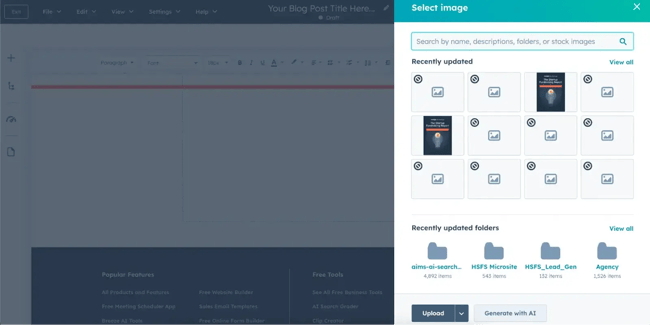
Just click Insert Image and then Generate with AI. After that, put your prompt in the Describe your image section, choose a style, specify the dimensions, and click Generate.
Here’s what I got:
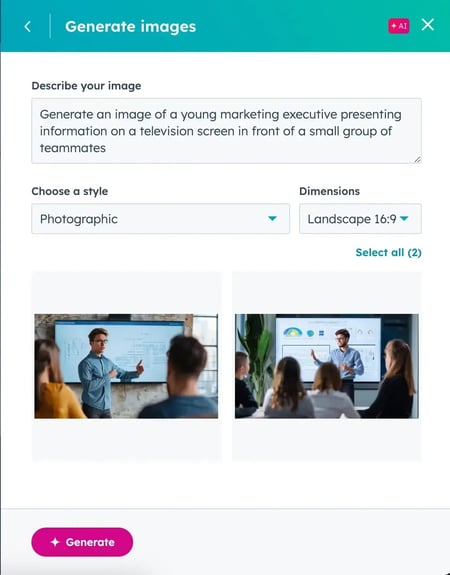
At first glance, these images looked great. However, when I zoomed in, I saw that there were some very noticeable issues with the model’s hands and facial features. So I tried fixing them with the follow-up prompt of being “photo realistic.”
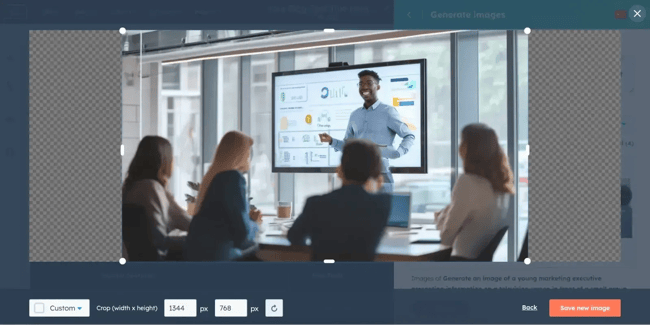
Honestly, it wasn’t very photorealistic and still had weird features. But as you will see later in this article, these are common issues with AI image generators, not specific to HubSpot. I was happy to see the racial representation, though.
More importantly, given that this tool is still in beta, I’m sure it will improve a lot in the coming months. All that said, the images are still great for use in smaller sizes.
What I like:
- It requires minimal context switching.
- The tool is pretty fast and generates images in seconds.
- Everything is automatically saved in the asset library.
What can be improved:
- Image quality and prompt adherence.
- The ability to generate four results per prompt, not two.
: Paid access with Content Hub, starting from $9/month/seat, depending on your tier.
Best for: Generating simple images that you can use to break up walls of text in your blog post.
2.
Midjourney is one of the earliest AI image generators, best known for its cinematic visuals, and strong creative direction. I’ve seen people use Midjourney to win , , and even . Needless to say, this made me excited to dive in and test the tool out for myself.
Test Results
You can use Midjourney in two ways:
- From their official Discord, using the /imagine command.
- From the Imagine bar, i.e., prompt field, on their web platform.
As with HubSpot’s tool, I first asked Midjourney for an image of a marketing professional giving a presentation. It’s nice how Midjourney gives four outputs by default. Here’s one of them:

Although these images accurately depicted the scene, the models’ fingers were mostly crooked. A classic problem with AI image generators.
Moreover, the texts depicted on the screens were illegible. I tried (and hoped) to fix this with the follow-up prompt.

But as you can see, Midjourney completely changed the scene and also couldn’t fix the text on the screen. The only improvement: the model’s fingers didn’t look as weird.
Discord has similar results. However, if you prompt on Discord, your generated images are available for everyone on the server to view and download. I am not a huge fan of this feature, especially for product-sensitive images, so I wouldn’t recommend using it.
What I like:
- Midjourney’s images are great for inspiration.
- Gives multiple outputs with a single prompt, and it’s very fast (takes <60 seconds).
- Allows extensive customization and fine-tuning.
What can be improved:
- Image quality and accuracy, especially with human features.
- Prompt adherence (though rich creativity is Midjourney’s USP).
- Including a Free tier or trial could lower the entry barrier.
Pricing: $10 for Basic Plan, goes up to $120. No free access or trial.
Best for: Companies that want brand-aligned stock photos, artists who want to test concepts and character design, and heavy Discord users.
3.
I’ve been using ChatGPT almost daily since mid-2023. Whenever I onboard a new client, I build out custom GPTs trained on their tone of voice, branding assets, and more. This helps me generate on-brand images that match their design aesthetic. It’s a lifesaver when our designer isn’t around (like in the launch crisis).
For this test, I used a new chat to show you what that looks like.
Note: DALL-E, which earlier used to be OpenAI’s main text-to-image generator, has now been integrated into the GPT-4o suite. While you can still access it as a custom GPT via the ChatGPT interface, GPT-4o can effectively do anything DALL-E 3 (the latest version) can do.
Test Results
ChatGPT-4o is available on all platforms: web, desktop, and mobile. I use the web and desktop versions. To confirm you’re using 4o, check the number mentioned beside ChatGPT in the top-left corner of the UI, just to the left of the sidebar. If it's not showing 4o, click the dropdown and select the right model.
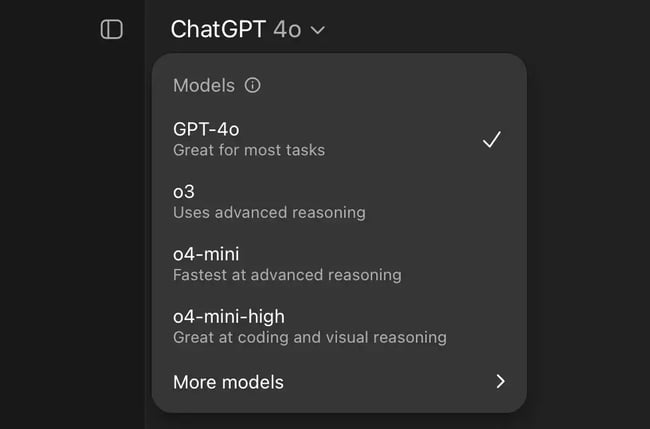
Now, coming to the test, I got the following result with the first prompt:
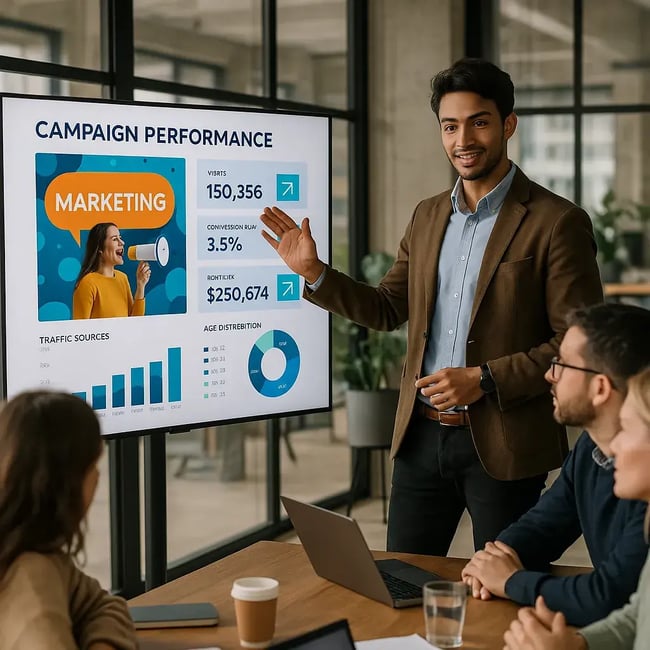
The fingers looked good in both (phew!), texts on the presentation screen were mostly legible, and there was decent racial diversity. It was, nevertheless, disappointing that ChatGPT’s default representation of a young marketer is male, across attempts.
Plus, the woman on the presentation screen looks like a ghost. Yikes!
Then I provided the follow-up prompt, specifically asking for a female marketer. 奥补颈迟颈苍驳…
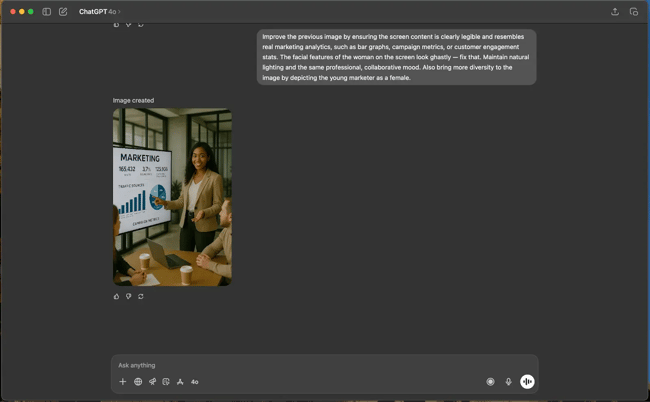
The features of the presenter and other people sitting around her were still good. But more interestingly, the text on the screen was significantly better. Unlike the original output, it wasn’t entirely gibberish.
What I like:
- Human features are realistic, and the in-image texts are legible and clear.
- Supports conversational follow-ups, so I don’t necessarily need new prompts for edits.
- I can get multiple things done from a single window, without constantly switching apps and context.
What can be improved:
- Faster image creation — currently takes a lot of time.
- Include visual editing controls like layer tweaks, set aspect ratio, etc.
- New users may need to learn prompt design and multi-modal workflows.
Pricing: $20/month for ChatGPT Plus and $200/month for Pro tier. Limited access for free users.
Best for: Brands who want to benefit from image generation as well as ChatGPT’s larger set of abilities.
Pro tip: If you find yourself getting the same results with each regeneration or badly edited images, try opening a new chat window.
4.
Sora is primarily a text-to-video model by OpenAI, but I’ve used it to generate some pretty cool images. You can even start with an image and then turn it into a video. The possibilities are endless: UGC content, testimonial images, product shots, just to name a few. I really think this tool is a great addition to ChatGPT 4-o.
Test Results
As of July 2025, Sora is only available in a web version. You can access it from the ChatGPT web app (look for Sora on the sidebar) or directly on Sora’s website.
For the first prompt, Sora gave me the images below (you can get up to two variations for images).
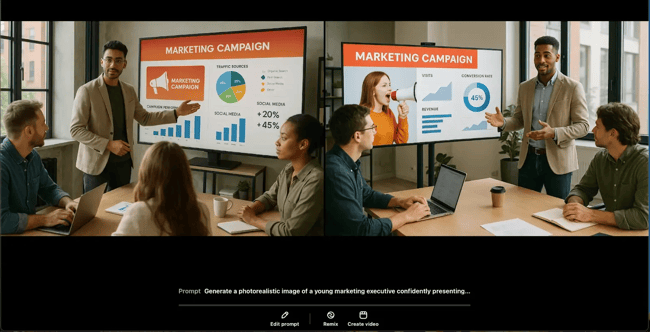
Except for a slightly deformed little finger (spot it?), these were the best and most accurate outputs so far, as you can see. So, instead of a follow-up, I played with two other prompts to see how Sora does in different contexts.
Alt Prompt 1: Create a high-quality, visually striking image of a sleek tech product (e.g., wireless earbuds or a smart wearable) placed on a minimalistic background with branded elements and marketing text like ‘Experience the Future of Sound.’ Ideal for social media ad use.
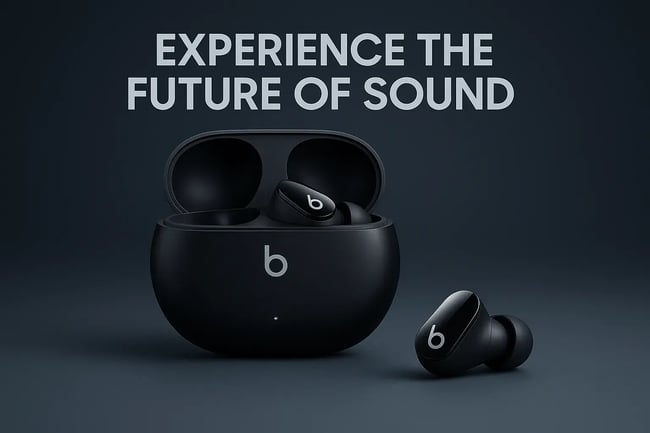
Sure, the text alignment was a bit off and could have been better. But the quality of the product images is professional-grade.
Alt Prompt 2: Generate a photorealistic image of a young professional working remotely on a tropical beach with a laptop and coffee. Show golden hour lighting and an aspirational, relaxed mood. The image should feel natural and ideal for use in brand storytelling around freedom and flexibility.

Sora really excels at cinematic, outdoor images, doesn’t it? But again, like ChatGPT-4o, its default representation for a young professional is male, across attempts.
What I like:
- Unmatched visual realism.
- Accurate, legible, and clear text in images.
- Granular control over aspect ratio, no. of variations, etc.
What can be improved:
- Multi-platform access (desktop, for example).
- Faster image generation.
- Representation of gender diversity in images.
Pricing: Available to ChatGPT Plus and Pro users.
Best for: Brands that want to explore text-to-image and video generation in one single tool.
5.
Adobe Firefly is the AI image generator built into Adobe’s Creative Cloud suite. I’ve used it a couple of times in the past inside Photoshop and Illustrator, but the tool is also available in a free web version. And when I went back to it for this test, I was surprised to see how much it had evolved.
Test Results
I tested Firefly Image v4’s web app, and like Midjourney, it gives four outputs by default.

While it was nice that Firefly’s marketers are both male and female, the text-on-screen and facial features of the models were off the mark. Especially when you zoom in on the image.
Then, to give the tool another chance, I tried the product ad and beach prompts. And got mixed results.
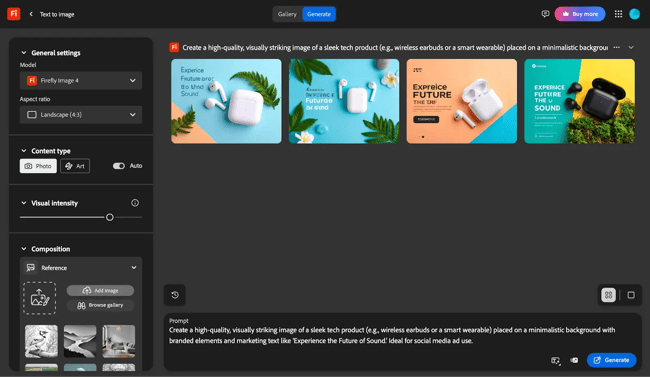

While the model still couldn’t handle text at all, it did much better with the images of the professionals on the beach than in the conference room.
What I like:
- Images can be edited directly in Photoshop, Illustrator etc., with native integrations.
- Much faster than ChatGPT-4o and Sora.
- No sign-up or login required for the free web version.
What can be improved:
- Image quality — too unrealistic and/or stock-like currently.
- Excessive use of a single color (blue, in my case).
Pricing: Available with Photoshop at $20.39 onwards. Free access with limited credits.
6.
Wordwriter is an AI image generator designed for marketers who need professional, business-focused visuals. It specializes in creating corporate and office settings with realistic human depictions for presentations, marketing materials, and business communications.
Test Results
When I tested Wordwriter, I wanted to see how it handles a common marketing use case: creating an image of a professional presentation for blog posts or marketing materials.
I started with a basic prompt: "Create an image of a young marketing executive presenting information on a television."
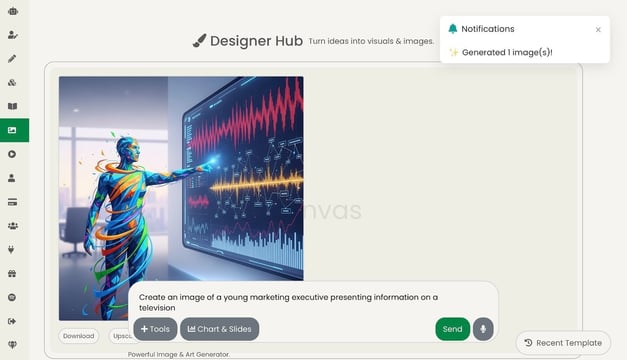
A sleek, futuristic robot presenting to analytics dashboards. While visually impressive, it wasn't what I asked for. The tool interpreted "marketing executive" quite literally as an automated entity — definitely not ideal for a business blog post.
I refined my prompt once more: "Create an image of a young marketing executive presenting information on a television, the young professional can be a male or female human being, not a robot, there can also be a view of people watching, more like an office setting."
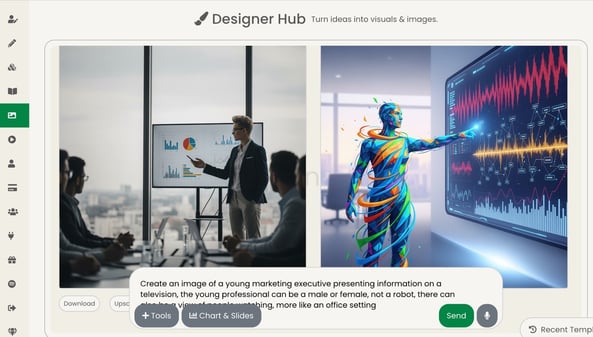
This result was exactly what I needed. A professional-looking male executive in business casual attire presenting analytics on a large screen to an engaged team in a modern office. The lighting was natural, the facial features were accurate, and the overall composition looked like it could have been taken with a smartphone at an actual company meeting.
What I like:
- Extremely photo-realistic results (when prompted correctly)
- Fast generation (under 30 seconds)
- Professional office/business focus
- Natural lighting and accurate human features
- Requires very specific prompting to get human subjects
- No diversity options without explicit prompting
- Limited to business/corporate themes
Pricing: Plans start at $20 per month.
Best for: Marketers creating professional business content like blog posts, case studies, presentations, or corporate communications who need realistic office and presentation imagery. The tool excels when you know exactly what you want and can describe it clearly.
7.
DreamStudio, the official interface of Stable Diffusion, is the only AI image generator on this list built on an open-source model. The UI isn’t as friendly or intuitive as the other tools, but I think DreamStudio has improved a lot with the recent upgrade to Stable Diffusion 3.5. If you like granular control, this one’s a must-try.
Test Results
DreamStudio is only available on the web, and you need to sign-up/sign-in to your Stability AI account using email, Google, or Discord.
Like Sora, DreamStudio lets you specify the number of variations you want. I selected four, but for the first prompt, got only one response (even after trying multiple times).

The facial features were okay (not great, not too bad), but the text wasn’t legible at all. So I put the follow-up prompt to fix the text. However, the result was worse.
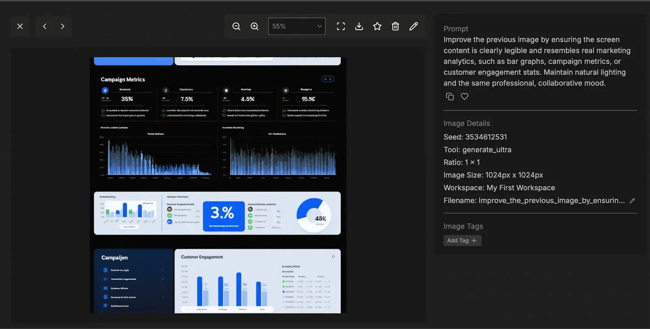
I hope this is nobody’s “campaign metrics.” However, I gave it another chance with the product-based prompt. And got the following images:
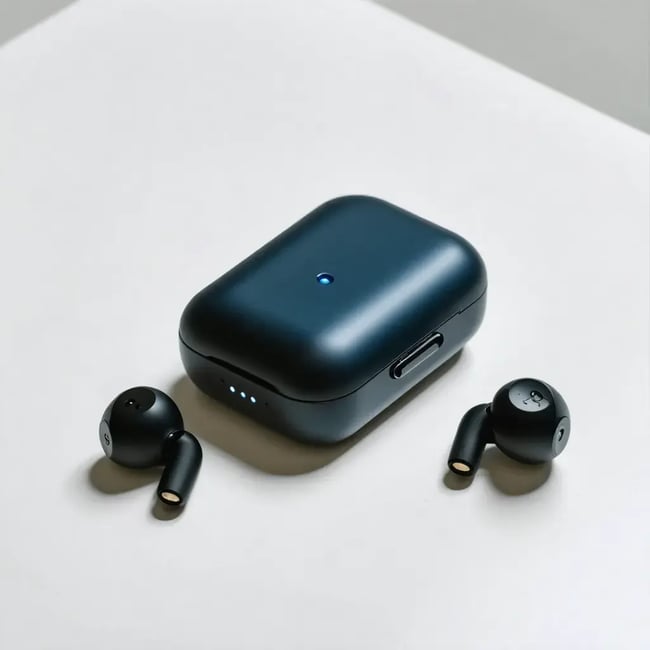
Although it still couldn’t handle text, the model did much better with product images. So, I think creating assets for campaign mockups might be a good use case for DreamStudio.
What I like:
- The underlying model is open source.
- Flexibility to choose between multiple models.
- Lots of customization, so you can play around to get better results.
What can be improved:
- Default image quality
- UI could be more intuitive and user-friendly
Pricing: 100 credits with free trial for new users. $10 per 1000 additional credits.
Best for: Marketers who want to test out image generation for campaign assets on a free and open-source model.
8.
I find Canva to be the much simpler, more intuitive version of Adobe Suite. While earlier I used to depend on Adobe Photoshop for my client assets, I’ve largely moved to Canva. Even my designers prefer Canva — the tool loads quickly, and is much more collaborative.
At first glance, I liked how Canva has specialized AI tools for design functionalities like removing backgrounds (Magic Eraser), image generation (Magic Media) and more. I decided on testing Magic Media for this article.
Test Results
You can use Magic Media anywhere you can use Canva: web, desktop (Windows and MacOS), and mobile (Android and iOS). I mostly use the web version, that’s where I ran these tests.
Canva also gives four variations by default.
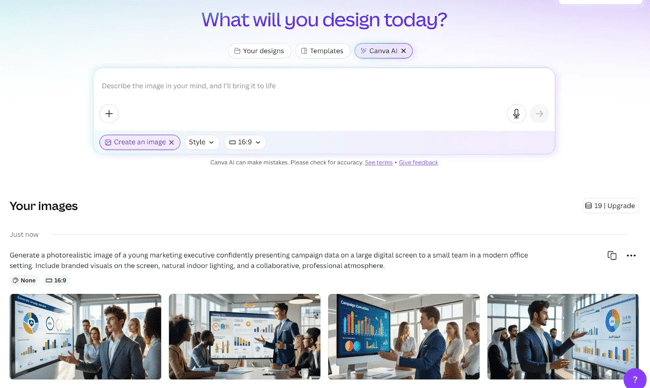
As you can see, Canva’s creations are the most unrealistic and cartoonish so far, so they clearly won’t work for most professional use cases.
But can this be a strength when it comes to product images? Here’s what I found.
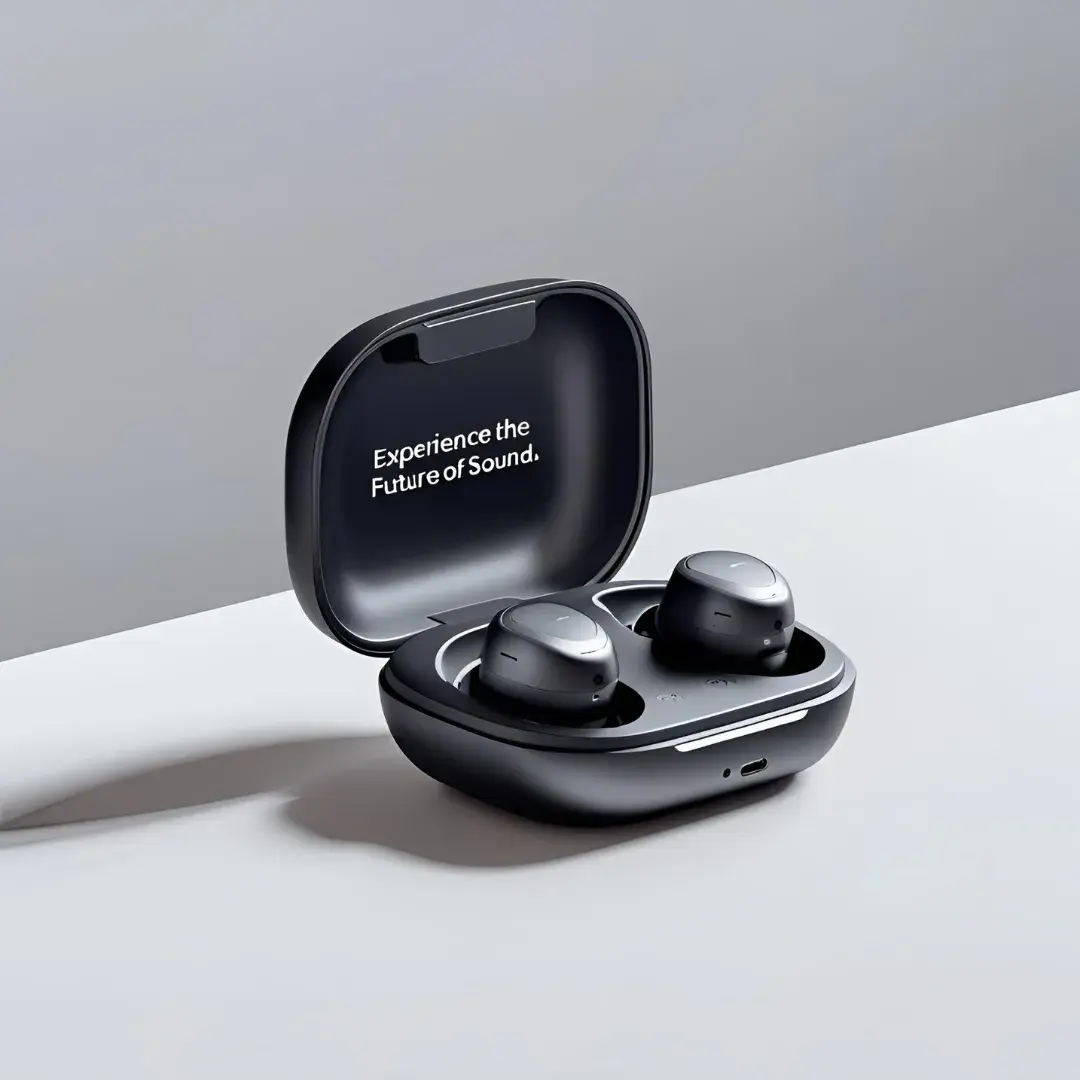
These aren’t perfect. But minus the text, you can use AI to create more complex layouts and campaign graphics on Canva. Especially for social media campaigns, where people mostly watch the image on smaller screens.
What I like:
- Its simplicity and ease-of-use.
- Works fine for smaller, less complicated images.
- Less context switching when I’m working on Canva.
What can be improved:
- Image quality and realism.
- Option to download images directly.
Pricing: Free access with limited credits. Paid plans from $5.81/month and $46.49/year.
Best for: Brands that already use Canva for design.
9.
If you need clean, legible text inside AI-generated images, try Ideogram. I’ve used it for ad creatives, call-to-action banners, and simple infographics.
And while this tool isn’t as polished as the others on this list, I think it’s very reliable from a typography PoV. You can’t say that about many GAI tools like we saw on this list.
Test Results
While Ideogram is also available on mobile now, I used the web version for this test. As I had expected, in the images it generated for the first prompt, the human figures weren’t up to the mark. But the text was almost spot on.
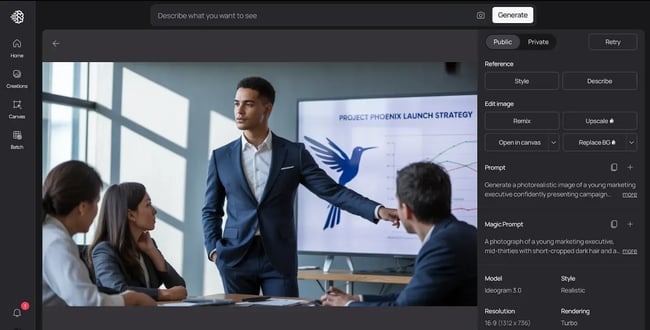
Then, I tried the more text-based, product ad prompt. Ideogram shines when it comes to text rendering and typography.
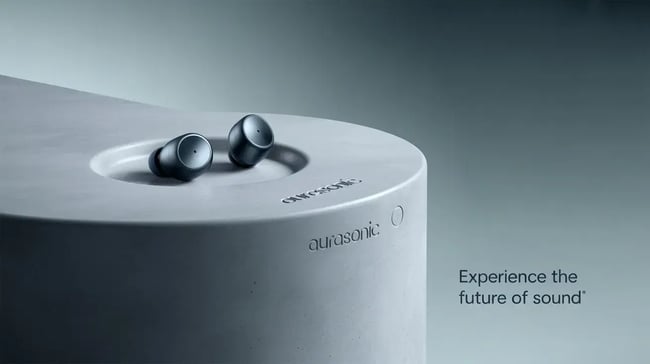
These can very well be used as is in campaigns. And by fine-tuning the prompt or running it multiple times with variations, you can get better, more detailed, and richer visuals with this AI image generator.
What I like:
- Built-in text-in-image rendering with clear, consistent fonts.
- Style presets for ads, posters, memes, and branded visuals.
- Fast, easy-to-use, and needs minimal prompting for design.
What can be improved:
- Deeper customization and control over layers, etc.
- Figure rendering and overall image quality, realism.
Pricing: Free access with limited credits. Paid plans cost $7–$42/month.
Best for: Real-world marketing use cases such as banners with text, billboards, etc.
Should you use AI image generators?
Yes, you should definitely use AI image generators — but I’d recommend using guardrails.
With deepfakes and fake influencers, you don’t want your brand to appear inauthentic and blend in a sea of AI slop. However, using AI strategically, such as to capitalize on an art trend or to speed up the design process, can help save time and budget.
Play around with different tools, use them in practical scenarios, and see what works best for you. I personally use a combination of ChatGPT, Canva, and HubSpot, but that would look different for you. Spend enough time with these tools, learn how to make the right prompts, and soon you’ll find your perfect combination.
Time to get generating.
Editor's note: This post was originally published in May 2024 and has been updated for comprehensiveness.
.png?)
HubSpot's AI Image Generator
Transform text into AI-customized images that perfectly match your content.
- Go to your preferred content tool
- Find the image generator feature
- Enter a text prompt or content input
- Generate and insert your image
Artificial Intelligence