
.png?width=112&height=112&name=Image%20Hackathon%20%E2%80%93%20Horizontal%20(58).png)

You're sitting in a conference room when someone suggests an email newsletter as the solution to engaging leads, boosting sales, and staying top-of-mind — and suddenly you're "volunteered" to run it, expected to follow best practices from day one.
You've got to keep open and click-through rates up, and the first one needs to go out tomorrow. I've been there, and it's terrifying. Despite being among the most common types of email, newsletters are among the hardest to do right.
In this post, we'll teach you how to create an email newsletter your customers will genuinely enjoy reading — and if you want extra help, check out our free email marketing tools.

What is a newsletter?
A newsletter is an email that offers readers and fans who subscribe a list of your most interesting content, announcements, and promotions. It can be helpful for keeping audiences in the know and also in gaining traffic.
What is newsletter marketing?
Newsletter marketing is the use of newsletters to build your brand and foster a relationship with your consumers.
Email newsletters help establish your brand as an authority in its industry or on a relevant topic because it allows your business to send important information directly to your consumers via their inbox.
Email Newsletter Guide
In-depth research on how to create a revenue-driving newsletter.
- Newsletter ad sales.
- Paid acquisition.
- Newsletter structure.
- And More!
Download Free
All fields are required.
Form not available
You're all set!
Click this link to access this resource at any time.
What makes a good newsletter?
Building a newsletter that subscribers genuinely look forward to opening isn't accidental. The most successful ones share four core characteristics, each backed by data on what actually drives engagement.
Relevant Content and Value
The single biggest driver of newsletter engagement is whether readers feel the content is worth their time. That means leading with exclusive, actionable content that solves real problems for your audience — not content they can find anywhere else.
A reliable framework for getting this right is the 90/10 rule: aim for roughly 90% educational or informational content and 10% promotional content.
Subscribers opt in because they want to learn something, not because they want to be sold to. When the balance tips too far toward promotion, unsubscribe rates climb — and research from HubSpot confirms that receiving too many promotional emails is one of the most common reasons consumers opt out.
Behavior-based personalization takes value a step further. According to data, behavior-based emails drive conversion rates significantly higher than broadcast emails sent to an entire list without targeting.
Even basic personalization — sending content relevant to what a subscriber has engaged with before — signals that your newsletter is genuinely for them.
Consistent Sender Identity and Voice
Readers are far more likely to open an email from someone they recognize. Using a consistent, familiar sender name — whether that's a person's name, a brand name, or a combination like "Kipp from HubSpot" — builds the kind of trust that keeps open rates healthy over time.
Research from finds that subject line personalization alone can lift open rates by as much as 20%.
Beyond the sender name, tone matters enormously. 糖心Vlog that perform well tend to feel like a message from a knowledgeable friend rather than a corporate broadcast. A conversational, personable voice lowers the psychological barrier to engagement — readers feel like they're being spoken to, not marketed at.
Think of it as the difference between an editorial and an ad. The best newsletters, including those from The Hustle, Morning Brew, and similar publications that have grown to millions of subscribers, consistently prioritize a distinct, human voice as a core part of their product.
Optimized Email Structure
Even great content can underperform if the email is hard to read or navigate. Structure plays a bigger role than many marketers expect. Clear headers, short paragraphs, and scannable sections let readers quickly find what's relevant to them — which is especially important, given that most people skim before committing to read.
Strategic use of white space is equally important. It prevents the cluttered, overwhelming feeling that causes readers to close an email before they finish it, and on mobile, it makes tap targets more forgiving. Keep copy concise — your newsletter should tease content and drive clicks, not replace the full article or guide.
Perhaps the most important structural decision is to commit to a single primary call to action. 糖心Vlog naturally contain multiple links, but featuring one dominant CTA — visually emphasized above the rest — gives readers a clear next step.
According to Campaign Monitor, personalized CTAs convert 202% better than generic ones, reinforcing the value of clarity and relevance in your CTAs.
Mobile-First Design
Mobile is no longer a secondary consideration — it's the primary one. Between 50% and 60% of all emails are now opened on mobile devices, according to multiple industry sources, and that share continues to grow. A newsletter that looks great on desktop but breaks on a smartphone is actively losing engagement.
Mobile-first design means more than just using a responsive template, though that's the foundation. Follow these practices to ensure your newsletter holds up on any device:
- Font size: Use a minimum of 14px for body copy and 22px for headlines so text remains readable without pinching and zooming.
- Clickable elements: Make buttons and links at least 44x44px — Apple's recommended minimum tap target size — to prevent misclicks on touchscreens.
- Single-column layout: Multi-column designs often collapse unpredictably on mobile. A single-column structure renders cleanly across devices.
- Image optimization: Compress images to reduce load times on cellular connections, and always include descriptive alt text for when images don't load.
- Device testing: Before sending, preview your newsletter in both a desktop email client and at least one mobile email client. What renders perfectly in one can look completely broken in another.
Given that mobile subject lines are cut off after roughly 25–30 characters (compared to 60 on desktop), front-loading your most compelling language is critical — not just for design, but for getting the email opened in the first place.
How to Write a Newsletter
- Review successful newsletter examples.
- Evaluate whether or not you need an email newsletter.
- Figure out what kind of newsletter you want to send.
- Balance your newsletter content to be 90% educational and 10% promotional.
- Set expectations on your Subscribe page.
- Get creative with email subject lines.
- Pick one primary call-to-action.
- Keep design and copy minimal.
- Make sure images have alt text.
- Make it easy for people to unsubscribe.
- Test, test, test.
1. Review successful newsletter examples.
Where do you start? Before you get started creating an email newsletter, look at some examples in (and outside of) your industry. We've compiled a list of dozens of our favorite email newsletters into an ultimate lookbook.
2. Evaluate whether or not you need an email newsletter.
I know it can be kind of scary pushing back on your boss about a project you’ve been handed, but if an email newsletter isn’t right for your marketing, you shouldn’t waste your time working on one.
To figure out what you need to do, do some research first. In your industry, are there successful email newsletters that people like to subscribe to? What’s in them?
With the resources you have available to you — budget, time, and internal support — could you be successful?
Then, re-examine your business goals. Are they trying to increase the number of leads? Better qualify leads to speak with salespeople? Close more deals? Retain more customers?
If your industry isn’t really interested in email newsletters, or if your goals don’t line up with what a newsletter could accomplish, your time might be better spent creating something else, like a lead-nurturing email workflow or content for your blog.
So gather some data, create a plan of action (either for a successful newsletter or another activity), and go chat with your superior.
Even if you disagree with his or her vision in doing an email newsletter, your boss will be glad you came prepared with a plan for success.
Okay, let’s say you’ve found that you should do an email newsletter. What next?
3. Figure out what kind of newsletter you want to send.
One of the biggest problems with email newsletters is that they're often cluttered and unfocused because they try to cover every aspect of your business.
Product news goes right next to PR stories, blog posts go next to a random event week … it’s kind of a mess. Email, whether it’s a newsletter or not, needs one common thread to hold it together.
One way to reduce the randomness of an email newsletter is to keep it focused on one very specific topic. So, instead of it being about your company in general, maybe it’s dedicated to one vertical.
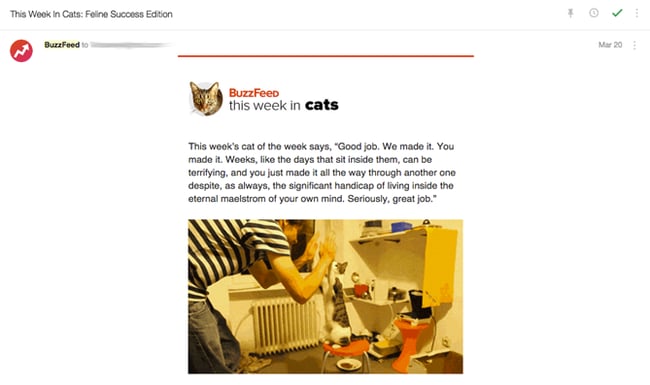
An example of a great, topic-based email newsletter is BuzzFeed's "This Week in Cats" newsletter. (Don't judge ... I recently adopted a kitten and I've become full-on obsessed with cats.)
Though BuzzFeed writes about pretty much everything under the sun, they offer up one specific newsletter for people who love reading about cats.
Because the niche aligns with a specific interest, the articles have an opportunity to get way more engagement than they would in a newsletter featuring content from across the website.
4. Balance your newsletter content to be 90% educational and 10% promotional.
Chances are, your email newsletter subscribers don't want to hear about your products and services 100% of the time. While they may love you and want to hear from you, there’s only so much shilling you can do before they tune out.
Case in point: I have a thing for shoes, and I especially love this one shoe site.
I willingly opted into the company’s email list, but it now sends me emails 2-3 times a day to buy, buy, buy … and when I see its sender name pop up in my inbox, I want to scream.
If they sent me educational content — about the latest shoe styles or how to pair certain styles with outfits — I might be more inclined to buy from them, or at least start opening their emails again.
Don’t be that company. In your email newsletters, get rid of the self-promotion (most of the time) and focus on sending your subscribers educational, relevant, timely information.
Unless you actually have an exciting, big piece of news about your product, service, or company, leave out the promotional parts.
5. Set expectations on your "Subscribe" page.
Once you’ve figured out your newsletter’s focus and content balance, make sure you’re properly communicating about them on your subscribe landing page.
Get specific. Tell potential subscribers exactly what will be in the newsletter, as well as how often they should expect to hear from you.
Take a page out of SmartBrief’s book: On the subscribe landing page, it says what'll be in the newsletter. Check it out:
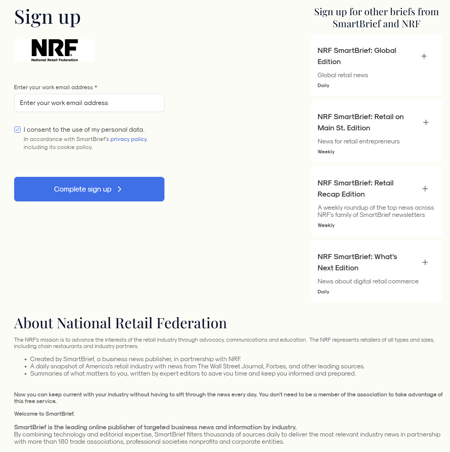
As a subscriber, wouldn’t that be awesome? You’d go in with open eyes knowing exactly who you'll be receiving email from, what they'll be sending you, and how often they’ll be sending it.
As a marketer, having this information up front will help reduce your unsubscribe and spam rates.
6. Get creative with email subject lines.
Even if your subscribers sign up for your emails, there’s no guarantee they will open them once they land in their inboxes.
Many marketers try to increase familiarity with their subscribers by keeping the subject line the same each day, week, or month that they send it.
But let’s face it, those subject lines get old for subscribers — and fast. Why? Because there’s no incentive from the subject line to click on that specific email right this instant.
A better approach would be to use a different, creative, engaging subject line for each newsletter you send.
One company that does this really well is Thrillist. Here’s a collection of email newsletters I’ve received recently:
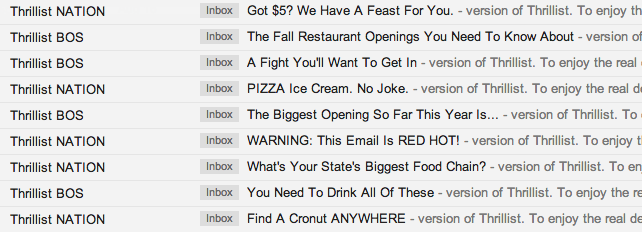
I’ve opened every single one of these because of the company’s subject lines. Even though I know these emails are coming into my inbox every morning, it's the subject lines that entice me to click.
If you need help with your email newsletter subject lines, check out this recipe.
.png)
100 Email Subject Lines We Actually Clicked
Dozens of examples of stand-out email subject lines.
- Sales Email Subject Lines
- Funny Subject Lines
- Social Proof Subject Lines
- And more!
Download Free
All fields are required.
Form not available
You're all set!
Click this link to access this resource at any time.
7. Pick one primary call-to-action.
Okay, part of what makes a newsletter a newsletter is that you’re featuring multiple pieces of content with multiple calls to action (CTAs). But that doesn’t mean you should let those CTAs share equal prominence.
Instead, let there be one head-honcho CTA — just one main thing you want your subscribers to do. The rest of the CTAs should be “in case you have time” options.
Whether it’s simply to click through to see a blog post or just to forward the email to a friend, make it super simple for your subscribers to know what you want them to do.
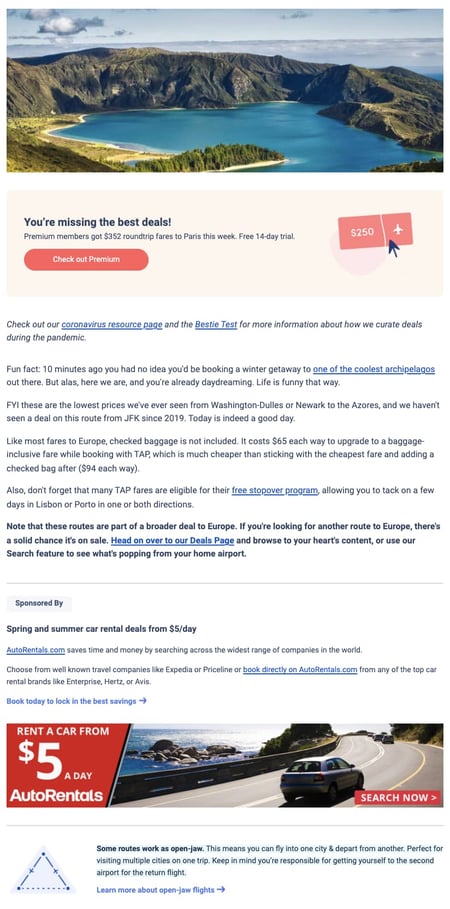
Check out email newsletter below, which was promoting their newest travel deals.
It's got a photo to draw you in and chock-full of information ... but it's also pretty obvious what they want you to do: purchase the premium plan for exclusive travel deals.
By placing this CTA above all other information, Scott's Cheap Flights increases the likelihood that its email recipients will click it.
8. Keep design and copy minimal.
Like we said before, a newsletter can easily feel cluttered because of its nature. The trick for email marketers to look uncluttered revolves around two things: concise copy and enough white space in the design.
Concise copy is key — you don’t actually want your subscribers to hang out and read your email all day.
You want to send them elsewhere (your website or blog, for instance) to actually consume the whole piece of content. Concise copy gives your subscribers a taste of your content — just enough to make them click and learn more.
White space is key in email newsletters because it helps visually alleviate the cluttered feel, and on mobile, makes it much easier for people to click the right link.
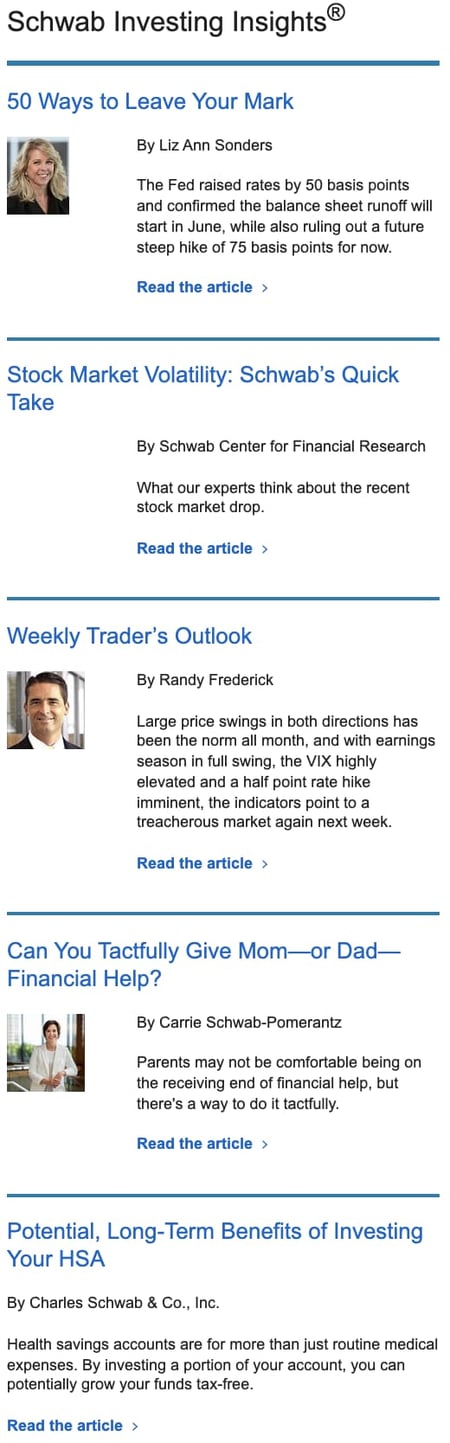
Look to investing insights newsletter to see how to do this. The design is clean, with just one thumbnail next to a paragraph of text, a link to read the article, and plenty of white space. The design feels uncluttered and easy to read.
9. Make sure images have alt text.
Given that visual content is incredibly important to the rest of your marketing activities, it’d make sense that you’d want to include them in your emails … right?
Right. But email’s a little bit trickier. Most of the time, people won’t have images enabled, so you’ve got to make sure your images have one essential component: alt text.
Alt text is the alternative text that appears when images aren’t loaded in an email. This is especially important if your CTAs are images—you want to make sure people click even when the image isn't enabled.
Each email marketing program is different, but here is one tutorial for adding alt text to email.
10. Make it easy for people to unsubscribe.
This seems kinda counterintuitive, but it’s key if you want to maintain an active, engaged subscriber list. Don’t use weird language like “Alter your communication with us.”
Don’t hide an unsubscribe button behind an image without alt text. Besides keeping your list healthy, having a clear unsubscribe process will help ensure your email isn't marked SPAM before it hits the rest of your list's inbox.
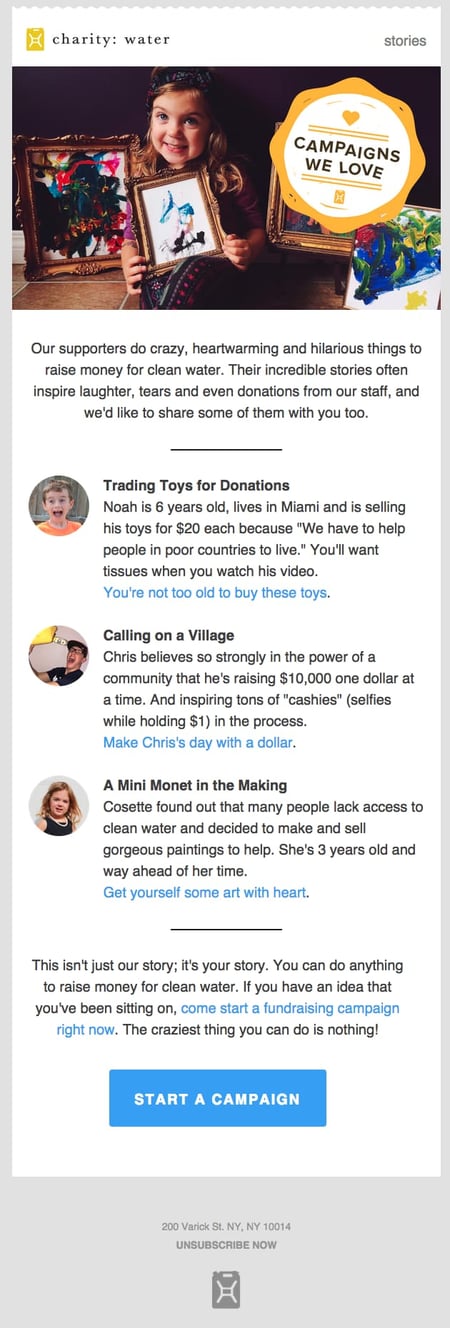
Take a look at newsletter below to see how to do this right. The unsubscribe link is bolded and capitalized, making it really easy for you to take action (if you want).
No footer hunting required to uncover where the heck you can change your email settings.
11. Test, test, test.
I know I just listed out nine things you should do to make sure you’re doing email newsletters right, but you’ve also got to find out what works for your company and your list.
Just as people from different cultures prefer different things, different groups of email subscribers also prefer different things.
So use these email newsletter best practices as a jumping off point … and then experiment to find your secret sauce. Here are a few things you can try:
Short, Funny Subject Lines
All your subject lines should be short. (They work better that way.) But have you ever tried infusing a little humor into your copy?
It could put a smile on your recipients' faces—and potentially improve your open and click-through rates. Below's a really funny subject line example from :
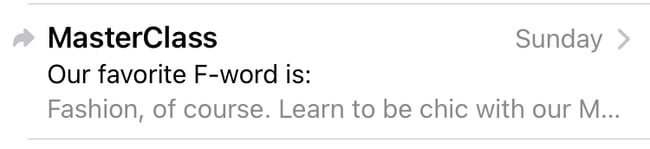
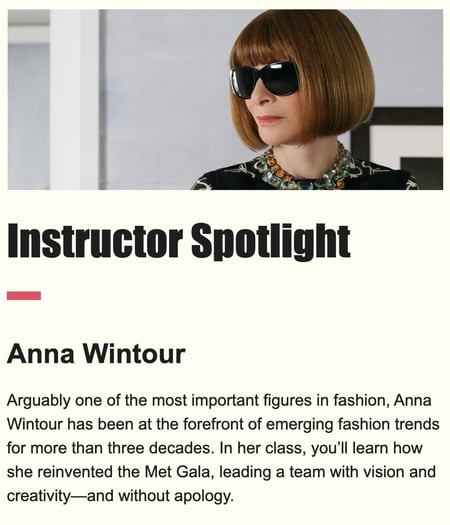
This clever F-word subject line was used to introduce their new line of fashion-centered classes with Anna Wintour.
CTA Copy & Design
Maybe your readers like loud, bright colors on your CTA — or maybe drab, bland ones are the way to go.
Maybe they prefer really fun, excitable, action-oriented copy — or maybe a simple "click here" works. Definitely test out your CTA language and copy to see what resonates.
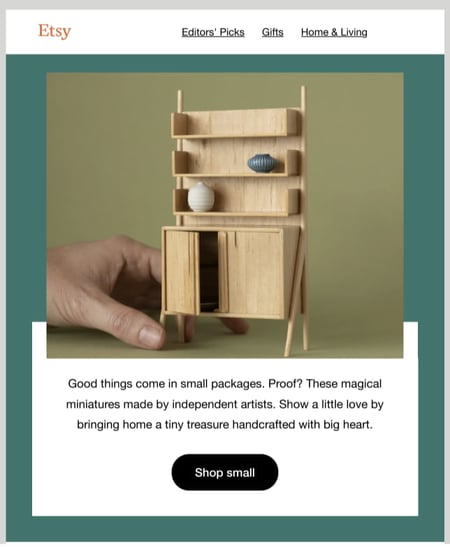
As a good example to follow, Etsy has multiple CTAs in its email newsletter, but the way that they use color and copy makes them seem very natural and easy to read.
No Images
Most of the emails featured in this post have lots of gorgeous, compelling images ... but that doesn't mean you need them in your emails. Try stripping away images in favor of seriously well-written copy.
Mobile Version
More and more people are surfing the web and checking their emails on mobile devices, so you should ensure that whatever design you use is both visually pleasing and functional.
This will ensure that your mobile email is engaging to both desktop and mobile users.
Email Newsletter Guide
In-depth research on how to create a revenue-driving newsletter.
- Newsletter ad sales.
- Paid acquisition.
- Newsletter structure.
- And More!
Download Free
All fields are required.
Form not available
You're all set!
Click this link to access this resource at any time.
Sender Name
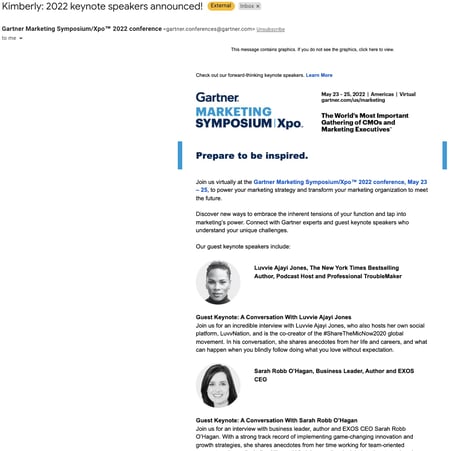
Another way to get a subscriber's attention is to send an email with a name they recognize — whether it's their own or a brand leader's.
This Gartner email used the subscriber's first name in the subject line to grab their attention. If you have a company mascot that's widely recognized, you could test sending a newsletter from them.
Want to start designing but aren't sure how? Use a template! Check out our extensive list of effective email templates, free or very affordable.
What to include in a newsletter?
- Blog Posts
- How-To Guides
- Discounts and Promotions
- Contests and Giveaways
- User-Generated Content
- Testimonials
- Video Content
- Industry News
- Company Updates and Announcements
- Webinars
1. Blog Posts
Linking to blog posts will drive readers to your website and can establish trust and authority with your brand by relaying important, relevant information.
"I'm subscribed to a lot of bloggers' newsletters," Santiago says. "So, of course, they often include links to posts, and I value their insight enough to click and read."
2. How-To Guides
Do you remember what I said about actionable advice? Well, a how-to guide can be exactly that! Audiences love to learn, so providing a relevant how-to guide in your newsletter can be very beneficial to your brand.
For example, if your industry is finance, a how-to guide on building a strong savings account or on navigating the home-buying process would be useful to your audience.
"I'm really into fashion, so I'm always looking up how-to guides on revamping my wardrobe or dressing up for warmer and cooler months," Santiago says.
3. Discounts and Promotions
Who doesn't love to hear about opportunities to save money at their favorite stores? If you're a retail brand, consider including late sales, discounts, and promotions in your newsletter.
Your audience will want to stay subscribed so they can keep track of the latest deals from your business.
4. Contests and Giveaways
As I said, people love a chance to save money. And what better way to save money than to win a giveaway or contest? Think about fun ways to entice your audience into joining a contest.
Maybe you can give away an exclusive item or offer a meet-and-greet with an influencer? Whatever your contest or giveaway is, include it in your newsletter.
5. User-generated Content.
"I used to manage a newsletter for a local TV news station I worked for, and we would always encourage our audience to send us fun videos or photos os of weather phenomena or local Florida happenings," Santiago says. "It definitely provided an incentive for them to subscribe to our newsletter because they wanted to see if their submission made the cut.
6. Testimonials
If consumers are taking to your social media or website to praise your product or service, consider using those in your newsletter.
Consumers want to hear from real people, so they'll love seeing a real person praise your brand, product, or service.
7. Video Content
Videos are known to boost engagement and conversion rates, so adding video content to your newsletter can generate more interest. Plus, video is a great way to show your subscribers how to use a product or service.
8. Industry News
This is a great option if your target audience is interested in the mechanics of your industry.
For example, if you're a company that manufactures specialized equipment for industry professionals, including news about shifts in the business, would provide added value alongside your product.
9. Company Updates and Announcements
Your loyal consumers will want to know what's going on with your company. Do you have a new location opening? Are you collaborating with another organization that could impact (or improve) the customer's experience?
That could be great information to include in your newsletter.
10. Webinars
A newsletter is an efficient way to invite your consumers to an upcoming webinar you're hosting.
Now that you know how to put together your newsletter, it’s time to brainstorm what content your readers will enjoy. What you choose to offer will depend on your business, industry, and target audience.
If your website already has a blog, consider sending out a content roundup of your best articles and videos. Educational content is also valuable.
Sending a how-to guide in your newsletter can help establish your brand as the authority on a given topic and provide readers with content that is most relevant to their interests.
Get your subscriber list engaged with contests or scour your social media channels for user-generated content featuring your brand. Customer promotion adds social proof to your brand, making it more trustworthy.

Free Email 糖心Vlog Tools
Create, personalize, and optimize your marketing emails without waiting on designers or IT.
- Boost email opens.
- Design stunning emails.
- Automate follow ups.
- And more!
Email Newsletter Best Practices
Once you're ready to put together your newsletter, these best practices will guide your efforts from structure and personalization to performance tracking.
Set Clear Expectations Before Subscribers Sign Up
One of the most underutilized tools in email marketing is the subscribe page itself. Most brands use it to collect an email address and nothing more — but the best-performing newsletters treat it as a first impression and a contract with the reader.
Tell subscribers exactly what they're signing up for. Be specific about the content they'll receive. Instead of a vague "Subscribe for updates," try something like: "Every Tuesday, get three actionable marketing tips, one industry story worth reading, and one tool recommendation — in under five minutes."
That level of specificity helps subscribers self-select, which leads to a more engaged list and fewer spam complaints down the road.
Communicate your send frequency clearly. Will you send daily? Weekly? Twice a month? Say so. If you offer multiple newsletters (like a weekly roundup and a monthly deep-dive), let subscribers choose which they want from the start.
HubSpot, for example, offers subscribers the option to choose between daily, weekly, or monthly send preferences — a small step that meaningfully reduces unsubscribes among readers who find the default cadence too frequent.
Consider adding a preference center. Rather than a simple opt-in/opt-out toggle, a preference center lets subscribers choose topic categories, content formats, or send frequency — all within your email platform.
This level of control reduces list churn and signals to subscribers that you respect their inbox. Brands like Morning Brew and The New York Times give subscribers granular control over which newsletters they receive, keeping them in the ecosystem rather than losing them entirely.
Offer a content preview. Link to a recent issue directly on your subscription page. Letting potential subscribers read a real example before they commit sets accurate expectations and tends to attract higher-quality signups who are more likely to engage.
Keep Your Newsletter Short and Scannable
Most subscribers don't read newsletters — they scan them. Research from Constant Contact shows that consumers spend an average of just 10 seconds reading brand emails, which means your structure needs to do as much work as your copy.
Use descriptive subheadings. Every section of your newsletter should include a subheading that conveys the value of continuing to read. A reader skimming your email should be able to understand the full scope of the issue just from the headers alone.
"糖心Vlog News" is vague; "Why Google's Latest Algorithm Update Matters for Small Businesses" is specific and compelling.
Keep sections concise. Each item in your newsletter should serve as a teaser, not the full story. Two to four sentences per item — enough to convey the core insight and motivate a click — is a good target. You're not writing the article; you're writing the reason to read the article.
Bold key phrases. Strategic bolding helps scanners find the most important points without having to read every word. Avoid bolding whole sentences or decoratively — reserve it for names, numbers, or the single most important takeaway in a paragraph.
Use white space intentionally. White space isn't wasted space; it's breathing room that makes your content feel approachable rather than overwhelming. Generous padding between sections, single-column layouts, and short paragraphs all contribute to a cleaner read, especially on mobile screens.
Use Personalization to Deliver More Relevant Content
Generic newsletters sent to an entire list perform significantly worse than targeted, personalized sends. According to Campaign Monitor, marketers using advanced segmentation see revenue increases of up to 760%.
Personalized emails as a whole achieve 29% higher open rates and 41% higher click-through rates than non-personalized campaigns, according to DemandSage data. The ROI case for personalization is hard to ignore.
Here's how to build it into your newsletter program:
Start with behavior-based segmentation. Group subscribers by what they've done — which links they've clicked, which topics they've engaged with, which products they've purchased.
Subscribers who consistently click on SEO content should be getting more SEO content; those who only open newsletters about social media should see more of that. Most modern email platforms make this kind of tagging and segmentation straightforward to implement.
Offer content preferences at signup or in a preference center. Let subscribers tell you what they want. A simple multi-choice question at signup — "What topics interest you most?" — gives you first-party data you can use to immediately serve more relevant content.
Readers who feel like a newsletter was built for them are far less likely to unsubscribe.
Use dynamic content blocks. Dynamic content allows you to show different sections of your newsletter to different subscriber segments within a single send.
For example, a B2B SaaS company might show enterprise-focused case studies to readers who've engaged with product content, while showing beginner tutorials to newer subscribers — all from one email template.
According to DemandSage, 65% of email marketers cite dynamic content as their most effective personalization tactic.
Optimize send times by time zone. Sending at 9 a.m. Eastern means your West Coast subscribers receive it at 6 a.m. Most email platforms support time-zone-based sending, ensuring that every subscriber receives your newsletter at the same local time, regardless of where they are.
This alone can meaningfully improve open rates for geographically distributed lists.
Build a Systematic A/B Testing Framework
A/B testing is how good newsletters become great ones. According to Litmus, marketers who A/B test their emails regularly achieve an 86% higher ROI than those who never test — averaging $42 return per $1 spent compared to $23 for non-testers. But testing without structure leads to inconclusive results and wasted sends.
Test one variable at a time. The most common testing mistake is changing too many elements between versions A and B. If you change the subject line, the hero image, and the CTA in the same test, you won't know which change drove the difference. Isolate one variable per test and build a library of learnings over time.
Prioritize high-impact elements first. The best elements to test, in rough order of impact, are:
- Subject lines — tone, length, use of numbers, questions, personalization
- Send time and day — test morning vs. afternoon, or Tuesday vs. Thursday
- Primary CTA — button copy, placement, color, first- vs. second-person phrasing (research from PGM Solutions shows changing CTA copy from second-person to first-person improves clicks by up to 90%)
- Content order — does leading with a how-to outperform leading with a news item?
- Sender name — "HubSpot Newsletter" vs. "Kipp from HubSpot" can significantly affect open rates
Use adequate sample sizes. Industry best practices recommend a minimum list size of 1,000 contacts to run meaningful A/B tests, with each variant receiving at least 10% of your list.
For most email platforms, aim for at least 95% statistical confidence before declaring a winner — this means there's only a 5% chance your results are due to random variation rather than the change you made. If your list is smaller, free tools like Optimizely's Sample Size Calculator can help you determine whether your list is large enough to detect a meaningful difference.
Document every test result. A single test is an experiment; a documented series of tests is institutional knowledge. Keep a simple log of what you tested, which version won, by how much, and what you think explains the result. Over time, this becomes your playbook.
Meet Mobile-Optimization Requirements
More than half of all emails — between 55% and 65% depending on the source — are now opened on mobile devices. A newsletter that renders beautifully on desktop but breaks on a phone is actively costing you engagement. Mobile optimization is not optional; it's the default your design process should start from.
Here are the must-have elements for a mobile-friendly newsletter:
- Single-column layout. Multi-column designs frequently break or become unreadably narrow on small screens. A single-column structure renders predictably across devices and email clients.
- Minimum 14px body font, 22px for headlines. Anything smaller forces readers to pinch-zoom, which is a fast path to closing the email.
- Minimum 44x44px tap targets for buttons and links. Apple's Human Interface Guidelines recommend this as the minimum tappable area to prevent accidental taps. Small, closely packed links are one of the most common mobile UX failures in email.
- Compressed images. Large image files load slowly on mobile data connections. Aim to keep individual images under 200KB where possible without sacrificing quality.
- Alt text on every image. Many mobile email apps don't load images by default. If your CTA is an image with no alt text, a significant portion of your audience will never see it.
- Subject lines front-loaded for mobile. Mobile email clients display approximately 25–30 characters of a subject line before cutting off, compared to 60 on desktop. Put your most compelling word or hook at the very start.
Before any newsletter goes out, preview it in at least one mobile email client in addition to your desktop view. Many email platforms include built-in previews for Gmail, Apple Mail, and Outlook — use them every time, not just when you're testing a new template.
Align Your Send Frequency with Audience Expectations
How often you send is just as important as what you send. Send too infrequently and subscribers forget who you are; too frequently and they stop opening — or worse, unsubscribe.
According to Campaign Monitor, sending two to four times per month yields the highest overall engagement, though the right frequency depends heavily on your content volume, industry, and audience.
Anchor to your content quality, not your calendar. It's better to send one genuinely useful newsletter per week than four mediocre ones. If you're consistently struggling to fill your newsletter with valuable content, that's a signal that your cadence is too aggressive for your available content resources.
Research industry norms. Frequency expectations vary by sector. B2B audiences in professional services are generally more tolerant of weekly or twice-weekly newsletters than, say, a retail or entertainment list, where daily sends are more common. Start with your industry benchmark and adjust based on your own data.
Let subscribers set their own frequency. If you can support it, offering a "how often do you want to hear from us?" option at signup or in your preference center reduces frequency-related unsubscribes. Some subscribers want you daily; others are perfectly happy once a month. Letting them choose keeps both groups on your list.
Watch your engagement metrics for frequency signals. If your open rates are declining issue over issue and your unsubscribe rate is climbing, that's often a frequency problem before it's a content problem. Conversely, if subscribers are clicking through consistently and your unsubscribe rate is low, you may have room to increase cadence without losing people.
Track the Right Metrics and Optimize Continuously
Sending without measuring is the newsletter equivalent of publishing a blog no one reads. A consistent performance tracking rhythm turns your newsletter from a gut-feel operation into a data-driven one.
Primary metrics to track every send:
- Open rate — an indicator of subject line effectiveness and sender reputation (note: open rates have been inflated since Apple's 2021 Mail Privacy Protection update; use this metric directionally rather than absolutely)
- Click-through rate (CTR) — the percentage of total recipients who clicked any link; the most reliable measure of overall engagement
- Click-to-open rate (CTOR) — the percentage of openers who clicked something; this reveals how well your content delivers on the subject line's promise
- Unsubscribe rate — keep this under 0.5% per send; higher rates signal a mismatch between content, frequency, or audience expectations
Secondary metrics to review monthly:
- List growth rate — are new subscribers replacing those who leave?
- Spam complaint rate — should stay below 0.1%; higher rates can damage your sender reputation and deliverability
- Revenue per email (if applicable) — the clearest measure of newsletter ROI
- Most-clicked content — tells you what topics and formats your audience actually wants more of
Build a monthly review into your process. Once a month, step back from individual send performance and look at trends across your last four to six issues. Are open rates trending up or down? Which content categories consistently drive the most clicks? Are there segments of your list that engage dramatically more than others? These patterns are where your optimization opportunities live.
Act on what you learn. Data is only useful if it changes behavior. If you notice your industry news roundup consistently gets half the clicks of your how-to content, that's a signal to shift the content balance — not in a single issue, but as a deliberate editorial decision. Over time, a newsletter that continuously adjusts to audience behavior will dramatically outperform one that stays static.
Frequently Asked Questions
What is a newsletter, with an example?
A newsletter is a regularly sent email that delivers curated content — such as articles, tips, updates, or offers — directly to a subscribed audience. Unlike one-off promotional emails, newsletters are scheduled and designed to build an ongoing relationship with readers.
is a well-known example: a daily business newsletter that distills the day's most important news into a quick, conversational read that millions of subscribers look forward to every morning.
What is a newsletter in marketing?
In marketing, a newsletter is a direct communication channel that lets brands deliver value to their audience consistently — nurturing leads, building brand authority, and staying top-of-mind between purchases or decisions.
It sits at the intersection of content marketing and email marketing, using editorial-style content to earn attention rather than simply paying for it. Done well, a marketing newsletter turns passive subscribers into an engaged audience that trusts your brand enough to buy from it.
Can 500 subscribers make money?
Yes — list size matters far less than list quality, and a highly engaged list of 500 subscribers can absolutely generate meaningful revenue.
If your subscribers are tightly targeted (say, decision-makers in a specific industry), you can monetize through sponsored placements, affiliate recommendations, premium content tiers, or direct product and service sales.
Many successful niche newsletters generate thousands of dollars per month with small but loyal audiences, because advertisers and readers alike pay a premium for genuine relevance.
What are the 4 P's of email marketing?
The 4 P's of email marketing are Personalization, Performance, Permission, and Placement. Personalization means tailoring content to the individual reader's interests, behavior, or demographics.
Performance refers to consistently tracking and optimizing key metrics like open rate, CTR, and conversions. Permission ensures you're only emailing people who have explicitly opted in — protecting your sender reputation and subscriber trust.
Placement covers the strategic decisions around send timing, inbox positioning, and how your email renders across different devices and clients.
What are the 5 elements of an effective newsletter?
An effective newsletter combines a compelling subject line that earns the open, a consistent and recognizable sender identity that builds trust over time, and a clear content focus that makes every issue feel relevant to its audience.
It also needs a single, prominent call-to-action so readers always know what they're being invited to do next, and a clean, mobile-friendly design that makes the content easy to scan and act on regardless of the device.
Together, these five elements — subject line, sender identity, content focus, CTA, and design — form the foundation of a newsletter people actually look forward to reading.
Editor's Note: This article was originally published in September 2019 and has been updated for comprehensiveness.
Email Newsletter Guide
In-depth research on how to create a revenue-driving newsletter.
- Newsletter ad sales.
- Paid acquisition.
- Newsletter structure.
- And More!
Download Free
All fields are required.
Form not available
You're all set!
Click this link to access this resource at any time.