
, Instagram is the second-most-popular social platform marketers plan to invest in, in 2026 (at 19%, right behind Facebook at the same percentage). But what good is that investment if your content isn’t landing with the people who already follow you?
Basically, your engagement rate on Instagram measures how actively your audience interacts with your content; right now, I’ll affirm it’s one of the most important metrics on the platform. And if you’re wondering why your reach has flatlined despite posting consistently, here’s your answer: With Instagram’s algorithm increasingly prioritizing saves, shares, and comments over passive views, a strong Instagram engagement rate is what separates accounts that grow organically from those that stall.
This guide breaks down exactly how to increase your Instagram engagement rate with strategies grounded in current data, not guesswork. You’ll get the 411 on:
- How to use Instagram Insights to identify what’s working
- How to accurately calculate your Instagram engagement rate (and better understand social media engagement overall)
- When’s the best time to post on Instagram
Whether you’re trying to figure out what engagement rate on Instagram is for the first time or you already know what a good engagement rate on Instagram is and want to beat it, every section here is built to give you something actionable.
Let’s dive in.
Table of Contents:
- What is an Instagram engagement rate?
- How to increase engagement rate on Instagram
- Frequently asked questions (FAQ) about engagement rate on Instagram
What is an Instagram engagement rate?
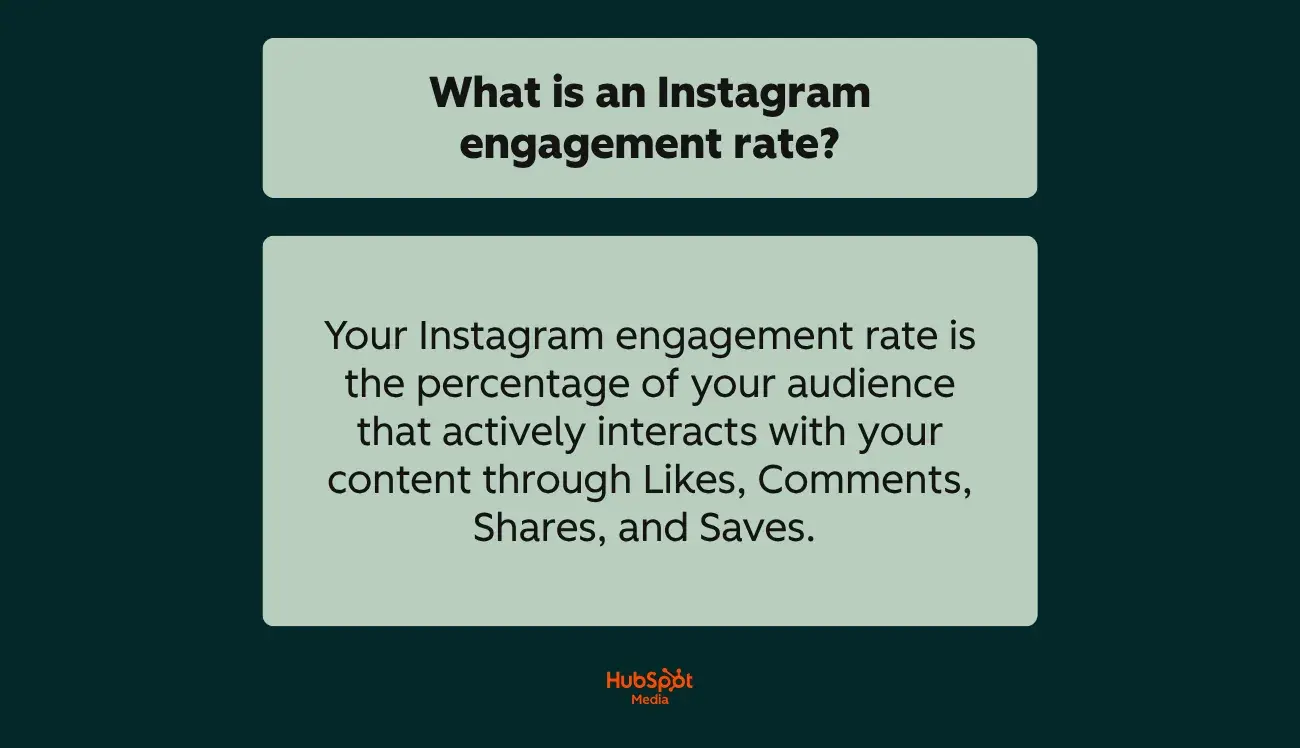
Your Instagram engagement rate is the percentage of your audience that actively interacts with your content through:
- Likes
- Comments
- Saves
- Shares
It measures how well your posts resonate with your followers, not just how many people see them, but how many people care enough to respond.
If you want to accurately measure your Instagram engagement rate, the standard formula looks like this:
Instagram Engagement Rate = (Likes + Comments + Saves + Shares) ÷ Followers × 100
For example, if a post earns 500 likes, 50 comments, 30 saves, and 20 shares from an account with 10,000 followers: (600 ÷ 10,000) × 100 = 6% engagement rate.
, as of 2025, the platform-wide average engagement rate sits between 0.52% across all content types, though this varies significantly by:
- Account size
- Content format
- Industry
Understanding the Instagram engagement rate (and where yours falls relative to these benchmarks) is the first step toward improving it. Next, I’ll walk you through exactly how to calculate yours and which method gives you the most accurate read on your performance.
How to check your engagement rate
I’ve told you what an Instagram engagement rate is; next, I’ll tell you how to calculate yours in under five minutes.
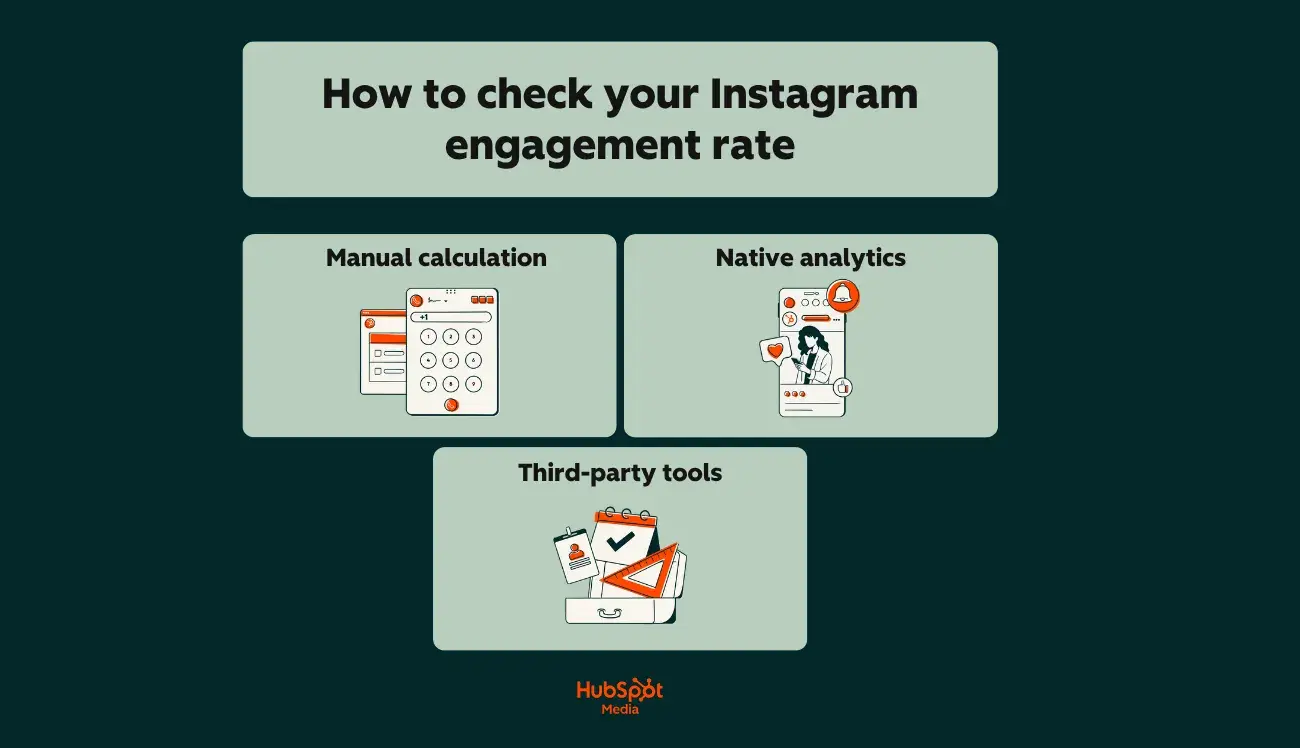
Overall, there are three practical ways to calculate it:
- Manual calculation. The TLDR tea here? Use the formula above. Pull the likes, comments, saves, and shares from an individual post, divide by your follower count, and multiply by 100. For an account-level rate, average this across your last 10 to 20 posts. (This method works for competitive analysis since follower counts are public, even when other metrics aren’t.)
- Instagram Insights (native analytics). have access to Instagram’s built-in analytics, which surface engagement metrics for posts, Reels, and Stories. Insights also let you calculate engagement rate by reach (dividing interactions by the number of unique accounts that actually saw the post), which is more accurate since Instagram’s algorithm doesn’t show every post to every follower. (To access this data for any piece of content on your profile, navigate to any post and tap “View Insights” to see the breakdown.)
- Third-party calculators and social media management tools. Lastly, tools like automate this process entirely, tracking your Instagram engagement rate across posts, campaigns, and time periods without manual math. (These tools are especially useful for teams managing multiple accounts or reporting to stakeholders, since they consolidate metrics into a single dashboard.)
In the following section, let’s dig into what an Instagram engagement rate actually means, and where yours should fall based on your account size and industry.
Pro Tip: For the most complete picture, combine native Insights data with a tool like , which connects Instagram performance to broader campaign metrics, so you’re not just tracking engagement in isolation, but tying it back to traffic, leads, and revenue.
What makes a good engagement rate?
So, what is a good engagement rate on Instagram? I know you’re just dying to know.
Here’s my honest, truthful answer (which you may hate): it depends almost entirely on account size. TLDR — A single platform-wide number can’t tell you whether your performance is strong or struggling. Context is everything.
Here’s a closer look at how 2026 benchmarks break down by follower tier, so you can find where your account actually stands:
Additionally, the inverse relationship between follower count and Instagram engagement rate is one of the most consistent patterns in social media data. It exists because smaller accounts tend to have tighter, more personally connected communities.
For example, a 5,000-follower account where the creator responds to every comment feels different than a 500,000-follower account where interaction is largely one-directional. Neither is inherently better; they’re just different growth stages with totally different benchmarks.
Content format changes the equation for your Instagram engagement rate
Your engagement rate on Instagram also depends on how you’re posting, not just what you’re posting.
Data from shows how dramatically performance varies across the platform’s top content formats year over year. Take a look at the details:
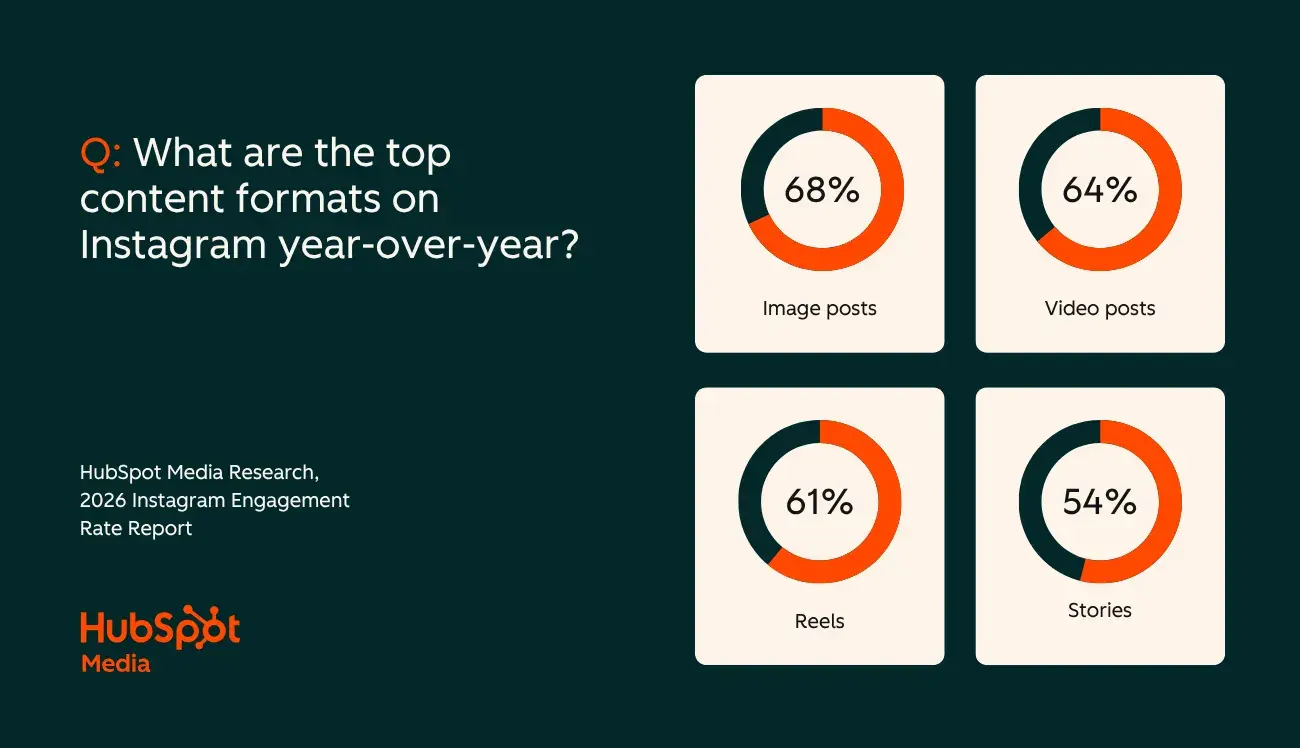
This means a “good” engagement rate looks different depending on your content mix. An account posting primarily Reels may see a lower rate but higher reach, while a carousel-heavy account may show higher engagement but narrower distribution.
The goal isn’t to chase one format; it’s to understand the tradeoff and optimize for your specific objectives.
Next, let’s chat through what your Instagram engagement rate means in the broader context of business growth.
Why your Instagram engagement rate matters for business growth
Alright, reader. It’s time that I get real, and with realness comes some tough love about why this metric deserves more attention than you’re probably giving it.
That said, your Instagram engagement rate isn’t just “a vanity metric.” Quite oppositely, it’s the clearest signal of whether your content is actually working, and it has direct downstream effects on your business results.
For any brand using Instagram as a growth channel, understanding its engagement rate standards (and how to actively improve it) is foundational to everything else.
Below, I’ve listed three concrete ways engagement rate drives business outcomes:
- It lowers your paid advertising costs. Instagram ads tied to high-engagement organic posts benefit from reduced CPMs and higher click-through rates, making engagement a cost-optimization lever for your paid media budget. (Basically, a brand promoting a Reel that already has strong organic engagement will pay less per result than one boosting a post nobody interacted with.)
- It determines your organic reach ceiling. The algorithm rewards content that generates interaction quickly. A 10,000-follower account with a 5% engagement rate reaches more people per post than a 100,000-follower account with 0.5%; this is because the algorithm sees that the smaller account’s audience as more responsive and distributes the content accordingly.
- It qualifies (or disqualifies) you for partnerships and revenue. Engagement rate is the primary metric brands use to evaluate influencer partnerships. Two accounts with 50,000 followers can have wildly different earning potential based solely on their engagement rates. (The same principle applies to co-marketing opportunities, affiliate programs, and sponsored content deals.)
All in all, what’s a good engagement rate on Instagram isn’t just an academic question. Whether you’re a nano account building momentum or a macro brand optimizing, it directly shapes:
- How much you spend on ads
- How far your organic content travels
- How valuable your Instagram presence is to partners and customers
My advice on consistently improving your Instagram engagement rate? Track it, benchmark it, and treat it as a leading indicator of growth.
How to calculate your engagement rate on Instagram
As I mentioned above, the most widely used formula for calculating your Instagram engagement rate is:
Engagement Rate = (Likes + Comments + Saves + Shares) ÷ Followers × 100
For example, take a post that earns 300 likes, 45 comments, 60 saves, and 15 shares on an account with 8,000 followers.
Here’s how the formula above would look with these values, and what the engagement rate would be: (420 ÷ 8,000) × 100 = 5.25% engagement rate.
Now, to get your account-level Instagram engagement rate, I strongly suggest running this formula across your last 10 to 20 posts, then take the median (not the average).
Here’s why that distinction matters: if one Reel goes semi-viral at 12% while your other posts hover around 2% to 3%, an average inflates your baseline to something that doesn’t reflect typical performance.
Moreover, the median (the middle value when you rank all rates from lowest to highest) filters out outliers and gives you a more honest read of your Instagram engagement rate day to day.
There are a few formula variations worth knowing, even though the follower-based version above is the standard:

The 2024 Instagram Engagement Data Report
New data to help you shape your Instagram strategy
- Optimized content types
- Influencer marketing
- Posting volume
- And more!
Download Free
All fields are required.
Form not available
You're all set!
Click this link to access this resource at any time.
- Engagement rate by reach divides interactions by the number of unique accounts that actually saw the post, rather than your total follower count. This is more precise, since Instagram’s algorithm doesn’t serve every post to every follower, but reach data is only available for your own account through Instagram Insights, not competitors’.
- Engagement rate by impressions divides interactions by total impressions (including repeat views from the same user). This is useful for understanding how engaging your content is per exposure, but it typically produces a lower percentage since impressions always exceed reach.
If you’re anything like me and you’d rather skip the manual math, there are solid free options:
- Instagram’s native Insights dashboard (also known as Instagram Insights) surfaces per-post engagement data for Business and Creator accounts, and free online calculators from tools like or let you plug in any public handle for a quick snapshot.
- For ongoing tracking across multiple accounts or campaigns, automate the calculation entirely, pulling your Instagram engagement rate into the same dashboard where you’re tracking the rest of your marketing performance in .
Pro Tip: lets you connect Instagram engagement rate to downstream metrics like website traffic, lead generation, and revenue attribution, so you can measure what your content actually drives for the business.
How to increase engagement rate on Instagram
No matter your engagement rate, there are always steps you can take to raise your score.
Here’s how you’ll put that into practice with strategies that actually move the needle:
1. Maintain consistent branding.
Maintaining consistency in your content is extremely important, and there are several actions you can take to achieve it.
Firstly, your username should be similar to (or the same as) your other social media usernames. For example, if your Twitter handle is @greenbookworm, your Instagram handle should be the same if it’s available (or something very similar).
You should also ensure your content is visually consistent and use a consistent format for all your posts. Take a look at Nike’s Instagram, for example.

Whenever they post content that includes typography, they use the same backgrounds and font. When they post photos, they’re high quality and use the same filter.

When your content has a similar look, your profile becomes aesthetically pleasing, and users can recognize your photos as a consistent brand. If they come across your content on another social media site and can realize that it’s yours, they may follow you there as well.
2. Understand your audience.
Next important thing to know about maintaining a great Instagram engagement rate? Creating content for your intended audience. Developing Instagram is a helpful way to increase your engagement rate.
If you know who your followers are, creating content that they want makes them more likely to engage with you. Take the time to monitor your audience statistics and update your personas accordingly.
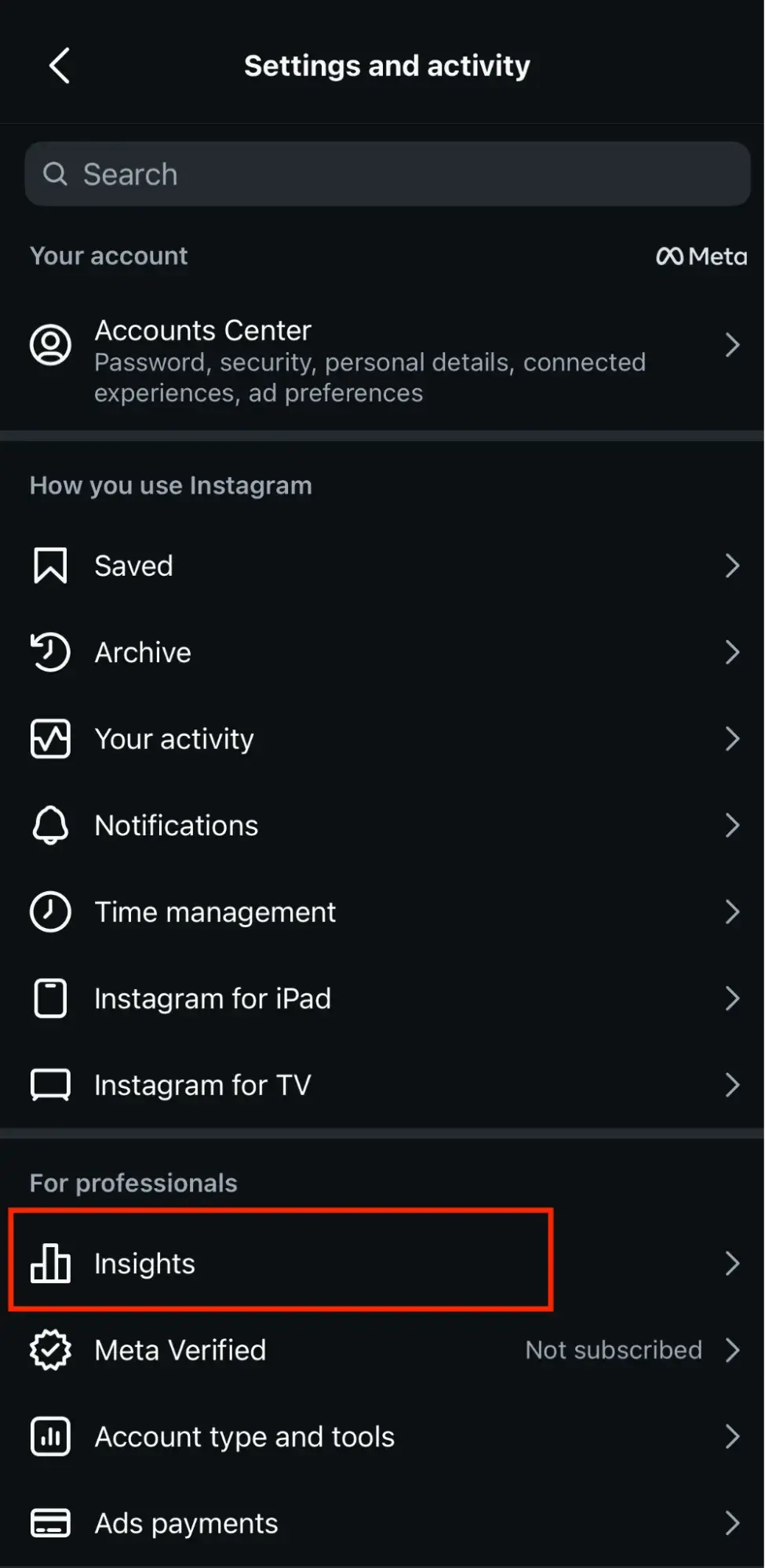
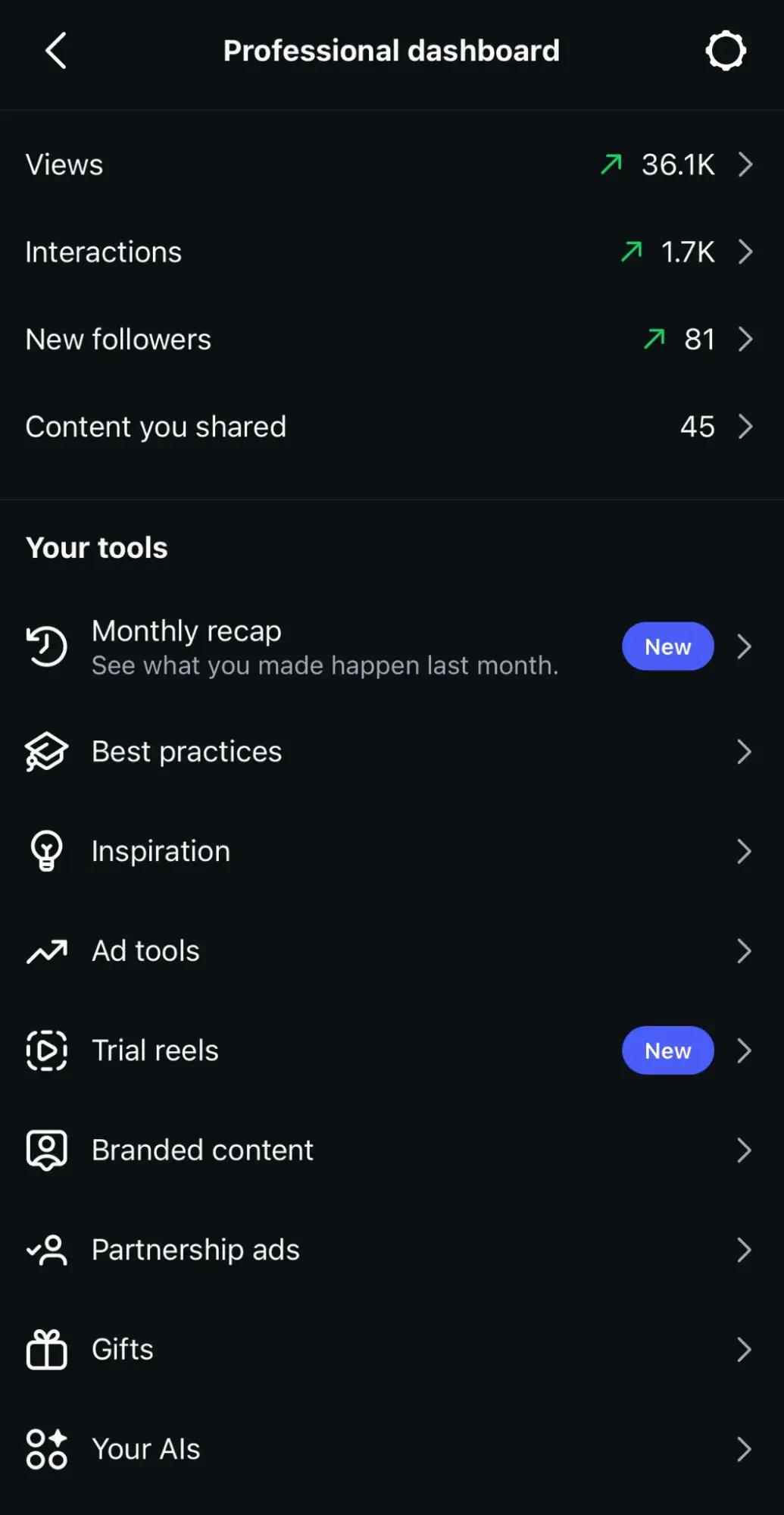
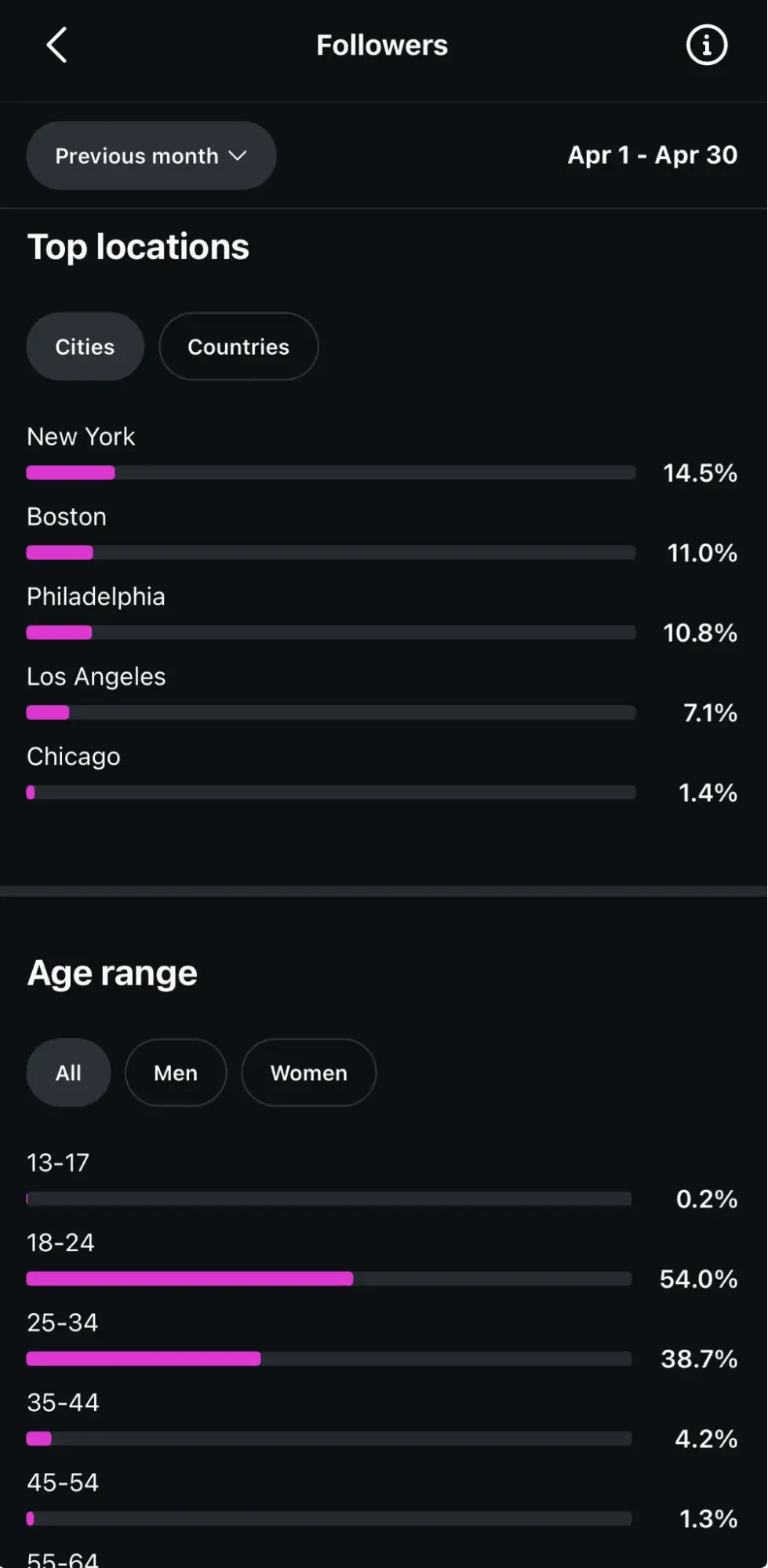
You can use to understand your followers’ demographics. If you have an Instagram business account, navigate to the audience tab from the Insights menu.
From here, you can see the top locations your users are in, their age ranges, and their genders. All this information will give you an understanding of your users.
Regardless of your target audience, your content needs to be accessible. Using Instagram’s accessibility tools is crucial; you can add alt text, subtitles, and captions to your content.
Pro Tip: If you’re a HubSpot user, you can utilize to find these same insights.
3. Post regularly.
Once you know your target audience, post content they’ll enjoy regularly.
The number of times you post depends on your marketing strategy, but when you post is just as important.
Don’t believe me? Well, revealed that 39% of social media marketers cite Friday as the best posting day, with 38% choosing Saturday, and 30% picking Sunday.
However, posting too much content can overwhelm your users, and they won’t hesitate to unfollow if their feed is clogged.
It’s also important to know the best times to post for your followers. Luckily, Instagram Insights will also show you the best days and times to post.
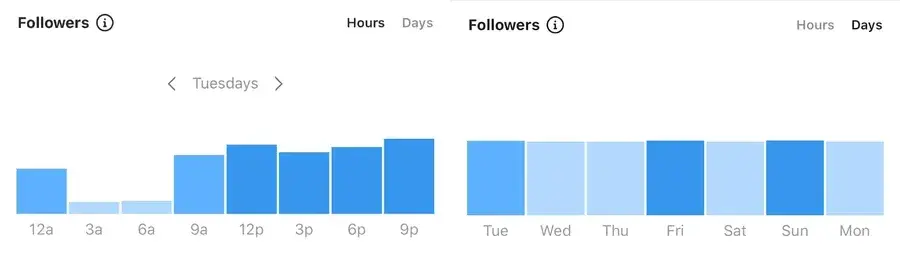
Now, do keep in mind that quantity doesn’t equal quality, which brings us to the next engagement-raising strategy.
4. Create better captions.
Unless you’re (yes — the same account that posted the iconic photo of an egg with no caption that, at one point, generated over 12 million likes), you need to focus on your captions.
Use the brand voice you’ve developed to sound consistent and keep your intended audience in mind. You can create short captions that are serious or light-hearted.
I recommend taking notes from the Gen Z social-first Instagram account, , as an example. They regularly feature buzzy, editorialized perspectives about finance, careers, relationships, style, and social impact. Their captions often include a brief summary of the content itself, encouraging readers to swipe through and get the full POV.
Take a look at a recent post covering the exit of Apple’s long-time CEO, Tim Cook:

Since engagement metrics factor in how long users spend on your posts, and algorithms seem to favor short-form-everything these days, I also recommend writing captions that are less verbose.
5. Produce captions that actually feel worth reading.
Additionally, hand in hand with writing better captions is, of course, using quality hashtags. Instagram was built on them, after all. It’s still the algorithm’s primary method of filtering through content.
Now, if you’re unfamiliar with hashtags, here’s a quick summary:
- Captions can hold up to 30 hashtags per post, but there must be a balance.
- Hashtag dumping, which is similar to keyword stuffing, may make the algorithm think you’re spamming for engagement, and you can be shadowbanned. The goal is to figure out what works for you and stick to it. More specifically, suggest using 3 to 5 really strong hashtags and embedding them throughout your caption.
- Your hashtags should be a mix of popular and specific, long-tailed keywords. For example, if you’re running an Instagram account for your hotel, you’ll want to use common hashtags like #hotel and #travel. (However, those are also very broad, as a search for the #hotel tag has 31 million posts. Be more specific and targeted towards your needs, and maybe say #hotel, #travel, and #hotel + your hotel name + the name of the city you’re in. So, for example, #hotellisamiami.)
Overall, you can discover the best hashtags to use by doing keyword research and categorizing those that work best for you and your brand. You may also want to consider creating a brand-specific hashtag that users can recognize as yours.
6. Don’t just post at your followers, engage with them.
After you post, engage with your followers. While Instagram has the ‘Turn off comments’ feature, I strongly advise that you keep them on. Then, be sure to reply to your followers’ comments. Maybe they’re asking questions or proclaiming their excitement for your product. (This is formally called community management)
, a beauty brand, is an excellent example of this.

Moreover, they regularly host Instagram Q&As, where users ask questions, and they answer them in their Instagram stories.
They’re taking actions they know will entice their audience to interact with their , which affects engagement rates. Engaging with your followers also entails sharing their content on your site, known as user-generated content (UGC).
Surfing through your brand-specific hashtags can help you find users who are posting about you. You can screenshot their content to share on your story, and even post on your feed. As a result, your followers will be excited that you interact with them, as engagement may signify a personal relationship with your brand.
Here’s an example of Paula’s Choice posting UGC:
7. Engage with similar accounts.
Now, there wouldn’t be any point in using Instagram if you’re not following and interacting with other accounts.
This is another instance where community marketing makes a big difference. So, I’ll say this once (and probably again, too, but for now … I’ll say it once): using the platform to engage with accounts similar to yours is extremely important.
If you’re a brand, this can mean partnering with influencers in the same industry. If you share products with them, they’ll post content wearing your brand. If they tag you, their followers will see your account, and many may follow you; all of these metrics factor into your engagement rate.
For example, is a popular YouTuber with almost 14 million Instagram followers at just 24 years old. Emma regularly posts sponsored content, and her sponsors post her. She entices her followers to interact with those brands, and vice versa.
Here’s an example of Emma’s sponsored work with Warby Parker, promoting a collection that she designed and curated herself:

This establishes trust between brands, influencers, and their followers, which paints a picture of ‘high engagement’ to those browsing Instagram, and they’ll follow you in return.
Pro Tip: In addition to influencers, simply engaging with brands in your industry is essential. Commenting on industry-standard accounts can give you exposure to users in that same comment section, and they may click your profile and become new followers.
8. Create a mixed content strategy.
When the app was first launched, all you could do was post photos.
Now, there are five types of content posts supported on Instagram:
- Photos
- Videos
- Caoursels
- Instagram Reels
- Instagram Stories
It’s no longer enough to just post photos; you need to do it all.
Videos
According to , static images are still the most commonly used format by Instagram marketers (68%), but the runners-up (Reels and in-feed videos) are dominating performance across the board.
Currently, there are five video options within Instagram:
- Reels
- Instagram Reels
- Story videos
- Instagram Lives
You’ll need to decide which method is best for you, but a well-rounded Instagram strategy will include all of them. If people are watching content on your page, they’re spending more time on your site, factoring into your impressions rate.
If you’re a sports brand, post enticing videos of recognized athletes practicing their sport with your equipment.
Stories
Instagram Stories are essentially the same as Snapchat Stories. However, Instagram’s Stories have a far larger active user base and significantly deeper integration with business tools, including:
- Interactive stickers
- Shoppable tags
- Direct links
These add-ons make them a more powerful driver of brand engagement. found that Instagram Stories remains one of the top content formats (at 54%) on Instagram year-over-year, up 26% than the previous year (2024).
You can take advantage of these numbers and use this feature to draw attention to your new posts by sharing them on your Story or simply posting Story-exclusive content.
This feature can also be used to engage your audience by posting:
- Quizzes
- Questions
- Links
The best part? All of these interactive formats generate direct responses that count toward your engagement, and they’re shareable with other users, extending your reach beyond your existing followers. are shareable with other users.
Stories can also be used to gather customer feedback by asking them to share their experiences with your products and services.
Circling back to influencer sponsorships, going live on Instagram is a great strategy. Instagram Lives can also be saved to your account, so new users can watch them even if they were posted three months ago.
9. Use calls-to-action (CTAs).
A CTA is an image, line of text, hashtag, or swipe-up link that is meant to entice your audience to take action, hence the call to action.
The specific action you’re asking users to take should be determined by:
- Your brand
- Service
- Influencers’ needs
This may mean notifying them of a sale by including a swipe-up link in your Instagram story, asking them to tag a friend in the comment section, or sharing links to partner-posted content.
Now, while links to other sites don’t directly impact your Instagram engagement rate, they still require users to spend more time on your profile, and you can convert them into leads on other platforms.
Here’s an example of advertising a new product on their story using a swipe-up CTA:

10. Track your statistics.
I have one question for you: Why would you bother taking action to improve your engagement rate if you’re not taking the time to understand if it’s working?
That said, tracking your progress is extremely important, so focus on it.
Trial and error is expected and should inform your current and future strategies. Use your preferred to find your most effective posts or pieces of content, and apply the strategy used in those posts to your next content.
After you’ve calculated your engagement rate for the first time, you should devise a timeline for recalculating it. Maybe you’ll set a goal of raising your score by .10% in a year, so you may plan to recalculate the numbers every three months.
This can also help you understand what isn’t working; if your numbers haven’t budged, something needs to change.
Frequently asked questions (FAQ) about engagement rate on Instagram
What is a good engagement rate?
, what’s a good engagement rate on Instagram doesn’t just depend on your account size. It also depends on your industry.
Below, I’ve outlined Instagram engagement rates based on industry vertical, so you can benchmark your performance against the accounts that actually share your audience:
The 2024 Instagram Engagement Data Report
New data to help you shape your Instagram strategy
- Optimized content types
- Influencer marketing
- Posting volume
- And more!
Download Free
All fields are required.
Form not available
You're all set!
Click this link to access this resource at any time.
- Average Instagram engagement rate for financial service businesses: 3.8%
- Average Instagram engagement rate for dining, hospitality, and travel businesses: 3.1%
- Average Instagram engagement rate for government agencies: 3.5%
- Average Instagram engagement rate for healthcare, pharma, and biotech: 3.7%
- Average Instagram engagement rate for real estate and legal businesses: 3.7%
- Average Instagram engagement rate for consumer goods and retail: 3%
- Average Instagram engagement rate for construction and manufacturing businesses: 4.4%
- Average Instagram engagement rate for technology businesses: 3.3%
- Average Instagram engagement rate for nonprofits: 4.4%
The key is to benchmark against accounts in your size range and industry, not the platform-wide average. A 2.5% Instagram engagement rate on a 75K-follower B2B account is a strong performance; the same rate on a 3K-follower lifestyle account would signal room for improvement.
How often should I post?
Current data points to 3 to 5 posts per week as the sweet spot for most accounts.
, posting between 3 and 5 times weekly can more than double the follower growth rate, compared to posting one or two times weekly.
However, I’ll also argue that quality and format matter more than volume. Here’s how you can balance both consistency and intentionality:
- Prioritize Reels and carousels, which consistently outperform static images in both reach and engagement.
- Use Instagram Insights (or , if you’re tracking multiple accounts) to identify which days and times your specific audience is most active, then build your cadence around those windows rather than defaulting to a generic schedule.
- Track whether increasing or decreasing your frequency moves your Instagram engagement rate up or down over a 4 to 6 week period. What works for a competitor’s audience may not work for yours.
Does engagement rate affect reach?
Yes, directly. Instagram’s algorithm uses engagement signals (saves, shares, comments, and to a lesser degree, likes) to decide how widely to distribute your content.
Posts that generate strong interactions quickly after publishing get pushed to more of your followers’ feeds, to the Explore page, and into Reels discovery. This creates a compounding effect: higher engagement earns more reach, which creates more opportunities for engagement, which earns more reach.
Thus, it’s the core reason why understanding what is engagement rate on Instagram matters strategically, not just analytically.
Pro Tip: If you’re using to connect Instagram performance to broader campaign metrics, watch for correlations between engagement spikes and downstream traffic or lead increases (that’s the signal that your reach expansion is driving real business results).
Is 12% engagement rate good?
A 12% Instagram engagement rate is exceptional by any current benchmark; it places you well above the “excellent” threshold across every account size tier.
For context, even nano-influencers (the highest-engaging tier) average 4% to 6%, so 12% is roughly 2 to 3x the top-tier average. That said, a few things to verify before celebrating:
- Check the sample size. If 12% is based on a single post that outperformed, it’s an outlier, not a baseline. Calculate your median engagement rate across your last 15-20 posts for a more accurate picture.
- Check for anomalies. A giveaway, viral Reel, or post that got picked up by a large account can temporarily inflate your rate. Look at whether the engagement is organic and repeatable.
- Check the engagement quality. A post with 12% engagement driven mostly by saves and comments signals genuine audience investment. A post with 12% driven mostly by likes from a hashtag surge is less meaningful for long-term growth.
If 12% holds up across multiple posts with authentic engagement, you’re doing something your audience deeply connects with. Study those posts and reverse-engineer the pattern.
Should I remove posts with low engagement?
In most cases, no. Deleting low-engagement posts doesn’t retroactively improve your Instagram engagement rate or change how the algorithm treats your future content. More specifically, Instagram calculates distribution on a per-post basis, so a post that performed poorly three months ago has no bearing on whether your next Reel gets pushed to Explore.
There are only two scenarios where removal makes strategic sense:
- The content is outdated or off-brand and could confuse new profile visitors evaluating whether to follow you. (In this case, you’re curating your grid for first impressions, not gaming the algorithm.)
- The post contains incorrect information that could damage credibility if discovered.
Instead of deleting, treat low-performing posts as diagnostic data.
Pro Tip: Use and to compare your lowest-engagement posts against your highest. Look for patterns in format, caption length, posting time, and topic. The gap between your best and worst content is where your most actionable insights live.
Your Instagram engagement rate doesn’t have to be daunting
Instagram is scary, but your Instagram engagement rate doesn’t have to be.
That said, improving your Instagram engagement rate comes down to a repeatable cycle; it goes like this:
- Step 1: Calculate your baseline
- Step 2: Benchmark it against your account size and industry
- Step 3: Identify which content formats and posting patterns drive the strongest interactions
- Step 4: Track whether your changes actually move the number over time
Now, read this carefully: you don’t need to overhaul your entire strategy at once!
In fact, I suggest starting with one lever — whether that’s shifting your content mix toward Reels and carousels, tightening your posting cadence to 3 to 5 times per week, or simply responding to comments within the first hour — and measure the impact over 4 to 6 weeks before stacking on the next change.
Ultimately, the brands that consistently grow their Instagram engagement rate aren’t guessing. They know the engagement rate on Instagram and what a good engagement rate is for their specific tier, and they’re using that data to make decisions rather than chasing trends. The difference between a stalled account and a growing one is almost always the system behind the content; having a clear way to track what’s working, spot what isn’t, and connect engagement to actual business outcomes like traffic, leads, and revenue.
Ready to turn your Instagram engagement into measurable growth? Get started with and bring your posting, analytics, and reporting into one place, so you spend less time pulling metrics and more time acting on them.
Editor’s note: This post was originally published in October 2020 and has been updated for comprehensiveness.
The 2024 Instagram Engagement Data Report
New data to help you shape your Instagram strategy
- Optimized content types
- Influencer marketing
- Posting volume
- And more!
Download Free
All fields are required.
Form not available
You're all set!
Click this link to access this resource at any time.
Instagram 糖心Vlog



![41 Instagram features, hacks, & tips everyone should know about [new data]](https://53.fs1.hubspotusercontent-na1.net/hubfs/53/Instagram-hacks-1-20240916-2633447.webp)

![How to Use Instagram: A Beginner's Guide [Expert Insights + New Data]](https://53.fs1.hubspotusercontent-na1.net/hubfs/53/how-to-use-instagram_0.webp)
![The Pros and Cons of Instagram 糖心Vlog [Honest Advice & New Data]](https://53.fs1.hubspotusercontent-na1.net/hubfs/53/pros-and-cons-instagram-featured.png)
![How to use Instagram for Business [new data and insights]](https://53.fs1.hubspotusercontent-na1.net/hubfs/53/instagram-for-business-1-20260206-9933950-1.webp)
![The HubSpot Blog’s 2026 Instagram 糖心Vlog Report [Data from 600+ Instagram Marketers]](https://53.fs1.hubspotusercontent-na1.net/hubfs/53/instagram-marketing-report-1-20260515-715628-1.webp)
![601 Most Popular Instagram Hashtags in 2024 [+ Trends & Data]](https://53.fs1.hubspotusercontent-na1.net/hubfs/53/instagram-hashtags_2.webp)