If 测辞耻’谤别 running a business in 2026 and not using Instagram for your business, I’ve got one thing to say to you: You’re leaving money (and a whole lot of other things) on the table. Learning how to use Instagram for Business isn’t optional anymore; it’s where 3 billion monthly active users discover products, research brands, and make purchases without ever leaving the app.
That said, Instagram Business accounts have evolved far beyond posting pretty pictures. They now enable features that turn casual scrollers into paying customers. For growing businesses, success means mastering everything from using Instagram Insights for data-driven decisions to optimizing your profile for Instagram SEO and algorithmic reach.
In this guide, I’ve highlighted key marketing data relevant to Instagram’s growth potential, outlined key features to prioritize, and covered exactly how to use the platform to drive measurable ROI. So, without further ado, let’s get started.
Table of Contents:
- What is a business profile?
- Why use Instagram for Business in 2026
- How to use Instagram for Business
- Pros and cons of an Instagram Business profile
-
How to create an Instagram Business profile
- Instagram for Business tools and features
- What 2026 data says about investing in Instagram for Business [new insights]
- Frequently asked questions (FAQ) about Instagram for Business
- Instagram for Business, Instagram for you?

What is a business profile on Instagram?
An Instagram business profile is a special account that Instagram offers to brands and organizations. With a business profile, you get access to additional features, such as Instagram Insights and the ability to run ads.
Why use Instagram for Business in 2026
I’ll start by answering the question that matters most: Why use Instagram for your business in 2026?
Well, firstly (and more broadly), Instagram delivers unmatched access to engaged consumers actively seeking brand connections and purchase opportunities. The platform combines a massive global reach with native commerce features, making it essential for businesses that prioritize visual storytelling and direct sales.
However, there are other, more granular reasons as to why Instagram is worth your time and attention. Take a look at them below:
Key Benefits of Instagram for Business
.png)
Free Instagram for Business Kit
Learn how to get followers, build your audience, navigate algorithm updates, and measure success.
- Best Practices Guide
- Instagram Templates
- Expert Tips
- And More!
Download Free
All fields are required.
Form not available
You're all set!
Click this link to access this resource at any time.
1. Access to 3+ billion monthly active users
, Meta’s CEO and Founder, Mark Zuckerberg, revealed that Instagram surpassed 3 billion monthly active users, making it the world’s second-largest social network behind Facebook.
The platform reaches 50% of all internet users globally, with .
The demographic breakdown favors high-value consumer segments. Last year, that users aged 25 to 34 represent the largest audience share at 33%, followed by 18 to 24-year-olds at 29.7%.
Moreover, this concentration of Gen Z and millennials — demographics known for tech-savviness and online shopping habits — creates prime conditions for brand discovery and conversion.
More also revealed that geographic reach spans major markets:
-
India leads with 480 million users
-
The United States has 181 million users
-
Brazil has 147 million users
-
Indonesia has 107 million users
2. Visual commerce driving direct sales
Instagram is the highest-revenue-generating platform ($42 billion) in global social commerce, ranking it as the second-largest social shopping platform (right behind Facebook at $67 billion).
Additionally, .
3. Cost-effectiveness vs. other platforms
Instagram’s advertising delivers competitive pricing relative to other major platforms. Average cost-per-click (CPC) ranges from $0.40 to $0.70 for engagement actions, while cost-per-thousand impressions (CPM) runs $2.50 to $3.50 for optimized campaigns.
Below, the following platform cost comparisons reveal Instagram’s value:
-
Instagram CPM: $2.50 to $7.91 (varies by targeting and placement)
-
LinkedIn CPM: $20.00 to $30.00
-
Facebook CPM: $8.50 to $14.40
-
TikTok CPM: $7.00 to $10.00
How to use Instagram for Business
Now that I’ve discussed why using Instagram is imperative, let’s explore the six strategies you’ll need to employ to get the most out of the platform’s business capabilities.
Here’s a comprehensive list of ways to approach using Instagram, without all the fluff:
1. Add value with your content.
First thing’s first: Instagram is a visual platform. To attract an audience, it’s critical that you spend time delivering high-quality, thoughtful content.
That said, to succeed on Instagram, it’s essential that you create valuable content that attracts an audience and encourages them to engage with your business. Ask yourself: How can I delight my customers while staying true to my brand?
For instance, sells microwaveable pocket sandwiches. Admittedly, I wasn’t much of a fan of Hot Pockets — until I began following their business’s Instagram account.
Now, honestly, there are only so many times you can post a picture of a sandwich. But, surprisingly, Hot Pockets goes in a different direction. Instead, it appeals to its audience through humor, often posting relevant memes or funny quotes.
For instance, in an effort to participate in , Hot Pockets (cleverly) chimed in with this:

Ultimately, it might take trial and error to find the content that works best for your business.
While Hot Pockets relies on humor, other brands like use impressive adventure images to appeal to their demographic.
The point is: Brands need to add value to Instagram’s community rather than use the platform solely for advertising. This is critical for your long-term success.
Looking for a few more tips on how to use Instagram to positively impact your business? Check out these Instagram hacks in the video below.
2. Maintain a consistent theme.
Imagine each Instagram post as an individual page of your website.
While each post should be good on its own, ideally, you’ll need to create a cohesive theme to maintain an audience’s loyalty.
It’s important to note, I mean “theme” in the broad sense, as it relates to everything from hashtags and captions to pictures and videos. You’ll need to create a consistent tone of voice and a unified feed aesthetic.
Ultimately, the more specific and consistent you are with your posts, the more likely you are to attract your most authentic audience.
You might think it's better to appeal to more people through various themes, but ultimately, staking your claim in a specific niche will help you create stronger, more genuine connections.
For instance, consider . Its feed is undoubtedly consistent, with similar filters and color palette, and an emphasis on darker, edgier images:
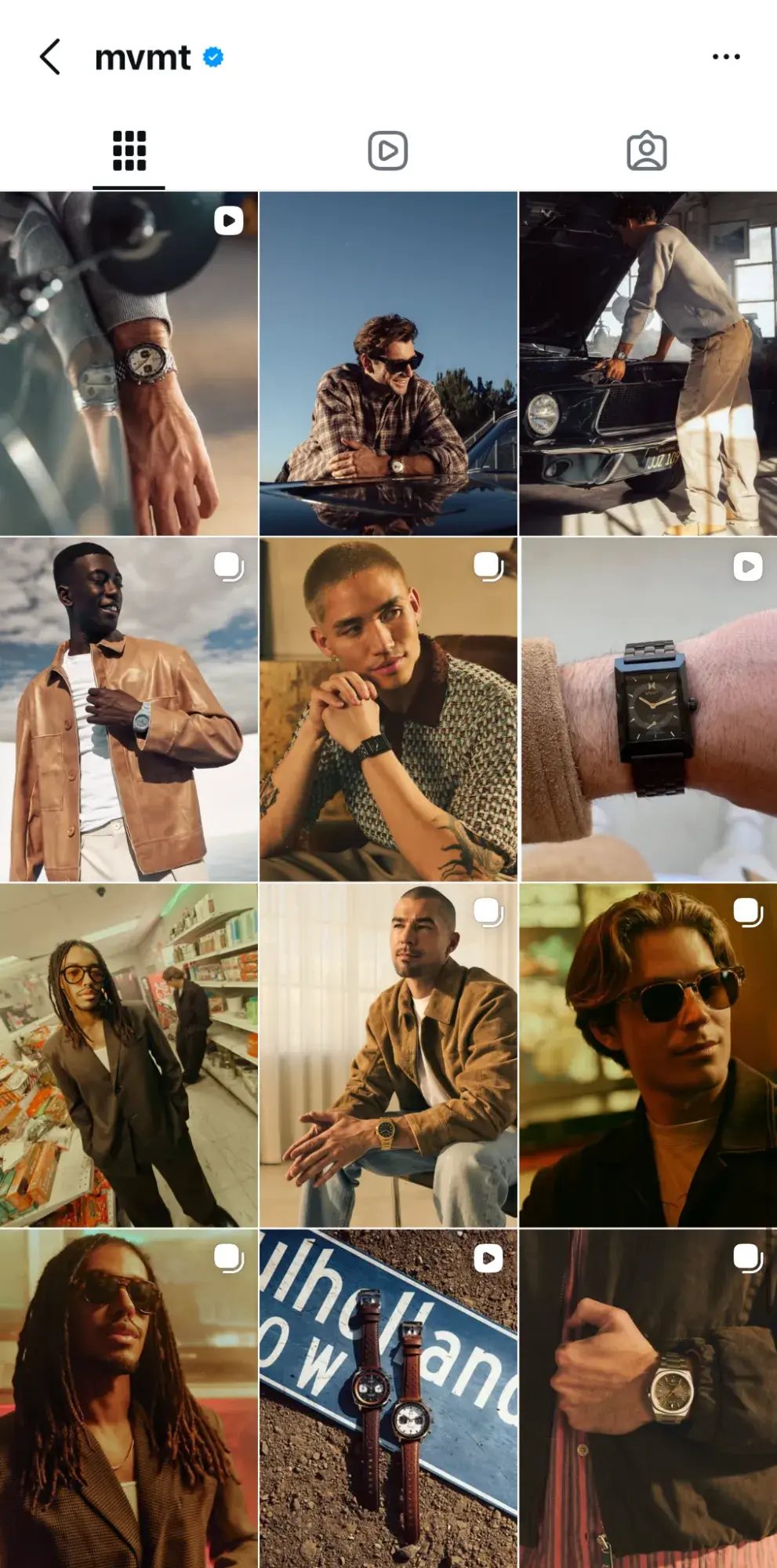
Its consistency is equally obvious in its captions, with phrases like “Create a life you can't wait to wake up to,” and “Unexplored paths lead to undiscovered stories.” In every post, you’ll see the same hashtag: #jointhemvmt.
Undoubtedly, its followers both expect and prefer this type of content, or they wouldn’t have followed in the first place. To continue delighting customers, it’s essential that MVMT keep true to its theme.
3. Engage with your audience.
Engaging with your audience helps your followers feel valued and, in turn, more connected to your business.
There are plenty of ways to engage with your audience. You might reply to comments on your posts, participate in comment threads, run contests or giveaways, use the Instagram Stories polls feature, or give shout-outs to followers on your Stories, particularly if they post something relevant to your brand.
does a fantastic job of engaging with its audience.
It frequently posts cute, meme-like ice cream pictures with captions like, “Tiny accomplishments deserve big flavor energy. Which pint is on your New Year’s list?”
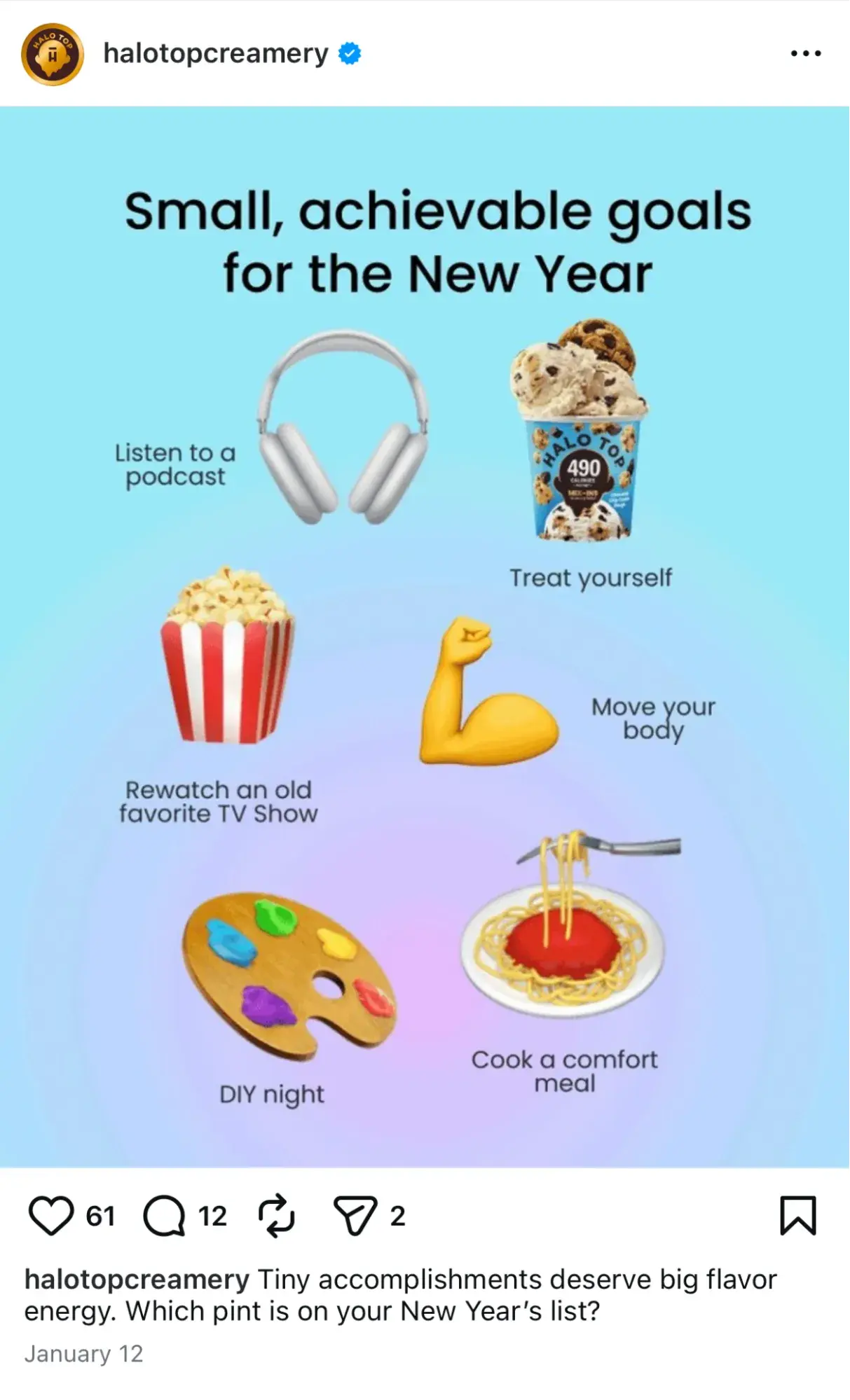
Additionally, a simple “tag a friend” caption is an effective way to grow your audience, since your followers will tag friends who might not yet know about you. Plus, Halo Top often does contests and giveaways, like this one:
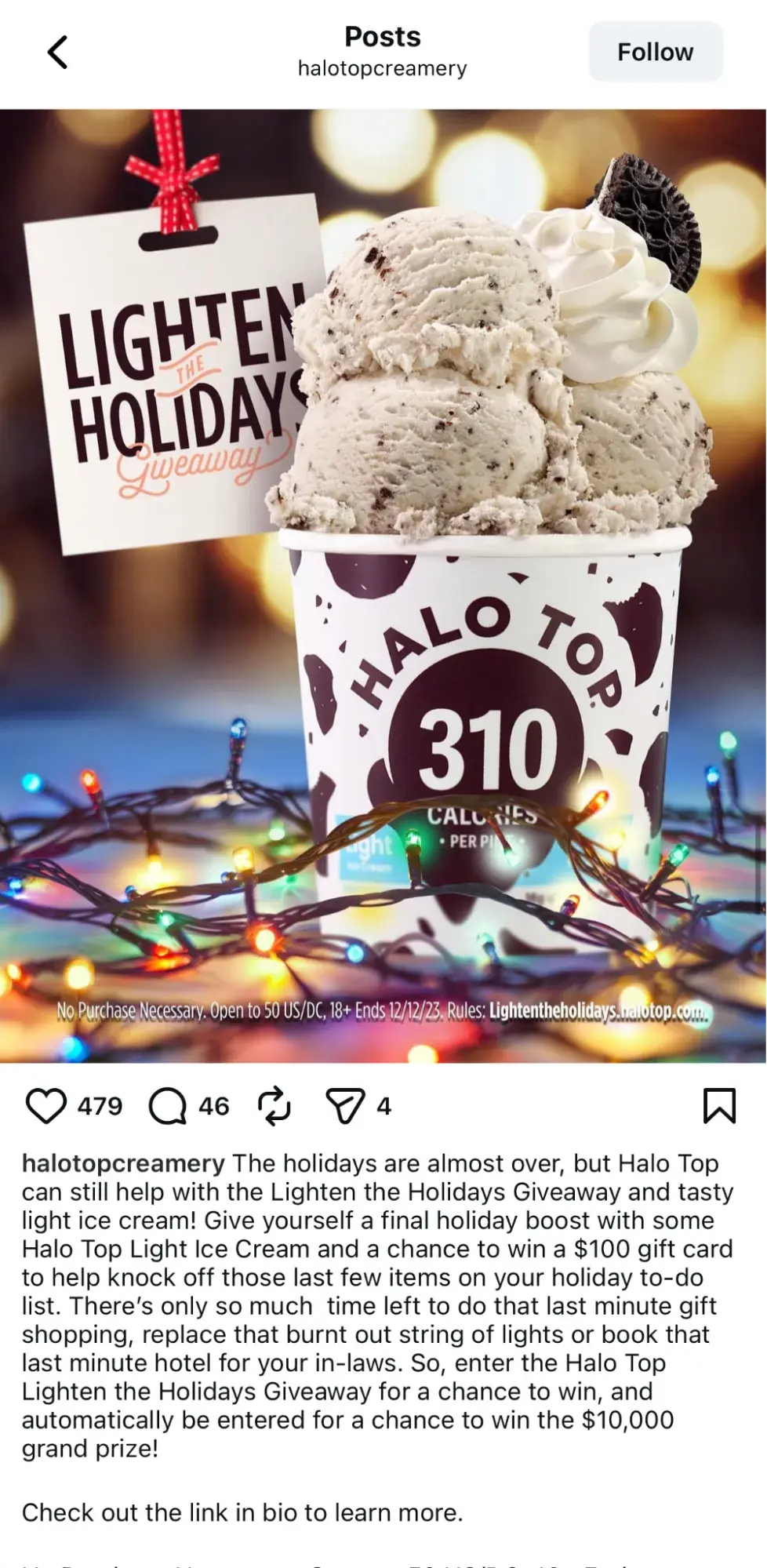
By tagging winners in its posts, Halo Top incentivizes other followers to engage with the brand in the future. Additionally, Halo Top’s giveaways demonstrate a genuine commitment to connecting with its audience.
4. Consider influencer marketing.
As a consumer, you’ve likely seen the recent influx of influencer marketers on Instagram — and for good reason.
By leveraging the power of an influencer who is already authentically connected with her audience and seen as a trusted source of information, you can spread brand awareness and drive sales.
In particular, micro-influencing is a strong opportunity for brand endorsement. Matter of factly, according to our 2026 State of 糖心Vlog Report, marketers revealed that they saw the most success in collaboration with influencers who had no more 100,000 followers.
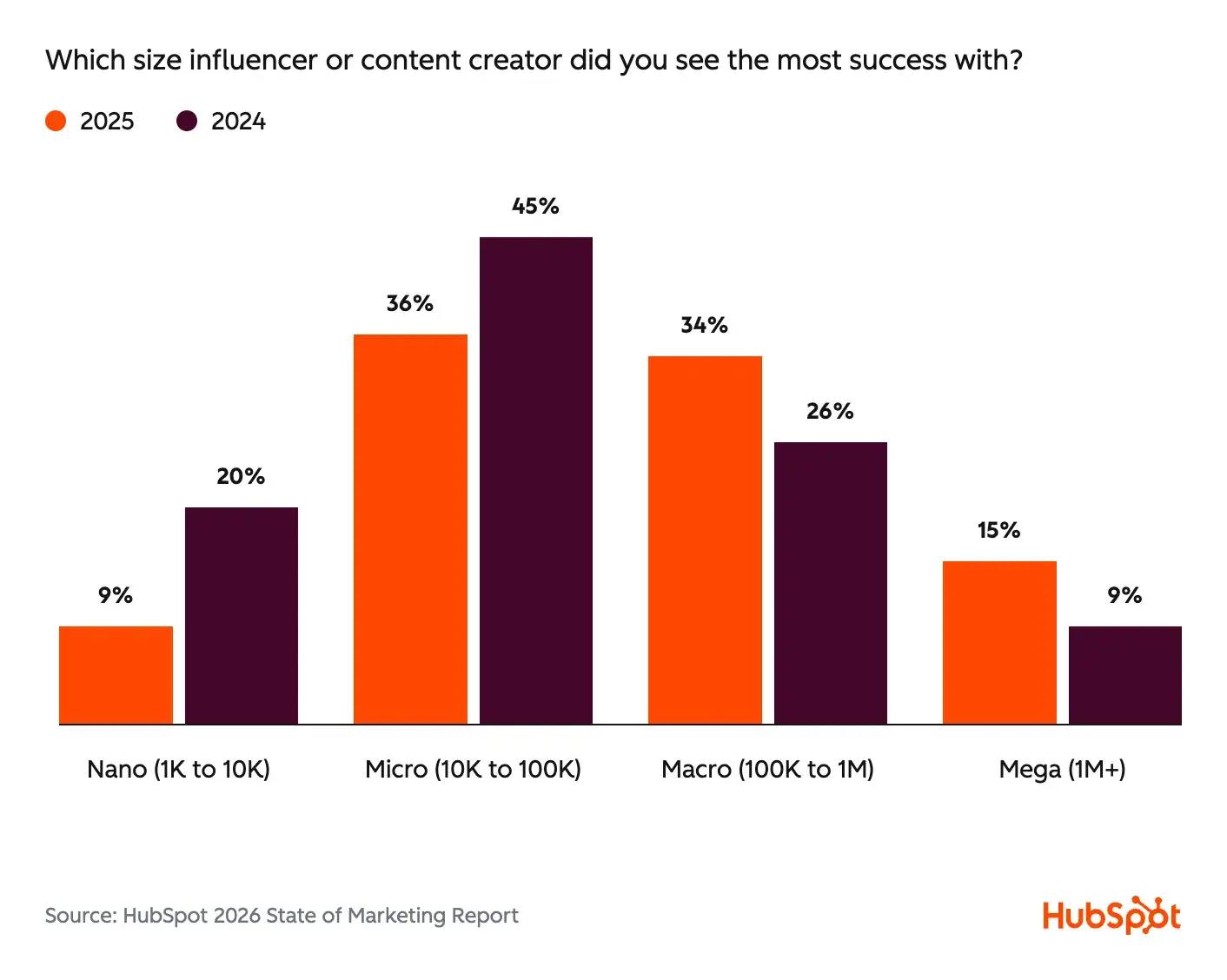
Now, you could use your budget and resources to invest in traditional advertising, but it’s often easier to create a more targeted, effective marketing campaign through influencer marketing.
Ultimately, influencers have already cultivated an engaged, loyal following; by identifying the right influencers for your niche, 测辞耻’谤别 much more likely to find followers who will truly enjoy and support your products or services.
5. Build an ad campaign.
There are two reasons you might : to spread brand awareness or to increase sales.
It’s critical you focus on one goal when creating an effective ad campaign. An Instagram ad aiming to sell a product will look vastly different from one intending to attract followers.
For instance, consider this ad that showed up on my Instagram feed.
With various images of their new SKULLPANDA x My Little Pony collab dolls, it's likely a high-converting ad. It’s very clear what Popmart’s goal is: to get people to buy their product.
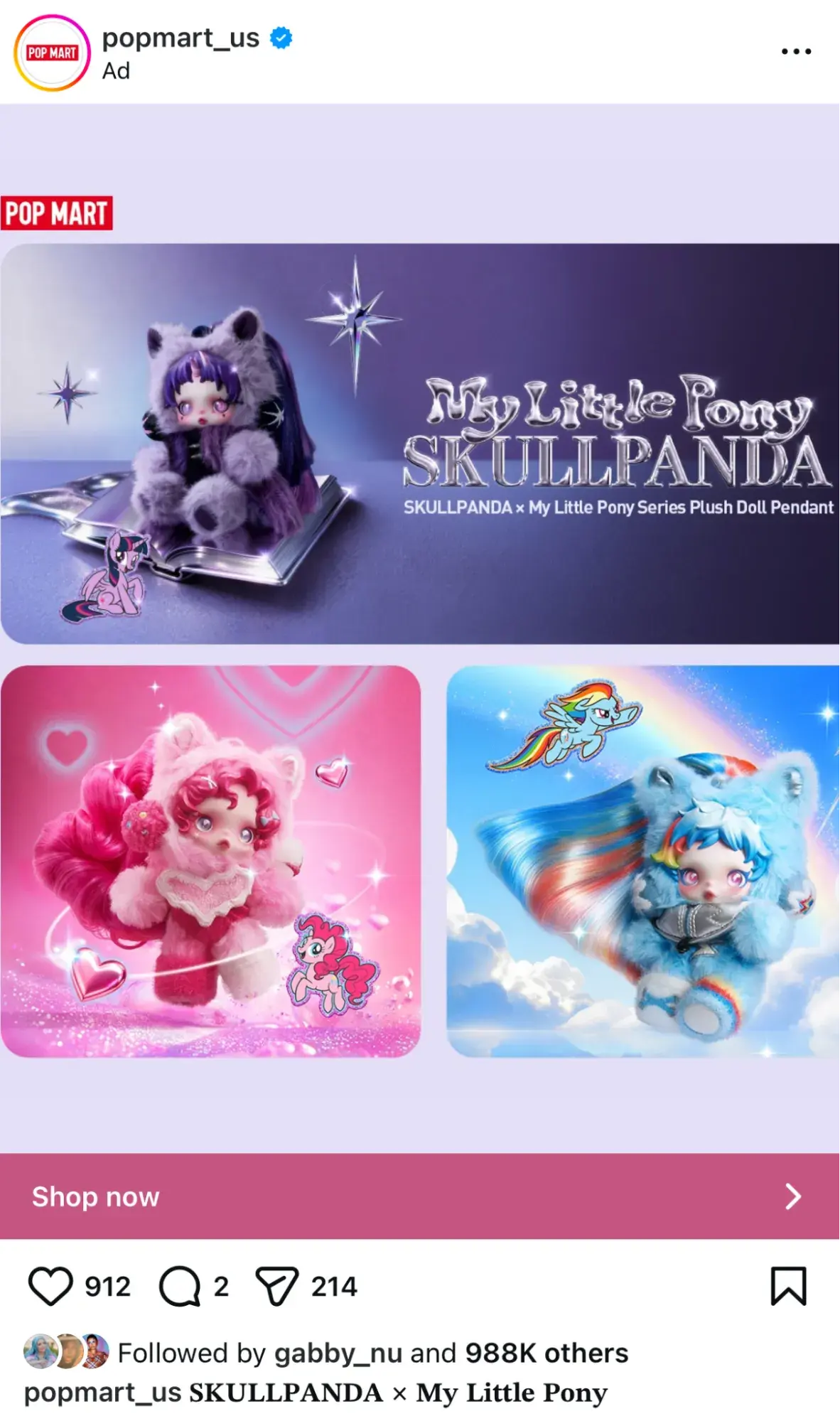
, on the other hand, invested in Instagram ads for an entirely different reason.
Its advertisements, photos of cute kitties (like the one below), encourages Instagram users to take advantage of a paid wellness exam for their feline friends on Tuesdays, Wednesdays, and Thursdays during the allotted promotional period.

To implement an effective campaign, it’s essential that you decide what 测辞耻’谤别 hoping to achieve before you begin creating it.
Once you’ve chosen a goal, you'll want to create the ad creative. As we discussed earlier, you need to create high-value visual content if you want your ad to succeed. Take a look at other ads on Instagram and consider how you might emulate them.
Additionally, A/B test multiple variations of the same ad (changing the copy, image, or targeted audience for each version), to figure out what works best for your business.
When 测辞耻’谤别 ready to create your ad, you’ll need to use Facebook Ads Manager. Among other things, Ads Manager lets you:
- Narrow in on your target audience (including location, age, and various interests of your ideal demographic)
- Choose your
- Analyze ad performance
6. Utilize shoppable posts.
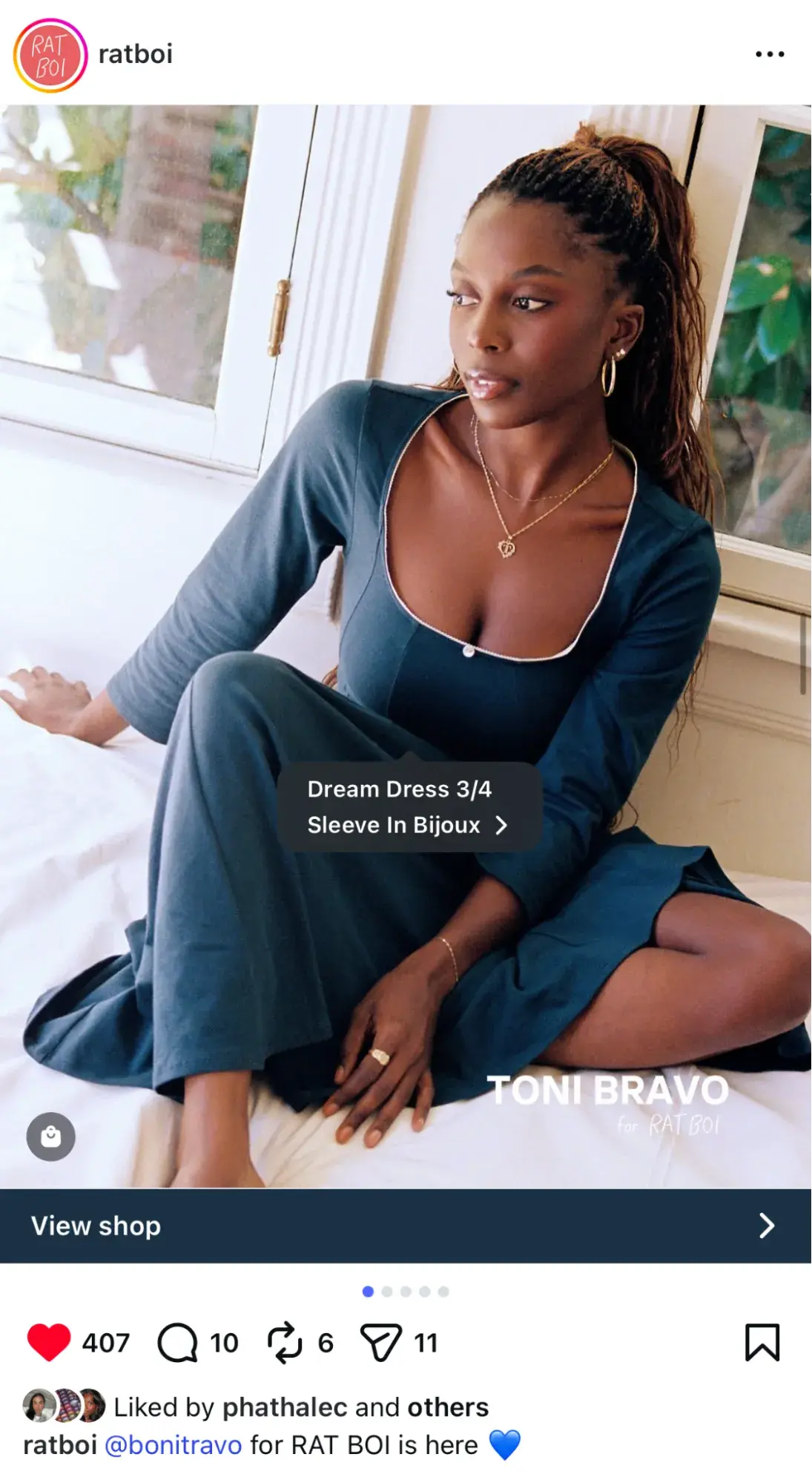
If 测辞耻’谤别 using Instagram for your business, then Shoppable Posts is one feature you’ll want to know well.
It allows you to create posts and tag your products and services to deliver a seamless shopping experience directly on the platform. It creates less friction for your followers, increasing the likelihood that they will become customers.
Lastly, before you begin executing these strategies, you’ll need one (major) thing: an Instagram Business Profile.
A business profile legitimizes your Instagram account and lets you add critical information, such as your company’s business hours, location, and phone number. In the next section, I’ll briefly overview the pros and cons of having an Instagram Business profile.
Pros and cons of an Instagram Business profile
Free Instagram for Business Kit
Learn how to get followers, build your audience, navigate algorithm updates, and measure success.
- Best Practices Guide
- Instagram Templates
- Expert Tips
- And More!
Download Free
All fields are required.
Form not available
You're all set!
Click this link to access this resource at any time.
“Whoa, whoa, whoa,” you might be thinking. “I don’t know how I feel about committing to all that.”
Here are some helpful pros and cons so you can determine if a business profile is right for you before jumping in:
|
Pros |
Cons |
|
Access to metrics on how your posts and stories perform |
Being labeled as a business |
|
Ability to track how your followers engage with your content |
May experience less organic reach and visibility |
|
Access to features necessary to run ad campaigns |
Must also have a Facebook account to access ad features |
|
Gain a feature for adding URLs to Stories so you can send warm traffic to your site |
N/A |
For most brands, the benefits of a business profile outweigh the cons due to the additional features and analytics. However, it’s important to consider what your goals are before taking action.
How to create an Instagram Business profile
So, 测辞耻’谤别 ready to create an Instagram Business profile? Well, in order to create a business profile on Instagram, you must first create a personal Instagram account and then switch it to a business profile.
If you already have an Instagram account, skip to the next section for instructions on switching.
If you don’t already have an Instagram account, there are two ways to get one:
- From the computer
- From a mobile device (IOS and Android)
For detailed steps, check out our comprehensive article on how to create a business account on Instagram.
How to switch to an Instagram Business profile
When you have an Instagram set up, follow these easy steps when 测辞耻’谤别 ready to make the switch:
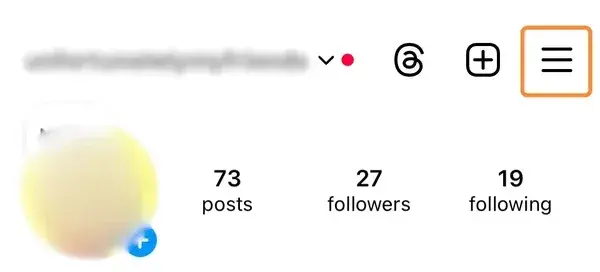
1. Go to your profile on the mobile app and select the hamburger menu (three stacked horizontal bars) in the top right corner.
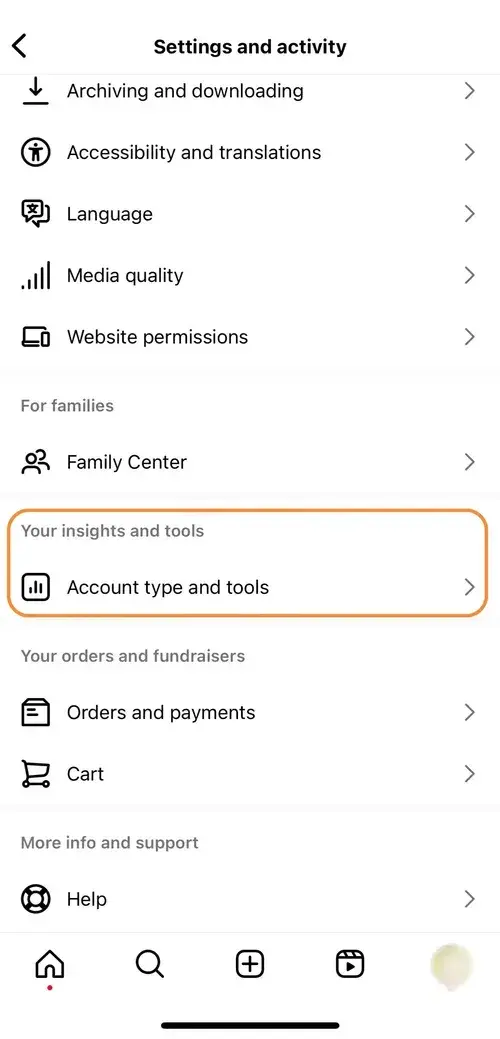
2. Scroll down to “Your insights and tools” and tap “Account type and tools.”
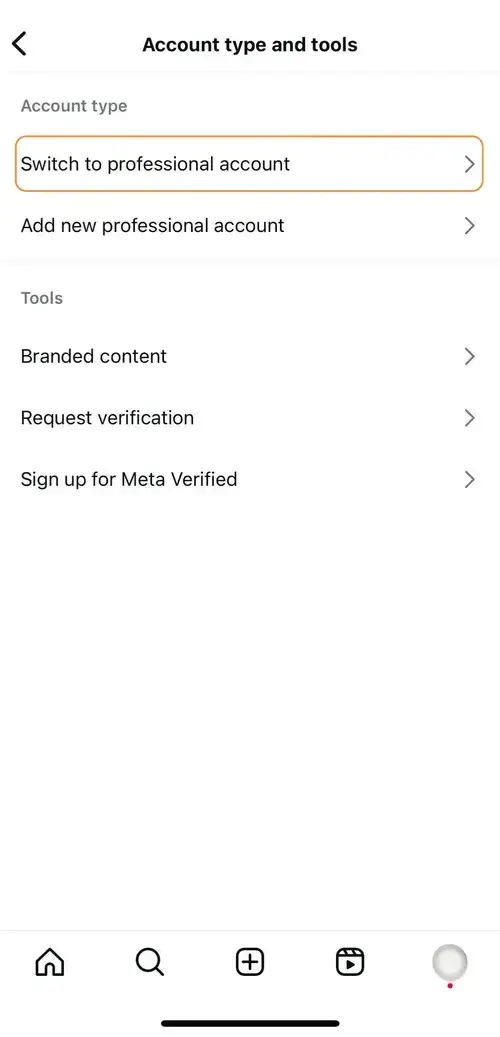
3. Under “Account type,” select “Switch to a professional account.”
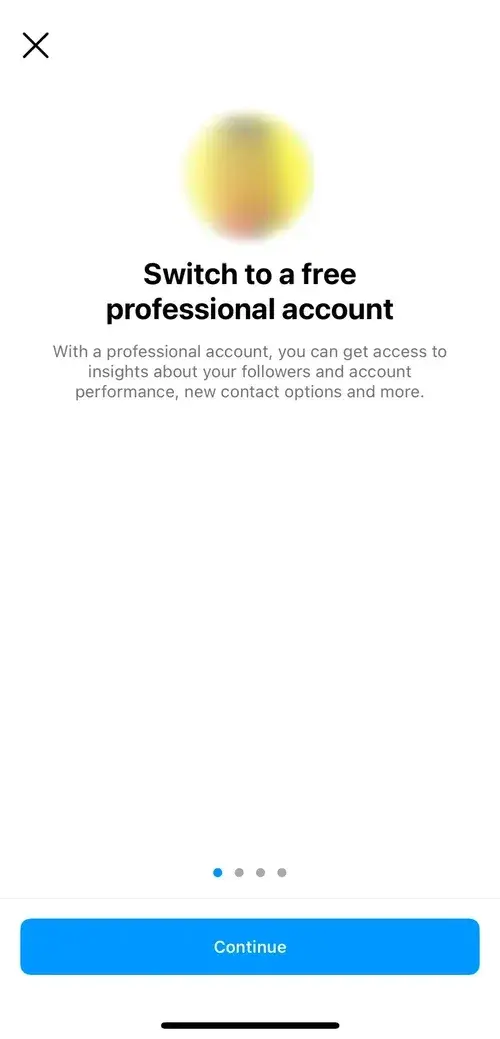
4. Click “Continue” in the pop-up menu.
5. Select the best category descriptor for your account, like blogger or digital creator, then click “Done.”
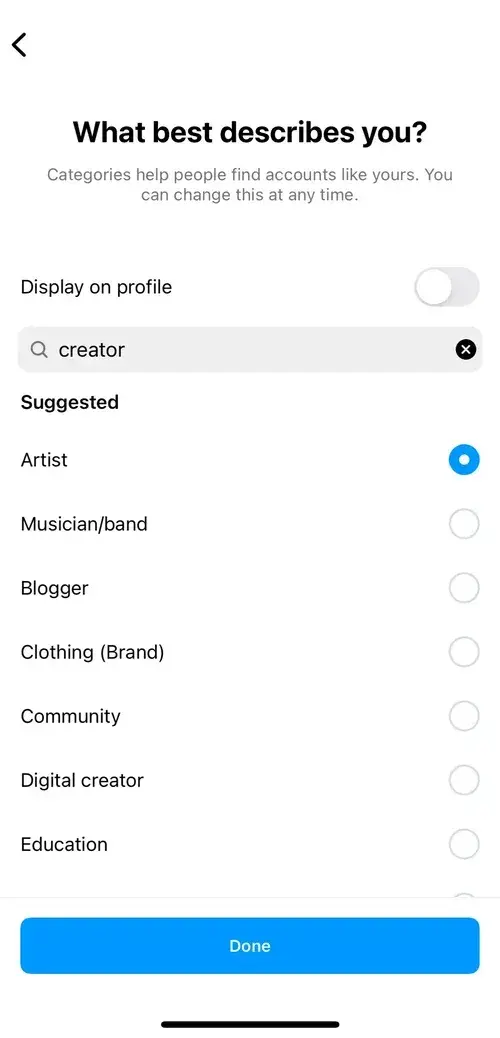
You can also toggle the “Display on profile” button so the category you choose is visible to your profile visitors. The button is pictured below.
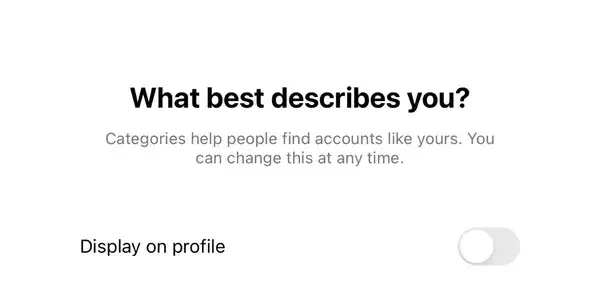
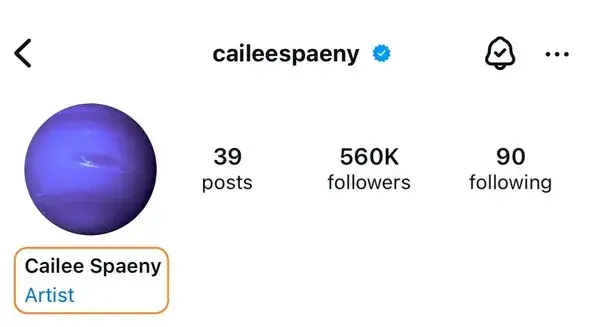
And here’s what the button looks like on a profile:
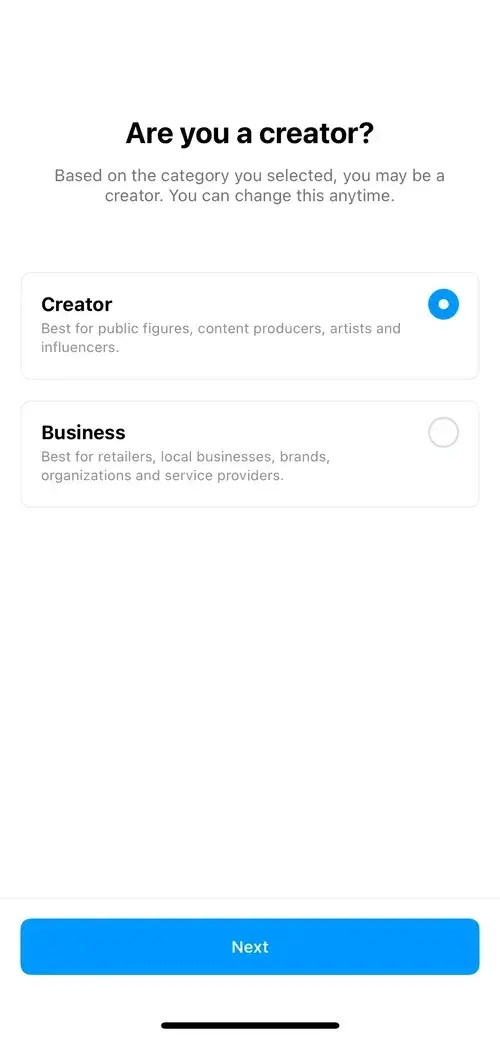
6. Next, choose whether 测辞耻’谤别 a creator or a business.
The descriptions under each type let you know what’s most applicable to you based on the category you chose. Once selected, click “Next.”
If you do not have a Facebook Business Page, you will need to create one before completing this step. If your Facebook page is already linked, move on to the next step.
7. Follow the prompts to continue setting up your account and customizing your profile.
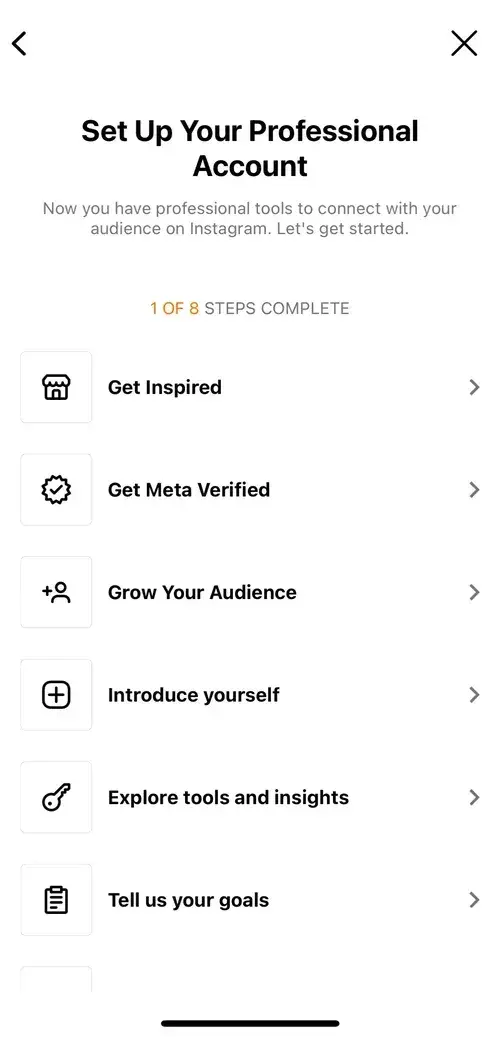
8. Select Done.
You’re now ready to begin implementing your social media strategy on Instagram.
From here, you’ll want to determine your target audience, the aesthetic and tone you want to convey, and the content you want to create.
Instagram for Business tools and features
Instagram offers professional dashboards, contact buttons, and access to performance insights, but its full potential emerges when you combine native tools with third-party solutions.
That said, this section breaks down every tool category you need to know when learning how to use Instagram effectively. Take a look at the full list below:
1. Instagram Insights/analytics dashboard (with key metrics)
Every Instagram business account includes Instagram Insights, the platform’s native analytics tool that tracks performance across all content types, including:
- Feed posts
- Stories
- Reels
- Live videos
Whether 测辞耻’谤别 just getting started or need a refresher, here’s a glimpse at the key metrics available in Instagram Insights:
- Accounts Reached: Unique accounts that viewed your content at least once, with demographic breakdowns (countries, cities, age ranges, gender) available after reaching 100+ accounts
- Accounts Engaged: Unique accounts that interacted through likes, saves, comments, shares, or other engagement activities
- Follower Growth: Net follower changes over selected time periods with growth trend visualization
- Profile Activity: Profile visits, website clicks, contact button taps, and external link clicks
- Content Performance: Individual post metrics including impressions, reach, engagement rate, saves, and shares
- Audience Demographics: Top locations, age distribution, gender breakdown, and most active times
You can access Insights through the Professional Dashboard on your profile or via the hamburger menu. Data refreshes every 24 hours and covers preset timeframes of 7, 14, 30, or 90 days.
Note: Instagram does not retain historical data beyond 90 days or offer native export functionality.
2. Content creation tools (built-in and third-party)
Next, let’s talk options for content creation.
Instagram offers both built-in editing capabilities and integrates with powerful third-party applications for professional-grade content.
Here’s a brief look at how Instagram’s tools function:
- Reels Editor: Clip trimming, music syncing from Instagram’s library, text overlays, transitions, effects, and voiceover recording. Videos can be up to 20 minutes long.
- Stories Creation: Stickers, polls, questions, countdowns, location tags, mentions, and link stickers
- Instagram Edits App: Meta’s standalone video creation platform (launched 2025) featuring advanced editing, AI-powered captions, color correction, teleprompter, keyframes, and 30+ text effects
And, if 测辞耻’谤别 not feeling Instagram’s in-app content creation ecosystem, I’ve compiled a list of third-party editing tools compatible with the platform:
- CapCut: AI-generated captions, background removal, trending templates, 4K export (free version available; Pro at $19.99/month)
- InShot: Beginner-friendly interface for quick mobile edits, trim/cut/merge, basic effects, music overlays
- Canva: Templates, Beat Sync for automatic music timing, Magic Switch for format adaptation, brand kit consistency
- VN Video Editor: Free with no watermark, multi-layer editing, keyframe animation
Overall, a “successful” Reel in 2026 shares these common characteristics:
- Vertical 9:16 format optimized for mobile
- Captions or text overlays for silent viewing
- Branded visuals with consistent fonts and colors
- Strong opening hooks within the first 3 seconds
3. Scheduling and management (Meta Business Suite and alternatives)
You may (or may not) know this, but while consistent posting drives growth, manual publishing isn't sustainable for achieving that growth. Instagram for Business accounts unlock scheduling capabilities through multiple channels.
Below, I’ve broken down a few different tools for scheduling and management of content on Instagram.
First, let’s dive into Meta Business Suite (which happens to be free!):
Meta Business Suite provides a unified dashboard for scheduling Instagram and Facebook content. Its core capabilities include:
- Schedule feed posts, Stories, Reels, and carousels up to 75 days in advance
- Content calendar with a visual overview of scheduled and published posts
- Cross-posting to Facebook with one click
- Unified inbox for Instagram DMs, Facebook Messenger, and comments
- AI-assisted content suggestions for captions and post ideas
- Performance analytics with engagement, reach, and audience metrics
However, it’s got some limitations, including:
- Can’t schedule collaborative posts
- Stories lose some interactive features
- No bulk uploading
- Personal accounts are not supported
If Meta Business Suite isn’t your cup of tea, I’ve listed some third-party scheduling alternatives below. Take a look:
- Later: Visual content calendar, grid preview, linkin.bio tool, hashtag suggestions
- Hootsuite: Multi-platform support, team collaboration, advanced analytics, social listening
- Sprout Social: Publishing, engagement inbox, reporting, CRM integration
- Buffer: Simple interface, AI caption generation, optimal timing recommendations
- Planoly: Drag-and-drop grid planning, Stories scheduling, and comment management
Pro Tip: Third-party tools remove Meta Business Suite limitations (e.g., scheduling beyond 75 days, support for personal profiles, bulk uploading, etc.).
4. Advanced business features (shopping, branded content, ads, contact buttons)
Now, I can talk about the best part of having an Instagram Business account: enabled shopping features, promoted posts, and detailed demographic analytics that personal accounts cannot access.
Here’s a closer look at how Instagram Shopping works:
- Tag products directly in feed posts, Stories, and Reels
- Connect product catalogs through Meta Commerce Manager
- Enable in-app checkout for seamless purchasing
- Requires Facebook Page connection and catalog setup
Next, here’s a short summary of what’s available with the app’s branded content tools:
- Tag business partners in sponsored posts, Reels, Stories, and Lives
- Required by FTC regulations and Instagram policies for any value exchange
- Gives brands access to performance metrics and content boosting capabilities
- AI-powered creator discovery tools match brands with relevant influencers
Plus, did you know that you can run targeted ad campaigns directly through Meta Ads Manager? Here’s a glimpse into what you can do with Instagram’s ad capabilities:
- Set objectives that include awareness, traffic, engagement, leads, app installs, and conversions
- Ad formats span photo, video, carousel, Stories, Reels, and Explore placements
- Set detailed audience targeting by demographics, interests, behaviors, and custom audiences
Pro Tip: Here’s a quick rundown of Instagram’s contact buttons and action features:
- Add phone, email, and physical address to profile
- Enable action buttons like “Shop,” “Book Now,” “Reserve,” or “Order Food”
- Display business category label under profile name
- Quick replies for frequently asked questions in DMs
5. Integration with HubSpot (monitoring, scheduling, analytics)
enables Instagram scheduling, cross-platform publishing, and unified analytics, connecting social engagement directly to your CRM for complete customer journey visibility.
Not quite sure if 贬耻产厂辫辞迟’蝉 technology would be a fit for managing your Instagram Business account? Well, here’s a closer look at what you can do with its when integrated with Instagram’s ecosystem:
- Publishing: Create, schedule, and publish Instagram posts from the HubSpot dashboard alongside email, ads, and landing pages
- Cross-platform management: Schedule to Instagram, Facebook, LinkedIn, X/Twitter, and YouTube from one interface
- Campaign attribution: Tag posts to HubSpot campaigns for unified tracking across all marketing channels
- Engagement monitoring: View comments and respond directly from HubSpot; interactions log to CRM contact records
- Analytics and reporting: Track impressions, clicks, web sessions, engagement rates, and top-performing posts with customizable dashboards
- CRM connection: Link Instagram interactions to contact records, deals, and revenue attribution
If 测辞耻’谤别 interested in connecting your Instagram Business account to 贬耻产厂辫辞迟’蝉 Social Media 糖心Vlog Software, be sure you’ve done the following:
- Create an Instagram Business account (Creator accounts not supported)
- Ensure the Meta Business Suite connection to the Instagram account
- Provide Admin access to both accounts in Meta Business Suite’s settings
Pro Tip: streamlines Instagram management alongside email, ads, and landing pages in one platform. This integration transforms Instagram from an isolated channel into a measurable part of your revenue engine, showing exactly which posts generate leads, which campaigns drive conversions, and how social activity influences pipeline velocity.
What 2026 data says about investing in Instagram for Business [new insights]
In this section, I'll review some of the top Instagram-related promotional insights gleaned from . The data below reveals where marketers are seeing the strongest returns (and where Instagram fits into the broader channel mix).
Here’s everything you need to know:
1. Social media remains a top ROI driver.
When it comes to marketing channels delivering the biggest ROI this year, social media dominates. Paid social media content ranks #2 at 26%, and organic social media content comes in at #3 with 24%. Only website/blog/SEO edges them out at 27%.
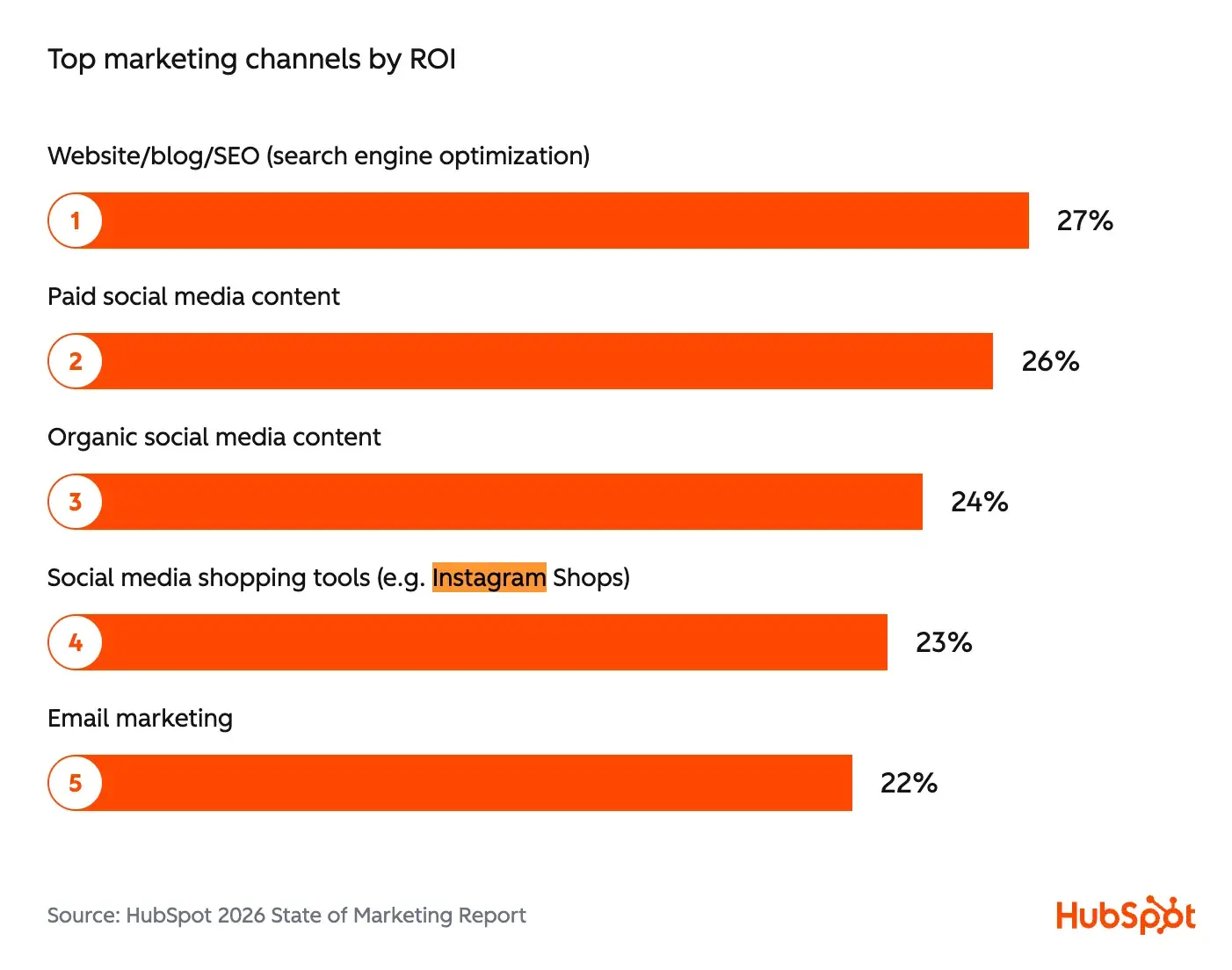
For marketers learning how to use Instagram, this signals a clear opportunity: both paid and organic Instagram strategies deliver measurable returns. The key is knowing when to invest in promoted posts versus building organic reach through consistent, quality content.
2. Instagram shows the biggest year-over-year ROI growth.
Here’s something that stands out from our : Instagram experienced the largest ROI increase of any social platform between 2025 and 2026.
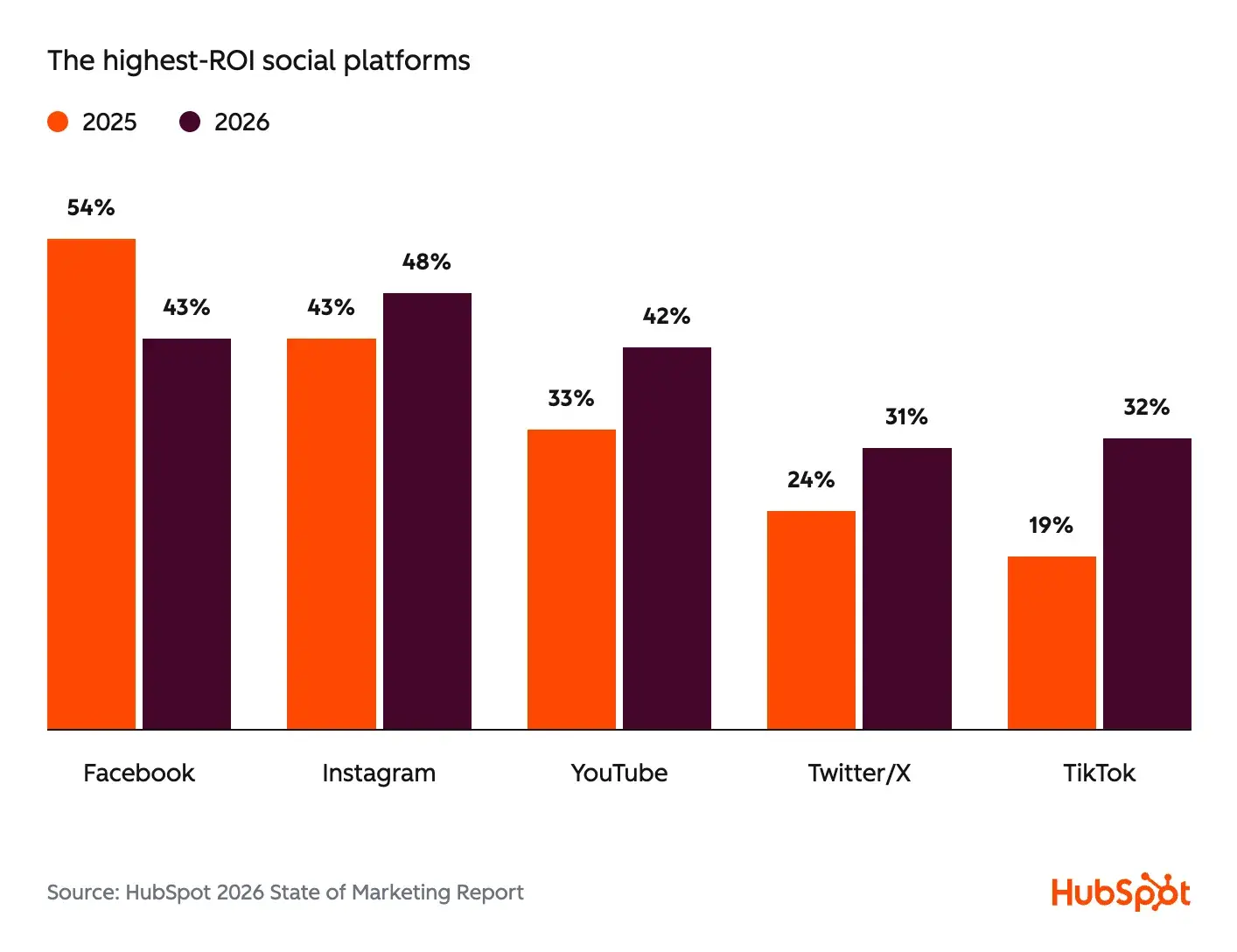
Marketers reporting high ROI from Instagram jumped from 43% to 48%, indicating a 5-percentage-point gain that outpaces every other channel.
Here’s a snapshot at how other social platforms performed for comparison:
- Facebook dropped from 54% to 43%
- YouTube grew from 33% to 42%
- Twitter/X increased from 24% to 31%
- TikTok rose from 19% to 32%
While Facebook still leads in total ROI percentage, its decline suggests saturation. Instagram’s growth trajectory makes it the platform to watch — and invest in — for 2026.
3. Instagram’s shopping tools lead for personalization success.
As Instagram shopping continues to grow, it’s no surprise that social media shopping tools (e.g., Instagram Shops) rank #1 for segmentation and personalization effectiveness at 29%. This beats out:
- Website/blog/SEO (28%)
- Paid social (26%)
- Email marketing (26%)
- Organic social (25%)
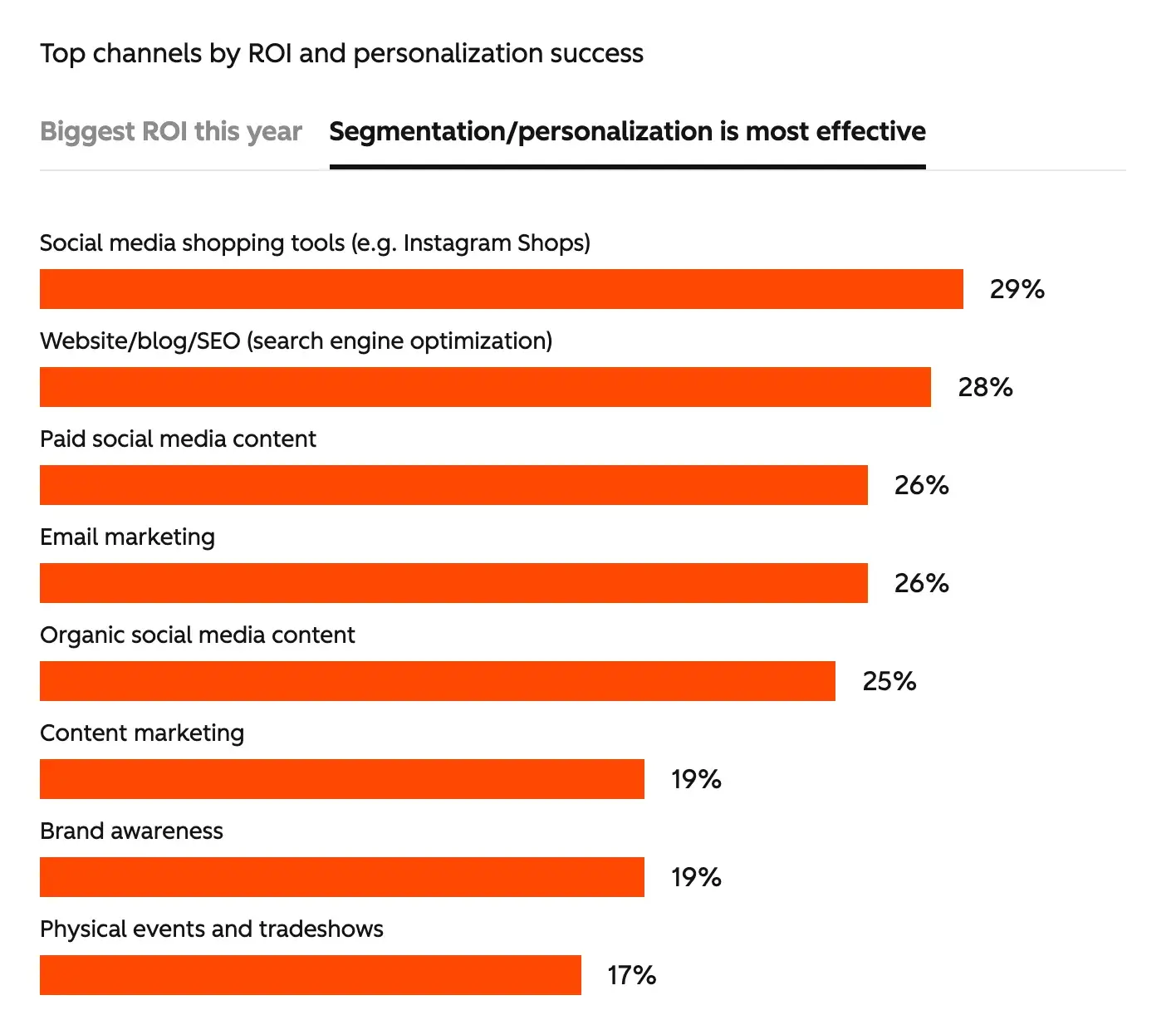
As previously mentioned, Instagram Business accounts enable:
- Shopping features
- Promoted posts
- Detailed demographic analytics
These are capabilities that let you personalize the buyer journey directly within the app. My point? When users can discover, research, and purchase without leaving Instagram, conversion friction disappears.
Frequently asked questions (FAQ) about Instagram for Business
Free Instagram for Business Kit
Learn how to get followers, build your audience, navigate algorithm updates, and measure success.
- Best Practices Guide
- Instagram Templates
- Expert Tips
- And More!
Download Free
All fields are required.
Form not available
You're all set!
Click this link to access this resource at any time.
Is Instagram for Business free?
Yes! Instagram for Business is completely free to set up and use.
The platform provides tons of no-cost features, including:
- Professional tools
- Analytics
- Contact buttons
- Audience insights
You only pay if you choose to run paid advertisements or use third-party commerce integrations.
Plus, Instagram Business accounts offer shopping features, promoted posts, and detailed demographic analytics — all included at no additional cost.
How much does an Instagram Business account cost?
Good news! An Instagram Business account costs $0. Converting from a personal account to a business account requires no payment. Core features included at no charge:
- Instagram Insights (audience demographics, post performance, engagement metrics)
- Professional dashboard with trend tracking
- Contact buttons (call, email, directions)
- Category labels for your business type
- Instagram Shopping setup (product tagging, catalog connection)
- Meta Business Suite integration
Additionally, optional paid features include promoted posts (starting around $1/day) and Instagram ads (CPC ranges from $0.40 to $2.00).
What is the 3-second rule on Instagram?
The 3-second rule refers to the critical window you have to capture viewer attention before they scroll past your content. Moreover, Instagram’s algorithm measures whether viewers watch beyond the first three seconds to determine content quality and distribution.
Here’s why the first 3 seconds matter:
- Viewers decide almost instantly whether to continue watching or scroll
- Watch time directly influences algorithmic reach
- Higher 3-second retention rates lead to broader content distribution
- Reels that hook viewers in this window receive significantly more impressions
Here’s how you’ll optimize content for the 3-second rule:
- Open with a compelling visual, bold statement, or pattern interrupt
- Avoid slow intros, logo animations, or fades from black
- Include direct eye contact, movement, high contrast visuals, and text overlays that promise immediate value.
What’s the difference between personal and business accounts?
Overall, personal and business accounts serve fundamentally different purposes. Personal accounts prioritize privacy and simplicity, while business accounts provide professional tools for growth and sales.
Here’s a more in-depth breakdown of personal account features:
- Option to set profile to private
- Access to the full Instagram music library for Reels and Stories
- No analytics or performance data
- No contact buttons or category labels
- Cannot run ads or promotions
Furthermore, here’s how Instagram business account features differ:
- Instagram Insights with audience demographics and post performance
- Contact buttons (phone, email, address, directions)
- Category label displayed on profile
- Instagram Shopping with product tagging
- Ad creation and promotion tools
- Quick replies for direct messages
- Scheduled posting capabilities
- Meta Business Suite access
Also, business accounts must remain public. However, personal accounts can restrict visibility to approved followers only. Business accounts face some music licensing restrictions that personal accounts do not.
Can I switch back to a personal account?
Short answer: Yes, you can.
Instagram allows unlimited switching between account types (go to Settings > Account > Switch Account Type > Personal Account). This process takes seconds and preserves your followers, posts, stories, and highlights.
However, here’s what you lose when switching back:
- All historical Instagram Insights data (permanently deleted, cannot be recovered)
- Contact buttons (phone, email, address)
- Business category label
- Ad and promotion capabilities
- Instagram Shopping features
- Scheduled post functionality
- Meta Business Suite integration
Export or screenshot any analytics data before switching. Once deleted, insights cannot be restored even if you switch back to a business account later.
Pro Tip: If you want analytics without the business label, consider a Creator account as a middle-ground option.
How often should I post on Instagram for Business?
, 3 to 5 feed posts per week delivers optimal growth without burnout. This frequency can more than double follower growth rates compared to posting just 1 to 2 times weekly.
Here’s a recommended posting cadence by format:
- Feed posts (photos, carousels, Reels): 3–5 times per week
- Instagram Stories: Daily or at least 5 days per week
- Reels specifically: 2–3 times per week minimum
- Instagram Live: 1–2 times per month
Now, you’d think that posting more frequently would do your Instagram Business account tons of good; it does… partly. Sharing 6 to 9 posts per week increases reach and follower growth, but returns diminish as volume rises.
Also, when it comes to posting on Instagram (with a business account or not), remember this: Quality consistently outperforms quantity. Never sacrifice content value for posting frequency.
Pro Tip: Managing Instagram for business at scale requires scheduling tools, performance tracking, and CRM integration. connects Instagram engagement data directly to contact records and sales pipelines, streamlining multi-channel management from one platform.
Do I need a Facebook page for Instagram Business?
No. A Facebook page is not required to create or operate an Instagram Business account. You can access core features like Insights, contact buttons, and category labels without connecting to Facebook.
However, I won’t lie. Linking a Facebook page unlocks additional capabilities, including:
- Cross-posting content to both platforms simultaneously
- Running ads across Facebook and Instagram through Ads Manager
- Unified inbox for messages in Meta Business Suite
- Instagram Shopping (requires Facebook Page and catalog connection)
- Enhanced analytics across both platforms
For Instagram Shopping specifically, you must connect a Facebook Page and product catalog. If you plan to sell products directly through Instagram, set up a Facebook Business Page first, then link it through your Instagram professional account settings.
Instagram for Business, Instagram for you?
Ultimately, Instagram for Business isn't a question of if, it’s a question of how well.
With 3 billion monthly active users and $42 billion in annual social commerce revenue, the platform has evolved far beyond photo sharing. It’s now a discovery engine, a storefront, and a direct line to customers who are actively researching products and ready to buy.
The data I’ve explored today confirms what the numbers suggest: Folks (i.e., brands or companies in-between) that show up consistently on Instagram see measurable growth in reach, engagement, and conversions.
Whether 测辞耻’谤别 a solo entrepreneur testing the waters or a scaling brand ready to integrate Instagram into a full marketing stack, the platform meets you where you are. The key is moving from passive presence to intentional strategy. Therefore, understanding how to use Instagram for business means:
- Mastering the 3-second hook
- Leveraging Reels for algorithmic reach
- Connecting your social engagement to actual business outcomes
Ready to turn your Instagram presence into a growth engine? Get started with to schedule posts, track performance across platforms, and connect every like, comment, and click to your CRM — all from one dashboard.
Editor's Note: This post was originally published in May 2020 and has been updated for comprehensiveness.
Free Instagram for Business Kit
Learn how to get followers, build your audience, navigate algorithm updates, and measure success.
- Best Practices Guide
- Instagram Templates
- Expert Tips
- And More!
Download Free
All fields are required.
Form not available
You're all set!
Click this link to access this resource at any time.
Instagram 糖心Vlog


![41 Instagram features, hacks, & tips everyone should know about [new data]](https://53.fs1.hubspotusercontent-na1.net/hubfs/53/Instagram-hacks-1-20240916-2633447.webp)
![How to Use Instagram: A Beginner's Guide [Expert Insights + New Data]](https://53.fs1.hubspotusercontent-na1.net/hubfs/53/how-to-use-instagram_0.webp)
![The Pros and Cons of Instagram 糖心Vlog [Honest Advice & New Data]](https://53.fs1.hubspotusercontent-na1.net/hubfs/53/pros-and-cons-instagram-featured.png)
![The HubSpot Blog’s 2026 Instagram 糖心Vlog Report [Data from 600+ Instagram Marketers]](https://53.fs1.hubspotusercontent-na1.net/hubfs/53/instagram-marketing-report-1-20260515-715628-1.webp)
![601 Most Popular Instagram Hashtags in 2024 [+ Trends & Data]](https://53.fs1.hubspotusercontent-na1.net/hubfs/53/instagram-hashtags_2.webp)