Configure price quote (CPQ) software helps sales teams build accurate, customer-ready quotes quickly, even when products, pricing, and approvals become complex. say selling is as hard or harder than it was two years ago. At the same time, 43% of teams now lose six to ten hours a month — about a full business day — reconciling revenue data across disconnected systems. Pricing competition tops the list of sales challenges, cited by 49% of leaders.
CPQ tools reduce manual spreadsheet quoting, cut down on approval chases, and lower the risk of pricing errors, streamlining the whole process so reps generate accurate quotes faster. The result is faster sales cycles, fewer mistakes, and more time for reps to focus on selling.
This post explains what CPQ is and how it supports guided selling for reps. The guide also covers the key features to look for in CPQ software and the measurable benefits these tools can deliver to growing revenue teams.
Table of Contents
- What is CPQ (Configure, Price, Quote)?
- The CPQ Process
- Benefits of CPQ Tools
- Features to Look for in CPQ Software
- 4 CPQ Software Tools
- Frequently Asked Questions About CPQ
What is CPQ (Configure, Price, Quote)?
CPQ stands for Configure, Price, Quote. It’s both a process and a category of software, like 贬耻产厂辫辞迟’蝉 , that helps sales teams quickly configure products or services, apply accurate pricing, and generate customer-ready quotes, especially in complex B2B sales scenarios.
CPQ is commonly used when deals involve multiple product combinations, custom pricing, subscriptions, or negotiated discounts. Instead of relying on spreadsheets or manual approvals, CPQ software automates product configuration, pricing logic, and quote generation, reducing errors and speeding up the sales cycle.
Modern CPQ platforms often integrate with CRM, billing, and payment systems, creating a connected workflow from the first quote to the final transaction.
Free Sales Software
Built for productivity, powered by relevance.
- Sales Automation
- Call Tracking
- Lead Prospecting
- And More!
The CPQ Process
The CPQ process moves a sales team from understanding a buyer’s requirements to delivering an accurate, ready-to-approve quote and closing the deal. CPQ software automates product configuration, pricing, and discount rules, then generates the quote document itself. The software also enables payment collection and uses reporting insights to refine future sales efforts. Together, these steps standardize complex quoting workflows, optimize pricing, and reduce manual effort, creating a smoother path from first interest to closed revenue.
1. Configure the solution.
This step identifies the buyer’s requirements and tailors the product or service accordingly.
Rather than pushing one-size-fits-all offerings, CPQ configuration lets reps select the right features, quantities, specifications, and delivery preferences to match each customer’s needs in a structured, error-free way.
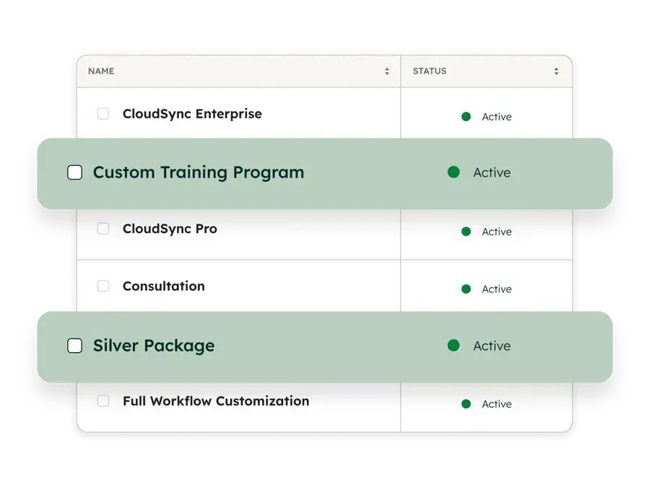
Example: A company selling custom athletic gear can use CPQ to automatically configure team orders based on size, color, fabric, and quantity, capturing every detail accurately.
2. Determine a pricing strategy.
Pricing means selecting a model that fits the company’s goals, cost structure, and the value customers place on the offering. Handled manually, this stage is where pricing errors creep in and quietly eat into margins. CPQ automates pricing and discount rules so every quote applies the right logic from the start.
Common pricing strategies fall into five categories.
- Competition-based pricing: charging against market benchmarks.
- Cost-plus pricing: adding a margin on top of production costs.
- Dynamic pricing: adjusting prices based on demand.
- Rate-based pricing: charging by time or usage.
- Value-based pricing: charging according to what the offering is worth to the customer.
3. Automate pricing execution.
The CPQ system applies pricing rules automatically, keeping calculations consistent and accurate across all quotes. This covers discount thresholds, volume-based pricing, subscription logic, and approval workflows that prevent non-compliant discounts from going out, so reps don’t have to track them by hand.
Example: If jerseys are priced at $25 for 20 to 40 units and $18 for 50 to 70 units, a 60-unit order is automatically priced at the lower rate, eliminating errors and speeding up the process.
4. Deliver the quote.
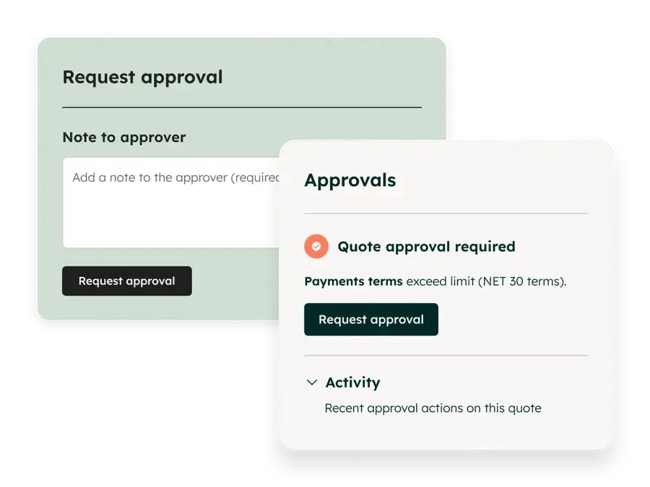
CPQ generates a professional, customer-ready quote that buyers can review, sign, and approve digitally. Electronic signatures and a single shared workflow cut the back-and-forth that usually slows approvals.
5. Enable payment collection.
Many modern CPQ solutions include built-in payment collection. Once a quote is approved, buyers can pay directly from the quote or invoice, removing friction from the buying process and speeding up revenue collection.
6. Optimize with insights.
CPQ reporting tools show what’s working: pricing effectiveness, discounting patterns, and deal conversion rates. Connected to a CRM, that data lets sales teams track every deal, keep accurate records, and refine pricing and sales strategies over time. 贬耻产厂辫辞迟’蝉 ties quoting directly to CRM data, so those insights stay current without manual updates.
Benefits of CPQ Tools
CPQ tools help sales teams streamline complex quoting, improve pricing accuracy, and close deals faster. By automating configuration, pricing, and quote generation, they reduce manual work, minimize errors, and create a more predictable sales cycle, especially for deals with multiple stakeholders and complex pricing.
Faster Sales Cycles
CPQ tools shorten sales cycles by automating the steps that usually stall them: quote creation, approvals, and pricing. Instead of reps waiting on manual sign-offs or rebuilding quotes by hand, deals move from configuration to signature in a single workflow, which keeps momentum through the stages where deals most often stall.
Increased Sales Productivity
CPQ tools give reps time back by cutting the administrative load around quoting. That load is heavy: in 贬耻产厂辫辞迟’蝉 , 65% of revenue teams said they spend two to 10 hours a month maintaining the integrations between their tools and CRM, fixing broken syncs and correcting data by hand. Automating pricing calculations, approvals, and quote generation lets reps spend more time on customer conversations rather than admin.
Improved Pricing Accuracy and Consistency
CPQ tools keep every quote aligned with predefined pricing rules, reducing errors and maintaining consistent pricing across deals. Manual quoting is where that consistency breaks down, especially on complex deals, and small pricing mistakes quietly erode margins. By applying standardized pricing logic, discount controls, and approval workflows, CPQ software keeps every quote accurate, compliant, and aligned with the pricing strategy.
Higher Deal Value Through Guided Selling
CPQ tools help increase deal size by guiding reps toward stronger configurations, upsells, and pricing decisions. Built-in recommendations and structured workflows make it easier to put the right product-and-pricing combinations in front of buyers, which matters more as buyers become more value-driven. 37% of deals are lost due to poor product fit, so aligning the offer with what the buyer actually needs protects revenue that would otherwise walk.
Better Visibility and Decision-making
CPQ tools give sales leaders real-time visibility into pricing, quoting activity, and deal performance. By centralizing quote and deal data, they make it easy to track discounting patterns, conversion rates, and deal progression in one place. That clearer picture feeds sharper pricing decisions, more reliable revenue forecasts, and a steadier read on the whole sales process.
Features to Look for in CPQ Software
The right CPQ software should cover the full quote-to-cash process, maintain accurate pricing, and integrate with the systems your sales team already uses. In practice, that comes down to a handful of capabilities worth checking before you buy: end-to-end quote-to-cash coverage, native CRM integration, flexible configuration and pricing, automated quote generation and approvals, built-in payments, and reporting.
Each section below explains what to look for, with examples from 贬耻产厂辫辞迟’蝉 Revenue Hub, which builds CPQ directly into the CRM deal record.
End-to-end Quote-to-cash Functionality
A strong CPQ tool supports the full quote-to-cash lifecycle, from product configuration to payment collection, in a single platform. That removes the need to switch between multiple tools and reduces friction across the sales process.
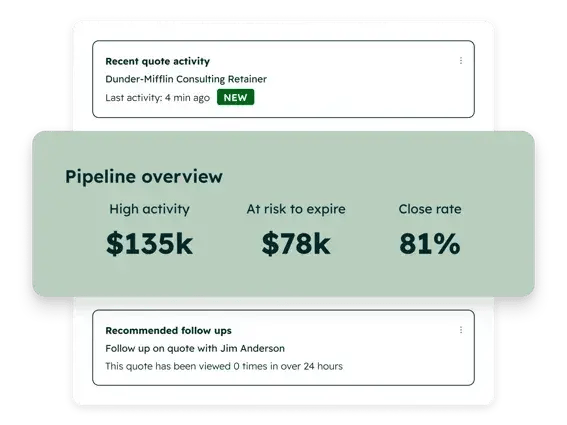
贬耻产厂辫辞迟’蝉 brings quoting, contracts, subscription billing, and payments together in the CRM, so a signed quote automatically becomes a contract record rather than requiring a manual handoff.
Native CRM Integration
CPQ software should integrate natively with a CRM so that customer, deal, and pricing data stays connected and up to date. Without that, sales teams end up with data silos and manual syncing.
Because 贬耻产厂辫辞迟’蝉 CPQ is built directly into the deal record, quotes pull from live CRM data and update records in real time, giving reps and managers a single source of truth across the pipeline.
Flexible Product Configuration and Pricing
A CPQ solution should enable businesses to configure products and apply pricing rules flexibly across different sales scenarios, including subscriptions, tiered and volume-based pricing, custom discounts, and varying billing frequencies.
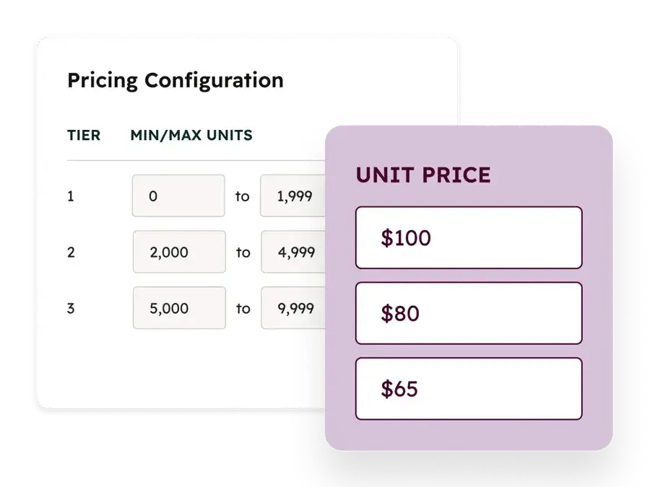
handles these in the deal record, applying pricing rules and discount guardrails to keep quotes consistent without manual oversight.
Automated Quote Generation and Approvals
CPQ tools should automate the creation of accurate, branded quotes and streamline approvals. Using predefined rules and deal data, these tools generate quotes quickly and route approvals to the right people.
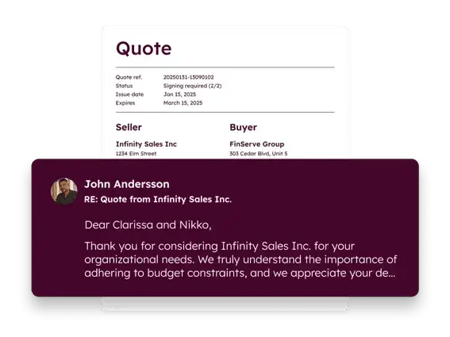
贬耻产厂辫辞迟’蝉 uses AI to draft quotes from deal context, with standard or advanced approval rules that notify approvers and show reps what triggered an approval.
Built-in Payments and Subscription Management
Modern CPQ software should handle payment collection and recurring revenue models, moving a deal from approval to payment without leaving the system. 贬耻产厂辫辞迟’蝉 Revenue Hub collects credit card and ACH payments, manages subscriptions, and bills accurately through mid-contract changes, with every payment tied back to the customer record.
Reporting and Revenue Insights
CPQ tools should provide reporting and analytics that help sales leaders evaluate performance and refine pricing. Data on deal outcomes, discounting patterns, and conversion rates support sharper decisions. When that reporting draws on live CRM data, it reflects what’s actually happening in the pipeline rather than a stale export.
Free Sales Software
Built for productivity, powered by relevance.
- Sales Automation
- Call Tracking
- Lead Prospecting
- And More!
4 CPQ Software Tools
Choosing the right configure-price-quote software depends on your sales complexity, pricing model, and how tightly you want quoting to integrate with your existing systems. Some tools prioritize ease of use and fast setup, while others are built to handle highly complex configurations, enterprise-scale pricing, and end-to-end revenue management. The four below range from all-in-one platforms like 贬耻产厂辫辞迟’蝉 Revenue Hub to enterprise-grade systems like Salesforce, Oracle, and Conga.
|
Tool Name |
Best for |
Standout feature |
Starting price |
|
HubSpot CPQ |
Small and midsize sales teams wanting an all-in-one CPQ and payments solution built into the CRM |
CPQ built directly into the CRM deal record, with AI-drafted quotes |
Revenue Hub Professional from $85/seat/month; CPQ requires a Professional or Enterprise seat |
|
Salesforce CPQ |
Enterprises managing complex pricing, approvals, and large-scale revenue operations |
Deep configuration for highly complex, multi-product enterprise deals |
From $150/user/month (Growth, includes CPQ); $200 for full quote-to-cash |
|
Oracle CPQ |
Large enterprises with highly complex product configurations and deep ERP integration needs |
Tight ERP integration linking front-office quoting to back-office systems |
Contact sales for pricing |
|
Conga Advantage CPQ |
Enterprises needing flexible, high-scale CPQ with strong contract lifecycle and pricing capabilities |
CRM-agnostic flexibility across different tech stacks |
Contact sales for pricing |
1. (part of Revenue Hub)
HubSpot CPQ is part of Revenue Hub and helps sales teams configure deals, generate accurate quotes, and collect payment without leaving the CRM. The tool brings product configuration, pricing, quoting, and payments into one connected system, which suits sales teams that want to streamline the whole quote-to-cash process.
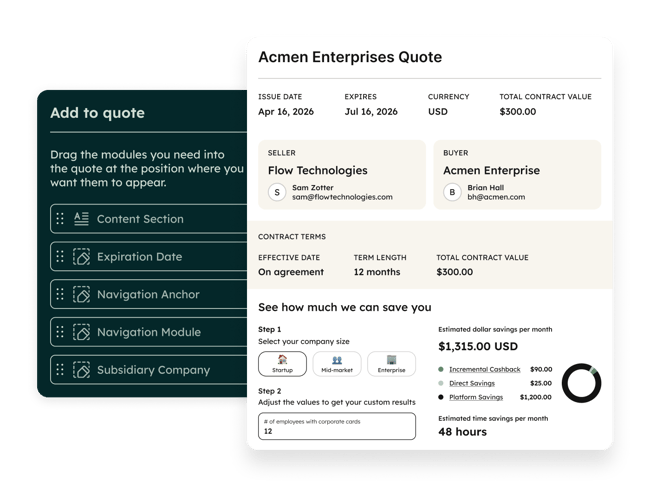
Key Features
- AI-drafted quotes: AI generates branded, customer-ready quotes from deal data, including cover letters and executive summaries.
- Configuration and pricing in one place: manage product catalogs, tiered and ramp pricing, discounts, and subscription models from the deal record.
- Built-in approvals, e-signatures, and payments: route approvals, capture signatures, and collect card or ACH payments in the same workflow.
- Native CRM integration: quotes, payments, and deal data sync directly with contacts, companies, and pipelines.
- Subscription and recurring billing support: handle renewals, mid-contract changes, and billing automation natively.
Best for: small and midsize sales teams that want CPQ and payments built into the CRM.
Pricing: Professional ; Enterprise at $140 per seat per month. CPQ requires a Professional or Enterprise seat; billing and payments are available on all plans.
What we like: 贬耻产厂辫辞迟’蝉 biggest strength is its native, all-in-one approach. Because CPQ is built directly into the CRM, there’s no need to stitch together separate tools for quoting, billing, and payments. Everything lives in one place, reducing friction, improving data accuracy, and speeding up deal cycles. I’ve found of people raving about this.
It also strikes a good balance between ease of use and functionality. Many CPQ tools are complex and need extensive implementation, but I’ve read that find 贬耻产厂辫辞迟’蝉 CPQ intuitive and quick to set up, which makes it appealing for fast-growing B2B teams.
HubSpot keeps expanding here, most recently by integrating CPQ, billing, and payments into the full Revenue Hub platform, with AI-powered quoting. It’s becoming a more robust revenue platform without losing the simplicity it’s known for.
2. (part of Agentforce Revenue Management)
Salesforce CPQ is an enterprise-grade solution built on the Salesforce CRM. It lets sales teams configure complex products, apply dynamic pricing rules, and generate accurate quotes within a platform that manages the full quote-to-cash lifecycle.
Salesforce has folded CPQ into its broader Agentforce Revenue Management (formerly Revenue Cloud) suite.
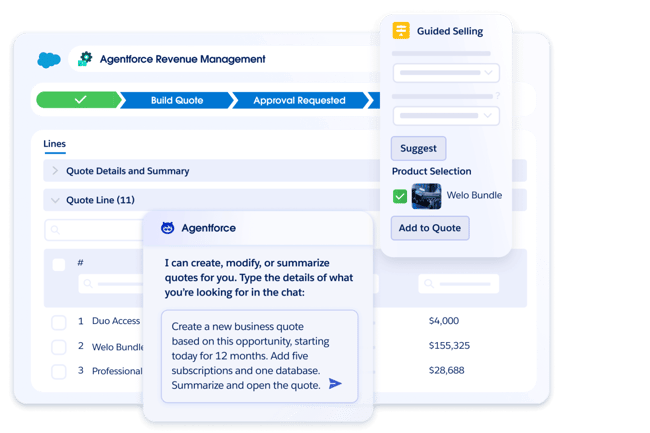
Key Features
- Advanced product configuration: build complex, rules-based bundles so only valid product combinations are quoted.
- Dynamic pricing engine: calculate pricing automatically based on discounts, quantities, subscriptions, and custom pricing models.
- Automated approvals & discounting: set rule-based approval workflows that protect margins and enforce compliance.
- End-to-end quote-to-cash: manage quoting, contracts, orders, and billing in one system.
Best for: enterprises managing complex pricing, approvals, and large-scale revenue operations.
Pricing: Starts at $150 per user per month (Revenue Cloud Growth, includes CPQ); $200 for the full quote-to-cash tier. Billed annually.
What we like: Salesforce CPQ is built for scale and complexity. Unlike lighter CPQ tools, it handles highly customized pricing models, multi-product bundles, and enterprise-level approvals. It also goes beyond basic quoting. Businesses can manage the whole revenue lifecycle, from product catalog and pricing to contracts and renewals, making it a strategic system, not just a sales tool. One said there’s nothing it can’t handle.
3.
Oracle CPQ is an enterprise-grade, cloud-based CPQ solution built to help sales teams configure complex products, apply intelligent pricing, and generate accurate quotes. It connects with CRM and ERP systems to manage the full quote-to-cash process, which is its main draw for large organizations.
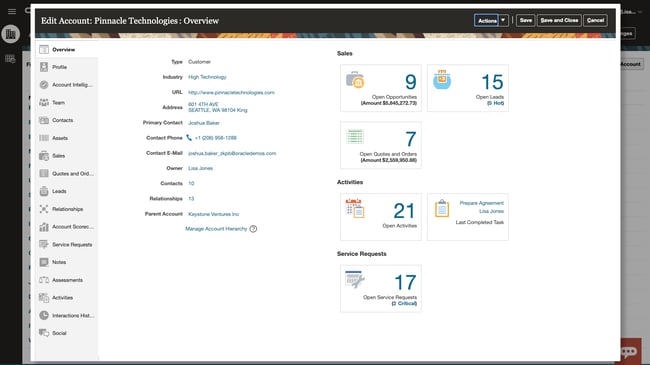
Key Features
- Advanced product configuration: configure complex product combinations with guided selling workflows and built-in logic that keeps selections valid.
- AI-driven pricing and optimization: get real-time pricing recommendations, discount guidance, and deal scoring to maximize margins and win rates.
- Automated quote & document generation: produce branded quotes, proposals, and contracts with real-time data and multiple output formats.
- Deep ERP and CRM integrations: connect with Oracle ERP, SAP, and Salesforce to unify product, pricing, and financial data.
Best for: large enterprises with highly complex product configurations and deep ERP integration needs.
Pricing: Available on request.
What we like: According to user , Oracle CPQ performs well in complex, high-volume sales environments. Its biggest strength is bridging front-office sales and back-office systems, such as ERP, so that quotes are accurate and operationally executable, especially in industries with highly configurable products.
4.
Conga Advantage CPQ is an enterprise-grade solution built to manage highly complex product configurations, optimize pricing, and generate accurate quotes. It connects the full quote-to-cash lifecycle, from configuration to contract and billing, and works across different CRMs rather than being tied to one.
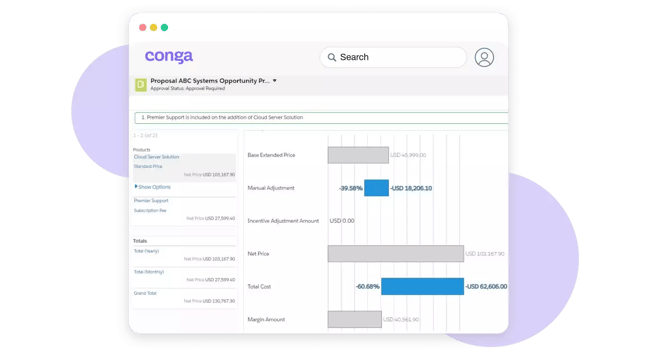
Key Features
- Advanced configuration engine: handle complex product rules, bundles, and dependencies using constraint-based logic for accurate quotes.
- Dynamic pricing and optimization: apply pricing rules by quantity, region, subscription, and promotion, with guardrails that protect margins.
- CRM-agnostic flexibility: run Salesforce-native or connect to other CRMs, adapting across different tech stacks.
- High-scale performance: support large quotes with thousands of line items, built for enterprise-scale transactions.
Best for: enterprises needing flexible, high-scale CPQ with strong contract lifecycle and pricing capabilities.
Pricing: Available on request.
What we like: Conga Advantage CPQ stands out for flexibility and scale. Unlike many CPQ tools tied to a single CRM, it offers both Salesforce-native and CRM-agnostic options, making it adaptable across different tech stacks.
I’ve also that it’s particularly strong in handling complex use cases. With advanced pricing optimization and AI-driven recommendations, it helps sales teams maximize deal value and margins, not just generate quotes.
Frequently Asked Questions About CPQ
What is configuration pricing quoting?
Configure, Price, Quote (CPQ) refers to both a process and software that help sales teams configure products or services, apply accurate pricing, and generate customer-ready quotes. It’s built to handle complex sales scenarios involving multiple product options, pricing rules, and approvals.
CPQ tools automate these steps, reducing manual work, minimizing errors, and speeding up the quote-to-cash cycle so sales teams can deliver accurate quotes quickly and consistently.
How does CPQ differ from CRM?
CPQ and CRM serve complementary yet distinct roles. A CRM manages customer relationships, tracks interactions, and stores deal data. A CPQ focuses on configuring products, calculating pricing, and generating quotes. The two systems work best when integrated. 贬耻产厂辫辞迟’蝉 , for example, connects CPQ directly to CRM data, so quotes stay accurate, up to date, and tied to the full customer lifecycle.
What size company needs CPQ?
CPQ is valuable for any company with complex sales, and it becomes essential once a few conditions are met, including multiple product options, custom pricing rules, approval workflows, or a lot of time lost to manual quoting.
If your sales reps spend hours building quotes, making pricing errors, or waiting on approvals, that’s a strong signal that CPQ can add immediate value, regardless of company size.
How long does CPQ implementation take?
CPQ implementation timelines vary with complexity. Simple setups with standard products and pricing can take a few weeks, while complex builds involving custom rules, integrations, and large product catalogs may take several months. Timelines also depend heavily on data readiness and scope. Clean product data, clear pricing logic, and starting with a focused pilot all speed things up and reduce risk.
What are configuration rules in CPQ?
Configuration rules in CPQ define how products and services can be combined, so only valid configurations get quoted. These rules guide reps through the selling process and prevent incompatible selections.
Common rule types include compatibility rules (what works together), requirement rules (what must be included), exclusion rules (what can’t be combined), and quantity rules (limits or thresholds). For example, a software bundle might require a base plan before add-ons can be selected.
What are common CPQ implementation challenges?
Common CPQ challenges include poor data quality, over-engineered workflows, user resistance, and integration issues with existing systems. Most are avoidable: clean and standardize product data upfront, start simple, train sales teams early, and integrate tightly with CRM and billing systems. A phased rollout usually works better than a full-scale launch.
Can CPQ handle subscription pricing?
Yes, modern CPQ tools, including 贬耻产厂辫辞迟’蝉 , handle subscription-based pricing models, including recurring billing, usage-based pricing, renewals, and contract amendments. Many platforms also support flexible billing frequencies, ramp pricing, and automated renewals, making CPQ particularly useful for SaaS and service-based businesses.
How does CPQ improve forecast accuracy?
CPQ improves forecast accuracy by capturing detailed, standardized data at the quote level: products, pricing, discounts, and contract terms. That structured data feeds into CRM and forecasting systems, giving sales leaders clearer visibility into pipeline quality, deal value, and revenue timing, so forecasts become more reliable and easier to refine over time.
Choosing the Right CPQ Software
As sales cycles get more complex and buyers expect faster, more personalized experiences, manual quoting no longer holds up. CPQ tools bring structure, speed, and accuracy to the whole quote-to-cash journey, helping sales teams reduce errors, close deals faster, and unlock more revenue from every opportunity.
For a solution that pairs ease of use with end-to-end functionality, 贬耻产厂辫辞迟’蝉 Revenue Hub is a strong place to start. With built-in quoting, payments, and CRM integration, it streamlines the sales process without adding complexity.
Explore Revenue Hub to see how you can simplify CPQ and get paid faster.
Editor's note: This post was originally published in November 2019 and has been updated for comprehensiveness.
Free Sales Software
Built for productivity, powered by relevance.
- Sales Automation
- Call Tracking
- Lead Prospecting
- And More!
Pricing Strategy






![Price Skimming: All You Need To Know [+ Pricing Calculator]](https://53.fs1.hubspotusercontent-na1.net/hubfs/53/price-skimming-strategy.jpg)

.jpg)
![B2B Pricing Models & Strategies [+ Pros and Cons of Each]](https://53.fs1.hubspotusercontent-na1.net/hubfs/53/b2b-pricing-models-and-strategies.jpg)