.webp?width=112&height=112&name=Help-Desk-EN@3x%20(1).webp)

Customer support teams are expected to deliver consistent, high-quality experiences — even as ticket volumes increase and customers demand near-instant responses. To meet this challenge, many companies are turning to customer service automation.
Automated customer service relies on chatbots, ticketing systems, and AI-driven workflows to resolve customer questions. By automating repetitive tasks like basic inquiries, support teams can respond faster while freeing up time to focus on complex issues. But first, teams must find the right tools to build these systems.
This post will explain the best automation tools available today. Looking to get started? Service Hub allows teams to build automated workflows that can improve the customer experience. Plus, HubSpot Breeze’s customer agents can help resolve simple tickets.
Table of Contents
- How to Automate Customer Service
- Automated Tech Support
- Benefits of Customer Service Automation
- Best Automated Customer Service Software at a Glance
- Frequently Asked Questions About Customer Service Automation
How to Automate Customer Service
In order to implement automation for customer service, CS leaders need to first take a few foundational steps before jumping in. It’s important to understand the business’ needs, clearly identify the best automation opportunities, and find the right software to solve to meet the challenge. Then teams can launch and measure automation efforts.
Let’s walk through each of these steps in detail.
.webp?)
Free Help Desk & Ticketing Software
Keep track of customer requests in one unified help desk that connects to your CRM database.
- Provide personalized, AI-powered support to your customers
- Save time, reduce errors, and streamline service processes
- Improve rep efficiency & time to resolution
- And more!
Outline the needs of the business.
Before starting any major initiative, it’s best to pause and clearly define the business‘ needs. Whether a company is looking to reduce churn, improve NPS, or all of the above, outlining the company’s goals ensures that automation initiatives are built around what’s actually important.
Pro tip: While company-wide initiatives are important, don’t forget to include the customer’s perspective as well. Layer insights from customer feedback, preferences, and needs into this part of the process.
Identify the best automation opportunities.
Now that the business goals are clearly outlined, CX leaders can begin to look for the best areas to automate. See what high-volume and repetitive tasks are slowing reps down. Friction points in the customer journey may also benefit from process improvements. Focus areas include:
- Tasks that are high-volume and repetitive. Password resets, account management updates, or answering frequently asked questions are great areas to start with.
- Friction points in the customer journey. Review the customer journey map and cross-reference with customer support ticket data to see pain points. For example, the post-onboarding part of the journey is a common area where customers often require additional support.
- Anecdotes from the team. There’s a good chance that customer-facing teams already have a long list of tasks or workflows they’d love to automate. Customer service leaders should talk with their reps to understand bottlenecks or which areas negatively impact the customer experience the most.
- Customer feedback. Customers are often vocal about sharing what a company can improve upon, so take the time to look through customer feedback and see what interactions customers think could be expedited or simplified.
Pro tip: is a unified customer platform that makes it easy for customer service leaders to uncover key customer insights, such as wait time. HubSpot analytics can help identify sticking points.
Once CS leaders have their list, they can cross-reference the findings and decide which automation opportunities to prioritize. Success leaders can ask themselves these three questions to help with the prioritization process:
- Which automation opportunities show up most frequently across all areas?
- Which automation opportunities will have the highest impact if solved for?
- Which automation opportunities directly align to the most pressing company goals?
Pro tip: If picking quick wins becomes difficult, customer support leaders use or an to prioritize. I also like creating to help me visualize findings and understand the natural “categories” they fall into.
Find the right automation software.
Now, teams need to find the right customer success software to build those automations. Below are a few common use cases to consider when shopping for customer service tools. (Pro tip: gathers all of these features into one product, making the selection process easy.)
A Unified Inbox
When a customer reaches out multiple times, a unified inbox will show messages as a single conversation thread and reduce duplicate tickets. Automation can immediately create a ticket from the email, categorize it, and assign it to the right agent. The automation can also trigger follow-ups, both to the customer and to internal support teams.
How HubSpot can help: streamlines the support team’s efficiency by centralizing all customer messages (email, chat, social, SMS) into one place, eliminating tab-switching and providing the agent with a 360-degree view of the customer.
AI Routing
AI routing connects customers to reps based on multiple factors. An unhappy customer may be connected with a manager. An at-risk customer should be matched with someone who can try to save the account. Specialized support can give insights into touch product issues.
How HubSpot can help: uses AI to route complex tickets to specialized agents. By making the right connection right away, customers avoid transfers and long wait times. This feature is a game-changer for the customer experience.
No-Code Workflows
No-code workflows allow support leaders and ops teams to design and scale automations without relying on engineering resources. Teams can automate common processes such as ticket routing, prioritization, escalations, and follow-ups, reducing manual effort and the risk of human error. With Service Hub, improvements can be made quickly as customer needs evolve — no coding required.
Integrations
Service teams need a tech stack that works together. That means service automation software should work with the business’ CRM, communication channels, and analytics tools. Service Hub is designed natively for HubSpot’s CRM, creating one support ecosystem. Strong integrations help the support team by centralizing customer data and leveraging cross-platform automations.
For companies supporting a global audience, it’s worth reviewing tools’ multi-lingual support capabilities of software tools. Multi-lingual capabilities offer a more inclusive experience without significantly increasing workload or complexity (plus, it’s just more customer-centric to be inclusive).
Omnichannel Capabilities
Customer service teams need to “meet the customer where they’re at.” Omnichannel support makes that vision possible. Reps can set up automations to trigger across different channels. For example, the customer may get a confirmation email after a purchase and a text message that includes tracking details once an order has shipped.
How HubSpot can help: supports personalized, omni-channel communications. Customer Operations Managers can leverage workflows to launch cross-channel automations that create seamless experiences for customers.
Pro tip: Free trials are a great way to test out a product and see if you can build the automations that you’re envisioning. Once you’ve narrowed down the list of potential software tools, I suggest starting with a free trial of a few of them and assessing how easy it is to build one or two potential automations.
Set up automations.
After identifying customer service automation opportunities, success leaders will usually have two types of requests: Quick-to-launch automations and more complex ones that require additional time to build. While the larger projects are in progress, teams can get started on the easier automations to improve efficiency right away.
Below is a list of commonly used automations that can deliver quick wins for support teams, along with concrete examples of ways to leverage them.
Chatbots
For companies not already leveraging chatbots, now is the time. Tools like let customers ask chatbots for help with common issues. Most customers will resolve challenges quickly, and more complex issues get routed to a human rep.
AI chatbots or AI agents can appear alongside a company’s knowledge base, so customers can ask complex questions and receive tailored responses. Companies can also leverage automation within their chatbot to support customers with routine challenges. Password resets, shipping updates, return processing, and ecommerce queries can all be taken care of by a chatbot.
Automated routing
Automated routing allows customers to be matched with the best rep to solve their specific problem. By implementing certain routing rules and criteria within a shared inbox or a chatbot, companies can create an excellent customer experience by sending incoming customers straight to the best person to solve their needs.
Examples: When a customer initiates a chat or sends an email and asks for help troubleshooting a technical issue, automated routing can get them to the right technical team to assist them. When a customer reaches out and the software tool detects both negative sentiment and repeated outreach in their history, the customer can be routed to a manager or someone to help diffuse the situation. And finally, from a commercial lens, if a customer writes in asking about a new product or their current contract, they can be automatically routed to the appropriate SDR or AE for a commercial conversation.
Smart Auto-Responses
Smart responses go beyond a generic “we’ll get back to you” email. Instead, they provide a tailored response that delivers value for customers. AI pulls in relevant details, customer information, and resources that customers need based on their query or commonly asked questions. Then, everything gets packaged nicely in an email.
Different auto-responses can be created based on keywords and customer segments. For example, a CS leader may opt to send an auto-response if a customer’s email includes keywords like “issue”, “error”, or “issue+chat”.
Pro tip: Don’t skip the personalization here! By pulling in tokens for things like name, ticket number, order number, or even the product they’re using, reps can tailor the information in responses to be more relevant to the customer.
Knowledge Base Deflection
Often, chatbots will send customers relevant knowledge base articles based on their query. Customer support teams can also leverage KB articles in automated ticket responses, follow-up emails, or text messages to customers.
Some include automation features such as content auto-tagging. HubSpot Service Hub even has an agent to based on common queries.
Measure and optimize automation.
Finally, define what success looks like. Identify key metrics or company goals that automated workflows should benefit. These metrics will be used to measure progress down the road. Below are a few key metrics to consider.
- Ticket response and resolution time, which tracks time it takes for an agent to respond to a ticket and for an issue to get resolved.
- Ticket volume by category, which highlights how many issues are deflected or reduced due to automation.
- Ticket deflection. This metric measures how many issues were resolved through self-service or automated channels, without needing to create a support ticket.
- CSAT (customer satisfaction score), which can help customer service leaders ensure that the automations are helping (not hindering) the customer’s experience.
- CES (customer effort score), which allows CX leaders understand how easy (or difficult) the interaction is for the customer.
- Productivity per rep. There are a variety of metrics to guage reps’ productivity, including Average Handle Time (AHT), agent utilization, and First Contact Resolution (FCR). Additionally, tracking the complexity of tickets that agents are handling can help CS leaders understand if automations are reducing the amount of Tier 1 tickets coming in.
- Automation utilization and automation success rate. These two different metrics track how often the automation is used (utilization) and how often the automation resolved issues without escalation (success).
Not sure where to start with reporting? includes out-of-the box dashboards that make it easy to track and measure service metrics like rep performance, ticket volume, CSAT, and more.
Once customer service leaders begin measuring the impact of their automations, the next step is optimization. This process should be guided by performance data, direct customer feedback, and input from the customer service team. By combining quantitative insights with real-world feedback, leaders gain a more complete view of what’s working and where automations can be improved.
Ready to start the customer service automation journey? Check out Hubspot’s Breeze Customer Agent, the designed to deliver excellent customer experiences at scale.
Example of Customer Service Automation
There are several examples of how reps use customer service automation. However, let's cover a use case to show what automated customer service may look like.
Say a CX leader has decided to implement a customer service . With this tool, service reps can record, organize, and track every customer ticket (or issue) in a single dashboard.
This dashboard is accessible to the entire team and gives CX leaders the ability to create a help desk by adding routing and automation to tickets.
For instance, when a customer reaches out via live chat, HubSpot automatically creates a ticket. The ticket includes details about who it's from, the source of the message, and the right person or team (if there is one) that the ticket should be directed to.
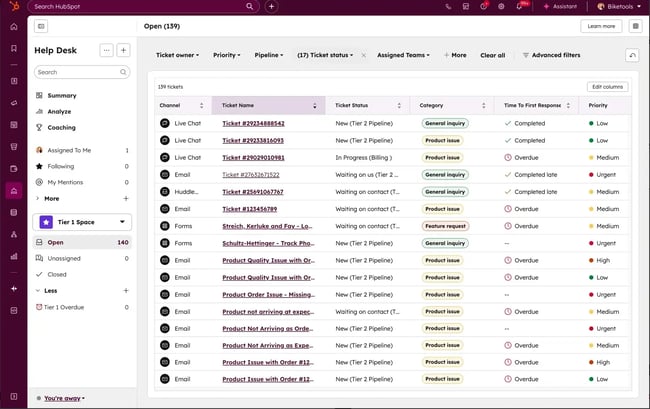
Then, as a result of the service rep successfully assisting the customer, HubSpot automatically compiles and provides data for that ticket — this includes information like ticket volume or response time.
With this insight, customer service leaders can determine which areas need improvement in order to offer a more delightful customer experience.
Automated Tech Support
Automated tech support refers to automated systems that provide customer support, like chatbots, help desks, ticketing software, customer feedback surveys, and workflows.
Here are some of the most common examples:
Help Desk & Ticketing Software
Help desk and ticketing software automatically combine all rep-to-customer conversations in a one-on-one communication inbox. Automation and bots work together to route, assign, and respond to tickets for reps. Then, reports are automatically created, so support teams can iterate as needed to improve the customer experience.
Customer Feedback Surveys
Set up automatic customer feedback surveys — NPS , CSAT, CES — to collect the information needed to improve the customer experience. The timing of these surveys can be automated so that customers can fill them out after completing specific actions, like making a purchase.
Pro tip: Customer Surveys measure customer experience across different touchpoints and interactions.
Workflows
Service-focused workflows allow customer support leaders to automate processes, ensuring no tasks fall through the cracks. For example, automations can be set up to trigger based on set criteria and then take action on contacts, tickets, and more. Workflows can also be used to”
- Rotate ticket owners (or notify service reps if a ticket needs an owner).
- Create email reminders for tickets that have been waiting for support.
- Escalate high-priority tickets, auto-reply to customers.
- Or mark customers with the NPS score that they provided, allowing service teams to follow up when necessary.
helps customer support teams automate tasks that are important but also time-consuming. Workflows such as automated ticket routing and assignment, CSAT Feedback follow-up, and ticket escalation and prioritization are just a few ways to leverage Service Hub’s built-in automation capabilities.
Benefits of Customer Service Automation
Customer service automation delivers clear benefits for companies aiming to improve efficiency and deliver great experiences at scale. By automating support, businesses can provide 24/7 service without adding headcount, respond faster to customer requests, and scale more effectively as demand grows.
Let’s dig into each of the customer service automation benefits in detail.
24/7 Support Without 24/7 Staff
Customers expect support on their own schedule, through their preferred channels, and with fast responses. In fact, more customers and .
Staffing round-the-clock support with human agents alone is rarely feasible. Automation allows companies to offer always-on support. By assisting customers when they need help the most, automation improves , , and even conversion rates.
In my time at a leading chatbot company, I consistently saw data that underscored the need for an automated customer service system that was available 24/7. As remote work , customers are no longer limited to a 9-to-5 schedule, and many people often work outside traditional hours. Offering always-on support lets customers get help on their own time, enabling them to find what they need and move on to their next task.
Dramatic Cost Reduction
AI and automation ROI in customer service is significant. Automated tools can resolve many customer inquiries at a , with chatbots handling up to . According to , AI agents can reduce customer support service costs by up to 30%.
Pro tip: I’ve worked with many customers who were forced to do “more with less”, and many of my customers found really creative ways to leverage automation to support customers when they couldn’t add more headcount. Providing self-service technical guidance is a great example of this, and I’m a big fan of Logitech’s technical support page experience.
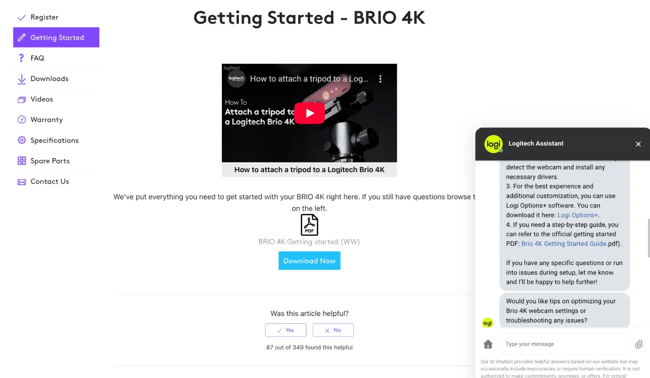
Logitech does a nice job of getting the technical and troubleshooting information in front of customers right away. You’ll see they include a video, a PDF with step-by-step instructions, and a chatbot that helps in real-time if a customer gets stuck on a step.
When I told the bot I’m not allowed to download the requested software on my computer, it pivoted and offered to help me get the most out of my product even without the software. That service felt like a real conversation.
Lightning-Fast Response Times
Customer service teams that use automation often see because routine tasks are handled instantly. Automated tools can acknowledge requests as soon as they come in, create and route tickets, and prioritize urgent issues. There are no delays from manual triage.
HubSpot research shows that 67% of customers expect their support ticket to be resolved within three hours. By leveraging automation, companies can respond more quickly, deliver more , and improve satisfaction. In fact, 86% of service leaders using AI report higher CSAT scores.
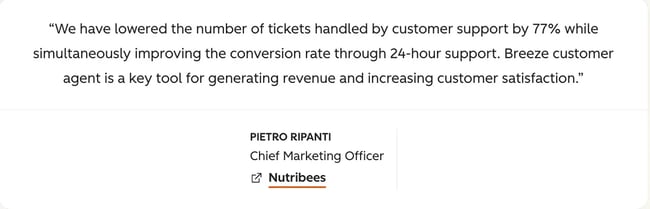
Check out this testimonial from about their results with HubSpot . After implementing the agent, they saw higher customer satisfaction, increased sales, and a support team that is now empowered to focus on high-value conversations with customers.
Happier, More Productive Agents
While customer service automation clearly benefits customers, it also has a meaningful impact on support reps. As the front lines of an organization, reps often work in high-stress environments — so much so that being at risk of burnout. Automating routine requests helps relieve that pressure, increasing job satisfaction and improving agent retention.
Research shows that teams using AI and automation feel , view , and believe that AI can . By removing repetitive Tier 1 tasks, automation frees up reps to build new skills and take on more complex issues.
While concerns about AI replacing human agents are understandable, human support remains essential for . For most organizations, automation is meant to support and elevate agents, not replace them.
Jon Dick, Senior Vice President of Customer Success Hubspot : “In most cases, AI doesn’t replace human staff — instead, it empowers them to handle more complex tasks and grow in their professional careers.”
I’ve seen companies use this opportunity to train their service reps to become subject matter experts, making them a critical asset to the customer and the company.
I also asked , Customer Service Specialist at Textla, how he felt about using AI as a customer service rep. Kellen reiterated what Jon said, stating, “In support, there’s always going to be this thought that AI could take your job. But what I’ve found is that AI helps me actually do my job better. With the help of AI, I’m able to deliver more white glove treatment to customers.”
The bottom line: When agents aren’t bogged down with overflowing support queues, they’re happier and more likely to want to grow with your company.
Infinite Scalability
Automation and scaling go hand-in-hand. report that AI helps teams scale more effectively than hiring alone. Automation also enables consistency by standardizing workflows, reducing errors, and speeding up response times across channels. That’s important in a world where of customers would leave a brand after an inconsistent support experience.
In addition, automation can surface content gaps and friction points. With that information, support leaders can make improvements faster and continuously optimize the customer experience.
I’ve also seen automation help a company scale by surfacing content gaps and friction points in the customer experience. I love using AI tools that will automatically write new content for me or suggest improvements to a process.
Interested in seeing how other companies have leveraged automation for customer service? See how used and the to build automated workflows for customer service.
Next, let's check out some automated customer service software and discuss how these tools can simplify the customer service automation process.
Best Automated Customer Service Software at a Glance
|
Software |
Key Features |
Best For |
Pricing |
|
HubSpot Service Hub |
Omnichannel inbox, self-service portal, feedback surveys, CRM integration, reporting dashboards |
CX leaders wanting an all-in-one service + CRM platform |
Free plan; Starter $9/seat/mo; Pro $90/seat/mo; Enterprise $150/seat/mo |
|
HubSpot Help Desk & Ticketing |
Ticket tracking, routing automation, priority management, shared dashboard |
Teams needing a free, simple ticketing solution |
Free |
|
Front |
Collaborative inbox, multi-channel support (email, SMS, chat, social), auto-assignment, collaborative drafts |
Teams that heavily collaborate on customer replies |
Starter $25/mo; Pro $65/mo; Enterprise $105/mo |
|
Freshdesk |
Helpdesk automation, multi-channel support, knowledge base, user communities |
Teams wanting intuitive helpdesk + self-service tools |
Growth $15/mo; Pro $49/mo; Enterprise $79/mo |
|
NICE CXone |
AI-powered omnichannel routing, workforce optimization, IVR, chatbots, CRM integrations |
Large enterprises needing advanced AI + analytics |
Upon request |
|
TeamSupport |
Multi-agent ticket collaboration, customer self-service portal, reporting |
B2B companies with complex, collaborative support needs |
Start $45/mo; Pro $65/mo; Scale $85/mo |
|
Creatio Service |
Low-code CRM + full-cycle service management, customer segmentation, social integrations |
Teams wanting customizable, process-driven automation |
Growth $25/mo; Enterprise $55/mo; Unlimited $85/mo |
|
Zoho Desk |
Auto ticket sorting, knowledge base suggestions, team collaboration, analytics |
Teams needing smart ticket prioritization on a budget |
Standard $14/mo; Pro $23/mo; Enterprise $40/mo |
1.
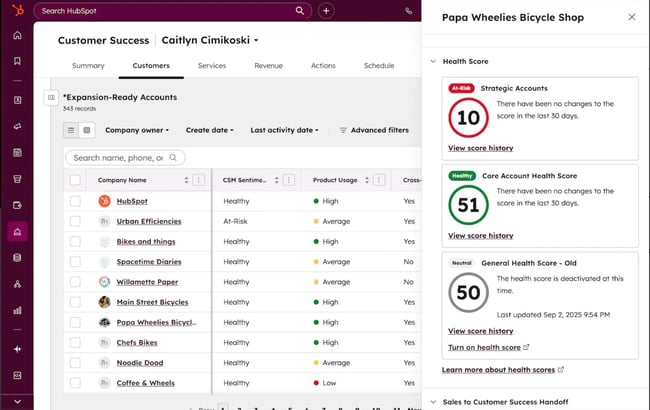
HubSpot’s Service Hub is a service management software that enables CX leaders to conduct seamless onboarding, flexible customer support, and expand customer relationships. Service Hub delivers efficient and end-to-end service that delights customers at scale.
CX strategists rejoice, because this tool activates and automates an omnichannel support strategy. It also enables companies to:
- Offer self-service support (e.g., , , and customer portal).
- Create customer service KPIs.
- See customer service analytics and data to improve the CX strategy.
- Obtain customer feedback (e.g., ).
store and customize critical data for supporting customers. Meanwhile, consistently surface actionable data to improve areas of the customer experience.
The makes it easy to connect communication channels (e.g., email, live chat, Facebook Messenger) in a single inbox — this way, the entire support team can view, manage, reply to, and collaborate in one place.
Lastly, Service Hub can integrate into an existing , meaning the entire customer and contact data are automatically tracked and recorded in the CRM. This creates one source of truth for customer data across the business.
Pro tip: Use HubSpot Service Hub to customer support. Unite your reps in one easy-to-use platform, and provide proactive service that makes customers loyal to your brand.
Price: Free plans are available. Starter plans start at $9 per month a seat. Professional plans cost $90 per month per seat, and enterprise plan pricing costs $150 per month per seat when billed annually.
2.
tracks all customer requests to help reps stay organized, prioritize work, and identify the right solutions for each customer.
With HubSpot, customer support teams can record, organize, and track customer communications in a single dashboard. The entire team can access each interaction and ticket. CX leaders can also track, view, and share customer support metrics via dashboards.
HubSpot also makes assigning and prioritizing tickets easy. With HubSpot, every customer gets the support they need.
Pro tip: Use the tool‘s automation features to add ticket routing and automation to service reps’ workflows, empowering them to provide support faster.
Price: Free
3.
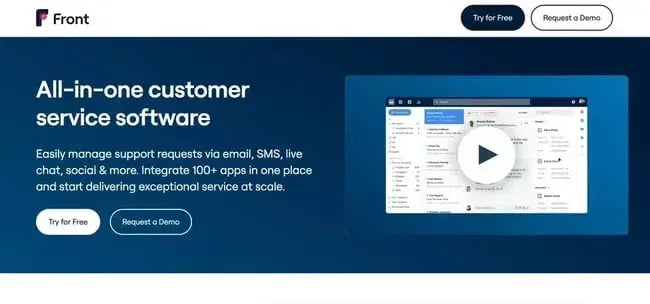
Front provides a strong, collaborative inbox that supports email, SMS, chat, and social media inquiries. With Front’s unified interface, every service rep has access to the same information.
Additionally, customer service leaders can automatically assign conversations to certain employees. Teams can avoid sending multiple responses to customers or having incoming emails slip through unnoticed.
What we love: This tool also helps you respond to customers through collaborative drafts and comments, rather than having to continuously forward emails and wait for coworker edits.
Price: Starter plans cost $25 a month. Professional plans cost $65 a month. Enterprise plans cost $105 a month.
4.
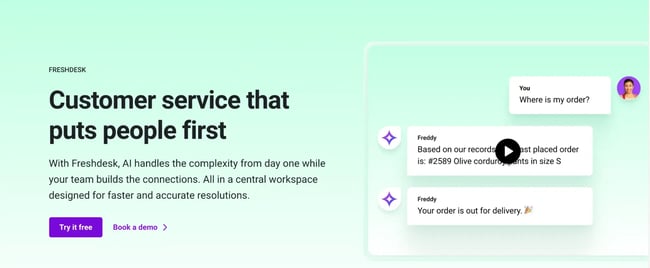
Freshdesk's intuitive customer service software prides itself on features that organize the helpdesk, plan for future events, eliminate repetitive tasks, and manage new tickets. Support managers can also streamline conversations across various channels and collaborate with broader teams on complex cases.
While the support team's responses are automated, quicker options are available for customers who need more immediate solutions.
Pro tip: With Freshdesk, support teams can build a knowledge base for the product with tutorials and DIY guides. They can even foster user communities to encourage customers to work together.
Price: Growth plans cost $15 a month. Pro plans cost $49 a month. Enterprise plans cost $79 a month.
5.
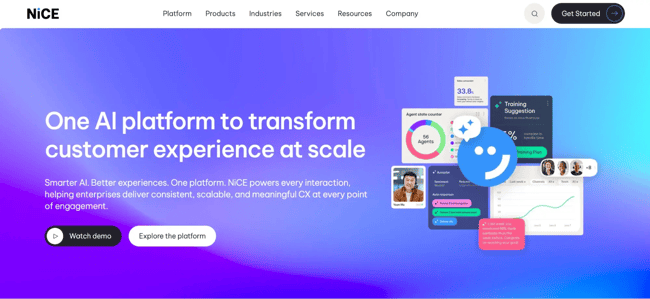
NICE is an AI-powered tool that helps businesses increase customer success. Its “omnichannel routing” feature helps employees streamline conversations across several support channels, and its analytics turns important customer insights into actionable results.
The “workforce optimization” tool maximizes the support team‘s potential by helping employees provide proactive customer service in their support cases. Automation and AI manage automatic actions that re-prioritize agents’ time away from menial tasks and increase the speed of responses.
What we love: Other features that help you meet your customers' needs include interactive voice response, proactive outbound calls, and AI chatbots.
Price: Pricing is available upon request.
6.
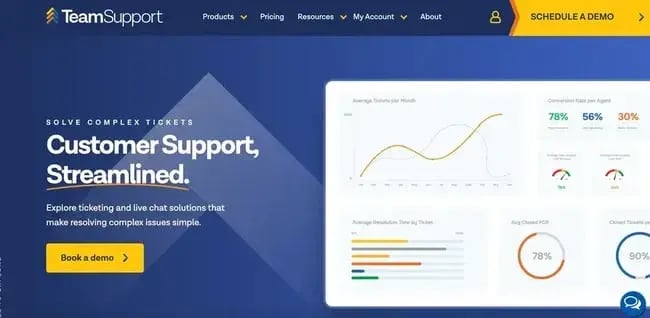
This customer service software is ideal for B2B companies. It encourages more communication between team members by allowing multiple agents to collaborate on the same tickets, products, customers, or solutions.
TeamSupport helps customers take charge of their own service experience. The customizable, flexible interface lets customers chat with agents, search for answers and solutions, and check on the status of their open cases.
Pro tip: You can gain important insights about your customer interactions through its reporting and analytics.
Price: Start plans cost $45 a month. Professional plans cost $65 a month. Scale plans costs $85 a month.
7.
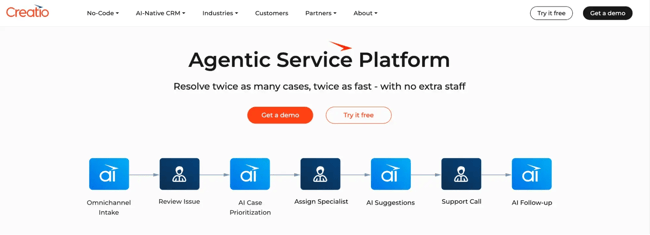
Creatio is a CRM and low-code automation system with a service product that works as a full-cycle service management system — meaning this product allows for easy management of omnichannel communications.
Its interface helps support agents concentrate by only showing the data they need to compile the task at hand.
Additionally, there are many other helpful features, such as customer segmentation — grouping customers by certain parameters to help automate responses within segments — social media integrations, knowledge bases, data synchronization, and more.
What we love: Pre-defined processes help agents stay on track and continuously deliver excellent customer service.
Price: Growth plans cost $25 a month. Service enterprise plans cost $55 a month. Unlimited plans cost $85 a month.
8.
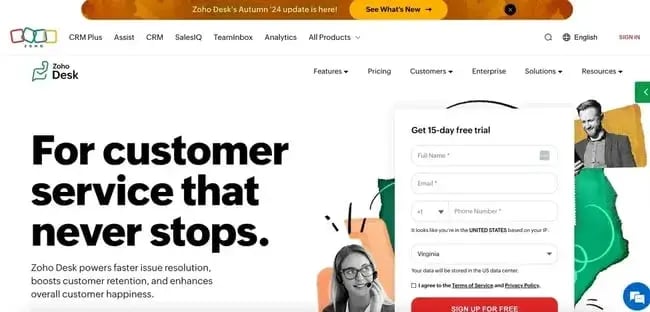
Zoho Desk helps support reps better prioritize their workload by automatically sorting tickets based on due dates, status, and need for attention. Reps can easily access previous customer conversations, so they don't have to waste time searching for information about the customer.
Based on keywords in the ticket, the product automatically pulls up articles from the internal knowledge base, empowering reps to quickly copy and paste solutions.
What we love: As with some of the other products on this list, the product allows for team collaborations, user communities, and helpful analytics.
Price: Standard plans cost $14 a month. Professional plans cost $23 a month. Enterprise plans cost $40 a month.
Frequently Asked Questions About Customer Service Automation
What is customer service automation?
Customer service automation involves resolving customer queries with limited or no interaction with human customer service reps. A great example is , which provides 24/7 automated customer support to resolve common issues.
Can customer service be fully automated?
With advances in technology, customer service may be able to be fully automated in some areas. For example, AI chatbots can answer basic questions. Additionally, automated phone answering systems free up support reps’ time. However, customers still appreciate a human touch. The 2024 found that 60% of customers are concerned that AI in customer service will make it harder to reach a person.
What is an example of automated service?
An example of automated service is when a support team configures to automatically route tickets to the right representative . This is faster and more efficient than manually assigning tickets each time they come in.
How does automated customer service work?
Automated customer service uses technology to handle customer inquiries and support tasks with little or no human involvement. It works by triggering predefined workflows or AI-driven responses when a customer reaches out. When an issue requires more context or expertise, the automation escalates it to a human agent.
How do I know if automation is working?
Customer service leaders will know if automation is working by looking at performance metrics and feedback. Effective automations typically reduce response times, lower ticket volume for repetitive issues, and increase ticket deflection through self-service or bots.
Will automation replace human agents?
No, that companies won’t fully replace human reps with automation any time soon, but instead companies will continue to adopt a “hybrid model”, where AI and automation are used to augment the work of human reps.
While leaders anticipate that AI will handle most ticket resolutions by 2025, industry leaders continue to recognize the value of keeping humans involved for higher-value, more complex situations. This means that human agents aren’t going anywhere any time soon.
As practice put it, “We expect fewer human agents, but not completely agentless organizations. The most successful organizations are those that balance technology with the human touch, redeploying their teams to focus on growth and customer satisfaction”.
Automate Customer Service Tasks
Automation in customer service empowers businesses to respond to customers faster, reduces costs, and improves efficiency, all while giving agents more time to focus on more meaningful interactions. By combining technology with the human touch, companies can deliver consistent, scalable support that empowers their support teams and delights their customers.
Using the right software tools, such as HubSpot’s Service Hub, makes it simple for customer service leaders to identify automation opportunities, launch workflows, and measure their impact. Customer service leaders looking to reduce ticket volume, scale support operations, and enhance the customer experience can get started on their automation journey today by leveraging tools like Service Hub.
Editor's note: This post was originally published in April 2019 and has been updated for comprehensiveness.
Free Help Desk & Ticketing Software
Keep track of customer requests in one unified help desk that connects to your CRM database.
- Provide personalized, AI-powered support to your customers
- Save time, reduce errors, and streamline service processes
- Improve rep efficiency & time to resolution
- And more!
Customer Service