Conversational customer service aligns support operations with rising customer expectations for speed and personalization. To meet that shift, companies need more than faster ticket resolution. Conversational customer service platforms bring AI, messaging channels, and human agents into a continuous conversation stream, so customers receive immediate, context-aware support without starting over each time.
Yet still operate across disconnected systems that prevent them from delivering consistently fast, contextual support.
But what is the winning half doing? This guide breaks down what conversational customer service is, its benefits, and the implementation framework service leaders use to reduce cost per ticket and improve resolution speed.
Table of Contents
- What is conversational customer service?
- Benefits of Conversational Customer Service
- How does conversational customer service work?
- Types and Channels of Conversational Customer Service
- How to Implement Conversational Customer Service
- Frequently Asked Questions About Conversational Customer Service
What is conversational customer service?
Conversational customer service is a support model that uses AI, messaging channels, and human agents to deliver real-time, context-aware conversations across the customer journey.
Conversational customer service is broader than conversational AI for customer service alone. Conversational CS includes AI automation and integrates CRM data, knowledge bases, routing logic, and human escalation into a single system.
.webp?)
Free Help Desk & Ticketing Software
Keep track of customer requests in one unified help desk that connects to your CRM database.
- Provide personalized, AI-powered support to your customers
- Save time, reduce errors, and streamline service processes
- Improve rep efficiency & time to resolution
- And more!
Traditional Support vs. Conversational Customer Service: Comparison
Benefits of Conversational Customer Service
Conversational customer service improves how support teams operate day-to-day. It shortens resolution time, reduces repetitive workload, preserves context across every touchpoint, and allows teams to scale without losing quality.
1. Faster Resolution Where Customers Demand “Now”
Conversational customer service is a quick cure that addresses routine intents instantly and escalates complex cases to a human agent with full context. This matters more now than ever, with 82% of service pros saying customers expect requests to be resolved immediately, often within three hours.
Teams using consistently report faster response and resolution times after the first year, as automation and AI handle routine requests.
2. Lower Cost-to-Serve Through Automation and Productivity Lift
Conversational customer service is a fundamental part of low-cost customer support because AI handles repetitive tickets, freeing agents to spend more time on high-value issues.
HubSpot’s State of Customer Service found that 86% of service leaders say they scaled team productivity by integrating generative AI into CX operations. And estimates that generative AI applied to customer care can deliver 30% to 45% productivity gains relative to current function costs.
AI tools like can resolve routine and common product questions instantly, 24/7. This lets human agents focus on complex cases that require expertise and judgment.
For example, I asked Breeze to create lead scoring logic and explain how to implement it in . Not only did it create the most detailed lead scoring model based on my pipeline, but it also suggested a workflow.
A human agent would spend significantly more time resolving a similar request manually.
Wondering how many tickets your AI agent could realistically resolve? Run your current volume through the and see the deflection potential in dollars.
3. Higher CSAT Through Consistent Personalization and Context Retention
Conversational customer service keeps customer context between AI and human agents. This workflow allows for personalization, which leads to higher CSAT scores. In fact, 86% of CRM leaders using AI say it positively impacted CSAT, and customer success teams with unified data are 225% more likely to say customers receive a personalized experience, according to HubSpot research.
Customer service platforms, like , recognize the customer, keep conversation history, and personalize responses across channels. If a chat escalates, an agent receives a summary of the dialogue and the initial request.
4. Better Scalability Without Sacrificing Quality
Conversational customer service improves scale by letting automation carry routine volume while routing edge cases to humans.
An impressive say AI is more effective for scaling service operations than hiring more reps. For example, helped Kaplan Early Learning Company handle 37% of chat requests without human intervention, freeing agents to focus on more complex cases and speeding up overall resolution times.
How does conversational customer service work?
Building effective conversational workflows requires understanding what actually happens behind each message. Every customer input triggers a six-step process that determines whether automation resolves the issue or a human takes over.
Step 1: Intent Recognition Using NLP
Intent recognition is when conversational customer service software classifies what the customer wants from plain-language messages. Natural language processing (NLP) models map the message to an intent such as “reset password,” “refund status,” “change delivery address,” or “talk to a person,” then route the conversation into the correct workflow.
In modern conversational customer service platforms, AI recognizes what the customer wants and automatically adds useful tags to the ticket. In , for example, AI can automatically tag a ticket’s Category (why the customer reached out) and apply sentiment analysis so teams can prioritize urgent or high?risk threads first.
What happens next in the flow:
- The system matches the message to a known intent or topic.
- If confidence is high, it triggers either a knowledge answer or a guided workflow.
- If confidence is low or risk signals appear (negative sentiment, high-value customer, bug report), it escalates based on rules.
Step 2: Knowledge Retrieval and Grounded Answers
After intent recognition, conversational customer service platforms retrieve verified information from connected knowledge sources and generate grounded responses.
AI agents answer using connected knowledge sources rather than relying solely on model memory. They pull from approved help centers, policy documents, product documentation, CRM fields, and internal knowledge bases before responding.
Plus, modern conversational AI contact center platforms integrate directly with structured knowledge repositories. For example, connects to knowledge base articles and website pages to generate answers based on published content. This HubSpot Agent resolves over 65% of conversations automatically, and top teams hit 90%.
Step 3: Smart Routing and Escalation
Once the system retrieves a grounded answer, conversational customer service platforms decide whether automation can complete the interaction or whether a human agent should step in.
Smart routing uses intent, customer profile data, priority rules, and confidence thresholds to assign the conversation to the right workflow or team. allows routing based on contact owner, team, ticket properties, or AI agent assignment. The routing sequence typically follows this logic:
- If AI confidence is high and the issue is routine, the system completes the resolution.
- If the issue requires approval, policy override, or human judgment, it escalates.
- If the customer is high-value or expresses frustration, priority routing applies.
- The agent receives full transcript history, customer profile data, and previous interactions.
This structure improves first-contact resolution and reduces unnecessary transfers. It also protects service quality by preventing AI from operating beyond defined guardrails.
Step 4: Human Handoff and Guardrails
Define clear thresholds for when AI must step aside and transfer control to a human agent. In 2026 architectures, escalation is built into the workflow as a safety mechanism. Guardrails usually activate when AI trips over one of the following scenarios:
- AI confidence falls below a defined threshold.
- The topic involves billing disputes, cancellations, or compliance.
- Negative sentiment is detected.
- The customer belongs to a high-value segment.
- The customer explicitly requests a human agent.
Platforms such as HubSpot, Intercom, and Genesys document rule-based escalation where AI hands off the full conversation transcript, detected intent, and customer metadata to the assigned agent. The transition preserves context, so the customer doesn’t repeat information.
Step 5: Machine Learning Feedback Loop
The best conversational AI for customer service improves through continuous feedback from resolved conversations, agent edits, and customer outcomes. The feedback loop typically includes:
- Resolution outcomes (resolved versus escalated).
- Customer satisfaction scores (CSAT).
- Agent corrections to AI responses.
- Knowledge article updates.
- Escalation frequency by intent type.
AI models log every interaction. When an agent modifies an AI-generated answer, the system captures that correction. Likewise, when customers rate an interaction, that signal influences future routing and response confidence without retraining the base model. This advanced feedback loop is what separates simple chatbots from advanced conversational customer service platforms.
Step 6: Channel Integration for Seamless Customer Experience
Conversational customer service platforms are omnichannel and connect all the entry points from the list in one consolidated thread:
- Web chat
- WhatsApp and SMS
- Apple Messages for Business
- Email threads
- Social media DMs
- Voice interactions
These interactions are also linked to the same customer record. When a customer reaches out via chat and continues via email or phone, the system attaches the interaction to a unified CRM profile. It preserves context, transcript history, and ticket status.
Free Help Desk & Ticketing Software
Keep track of customer requests in one unified help desk that connects to your CRM database.
- Provide personalized, AI-powered support to your customers
- Save time, reduce errors, and streamline service processes
- Improve rep efficiency & time to resolution
- And more!
Types and Channels of Conversational Customer Service
Channel selection defines where automation delivers the most impact. Understanding how each channel functions within the same conversational engine helps CX teams design workflows that match intent, urgency, and risk level.
Messaging Apps (WhatsApp, SMS, Apple Messages for Business)
Messaging channels sit at the center of modern conversational support because customers expect immediate responses without logging into portals or submitting tickets. These channels typically handle structured, repeatable intents such as:
- Order status and delivery updates.
- Appointment scheduling and confirmations.
- Billing questions.
- Account changes.
- FAQs and policy lookups.
Because messaging conversations attach to the same CRM profile used across other channels, automation can resolve routine inquiries instantly while preserving full transcript history for escalation. When complexity increases, the system routes the thread to a human agent with complete context intact, preventing restarts and reducing friction.
With HubSpot , customer success teams can switch channels “within the same ticket,” so context stays consistent.
Web Chat
Web chat remains the fastest path to resolution for in-product and on-site questions because it captures live session context — page URL, product area, login state, and user behavior — that other channels cannot access in real time.
Because web chat captures live session context, AI can classify intent immediately and either surface a relevant knowledge article or trigger a structured workflow within seconds. Web chat is particularly effective in scenarios such as:
- In-session troubleshooting.
- Sales-to-support transitions.
- Technical issue triage.
- Guided product workflows.
Beyond reactive support, web chat also enables proactive engagement. AI can initiate conversations based on page behavior, cart activity, feature usage, or login state, increasing CSAT and revenue.
Email Automation
Email remains essential for complex, documentation-heavy, and compliance-driven interactions where customers expect structured, traceable communication. Conversational AI enhances email workflows by:
- Drafting suggested replies based on ticket history and knowledge sources.
- Classifying ticket category and intent.
- Extracting structured data from long-form messages.
- Routing conversations based on priority, sentiment, or customer segment.
This AI-enhanced email workflow allows teams to reduce handle time and improve consistency without forcing email into real-time automation patterns where it simply doesn’t fit.
Voice and Conversational AI Contact Center
Voice remains the preferred channel for high-emotion, high-complexity, and regulated interactions where nuance and reassurance matter. Nowadays, conversational AI in contact centers supports:
- Voicebots for authentication and initial routing.
- Speech-to-text transcription.
- Real-time agent assistance with surfaced knowledge.
- Post-call summarization and structured note capture.
AI classifies spoken intent before the agent joins and routes calls to the appropriate skill group, reducing misdirected transfers. During live conversations, the system can surface relevant documentation or suggest responses, helping CX agents resolve faster without switching screens.
Social Media Direct Messages
Social media has become a front door to customer service. People ask product questions, report issues, or complain publicly — and they expect quick replies.
Conversational customer service platforms pull social DMs into the same inbox as chat and messaging. AI helps sort complaints, delivery questions, and product inquiries, then routes them using the same rules as other channels.
How to Implement Conversational Customer Service
It takes eight to 12 weeks to deploy conversational customer service from zero within any organization. Below, find the five main steps of conversational customer service platform implementation that teams can’t afford to skip.
1. Assessment phase: Identify high-volume queries.
During the assessment phase, customer service managers map what automation should handle and what must stay human. Teams typically start with 10 to 20 intents that drive the highest ticket volume and lowest variance in resolution steps. These four areas reveal what automation should handle first:
- Top ticket categories by volume and average handle time (AHT).
- Top customer “where is my … ?” and “how do I … ?” requests by channel.
- Escalation triggers that must route to humans (billing disputes, cancellations, compliance).
- Knowledge gaps: Missing or outdated help desk articles, policy pages, and macros.
2. Platform selection criteria: Multi-channel, Integration, Analytics
Conversational AI for customer service should reflect the work — unified inbox, routing rules, knowledge base grounding, and measurable ROI reporting. Platforms that cannot connect conversations to customer records force manual triage and make ROI hard to prove. Here are the minimum requirements for conversational customer service software:
- Multi-channel coverage, such as web chat, email, messaging, with expansion paths to voice.
- Routing controls like skills-based and rules-based routing, plus AI-agent assignment.
- Knowledge integration, including knowledge base ingestion and controlled answer generation.
- Analytics and attribution that include deflection, close rate, time saved, churn impact, and cost savings.
meets all the marks and supports routing rules that assign conversations to an , specific users/teams, or the contact owner.
3. Pilot program: Launch one channel, one queue, one intent set.
Pilot programs work when the scope is controlled and measurement is strict. Start with one primary channel (typically web chat or messaging) and one queue, then launch the first intent bundle. For operational setup, define routing rules and operating hours, handoff messages and fallback behaviors, and agent playbooks for escalations and QA reviews. A recommended pilot scope includes:
- 1 to 2 channels (web chat and one messaging channel).
- 10 to 20 intents.
- One knowledge base as the grounding source.
- Defined guardrails for when AI must hand off to humans.
4. Measurement metrics: Prove deflection, CSAT, time, cost, and revenue.
Implementation only works if results are measurable. CS leaders should tie service metrics directly to business outcomes and track performance weekly to validate automation quality and escalation accuracy. Core metrics to monitor include:
- Deflection rate (AI-resolved / total inbound).
- Ticket close rate.
- Time to first response.
- Average handle time (AHT) for escalated cases.
- CSAT by channel and by intent.
- Cost per ticket (blended).
- Churn or retention signal changes in serviced cohorts.
If you need to justify automation to CX leadership, start with the math. HubSpot’s lets you input your team’s data to estimate potential cost savings, time recovered, and retention impact. The HubSpot Service Hub ROI calculator uses data from 238,000+ HubSpot customers, so the estimations are quite accurate.
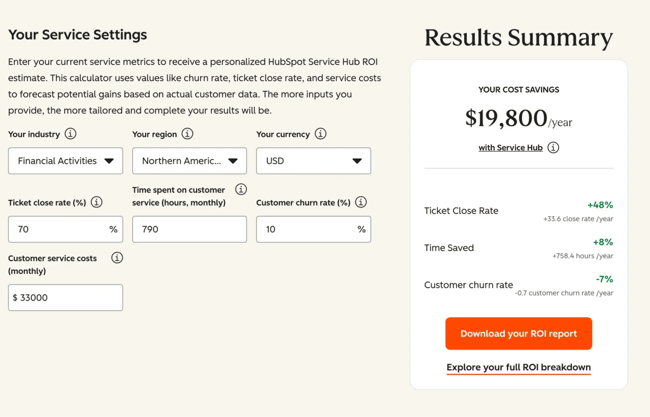
5. Scaling strategy: Follow 12-week rollout for measurable results.
A practical 12-week rollout focuses on breadth after quality stabilizes.
Weeks 1 to 2: Foundation
- Clean up ticket taxonomy and select top intents.
- Audit and prepare the knowledge base for AI grounding.
- Lock baseline metrics.
Weeks 3 to 6: Pilot
- Deploy in one channel and one queue.
- Add routing rules, guardrails, and handoff paths.
- Weekly QA review loop and knowledge updates.
Weeks 7 to 10: Expansion
- Add 10 to 20 more intents.
- Expand to a second channel (messaging or email).
- Introduce advanced routing (priority, segmentation, availability rules).
Weeks 11 to 12: Optimization
- Tune intent coverage, confidence thresholds, and escalation criteria.
- Formalize reporting pack: deflection, CSAT, time saved, cost impact.
- Decide scale path: additional channels, voice, proactive flows.
This sequence keeps the rollout measurable, reduces operational risk, and produces a defensible ROI story tied to close rate, time saved, and churn impact.
Frequently Asked Questions About Conversational Customer Service
What’s the difference between conversational AI and traditional chatbots?
Conversational AI for customer service uses natural language processing, intent classification, knowledge retrieval, and routing logic to resolve requests dynamically. The user gets their issue resolved in the moment. Conversational AI also integrates CRM context, so customer success agents get a full picture of a user.
Traditional chatbots rely on predefined decision trees and keyword triggers. They may not suggest a solution on the fly, and traditional chatbots often trap users in back-and-forth reply cycles because their logic fails to recognize the user’s actual inquiry.
How much does conversational customer service cost?
Conversational customer service costs depend on platform tier, channel coverage, and automation scope. HubSpot Service Hub starts with a Free plan at $0/month (no credit card required), which includes contact management, ticketing, and team email. The Starter plan begins at $20 per seat/month and adds simple ticket automation, multiple ticket pipelines, and live chat.
The Professional plan starts at $100 per seat/month, adding a help desk workspace, knowledge base, customer success workspace, and Breeze Customer Agent.
The Enterprise plan starts at $150 per seat/month, introducing skill-based routing, conditional SLAs, interactive voice response, and customer journey analytics.
Most teams see measurable impact within eight to 12 weeks when automation focuses on high-volume intents and ROI is tracked through deflection rate, resolution time, and cost per ticket.
Can small businesses benefit from conversational AI?
Small businesses benefit from conversational AI because automation compensates for smaller support team sizes. AI handles routine inquiries, provides after-hours responses, and routes complex cases to the right person.
According to , 72% of consumers say AI gives SMBs a personal touch with big-company efficiency.
How do you ensure data security and privacy?
Conversational customer service systems enforce security through role-based access control (RBAC), encrypted data transmission (TLS), secure data storage, audit logging, and defined retention policies. Enterprise deployments also restrict AI responses to approved knowledge sources, preventing the model from generating unsupported answers outside governed content.
Modern conversational AI contact center platforms operate within compliance frameworks such as GDPR, SOC 2, and ISO 27001. Confidence thresholds, escalation rules, and knowledge grounding function as technical guardrails by reducing hallucination risk and preventing policy violations during customer interactions.
What happens when AI can’t handle a question?
Conversational AI systems define escalation thresholds based on confidence, sentiment, issue type, and customer value. When those thresholds are met, the conversation is routed to a human agent, with a full transcript and customer context attached.
The future of support is conversational — and it’s already here.
Conversational customer service is the operating model defining modern support. By unifying AI, messaging, and human expertise into a single continuous experience, businesses can resolve customer issues more quickly, reduce operational costs, and deliver personalized, always-on service. The shift is about speed, context, continuity, and building smarter systems that learn and improve with every interaction.
To move forward, start small but stay focused. Identify your highest-volume support requests, pilot automation in a single channel, and measure what matters like resolution time, deflection rate, and customer satisfaction. From there, expand intentionally, refining your workflows and knowledge base as you scale. If you’re looking to accelerate this transition, HubSpot Service Hub brings everything together — AI-powered automation, omnichannel support, and CRM-backed context — so your team can deliver efficient, high-quality service without added complexity.
Editor's note: This post was originally published in January 2025 and has been updated for comprehensiveness.
Free Help Desk & Ticketing Software
Keep track of customer requests in one unified help desk that connects to your CRM database.
- Provide personalized, AI-powered support to your customers
- Save time, reduce errors, and streamline service processes
- Improve rep efficiency & time to resolution
- And more!