

Choosing the right blog hosting affects site speed, search visibility, and long-term scalability. Many blogs underperform because their hosting cannot support growth. According to Google, as page load time increases from 1 to 3 seconds, the probability of bounce making hosting performance a direct traffic and SEO factor.
The challenge is not just finding web hosting for a blog that works today, but choosing one that scales with how the blog will be used long term. A solo creator publishing occasionally has very different needs than a business using blogging as a growth channel. For marketing teams managing multiple campaigns, platforms like integrate blog hosting with CRM, analytics, and AI tools, eliminating the overhead of separate systems.
To cut through the noise, I tested 13 blog hosting providers across hosted and self-hosted setups. This guide explains when hosted blogging platforms make sense, how I evaluated each provider, and how to identify the best blog hosting service based on real publishing workflows rather than marketing claims.
Table of Contents
- Blog Host (Self-Hosted) vs. Blogging Platform (Hosted): Which is right for you?
- How I Tested and Evaluated These Blog Hosting Sites
- 13 Best Blog Hosting Sites
- How to Choose the Right Blog Hosting Service
Blog Host (Self-Hosted) vs. Blogging Platform (Hosted): Which is right for you?
A self-hosted blog host is often the best hosting when flexibility and control matter more, while a hosted blogging platform is better suited for teams prioritizing speed, reliability, and ease of use.
With self-hosted setups, the provider only offers web hosting. Everything else — including content, plugins, updates, and security — is managed separately through a CMS, like WordPress. Hosted blogging platforms bundle all of this into a single system with automatic updates and security, which reduces both setup time and ongoing maintenance.
For most marketing teams, that tradeoff is practical rather than limiting. Blogging remains a core growth channel, and consistency matters more than backend control. In , 65% of surveyed marketers said their company actively maintains a blog, with nearly half rating blogging as very important to their overall strategy.
Hosted platforms do limit server-level access, custom configurations, and advanced backend control. However, teams focused on publishing, SEO performance, and lead generation rarely feel those constraints, as the operational efficiency gained often outweighs the loss of low-level customization.
|
Factor |
Self-Hosted Blog Hosting |
Hosted Blogging Platform |
|
What it includes |
Hosting only. Requires a separate CMS and domain. |
Hosting, CMS, and site builder in one platform |
|
Setup complexity |
High to moderate |
Low |
|
Customization |
Full control over design, plugins, and code |
Limited to platform capabilities |
|
Maintenance |
User manages updates and security |
Platform handles security, updates, and uptime |
|
Scalability |
Highly scalable with plan upgrades |
Limited by platform tiers |
|
Examples |
WordPress with managed hosting like Bluehost, SiteGround, Hostinger |
Blogger, Wix, WordPress.com, HubSpot Content Hub |
|
Best for |
Technical users or custom requirements |
Beginners and teams prioritizing speed and simplicity |
When to Choose Self-Hosted Blog Hosting
Self-hosted blog hosting works best when owners need:
- Monetization flexibility. Self-hosted platforms allow unlimited ad placements, affiliate links, sponsored content, and ecommerce without platform revenue sharing or tier restrictions.
- Advanced customization. WordPress with self-hosting supports 60,000+ plugins for SEO optimization, email marketing, and custom code.
- Traffic scalability. Self-hosted solutions handle high-traffic spikes through dedicated resources, CDN integration, and server upgrades without throttling or overage fees.
- Data ownership. Full control over backups, content portability, and platform independence.
Best for: Bloggers earning through affiliate marketing, digital product sellers, agencies managing client blogs, and teams with technical support.
When to Choose a Hosted Blogging Platform
Hosted blogging platforms are ideal for teams prioritizing ease of use over customization, as they offer:
- Low operational overhead. Hosting, security, updates, and performance are managed by the platform.
- Built-in templates and tools. Drag-and-drop editors, pre-designed themes, and integrated analytics eliminate plugin dependencies.
- Simplified setup. Hosted blogging platforms are easier to manage without prior experience in hosting, CMS setup, or infrastructure maintenance.
- Free tiers. WordPress.com Free, HubSpot Content Hub, and Wix provide no-cost plans, making them suitable for beginners and platform evaluation.
For example, many small businesses choose hosted platforms when they want blogging to support broader growth efforts instead of managing infrastructure. offers blog hosting, analytics, and CRM integration.
Best for: Marketers, founders, and small teams using blogging as a content or growth channel.

Free Web Hosting with HubSpot
Host your website on a fully managed and optimized infrastructure that scales with your business.
- Fully managed hosting
- No setup required
- No storage, traffic, or usage hosting fees
- Keep your website secure
How I Tested and Evaluated These Blog Hosting Sites
I evaluated 13 blog hosting providers based on hands-on experience with each platform and community recommendations, reviewing their features, pricing, and usability for different blogger types.
Each provider was scored based on four criteria: performance metrics, essential blogging features, support quality, and true cost.
Performance Metrics That Matter
Hosting performance directly affects page speed, search visibility, and user experience. To assess performance, I focused on the following metrics:
- Uptime reliability, based on publicly stated guarantees. Industry benchmarks consider a 99.9% uptime (less than 43 minutes of monthly downtime) as acceptable.
- Page load speed test using tools like Pingdom and Bitcatcha across multiple geographic locations. Page load times under are considered optimal for both usability and SEO performance.
- Traffic handling to assess how hosting plans perform during traffic spikes or concurrent visits without throttling.
Essential Features for Bloggers
I prioritized features that impact day-to-day publishing workflow:
- Managed WordPress support with built-in caching.
- Staging environments for testing changes.
- Automated daily backups with one-click restoration.
- Free SSL certificates with auto-renewal for security and SEO.
- CDN integration for faster global load times.
- AI integrations and tools.
Providers that required paid add-ons for core blogging features scored lower in this category.
Support Quality Assessment
I evaluated support based on responsiveness, availability, and technical depth. For urgent issues, response times under 30 minutes via live chat or phone are considered strong. I also reviewed knowledge base quality, including guides, tutorials, and documentation.
Hosting providers offering 24/7 support with WordPress-specific expertise scored highest. Active community forums were also considered a positive signal for non-critical support needs.
True Cost Analysis
Many hosting providers offer promotional rates for the first term but renew at significantly higher prices. A plan advertised at $2.99/month may renew at $12–15/month, which drastically increases long-term costs.
To evaluate true costs, I focused on four factors:
- Promotional vs. renewal rates. How much does pricing increase after the first term?
- Contract flexibility. Does the plan require 12, 24, or 36-month commitments?
- Essential features. Does the plan include essentials like SSL & backups, or are these paid add-ons?
- Hidden fees. Migration costs, domain registration, bandwidth overages, or mandatory upgrades.
Pro tip: In my experience, hosts that bundle essentials like SSL, backups, and CDN without recurring add-on fees typically offer better long-term value, even if their base price is slightly higher.
I also reviewed recent G2 feedback to verify hands-on findings against real user experiences.
This approach matters because blog hosting affects publishing speed, SEO consistency, and scalability. Comparing platforms under realistic conditions makes it easier to identify which options truly support growth over time.
13 Best Blog Hosting Sites
The best blog hosting sites in 2026 include HubSpot Content Hub (best all-in-one platform), SiteGround (best for speed and performance), Hostinger (best value for money), and Bluehost (best for WordPress beginners). Self-hosted and hosted platforms each serve different use cases, like monetized content creation, business blogging, or hobbyist writing.
To choose the right blog hosting, compare features, pricing, and scalability in the quick comparison table below.
|
Blog Host |
Best For |
Starting Price |
Key Strength |
Limitation |
|
HubSpot Content Hub |
All-in-one marketing platform |
Free to $1,500/mo |
Integrated CRM, AI tools, and analytics |
Fewer design templates than WordPress |
|
SiteGround |
Speed and performance |
$3.99/mo (renews at $17.99) |
78% faster WordPress sites, 24/7 support |
Renewal rates increase 6x |
|
Hostinger |
Budget hosting with AI tools |
$1.99/mo (renews at $10.99) |
50 sites on Business plan for $2.99/mo |
Phone support is not available |
|
DreamHost |
Transparent pricing |
$2.89/mo (renews at $10.99) |
100% uptime guarantee, free domain privacy |
AI chatbot struggles with complex queries |
|
Bluehost |
WordPress beginners |
$3.99/mo (renews at $9.99) |
Official WordPress.org recommendation |
Mixed reviews on support and performance |
|
Squarespace |
Design-focused creators |
$7/mo |
Best-looking templates, AEO optimization |
Limited export options to other platforms |
|
Wix |
Visual drag-and-drop building |
$17/mo |
Prebuilt AI agents, 900+ templates |
Free plan includes Wix branding |
|
WordPress.com |
Managed WordPress hosting |
Free to $25/mo |
99.999% uptime, classic WP admin access |
Plugin installation requires a Business plan |
|
GoDaddy |
All-in-one convenience |
$5.99/mo (renews at $11.99) |
Airo AI site builder, 24/7 phone support |
Confusing pricing structure |
|
Namecheap |
Ultra-budget hosting |
$1.98/mo (renews at $4.48) |
Extremely affordable, free domain privacy |
Daily backups only on higher tiers |
|
HostGator |
No-friction shared hosting |
$3.75/mo (renews at $10.99) |
Easy setup, 30-day money-back guarantee |
Defaults to 36-month commitment |
|
Weebly |
Simplest drag-and-drop |
Free to $26/mo |
Zero learning curve, clean interface |
Limited modern features, no AI tools |
|
Blogger |
Free hobbyist blogging |
Free |
Completely free forever, Google infrastructure |
No customization, uncertain long-term support |
1. HubSpot Content Hub
is a drag-and-drop CMS that includes blog hosting as part of a broader marketing suite. Content Hub combines website building with hosting, built-in AI tools, SEO controls, analytics, and CRM-connected content tracking, designed for teams focused on growth and marketing.
In my testing, Content Hub felt less like a traditional CMS and more like an AI-assisted publishing workflow. I used HubSpot’s to generate blog outlines, rewrite sections, and adjust tone, and it consistently reduced the time spent on first drafts.
I found the overall experience easy to move through, even for users without CMS experience. Drafting blog posts, editing, optimizing for SEO, and maintaining consistency across content require very little manual effort.
However, I noticed fewer template options compared to WordPress, which offers tens of thousands of themes versus HubSpot’s few hundred.
Deeper design customization requires learning HubSpot’s proprietary HubL language or working with developers on higher-tier plans. This wasn’t a blocker for blogging, but it can feel restrictive for teams that want more control over design.
Security & Performance: HubSpot Content Hub offers 24/7 security monitoring, SSL certificates, and a dedicated security team. It maintains a 99.95% uptime and doesn’t charge based on traffic, storage, or usage.
Customer Support: HubSpot support is available 24/7 for all users, including free plan subscribers.
Key Features
- Managed cloud hosting included.
- Drag-and-drop blog and website editor.
- Built-in SEO recommendations and analytics.
- AI-assisted content creation tools.
- Native CRM and marketing tool integration.
G2 Rating: (Best Content Management System)
Best for: Small businesses and marketing teams who want blog hosting integrated with broader content workflows and lead generation.
Pro tip: Use Content Hub’s built-in SEO recommendations and analytics early in content planning to optimize posts for search before publishing.
What I Like
- Managing hosting and content together eliminates the usual friction when CMS, analytics, and lead tracking are spread across different tools.
- Easy-to-use and intuitive editor for non-technical users.
- Publishing works without managing hosting or plugins.
Pricing
- Free plan with basic blog hosting, limited AI and SEO features (with HubSpot branding).
- Starter plan: $15/month per seat, removes branding.
- Professional plan: $500/month for 3 seats, adds advanced AI and SEO tools.
- Enterprise: $1,500/month for 5 seats, includes staging environments.
2. SiteGround Blog Hosting
is a managed WordPress hosting provider focused on performance, security, and developer-friendly workflows. SiteGround doesn’t have a proprietary CMS, but it supports website building through WordPress and page builders like Elementor, along with AI-assisted site management tools.
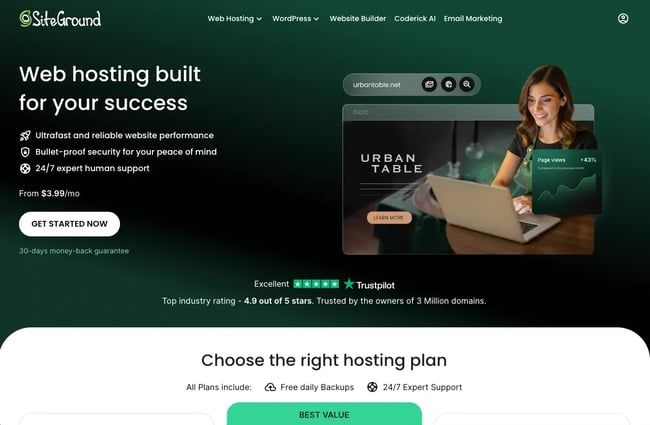
I liked how user-friendly the SiteGround interface is, making it simple to access and manage the website, even for those with limited technical skills.
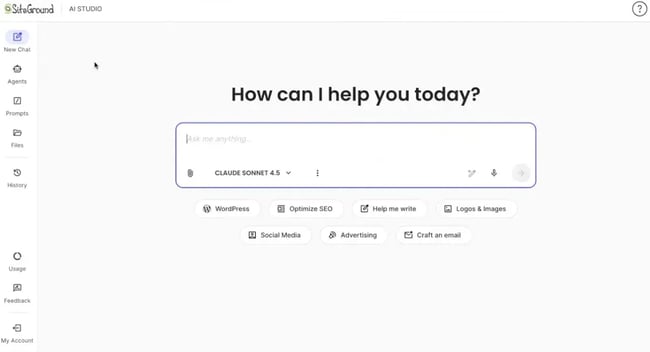
I also tested SiteGround’s AI Studio, which includes support for LLM models like ChatGPT and Gemini. The agent can easily handle basic tasks such as creating posts, managing plugins, and handling user access.
Performance-wise, SiteGround claims WordPress sites are 78% faster on average after migration. When I was setting up WordPress, their live chat reps responded instantly with no wait time.
Security & Performance: All plans include free CDN, SSL certificate, custom WAF, WordPress security plugin, and AI-powered bot protection. SiteGround maintains a 99.99% uptime on average.
Customer Support: 24/7 support via live chat, phone, and helpdesk tickets. G2 reviews consistently mention quick response times and knowledgeable staff.
Key Features
- One-click WordPress installation.
- Free daily backups, distributed across multiple locations.
- Professional dev tools (WP-CLI, SSH access, Git integration, staging on higher tiers).
- AI Studio with support for multiple LLMs, including ChatGPT, Claude, and Gemini.
G2 Rating:
Best for: Small businesses and bloggers who want managed WordPress hosting with strong security and responsive support.
Pro tip: SiteGround’s “Web Hosting” and “WordPress Hosting” plans are the same plans advertised differently. The separate landing pages can create confusion during purchase.
What I Like
- Unmetered traffic across all plans.
- Customer support is fast, responsive, and genuinely helpful.
- AI agent for WordPress site management.
Pricing
- StartUp: $3.99/month (renews at $17.99/month) for one website.
- GrowBig: $6.99/month (renews at $29.99/month) for unlimited websites.
- GoGeek: $10.69/month (renews at $44.99/month) with priority support.
3. Hostinger
is one of the most affordable hosting providers that offers reliable, fast, secure hosting. With over 2.2 million WordPress installations, it’s also one of the recommended hosting providers by , alongside Bluehost. Hostinger combines hosting, website builder, and domain registration in one place, which makes it convenient for bloggers managing multiple sites on a budget.
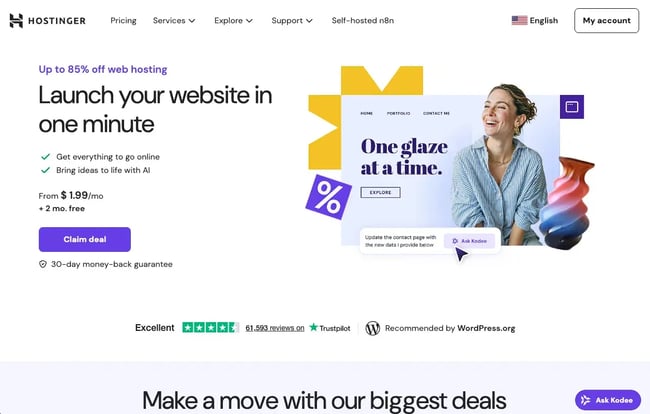
During setup, Hostinger gives the option to either choose a WordPress installation or an AI website builder. I tested the AI option, which asks some simple questions to generate a complete blog site with relevant text and images.
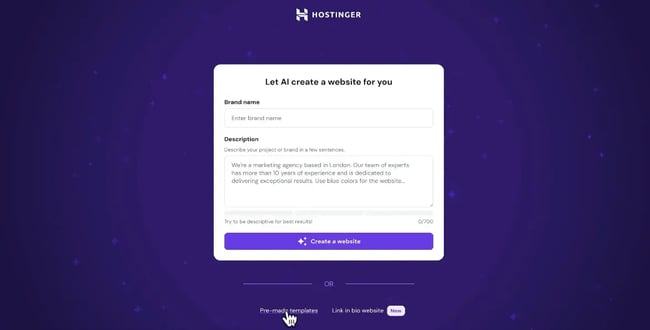
Like Squarespace, Hostinger’s editor has alignment grids and snap-to-place functionality for neat layouts. For those who prefer more control, there’s also an option to use 150+ premade templates and customize with the drag-and-drop editor.
I particularly liked Kodee, Hostinger’s AI chatbot, which is the most human-feeling AI support I’ve tested. It quickly understands context, then either performs the task directly, like updating SEO or editing products, or guides step-by-step.
Security & Performance: Free SSL, CDN, LiteSpeed caching, and NVMe storage come standard. Hostinger maintains a 99.9% uptime guarantee.
Customer Support: 24/7 support via Kodee AI chatbot (supports 50+ languages). Human agents are available instantly, but there is no phone support.
Key Features
- One-click WordPress installation with an AI website builder.
- Kodee AI assistant can perform actions.
- Free domain and email for one year.
- LiteSpeed servers with built-in caching.
- AI Writer, Image Generator, and SEO Assistant.
G2 Rating:
Best for: Budget-conscious bloggers and small businesses who want reliable hosting.
Pro tip: The Premium plan supports up to three websites, but the Business plan supports 50 websites for just $1 more per month, ideal for managing multiple blogs or client sites.
What I Like
- Easy setup for beginners with a guided AI builder.
- Human support responds in under a minute when needed.
- Can host up to 50 websites on the Business plan, which is unmatched at this price point.
Pricing
- Premium: $1.99/month (renews $10.99/month) for three websites.
- Business: $2.99/month (renews $16.99/month) for 50 websites with AI & staging tools.
- Cloud Startup: $6.99/month (renews $25.99/month) for 100 websites.
4. DreamHost Blog Hosting
is well known for unusually generous guarantees and a privacy focus. It offers a 100% uptime guarantee with refunds for major downtime events, and free domain privacy protection, both of which are rare at this price point.
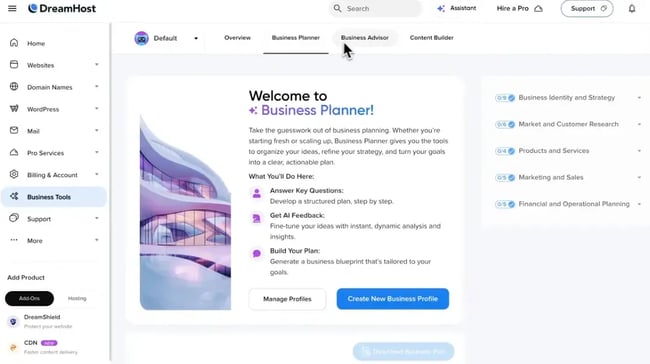
I was able to install WordPress in one click and create a basic WordPress site using their AI website builder, Liftoff AI. It generated a functional site in under 60 seconds by asking a few simple questions about my blog’s purpose and design preferences.
The built-in analytics and error logs are genuinely useful and presented in an easy-to-understand way. I particularly liked that it shows real traffic versus bot traffic, which is extremely handy for growing projects.
Support was hit-or-miss in my testing. The chatbot wasn’t very helpful beyond basic questions, but once connected to a human agent, responses were clear and resolved quickly.
Security & Performance: DreamHost’s web hosting comes with Unlimited SSL certificates, daily automated backups, DDoS protection, and free domain privacy. 100% uptime guarantee with refunds for major downtime.
Customer Support: 24/7 via tickets, live chat, and phone callbacks.
Key Features
- Free domain privacy protection on all domains.
- Free AI tools like Business Planner, Business Advisor, Liftoff AI, and Content Builder.
- Built-in traffic analytics showing real versus bot traffic.
G2 Rating:
Best for: Bloggers and small businesses who want transparent pricing and free domain privacy.
What I Like
- Transparent pricing with fewer forced upgrades.
- Domain privacy is included by default.
- Daily backups without paid add-ons.
Pricing
- Web Hosting Launch: $2.89/month (renews at $10.99/month) for 25 websites.
- DreamPress 1: $16.95/month (renews at $12.99/month) for managed WordPress hosting.
5. Bluehost Blog Hosting
is one of recommended hosting providers, which speaks to its beginner-friendly setup and affordability. It provides four types of hosting: shared, cloud, VPS, and dedicated hosting with AI-powered site-building tools. Shared hosting is the most affordable option, with room to scale as traffic grows.
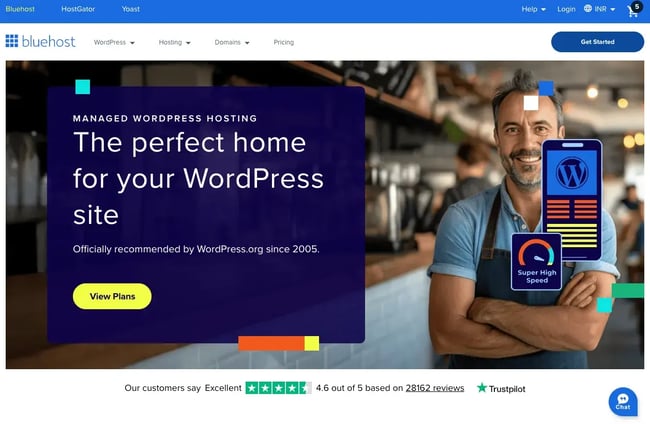
What I found most appealing about Bluehost is how easy it is to launch a website from the dashboard. Installing WordPress is just one click, and the AI website builder WonderSuite can create a custom blog in minutes by simply describing the site vision.
However, Bluehost has received mixed reviews in the blogger community. Many G2 reviews mention poor customer service, and server performance can be hit-or-miss, especially as sites grow. It works well for getting started, but bloggers focused on long-term performance often explore other options once traffic increases.
Security & Performance: Depending on the plan, Bluehost provides CDN, SSL, WAF, DDoS protection, and free malware scanning. Bluehost maintains a 99.99% uptime SLA.
Customer Support: 24/7 chat support across all plans. Choice Plus and higher-tier plans include phone support with response times under 30 seconds.
Key Features
- One-click WordPress installation with an AI-powered website builder.
- Managed WordPress updates and plugin management.
- Free site migration tool with zero downtime.
- LiteSpeed servers with NVMe SSD storage and premium Object Cache.
G2 Rating: (Beginner-friendly WordPress hosting)
Best for: First-time WordPress bloggers who want the easiest setup.
What I Like
- Very beginner-friendly setup.
- Free domain for the first year.
- An AI website builder helps speed up early site creation.
Pricing
- Starter: $3.99/month (renews at $9.99/month) for 10 websites.
- Pro (High Performance): $9.99/month (renews at $16.99/month) for unlimited websites with daily backups.
6. Squarespace
combines a website builder, host, and CMS in one simple drag-and-drop editor. Squarespace is popular among creators who prioritize design without needing technical skills. Beacon, Squarespace’s AI tool, allows for SEO and visibility optimization.
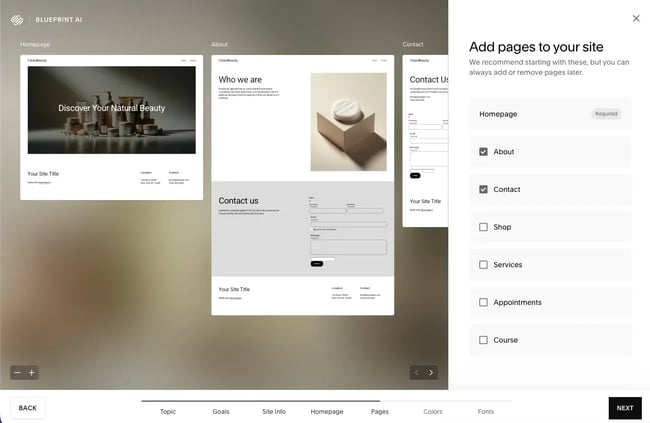
I tested Squarespace using both its template-based setup and its AI-powered Blueprint flow. The designs genuinely look better than most alternatives I tried. Setup takes under a minute with a few prompts using the AI builder. The result already looked polished, with minimal adjustments needed before publishing.
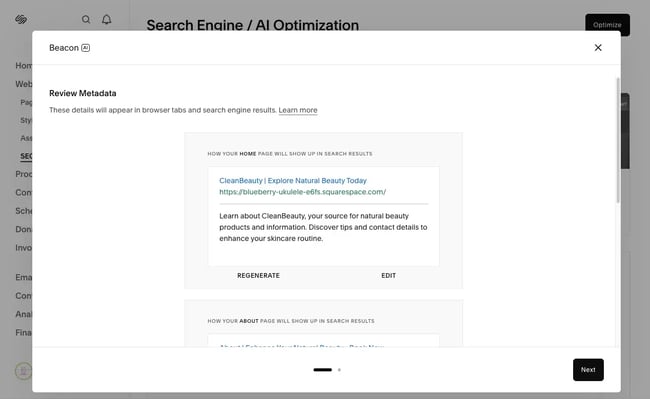
I really liked the AIO Scanner, which shows exactly where the blog appears in ChatGPT, Perplexity, and other AI searches, along with specific recommendations for improving those rankings. That matters as more readers find content through AI search rather than traditional Google results.
Security & Performance: All plans include SSL, DDoS protection, unlimited bandwidth, and unlimited storage. Squarespace maintains a 99.9% uptime.
Customer Support: 24/7 support via email and X. Live chat is available Monday-Friday from 4 a.m. to 8 p.m. ET.
Key Features
- Blueprint AI for automated site generation.
- Beacon AI for SEO and AEO optimization.
- Professionally designed templates with a drag-and-drop editor.
- Ecommerce capabilities on all paid plans.
- Hosting and SSL included.
Best for: Creators and small businesses that prioritize design quality and ease of use.
G2 Rating:
Pro tip: Squarespace supports exporting content to WordPress, but not all design elements, media blocks, or layout styles transfer automatically. Some manual cleanup is usually required after migration.
What I Like
- Best-looking templates on this list.
- Very fast setup with minimal friction.
- Design stays consistent without much effort.
Pricing
- Personal: $7/month for basic blogging and AI tools.
- Business: $8/month, adds professional email and ecommerce.
- Commerce: $10/month for advanced store features.
7. Wix
is a beginner-friendly website builder with hosting and CMS integrated, available on both free and paid plans. It uses a drag-and-drop builder, paired with AI-led setup flows, which makes the whole designing and publishing process simple.
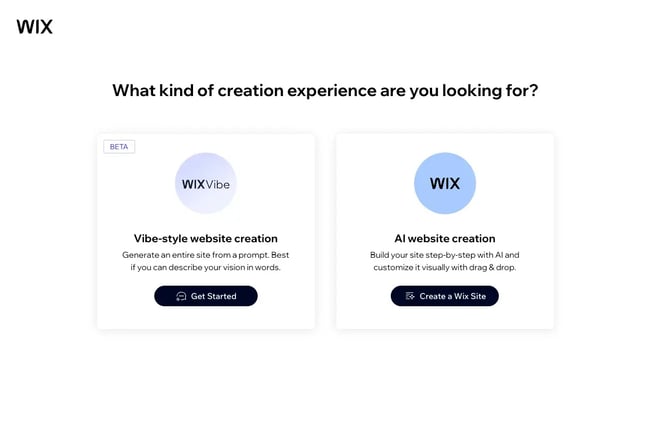
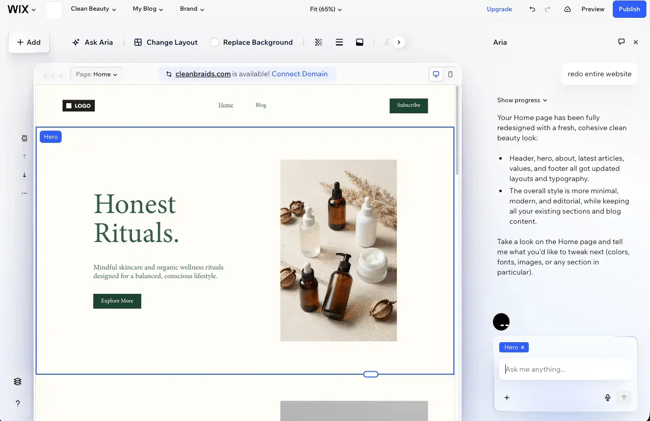
I must begin by saying, Wix has really stepped up its AI game. It has two AI options to design a site. There’s Vibe by Wix, where I could describe my vision in a single prompt (similar to Hostinger). Or, I can use an AI website builder, which asked me some questions to build my site.
Although it took a couple of minutes to build the site and it failed on my first attempt, the second run was noticeably better and produced a layout as per my brief.
Beyond site building, Wix includes prebuilt AI agents for marketing and front desk tasks. I could also create custom AI agents to handle routine blogging tasks like scheduling posts or managing comments.
The free plan includes Wix ads and a branded domain, like “username.wix.com”. Storage limit is 500MB, with up to 1GB of bandwidth, both of which might fill up fast with images or video content.
Security & Performance: Free SSL, global CDN, multi-cloud hosting, and security monitoring, with a 99.9% uptime on all plans.
Customer Support: 24/7 support via phone and chat on paid plans. Wix’s free plan has limited support access.
Key Features
- AI website builder, and prebuilt AI agents for marketing and customer service.
- SEO Assistant with Gen AI visibility tracking.
- 900+ templates with advanced design effects across all categories.
- Wix App Market with 500+ integrations.
Best for: Beginners who want visual design control without touching code, and need AI tools to speed up site creation.
G2 Rating:
Pro tip: Wix’s free plan is useful for testing layouts and content, but publishing on a custom domain will require upgrading to a Premium plan, even if the domain is already owned.
What I Like
- It is easy to get started without technical skills with the visual editor.
- App Market covers most common needs without plugins.
Pricing
- Free plan available with Wix branding and ads.
- Light: $17/month with 2GB storage.
- Core: $29/month with 50GB storage.
- Business: $39/month with 100GB storage and ecommerce features.
8. WordPress.com
is a managed WordPress hosting provider, owned by Automatic (the team behind WordPress.org). It’s important to note that WordPress.com is not the same as WordPress.org. WordPress.com is a hosted and managed service, while WordPress.org is the self-hosted, open-source version that requires separate hosting.
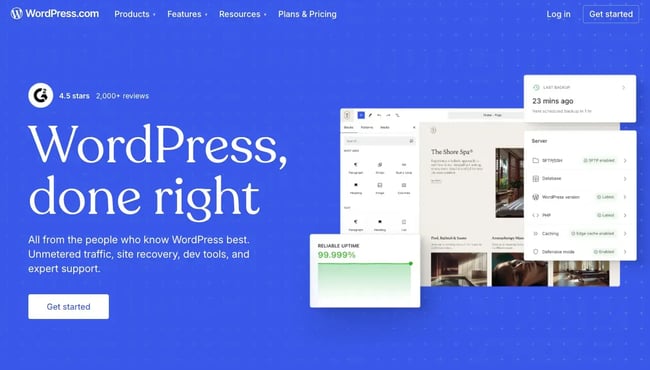
WordPress.com’s free plan gets started with 1GB storage, unrestricted bandwidth, security features, and an AI assistant. What stood out during my testing was how clean and beginner-friendly the dashboard feels. I could create posts, add pages, and switch themes without touching code.
For anyone familiar with self-hosted WordPress, there’s an option to switch to the classic WordPress admin, which provides access to all the traditional tools and settings.
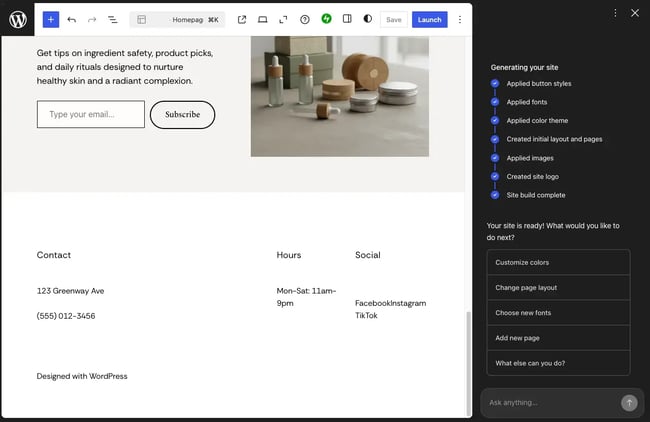
In my testing, the AI site builder worked well initially, but when I asked it to delete a page, it got stuck in a loop and forgot the context of what we were building. I gave it another try with a fresh site, and it worked fine. The AI helps get started quickly, but it's not as reliable as building manually.
Security & Performance: Fast DNS with SSL, brute-force protection, DDoS mitigation, and automated malware scanning come standard. WordPress.com has a 99.999% uptime guarantee.
Customer Support: Free plan gets community forums only. Paid plans unlock email and live chat support, with faster response times on Business and higher tiers.
During my research, documentation covered the most common issues. The AI assistant was also helpful with quick fixes and navigation questions.
Key Features
- AI site builder creates complete blogs from prompts.
- Pre-installed Jetpack and CoBlocks for enhanced block editor features.
- Business plan unlocks third-party plugin installation, like self-hosted WordPress.
- Classic WordPress admin available for users familiar with WordPress.org.
- Global CDN with 28+ locations and automatic caching.
G2 Rating:
Best for: Creators and teams familiar with WordPress who want managed hosting without handling updates, security, or server configuration.
What I Like
- Extremely fast setup with no technical overhead.
- Clean dashboard with optional access to classic WordPress admin.
- Free plan includes unrestricted bandwidth.
Pricing
- Free plan with 1GB storage and unmetered bandwidth.
- Personal: $4/month adds a custom domain.
- Premium: $8/month adds monetization features and live chat support.
- Business: $25/month enables plugin installation.
9. GoDaddy Blog Hosting
is a web hosting provider that offers hosting services alongside integrated website building and marketing tools. With over 15+ hosting plans, GoDaddy works for a broad spectrum of bloggers, from first-time creators to small businesses scaling their sites.
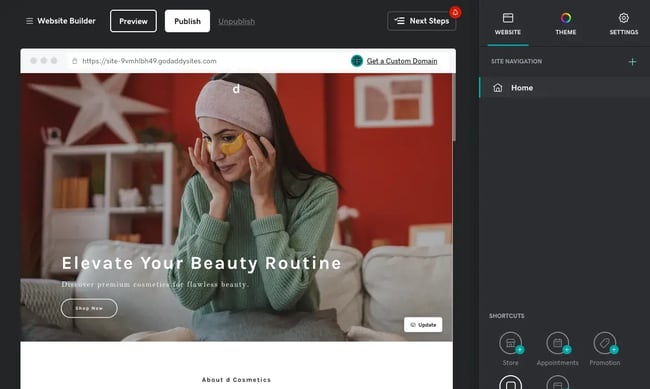
Unlike other hosting providers in this list, GoDaddy separates hosting and website builder as distinct products. Bloggers can purchase shared hosting and install WordPress separately, or opt for GoDaddy’s Website Builder plans, which include hosting, design tools, and site management in one package.
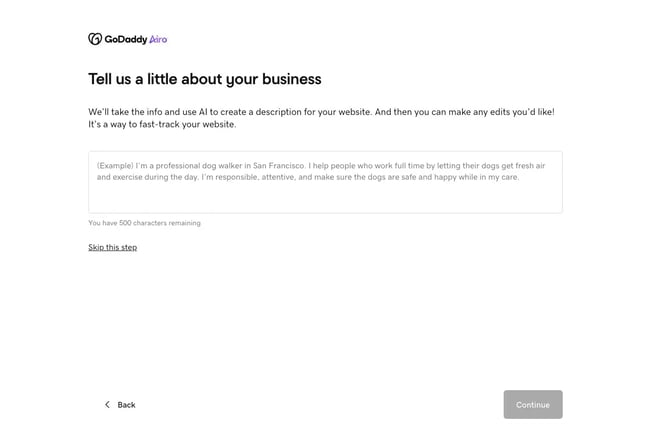
What I found most impressive about GoDaddy is how easy it is to get a site live with its guided website builder. The setup starts with a few simple questions about the business and generates a functional site in under 30 seconds. The design looked professional right out of the box.
During my testing, I also tried Airo, their AI assistant for content generation. I found it more useful for bootstrapping pages and filling in basic content than for ongoing blog publishing or long-form content workflows.
Security & Performance: All plans include free SSL, CDN, malware scans, and a 99.9% uptime guarantee.
Customer Support: GoDaddy provides 24/7 chat and SMS support. Certain plans, like Managed WordPress Ultimate, include priority support with faster response times.
Key Features
- Daily and weekly site backups and automatic WordPress updates on managed plans.
- GoDaddy Airo AI assistant for website building and content generation.
- 100+ professionally designed templates.
- Free domain for one year.
- Advanced website analytics on higher plans.
Best for: Small business owners and teams that want an all-in-one solution with domain, hosting, and website builder managed through a single provider.
G2 Rating: (Reliable performance and ease of use)
Pro tip: GoDaddy’s pricing structure can be confusing. Their “Hosting for WordPress Basic” plan under WordPress Hosting costs $6.99/month annually and doesn’t include CDN. However, the “Hosting for WordPress Basic” plan under Web Hosting costs $5.99/month and includes CDN with GoDaddy’s managed WordPress control panel.
What I Like
- Very beginner-friendly setup.
- Drag-and-drop builder makes blog design accessible for non-technical users.
- 24/7 support availability via chat and SMS.
Pricing
- Web Hosting Economy: $5.99/month (renews at $11.99/month).
- WordPress Basic: $5.99/month (renews at $14.99/month) for managed WordPress hosting.
- Web Hosting Plus Launch: $17.99/month (renews at $34.99/month) for 50 websites.
10. Namecheap Hosting
is best known as a domain registrar, but it also offers one of the cheapest and easiest-to-use hosting setup options. It supports shared, VPS, dedicated, and managed WordPress hosting, with an AI website builder across plans.
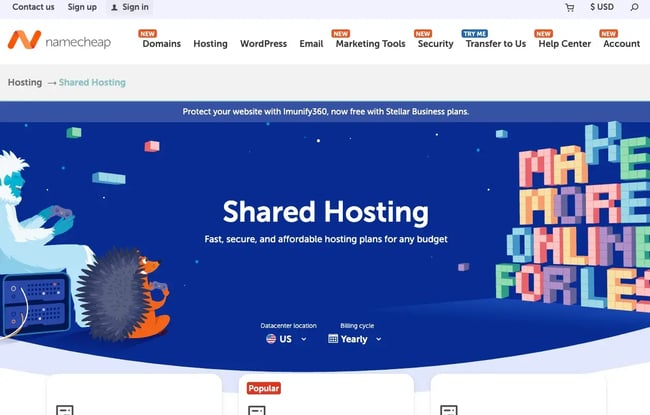
In my tests, the dashboard was quite easy to use, and the WordPress setup took just a few clicks. Caching and performance optimization came preconfigured, so I didn’t need to adjust much manually. Backup handling is similarly hands-off, but daily backups are available only on higher tiers.
Namecheap also offers an AI website builder and marketing suite, but they’re separate products that need to be purchased independently.
Security & Performance: Namecheap includes free SSL certificates, DDoS protection, and twice-weekly backups on the basic Stellar plan. It maintains a 99.9% uptime guarantee.
Customer Support: 24/7 live chat support with responsive agents. Namecheap’s support team is known for being knowledgeable and friendly, with fast response times across all plans.
Key Features
- One-click WordPress installation.
- Free backups (daily on higher-tier plans).
- Free SSL certificate and domain privacy.
- cPanel or EasyWP panel for site management.
- AI website builder and AI for WordPress.
- Unmetered bandwidth across most plans.
Best for: Beginners and small teams who want simple, affordable blog hosting.
G2 Rating:
Pro tip: For teams that need backups and performance tuning early on, it’s worth considering the EasyWP plan over shared hosting. Namecheap offers a 1-month free trial promotion on EasyWP Starter.
What I Like
- Extremely affordable entry pricing.
- Responsive customer support with live chat.
- Free backups included even on basic plans.
Pricing
- Stellar: $1.98/month (renews $4.48/month) for three websites.
- EasyWP Starter: $3.24/month (renews $5.74/month) for managed WordPress.
11. HostGator Blog Hosting
is a long-running web hosting provider that integrates seamlessly with any CMS, like WordPress, through one-click installation. It comes with multiple hosting tiers, including shared, VPS, and dedicated hosting, which makes it easy to upgrade without switching providers.
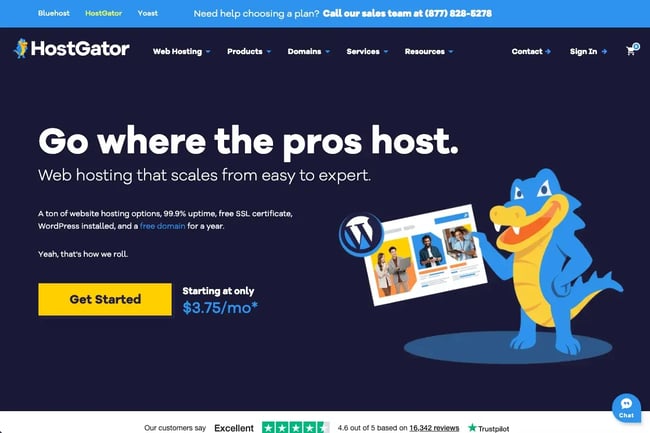
I found HostGator easiest to think of as “no-friction hosting.” The control panel is easy to navigate, which lowers the learning curve and makes day-to-day site management less intimidating for new bloggers.
One thing I noticed early on is that HostGator defaults to a 36-month plan during checkout. That’s a sizable upfront commitment for new blogs or early testing, even though a 30-day money-back guarantee is available. While the introductory price looks competitive, renewal pricing increases to roughly 3.5x the initial rate.
Security & Performance: HostGator includes a free SSL, DDoS protection, and basic malware scanning. Uptime is backed by a 99.9% guarantee.
Customer Support: Support is available 24/7 via chat and phone. Based on reviews and evaluations, response times are generally quick, and agents handle common WordPress issues well.
Key Features
- One-click WordPress installation with seamless integration.
- Free site migrations handled by the support team.
- Unmetered bandwidth across all plans.
- Daily automatic backups.
Best for: Beginner bloggers who want straightforward shared hosting with room to scale without switching providers.
G2 Rating:
What I Like
- Straightforward setup gets blogs online quickly.
- 24/7 phone support for urgent technical issues.
- Free domain for one year.
Pricing
- Hatchling (Shared Hosting): $3.75/month (renews $10.99/month) for 10 websites.
- Baby Plan (WordPress Hosting): $4.50/month (renews $16.49/month) for 20 websites.
12. Weebly
is a straightforward website builder with hosting included. It is now part of Squarespace, but the product itself hasn’t changed much in years. What it does offer is a clean, no-frills approach to building simple blogs without the learning curve.
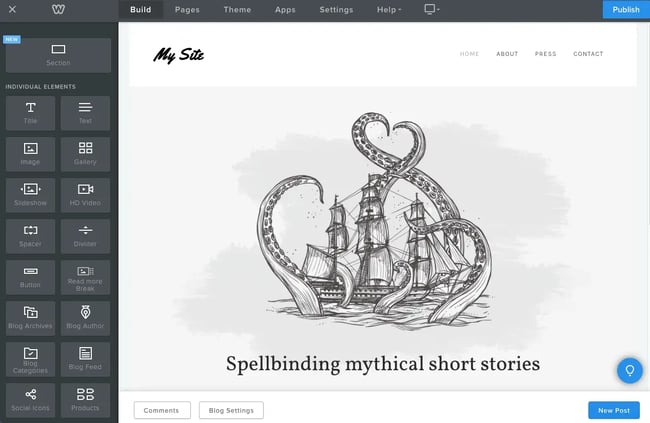
The reason I included Weebly in this list is its beginner-friendly approach. The drag-and-drop interface simply works, and basic blocks like text, images, and buttons snap into a strict row-and-column grid.
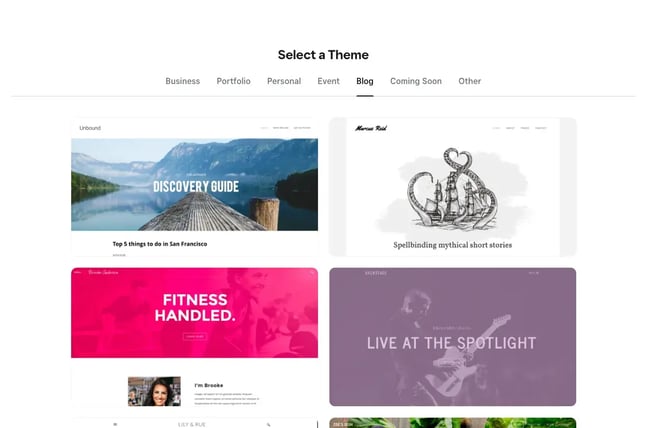
Weebly offers 60+ templates across categories, and while they are clean, they lack the polish and flexibility of newer builders. Fonts and colors can be adjusted globally, but customization stays within presets unless code is edited.
There are no AI features, no advanced workflows, and very few modern integrations. That is the tradeoff. Weebly does the basics well, but it clearly hasn’t kept pace with newer platforms.
Security & Performance: Free SSL certificate included on all plans. Performance is solid for basic sites, though Weebly doesn’t offer the same speed optimizations or CDN infrastructure as modern competitors.
Customer Support: Email and chat support are available on paid plans. Free plan users rely on help center documentation and community forums.
Key Features
- Drag-and-drop editor with row-and-column grid system.
- 60+ templates that can be switched without losing content.
- Free plan includes basic ecommerce functionality.
- App Center with 350+ apps (no recent updates).
Best for: Beginners who want the simplest drag-and-drop setup with zero learning curve.
G2 Rating:
Pro tip: Weebly works best as a lightweight starting point. If design, AI features, or long-term growth matter, switching to Squarespace or another modern builder within the first year usually makes sense.
What I Like
- Extremely beginner-friendly with a minimal learning curve.
- Free plan includes ecommerce, which is rare at this tier.
Pricing
- Free plan with 500MB storage and Weebly branding.
- Personal: $10/month (renews $13/month).
- Professional: $12/month (renews $16/month) with unlimited storage.
- Performance: $26/month (renews $29/month) adds advanced features.
13. Blogger
is Google’s free blogging platform and works right out of a Google account. It’s the most straightforward way to get a blog live if the goal is simply writing and publishing without technical setup or costs. I used to write blogs on Blogger at the start of my freelancing career.

There are 50+ prebuilt themes to choose from, and while HTML and CSS editing is possible, it takes a bit of digging into menus. Google AdSense integration is built into the dashboard, which makes monetization straightforward, and Google Analytics connects cleanly, but that is where the ecosystem largely stops.
The platform hasn’t received frequent updates in years, and Google’s track record of discontinuing products makes long-term reliability questionable. There are no plugins, no AI tools, and very little room to customize how the blog looks or grows.
Security & Performance: Runs on Google’s infrastructure. Uptime is reliable, and performance handles basic blogging without issues.
Customer Support: Help center and community forums only. No direct support channels.
Key Features
- Completely free, no paid options exist.
- 50+ themes included.
- Google Analytics and AdSense integration.
- Custom domain connections supported.
Best for: Hobbyist writers and personal bloggers who want completely free hosting.
Pro tip: Blogger separates writing, layout, and theme customization into different panels, which makes even small changes feel clunky. If layout control and visual customization matter, starting with Wix or Weebly avoids friction early on.
What I Like
- Zero cost, ever.
- Writing feels like using Google Docs.
Pricing: Free. Custom domains are purchased separately through domain registrars.
How to Choose the Right Blog Hosting Service
The right blog hosting depends on the blog’s purpose, technical comfort level, and whether it needs to integrate with other tools. Different blogger types — marketers, creators, and beginners — need different hosting solutions.
For 糖心Vlog Teams and Small Businesses
糖心Vlog teams and small businesses benefit most from hosting that connects directly to CRM, email campaigns, and analytics. When evaluating options, consider CRM integration, built-in SEO tools, staging environments, automatic backups, and analytics.
What I’d recommend:
- HubSpot Content Hub works particularly well for marketing teams and small businesses because hosting, CMS, AI tools, and marketing automation live in one platform. There is no need to connect separate systems or manage plugin conflicts.
- For teams already using WordPress or preferring open-source flexibility, SiteGround and Hostinger offer managed hosting with AI-assisted site management and strong performance.
HubSpot scales from free tools to enterprise plans based on team size. Managed WordPress starts with shared hosting and scales to VPS or dedicated servers at higher traffic past 100,000 monthly visits.
For Creators and Independent Publishers
Creators monetizing through ads, affiliate links, or digital products need hosting without platform restrictions on revenue streams. That makes full plugin access, unlimited ad placement, ecommerce support, export options, and bandwidth flexibility matter most.
What I’d recommend:
- Self-hosted WordPress through Bluehost, DreamHost, or HostGator offers full monetization control with no platform revenue sharing.
- Squarespace is a solid option for creators who care more about design and presentation, with built-in commerce and AI tools, but less backend flexibility.
Start with shared hosting at $3–6/month. Move to managed WordPress hosting ($15–30/month) as traffic and content volume increase. Scale to VPS or dedicated servers for high-traffic monetized blogs exceeding 200,000 monthly visits.
For Beginners and First-Time Bloggers
Getting a first blog or portfolio site online shouldn’t require technical knowledge. Solutions that reduce setup friction through AI site builders, drag-and-drop editors, and one-click WordPress installs lower the barrier to entry.
What I’d recommend:
- Wix and Weebly offer drag-and-drop builders with AI-assisted site generation that remove most technical setup barriers.
- For beginners who specifically want WordPress, WordPress.com works as a training ground. It keeps the familiar WordPress editor, but removes the need to manage updates, security, or servers.
- Blogger is the most stripped-down option.
Start with free plans or basic shared hosting. Upgrade to paid tiers ($10–20/month) when custom domains and additional storage become necessary. Once the blog is monetized or needs deeper customizations, opt for self-hosted WordPress.
Get Started With Blog Hosting
There’s no universally “best” option for blog hosting. The choice depends largely on the features brands prefer to prioritize. Hosted platforms simplify publishing and maintenance. Self-hosted platforms trade ease of use for deeper control and flexibility.
For teams treating blogging as part of a larger growth strategy, an all-in-one solution like HubSpot Content Hub removes the need to manage hosting, plugins, analytics, and CRM separately. For creators building monetized content, self-hosted WordPress remains the most adaptable long-term option.
In my experience, the biggest mistake is over-optimizing for blog hosting too early. Starting with a platform that makes publishing easy builds momentum faster than chasing flexibility that may not be needed yet.
If the decision isn’t clear yet, try testing a few free platforms to help gain clarity, like the free HubSpot Content Hub.
Free Web Hosting with HubSpot
Host your website on a fully managed and optimized infrastructure that scales with your business.
- Fully managed hosting
- No setup required
- No storage, traffic, or usage hosting fees
- Keep your website secure
Web Hosting


.jpg)
.webp)