


SEO site analysis software is easy to buy but hard to choose well. With so many tools covering audits, monitoring, reporting, and AI visibility, marketing teams often waste budget on tools that are too shallow, too expensive, or too complex for the job. The better approach is to match the tool to the use case, business stage, and potential scalability.
I’m breaking down my favorite software for SEO and AEO audits I’d actually use, like and HubSpot AEO, and how to choose the right one for your budget and workflow.
What is SEO software?
SEO software is a category of digital tools designed to help businesses improve their visibility in search engine results pages (SERPs) and answer engine results (AEO). All of this happens automatically in the background, so you can make data-driven decisions instead of guesses. At its core, SEO software analyzes:
- Websites
- Identifies optimization opportunities
- Tracks performance over time
Additionally, SEO tools generally fall into four categories:
- Site audit tools. These SEO tools crawl your website to surface technical issues (such as broken links, slow page speed, and crawl errors that can hurt rankings).
- Keyword research tools. These SEO tools identify the search terms your target audience uses, along with search volume, difficulty scores, and competitive data.
- Rank tracking tools. These types of SEO tools monitor where your pages appear in SERPs for specific keywords over time, across devices and locations.
- All-in-one SEO tools. These all-in-one SEO software combine audit, keyword, and rank tracking capabilities. The best SEO site analysis software in this category, like integrates directly with your CRM and marketing workflows through features like .
- AEO visibility tracking tools. Tools like HubSpot AEO and HubSpot measure a website’s coverage in LLMs and AI Overviews.
Featured Resource: Best website research tools for competitive intelligence and market analysis
What Makes Great SEO Site Analysis Software
The best SEO site analysis software helps SEO teams identify technical, content, and performance issues that affect organic and AI visibility. It then turns those findings into clear next steps. The more mature your business becomes, the more SEO tools you need to match with the specific use case.
Key Features to Look For
When you compare SEO audit tools, start with the features that improve decision quality. Many tools can run a scan. Far fewer can produce a trustworthy SEO audit report that helps a team move straight to execution. Here’s a complete list of features SEO specialists seek in website audit software:
- Crawl depth should come first. A good tool needs to crawl the site deeply enough to find indexability issues, redirect chains, canonical conflicts, duplicate pages, orphaned URLs, broken internal links, and JavaScript-dependent problems.
- Reporting quality is the second filter. A strong website audit software groups issues clearly, explains the business and ranking impacts, and helps teams separate critical fixes from low-priority cleanup.
- Integrations. SEO software should not live in isolation. Look for integrations with Google Search Console, Google Analytics, content management systems, page speed tools, project management systems, and content workflows.
- Historical data is one of the clearest dividing lines between a basic free SEO analyzer and a mature tool. You need to see whether technical health is improving or getting worse over time.
- Monitoring alerts are essential for ongoing SEO. Choose tools that catch sudden noindex directives, robots.txt mistakes, uptime issues, internal linking changes, or sharp performance drops before rankings take the hit.
- Collaboration features become important the moment more than one person touches the site. Agencies, in-house teams, and cross-functional marketing teams need shared projects, notes, task assignments, and clean exports.
Also, check project caps, user seats, and reporting flexibility before you commit. - Scalability. Check crawl limits and test whether the tool can handle heavy loads. Software may feel fine during a trial on a 50-page site but fail when you send it 20,000 URLs in multiple subfolders.
- Actionable recommendations. SEO site analysis tools should tell you what is wrong and what to do next. It should give SEO pros practical guidance tied to real issues like consolidating duplicate templates or compressing render-blocking assets.
A good way to pressure-test any best seo audit tool claim is simple: after the first audit, could your team clearly name the top five fixes, estimate their impact, and assign owners? If not, the tool may be generating data, but it isn’t saving you time or helping with SEO fixes.
How to Evaluate Tools by Use Case
SEO software (unfortunately) isn’t one-size-fits-all. The right SEO site analysis software for your team depends on the scope of SEO specialists’ tasks and the type of your business. In practice, the best approach is to match the tool to the bottleneck.
- For one-time audits, prioritize crawl quality, issue discovery, and reporting. All-in-one SEO tool will make the best fit. Free SEO analyzer tools may also be a good option, as well as the free which measures how your brand appears in answer engines, like Gemini, Perplexity, and ChatGPT.
- For ongoing SEO monitoring on large websites, look for recurring crawls, historical data, and alerts. Deep crawlers and technically focused website audit software, such as Screaming Frog, usually outperform all other contenders.
- For technical SEO, depth matters most. Look at how well the tool handles canonicals, redirects, internal linking, XML sitemaps, status codes, render-dependent pages, and duplicate content. The tool has to perform well across hundreds or thousands of URLs.
- For content optimization, the goal is not just to find technical errors but also to identify weak pages, intent mismatches, content gaps, and internal linking opportunities.
Remember, in many cases, the strongest setup is not one tool alone. Multiple SEO tools can work well together when each one serves a distinct purpose in the workflow.

Best SEO Tools
- HubSpot Website Grader
- Microsoft Bing Webmaster Tools
- Google Rich Results Test
- Google Search Console
- Google Sheets + Search Analytics for Sheets
- Google Trends
- HubSpot SEO Software
- Google PageSpeed Insights
- Screaming Frog SEO Spider
- HubSpot AEO Grader
- Ahrefs
- Semrush
- Screaming Frog (Paid)
- Sitebulb
- Surfer SEO
- AirOps
- Glimpse
- Wizible
- HubSpot AEO
How to choose the right SEO software for your needs
Choosing SEO software depends on:
- Your business goals
- Budget
- Technical expertise
Below are actionable steps to finding the perfect match in SEO software. Take a look:
1. Selection criteria for identifying SEO software
Before committing to any SEO software, be sure to evaluate it against these factors:
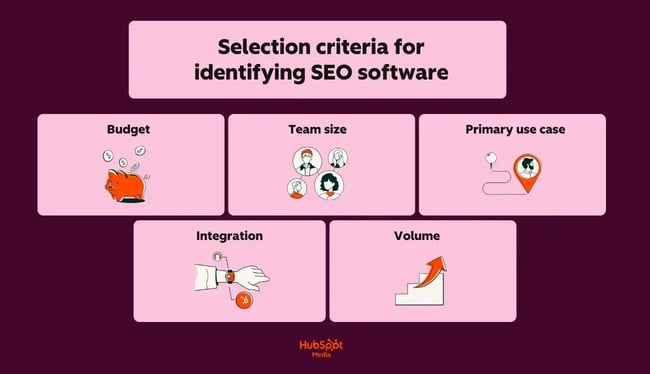
- Budget. Free SEO tools cover the basics; paid SEO tools unlock competitive analysis, advanced reporting, and scale.
- Team size. Some tools are built for solo use; others offer multi-seat access and client reporting dashboards.
- Primary use case. Are you focused on technical audits, keyword research, rank tracking, or content optimization?
- Integration. SEO software should integrate with your existing marketing and sales systems, including your CMS, CRM, and content workflows.
- Volume. How many pages, keywords, or domains do you need to manage regularly?
Recommendations for SEO software by team size
Here’s a breakdown of the best SEO tools that make the most sense for specific roles, team sizes, and goals:
- Beginners and small businesses. Those just getting started should leverage free SEO tools (i.e., Google Search Console for search performance, PageSpeed Insights for technical health, and to understand how your brand appears in answer engine results). These tools collectively provide foundational monitoring at no upfront cost.
- Content-focused teams. Writers, editors, and content strategists benefit most from pairing for topic discovery with for on-page optimization and performance tracking. extends this further by connecting SEO insights directly to content creation, publishing, and distribution workflows in one place.
- Agencies and SEO professionals. Teams managing multiple clients or large sites should anchor their stack around for competitive analysis and client reporting, and for deep technical audits on large or complex sites. Both tools offer the depth and scalability that client work demands.
Quick decision framework for choosing the right SEO software
Before committing to an SEO software, be sure to ask yourself these four questions:
- Can you invest $100+ per month in professional SEO software?
- Do multiple people need simultaneous access?
- What’s your primary bottleneck: technical issues, content gaps, search ranking, or AI visibility?
- How many keywords, pages, or domains do you actively manage?
The best SEO software is the one you’ll consistently use. Start with free tools, master the fundamentals, then upgrade when you hit real limits.
SEO site analysis software feature and pricing comparison
Free SEO Tools That Actually Deliver Value
I recommend using free SEO tools when your team needs foundational visibility into site health, search performance, speed, or AI presence without adding software costs. Free SEO analysis tools work best for quick checks and early-stage workflows where the goal is to identify obvious issues before investing in deeper audits.
Can you trust these tools? Absolutely. Google Search Console is a free tool that all businesses use for technical SEO audits and performance analytics. That said, free tools have limits. Most don’t support deep crawls, large-scale reporting, and advanced collaboration.
Now that I’ve given you the 411 on how to choose the right free SEO tool, here are a few options to choose from.
For Quick Website Health Checks
Some free tools from the list I use for fast diagnostics. They help me spot high-level issues and validate whether a site has obvious performance or technical problems.
1.
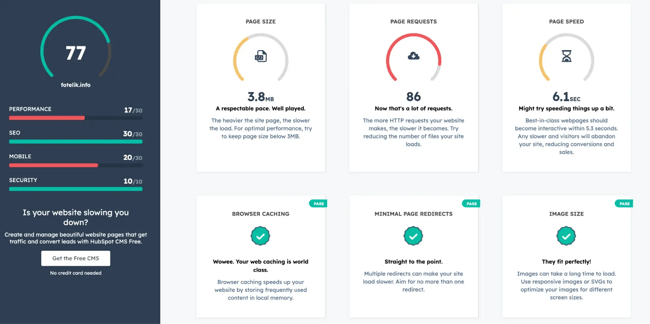
is a free website analysis tool that gives website owners a quick read on the site’s overall health across performance, SEO, mobile readiness, and security. The tool also says how to fix your SEO mistakes and why it matters.
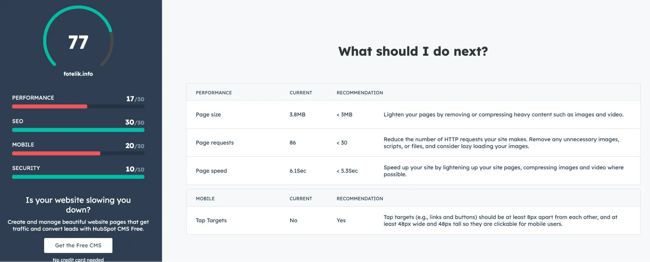
I recommend it when the goal is speed. It is one of the fastest ways to benchmark a site and identify whether a fuller audit is worth the time.
Key Features:
- Website performance scoring
- Basic SEO checks
- Mobile optimization review
- Security checks, including HTTPS
- Actionable suggestions for improvement
Limitations:
- High-level analysis only
- Not built for deep technical SEO audits
- No recurring crawl or monitoring workflows
Best for: Quick website health checks for marketers and small teams.
Who should use it: Marketers, founders, and small teams that need a fast website health snapshot before moving into deeper SEO analysis.
2.
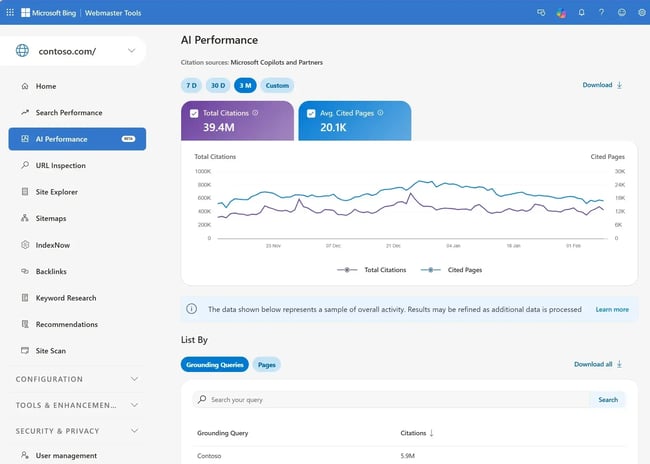
Microsoft Bing Webmaster Tools is a free SEO tool that mirrors much of Google Search Console’s functionality, but for Bing. Given that Bing powers a meaningful share of desktop searches and feeds results into AI tools like Microsoft Copilot, I think it’s an underutilized tool that’s worth adding to your stack.
Key Features:
- Search performance reporting for Bing
- Site crawl reports and crawl error detection
- A keyword research tool built directly into the software
- SEO analyzer with on-page recommendations
- Backlink data
Limitations:
- Bing’s market share is significantly smaller than Google’s
- Less third-party integration compared to Google Search Console
- Data insights are less granular than Google’s equivalent
Best for: Broader search coverage beyond Google.
Who should use it: SEO professionals and marketers who want full search coverage, particularly those targeting desktop users or tracking answer engine visibility.
3.
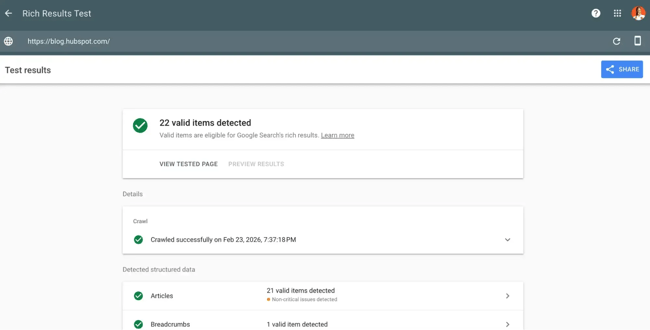
The Google Rich Results Test, part of tool, is a free SEO tool that checks whether your structured data markup is correctly implemented and eligible to generate rich results in Google Search.
I use Google Rich Results Test any time I add or modify schema markup; it catches errors before they affect how your pages appear in SERPs.
Key Features:
- Tests URLs or code snippets for valid structured data
- Shows which rich result types a page is eligible for
- Flags warnings and errors in schema implementation
- Supports all major schema types (Article, FAQ, Product, HowTo, and more)
Limitations:
- Validates markup only (doesn’t guarantee Google will display rich results)
- No bulk testing capability; analyzes one page at a time
- Requires a basic understanding of structured data to act on results
Best for: Technical SEO and structured data validation.
Who should use it: SEO professionals and developers implementing or auditing schema markup across their sites.
For Search Performance Tracking
When the job is to understand visibility, clicks, impressions, indexing, and trend movement over time, I use search performance tracking tools as a strong, free starting point.
4.
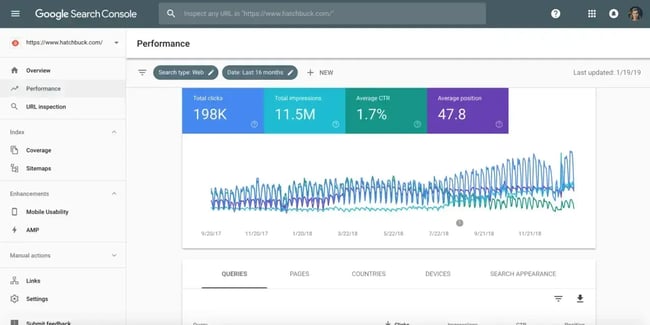
Google Search Console is a free SEO tool provided directly by Google that shows how your site performs in Google Search. It’s my non-negotiable starting point for any SEO audit; nothing tells you more about how Google actually sees your site than data straight from the source.
Key Features:
- Search performance reporting (clicks, impressions, CTR, average position)
- Index coverage reporting to identify pages Google can’t crawl or index
- Core Web Vitals monitoring
- Manual actions and security issue alerts
- Sitemap submission and URL inspection
Limitations:
- Data is limited to Google Search only (no Bing or other engines)
- Keyword data is sampled and capped at 16 months of history
- No competitor data or keyword suggestions
Best for: All website owners and SEO practitioners.
Who should use it: Every website owner, marketer, and SEO professional, regardless of experience level or budget.
5. +
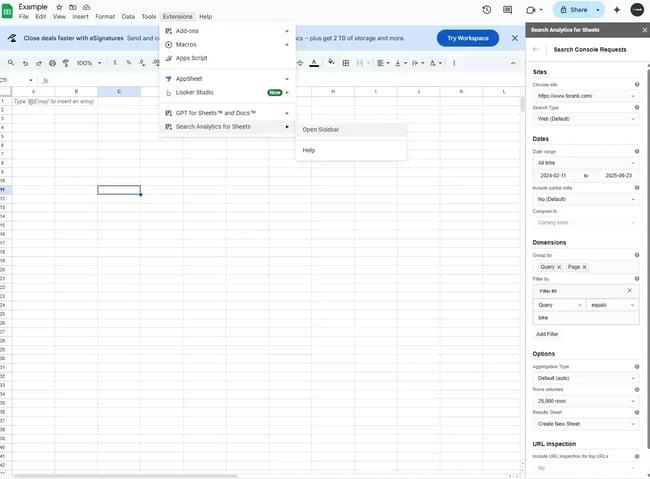
Search Analytics for Sheets is a free Google Sheets add-on that pulls Google Search Console data directly into a spreadsheet for custom analysis and reporting.
I recommend using this combination when there’s a need to go beyond Search Console’s native interface, particularly for tracking keyword trends over time or building client-ready reports.
Key Features:
- Direct Google Search Console data import into Sheets
- Customizable filters by date, device, country, and query
- Historical data comparison beyond Search Console’s native interface
- Fully customizable reporting and visualization
- Schedulable automatic data refreshes
Limitations:
- Requires familiarity with Google Sheets to use effectively
- No built-in visualizations (charts must be built manually)
- Data is still sourced from Search Console, so the same sampling limitations apply
Best for: Data-savvy marketers who want custom Search Console reporting.
Who should use it: SEO analysts and marketers who need flexible, custom reporting beyond what Google Search Console’s native dashboard provides.
6.
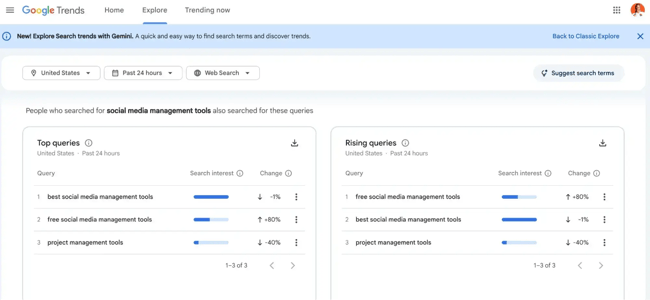
Google Trends is a free SEO tool that shows how search interest in a topic changes over time, across regions, and categories.
I rely on it heavily for content planning; it helps me validate whether a topic is rising, declining, or seasonal before investing time in a full article.
Key Features:
- Relative search interest over custom time ranges
- Geographic breakdown by country, region, and city
- Related queries and breakout topics
- Side-by-side topic comparisons
- Real-time trending data
Limitations:
- Shows relative interest, not absolute search volume
- No keyword difficulty or CPC data
- Works best when paired with a volume-based keyword tool
Best for: Content strategy and keyword trend research.
Who should use it: Content strategists and SEO teams validating topic demand before committing to content production.
7.
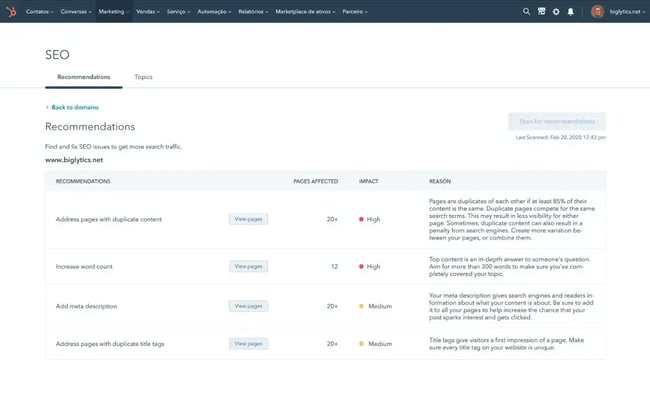
provides integrated SEO tools within its unified marketing software, connecting search optimization directly to content creation, CRM data, and campaign performance.
Unlike standalone SEO tools, makes SEO optimization part of the publishing process through the free and , so your team isn’t context-switching, which is why it’s my top recommendation for teams already on HubSpot. Create content, remix, distribute, and generate performance reporting in one place.
Key Features:
- On-page SEO/AEO recommendations embedded directly in the content editor
- Topic cluster and pillar page planning tools for building content authority
- Search performance reporting connected to contact and CRM data
- AI-assisted content suggestions and optimization with
- Integration with for end-to-end content strategy and publishing
Limitations:
- Full SEO features require a 糖心Vlog Hub or Content Hub subscription
- Less suited for deep technical audits compared to dedicated tools like Screaming Frog
- Competitive analysis features are less robust than Semrush
Best for: Teams using HubSpot who want SEO integrated into their marketing workflows
Who should use it: 糖心Vlog teams already using HubSpot who want SEO software that integrates with their CRM, content workflows, and campaign reporting rather than operating as a separate, siloed tool.
For Speed and Performance Diagnostics
Speed tools are best used when SEO pros need page-level performance data, Core Web Vitals insights, or technical diagnostics tied to loading behavior.
8.
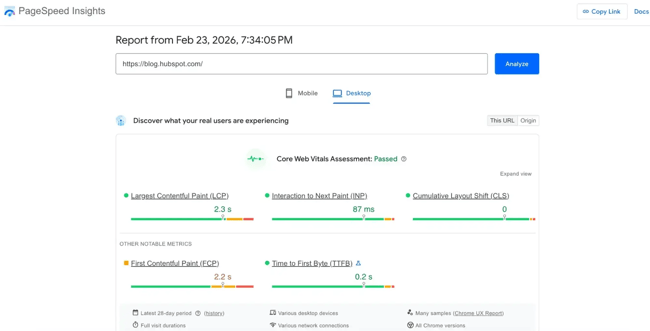
Google PageSpeed Insights is a free SEO tool that analyzes a URL’s loading performance and Core Web Vitals scores for both mobile and desktop. Use it to quickly diagnose speed issues before diving into deeper technical audits. It surfaces actionable fixes without requiring developer-level expertise.
Key Features:
- Core Web Vitals scoring (LCP, INP, CLS)
- Field data from real Chrome users alongside lab data
- Specific, prioritized recommendations for improvement
- Mobile and desktop performance are scored separately
Limitations:
- Analyzes one URL at a time (not suitable for site-wide audits)
- Recommendations require developer involvement to implement
- Lab data doesn’t always reflect real-world user experience
Best for: Technical SEO and web performance optimization.
Who should use it: Marketers and developers who need a fast, reliable read on page speed and Core Web Vitals performance.
9.
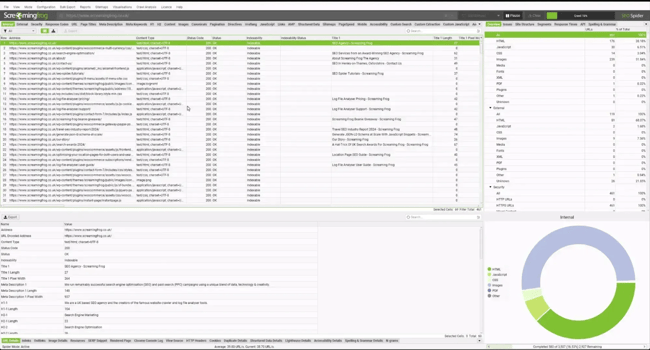
Screaming Frog SEO Spider is a desktop-based site crawler that audits websites for technical SEO issues at a depth most cloud-based tools can’t match. The free version crawls up to 500 URLs, which is enough for small sites and spot checks.
Key Features:
- Full site crawl surfacing broken links, redirect chains, and duplicate content
- On-page element analysis (titles, meta descriptions, headers, canonical tags)
- Integration with Google Analytics, Search Console, and PageSpeed Insights
- JavaScript rendering for crawling dynamic sites
- XML sitemap generation and visualization
Limitations:
- The free version is capped at 500 URLs
- Desktop-based (not accessible via browser or mobile)
- Steeper learning curve than most cloud-based SEO tools
Best for: Technical SEO audits on sites of any size.
Who should use it: SEO professionals and technical marketers who need comprehensive site crawl data, particularly for large or complex websites.
For AI Visibility Tracking
Free AI visibility tools are still a smaller category, but they matter the most now. As answer engine answers take up more search real estate, teams need a way to understand how their brand appears in answer engines alongside traditional search.
10.
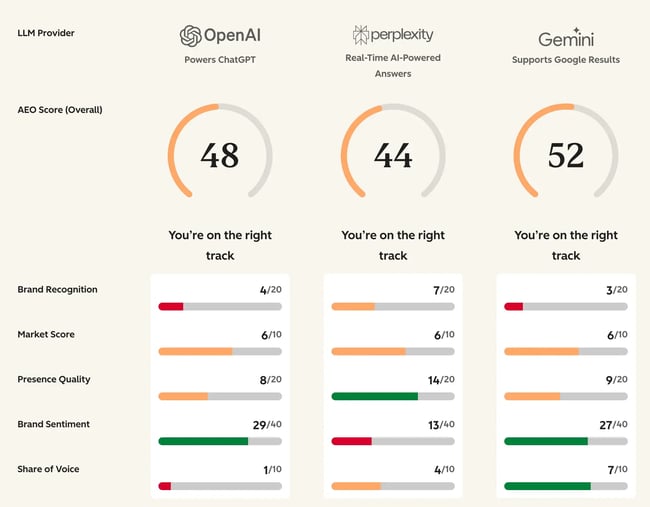
HubSpot is a free AEO tool that scores how prominently your brand appears in answer engines, including tools like ChatGPT and Perplexity. It evaluates visibility and suggests areas for improvement.
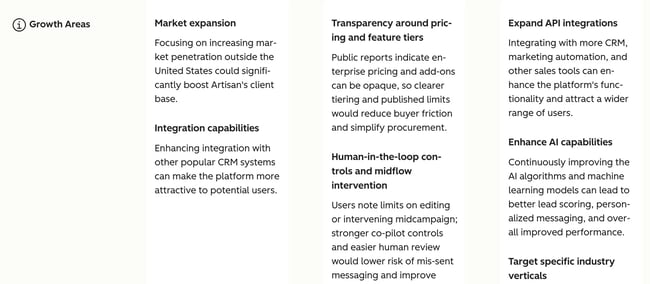
HubSpot AEO Grader is one of the few tools I’ve found that directly addresses answer engine optimization (AEO) and evaluates your website across dimensions such as share of voice, and sentiment analysis.
Key Features:
- Answer engine visibility score for your brand
- Sentiment analysis of how AI tools describe your brand
- Share of voice benchmarking against competitors
- Actionable recommendations to improve answer engine visibility
Limitations:
- Focused on brand-level visibility, not individual keyword rankings
- AEO metrics are still an emerging category — methodology will evolve
- Best used alongside traditional SEO tools, not as a replacement
Best for: Marketers tracking brand visibility in answer engines.
Who should use it: Marketers and SEO professionals who want to understand and improve how their brand appears in answer engines.
Access deep and ongoing AI attribution and AI visibility analytics with It finds and tracks the best prompts for your industry, creates competitor comparisons, and performs citation analysis. With HubSpot AEO, you can finally track ROI from answer engine optimization.
Paid SEO Audit Software for Scaling Teams
The free SEO tools I’ve shared are useful for diagnostics. Next, let’s look at some paid SEO tools if you’re ready for deeper crawls, recurring audits, integrations, and stakeholder reporting.
I personally use Ahrefs, HubSpot SEO Software, , ScreamingFrog, and SurferSEO from the list. Some of these tools have free trial periods. Some also offer entirely free plans, but with restrictions in terms of flexibility and customization. Keep this in mind!
For Comprehensive SEO Suites
These tools combine site audits, keyword tracking, competitor research, backlink analysis, and reporting in one interface. They work best for in-house SEO teams, agencies, and companies managing multiple sites.
11.
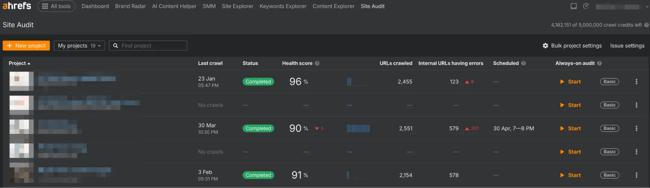
Ahrefs is one of the most widely used all-in-one SEO software tools on the market, with particular strength in backlink data and keyword research.
I consider Ahrefs the gold standard for link analysis. Its index is among the largest and most frequently updated available.
Key Features:
- Site Explorer for backlink profile and organic traffic analysis
- Keywords Explorer with search volume, difficulty, and click data across multiple search engines
- Site Audit tool for technical SEO crawling and issue detection
- Content Explorer for identifying top-performing content in any niche
- Rank Tracker for monitoring keyword positions over time
- Competitor gap analysis for keywords and backlinks
Limitations:
- No free plan (entry-level Lite plan starts at $129/month)
- Less integrated with CRM or content management workflows compared to HubSpot
- Steeper learning curve for users new to SEO software
Best for: SEO professionals who prioritize backlink analysis and keyword research.
Who should use it: SEO professionals, content marketers, and agencies who need deep backlink intelligence and comprehensive keyword data across a full site or competitive landscape.
12.
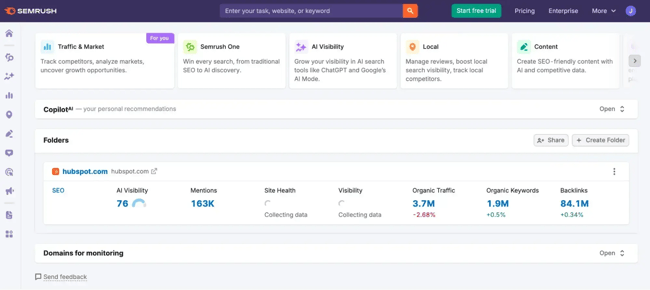
Semrush is one of the most comprehensive SEO software tools available, covering keyword research, competitive analysis, technical auditing, rank tracking, and content optimization in a single suite. Additionally, paid SEO software like Semrush offer advanced features (such as competitor analysis and technical audits) that justify the investment at scale.
Key Features:
- Keyword Magic Tool with 25+ billion keywords across geographic databases
- Domain and competitor analysis via Traffic Analytics and Organic Research
- Position Tracking for daily rank monitoring across devices and locations
- Backlink Analytics and Link Building tool
Limitations:
- Starter plan begins at $139/month (among the higher entry points for SEO software)
- Data volume can be overwhelming for beginners without SEO experience
- Some advanced features (like Agency reporting) require higher-tier plans
Best for: Agencies and enterprises needing all-in-one SEO software
Who should use it: Agencies, in-house SEO teams, and enterprises that need a single tool covering the full range of SEO functions at scale.
For Technical SEO Auditing
These tools prioritize crawl depth, diagnostics, and technical analysis. They are best for large sites, migrations, and ongoing technical SEO monitoring.
13. (Paid Version)
The paid version of removes the 500-URL crawl limit and unlocks automation, advanced extraction, and API integrations. It’s one of the most flexible tools for diagnosing indexing, architecture, and rendering issues across large sites.
Key Features:
- Scheduled crawls for recurring technical audits
- JavaScript rendering using Chromium for SPA frameworks
- Custom extraction using XPath, CSS selectors, and regex
- Log file analyzer integration for crawl budget analysis
- Google Analytics, Search Console, and PageSpeed Insights API integrations
- Crawl comparison to detect changes between site versions
- Custom robots.txt testing and rendering controls
Limitations:
- Desktop-based software (requires local machine resources like your RAM)
- No built-in keyword tracking or rank monitoring
- Reporting exports require manual setup for stakeholder summaries
Best for: Large-scale technical SEO audits and crawl-level diagnostics.
Who should use it: Technical SEO specialists, developers, and agencies auditing large or complex sites.
14.
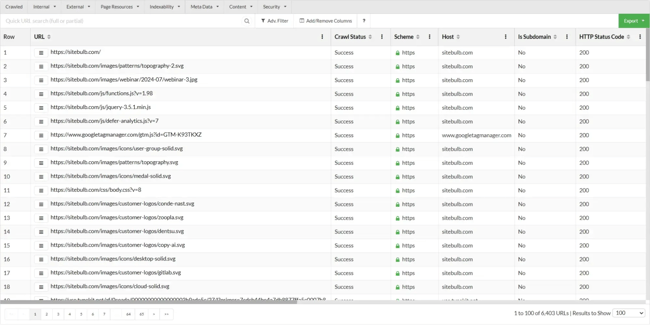
is a desktop-based crawler designed for technical SEO analysis with visual reporting. I find it especially useful when communicating technical issues to non-technical stakeholders.
Key Features:
- Full technical site crawler with JavaScript rendering support
- Visual crawl maps showing architecture depth and link flow
- Internal linking analysis with crawl depth visualization
- Structured data auditing with schema validation reports
- Crawl comparisons between audits
- Page type segmentation for templates and sections
- Page speed insights integration
Limitations:
- Desktop-based software (cloud version priced separately)
- Smaller third-party integration ecosystem than Semrush/Ahrefs
- No native backlink database
Best for: Visual technical SEO audits and stakeholder-friendly reporting.
Who should use it: Technical SEO professionals and agencies needing visual technical diagnostics.
For Integrated 糖心Vlog and SEO Workflows
These tools connect SEO audits with content, marketing, and CRM workflows. They work best for teams where SEO is embedded in broader marketing operations.
15.
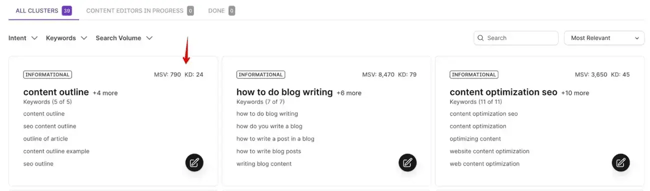
analyzes top-ranking pages and provides data-driven content recommendations for new content, together with an AI outline. It has a built-in Content Editor with the score system for on-page SEO and a content audit feature for existing pages.
Key Features:
- Content Editor with real-time optimization scoring
- SERP Analyzer compares ranking pages by word count, headings, and NLP terms
- Content Audit tool for existing pages
- Keyword clustering and topic grouping
- Content planner for topical authority mapping
- Google Docs and WordPress integrations
- AI outline and content generation support
Limitations:
- Not a technical SEO audit tool (no crawl-based diagnostics)
- Pricing starts around $79/month for content-focused plans
- Requires separate tools for site architecture and indexing analysis
- Recommendations based on correlation, not direct ranking factors
Best for: Content-driven SEO teams and content optimization tied to ranking signals.
Who should use it: Content marketing teams optimizing articles for search visibility.
16.
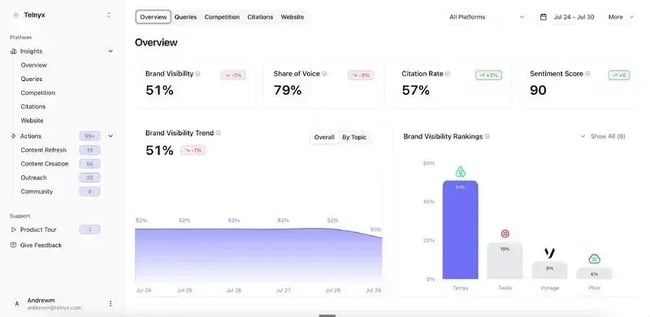
is an AI workflow tool that lets SEO and content teams build custom, repeatable AI pipelines without engineering support. This can include content briefs, metadata generation, keyword clustering, and content audits. SEO software should integrate with existing marketing and sales systems, and AirOps is built on that principle.
Key Features:
- Custom AI workflow builder for SEO and content tasks
- Pre-built templates for briefs, audits, metadata, and content refreshes
- Integrations with Google Search Console, Ahrefs, Semrush, and other SEO tools
- Bulk processing for large-scale keyword clustering and content operations
- Team collaboration features with workflow sharing and version control
Limitations:
- Airops requires integration with data sources like Search Console or Ahrefs to be effective
- Workflow setup requires upfront time investment
- Pricing scales with usage and team size; it can become costly at enterprise scale
Best for: SEO and content teams scaling AI-assisted workflows.
Who should use it: SEO managers and content operations teams who need to scale AI-assisted workflows across keyword research, content creation, and site optimization without manual repetition.
17.
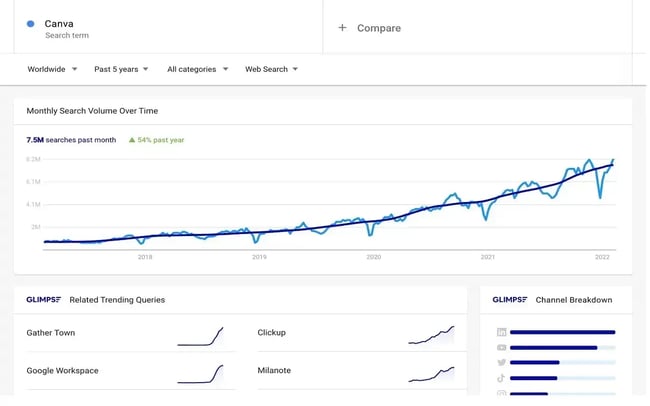
layers additional data on top of Google Trends, surfacing actual search volume estimates, trend velocity, and related topic suggestions that Google Trends alone doesn’t provide.
I recommend using Glimpse when there’s a need to turn a trend signal into a concrete content brief. It bridges the gap between “this topic seems interesting” and “here’s the data to justify writing about it.”
Key Features:
- Search volume estimates layered onto Google Trends data
- Trend alerts for rising topics in your niche
- Related keyword suggestions with volume data
- Trend velocity scoring to identify breakout topics early
- Export functionality for content planning workflows
Limitations:
- Full feature access requires a paid plan; pricing requires a demo call
- Data is directional rather than precise
- Less useful as a standalone tool without Google Trends context
Best for: Content strategists who want deeper trend intelligence.
Who should use it: Content-focused SEO teams who want to move faster from trend discovery to content execution.
18.
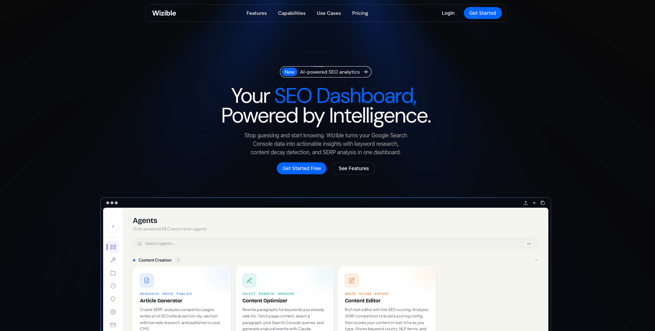
is an AI-powered SEO analytics platform built directly on top of your Google Search Console data, using a team of 22+ specialized AI agents to surface insights that are easy to miss in GSC's native interface. Instead of just visualizing clicks and impressions, it actively flags problems—like keyword cannibalization and content decay, and tells you what to do about them.
I'd reach for Wizible when a site has enough GSC history to mine, but the team doesn't have time to manually audit query and page performance. It turns raw Search Console data into prioritized, ranking-protecting actions.
Key Features:
- 22+ AI agents that analyze GSC data and generate actionable recommendations
- Keyword cannibalization detection to find pages competing for the same queries
- Content decay alerts that flag pages losing traffic before rankings collapse
- SERP preview to check how titles and descriptions render in search
- WordPress integration and Slack alerts for in-workflow monitoring
Limitations:
- Built on Google Search Console data, so insights are limited to Google (no Bing or other engines)
- Best suited to sites with enough historical GSC data for the agents to analyze
- Focused on analytics and recommendations rather than deep technical crawling
Best for: Teams that want AI-driven insights and alerts layered on top of their Search Console data.
Who should use it: SEO professionals, in-house marketers, and agencies who already rely on GSC and want automated cannibalization, content decay, and performance monitoring without manual analysis.
For Auditing AI Attribution and Share of Voice
19. and
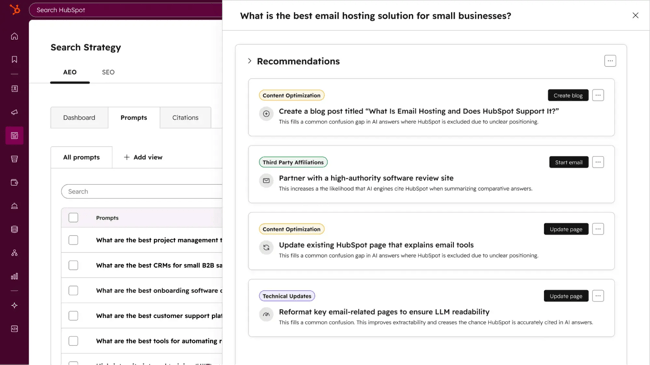
gives marketers a clear view of how their brand appears in AI-generated answers across ChatGPT, Perplexity, and Gemini. The tool tracks brand visibility, analyzes which sources and content types are driving citation.
already have access to AEO features, giving teams prioritized recommendations for improvements. Using CRM data, 糖心Vlog Hub automatically suggests and tracks the right AI prompts that matter for your market. The longer you use HubSpot, the smarter the HubSpot AEO tool gets since it trains on your industry, competitors, content library, and customer segments.
For example, when 糖心Vlog Hub's AEO features flag gaps in your owned content, HubSpot users can create new content with the If AEO identifies Reddit as a heavily cited source in your category, it suggests increasing the presence via Reddit integration with HubSpot. That’s a compounding advantage of using AEO features in 糖心Vlog Hub Pro.
Key Features:
- AI visibility score across ChatGPT, Perplexity, and Gemini
- CRM-powered prompt suggestions, auto-tuned to your business
- Full integration with your existing HubSpot workflows
- Citation Analysis across domains, content types, and source types
- Recommendations with prioritized actions to improve your AI visibility
- Weekly score tracking and trend alerts
Limitations:
- If you choose HubSpot AEO without 糖心Vlog Hub Pro or Enterprise, the CRM data won’t inform prompt suggestions.
- Teams that want to go from recommendation to published content in one system will get more value from AEO in 糖心Vlog Hub Pro or Enterprise.
Best for: 糖心Vlog and SEO teams who want fast visibility into AI prompts that cite you or your competitors instead, and where you’re completely absent across ChatGPT, Perplexity, and Gemini.
Who should use it: Marketers and business owners who want to see how their brand performs in popular answer engines, stack up against competitors, and get a clear action plan on improving the brand’s presence in LLMs.
Frequently Asked Questions About SEO Analysis Tools
How often should I run a website audit?
Run a full SEO audit at least quarterly, and after major website changes like migrations, redesigns, CMS updates, search engine algorithm updates, or large content launches. For enterprise-level websites, run a monthly audit for crucial pages. Most paid SEO audit tools support scheduled crawls so SEO teams can catch indexing issues, broken links, or performance regressions before rankings drop.
What’s the difference between free and paid SEO site analysis software?
Free SEO tools are best for quick health checks, basic diagnostics, and platform-native data. They typically focus on a single area like search performance, AI visibility, page speed, or structured data validation. Free SEO tools include:
- Google Search Console
- PageSpeed Insights
Paid SEO audit software supports deeper crawls, automation, historical tracking, integrations, and stakeholder-ready reporting. Teams usually upgrade when they need recurring audits, collaboration features, or visibility across larger websites.
Can I use multiple SEO tools together?
Yes. Most SEO teams use multiple tools because each one serves a different purpose. For example, Google Search Console tracks search performance, Screaming Frog handles technical crawling, evaluates AI share of voice, and Ahrefs supports keyword and competitor analysis. SEO pros and digital marketers need all the tools together for a complete SEO workflow.
Which website audit tools are best for beginners?
Beginners should start with tools that provide clear scoring and actionable recommendations.
- is useful for quick website health checks.
- Google Search Console helps track indexing and performance.
- Ahrefs Webmaster Tools is a free tier with surprisingly good technical data.
- PageSpeed Insights identifies speed issues.
- measures your brand’s AI visibility.
These tools provide enough insight without requiring deep technical SEO knowledge. As teams grow, they typically move to all-in-one SEO audit tools like Semrush or Ahrefs.
When should I upgrade to paid SEO monitoring software?
Upgrade when manual checks become difficult to maintain. This usually happens when a site grows beyond 500 pages, when multiple stakeholders need reports, you need white-label reports for clients, or when SEO issues must be tracked over time. If your organic channel drives meaningful revenue, the ROI calculation on a $100 to $500/month software is usually straightforward.
I’ll also say this: paid SEO software becomes necessary when you manage multiple sites or clients, need historical data at scale, or require advanced reporting beyond what free tools provide. Don’t pay for what you don’t need. Start free and upgrade only when your current tools become the bottleneck.
Do SEO tools integrate with other marketing platforms?
Most modern SEO audit tools integrate with analytics platforms, CMS tools, and reporting dashboards. Common integrations include Google Analytics, Google Search Console, Looker Studio, and content management systems.
Some platforms also connect directly to marketing tools. For example, HubSpot SEO Tools tie audit recommendations to content workflows in , making it easier to optimize a website’s content.
How do I choose between similar SEO tools?
Here’s your checklist for how to choose the best SEO software for your business:
- Define your primary use case and secondary features
- Compare crawl limits, reporting depth, integrations, and pricing
- Evaluate if the SEO audit tool fits your workflow
- Compare features and pricing for scaling up
- Check for integration with your current marketing stack
- Analyze support and learning resources
My advice is to test two similar tools using the same site audit and compare output quality before committing.
Start analyzing your website with confidence.
I always suggest choosing SEO site analysis software framed around the business maturity, not features. Early-stage teams need visibility and simple fixes. Growing teams need consistent reporting and deep crawls. Likewise, advanced teams need scale, lots of integrations, and automation.
So, the right tool is the one that supports the next operational step — and not all tools have to be paid. Before you go, here are a few quick recommendations to take with you:
- For foundational monitoring, use Google Search Console and PageSpeed Insights
- For answer engine visibility, use HubSpot AEO Grader and HubSpot AEO
- For content strategy, use Google Trends and Glimpse
- For technical audits, use Screaming Frog SEO Spider
- For all-in-one SEO, use Semrush or Ahrefs
- For content audits, use Surfer SEO
The next decade of discovery starts now. Find out what AI is saying about your brand before your competitors do. HubSpot AEO gives you the visibility, recommendations, and starting point to build your AEO strategy with confidence.
Editor's note: This post was originally published in December 2018 and has been updated for comprehensiveness.
.png)
Complete SEO Starter Pack
An introductory kit to optimize your website for search.
- Increase your organic traffic.
- Plan your keyword strategy.
- Debunk SEO myths.
- Build a blog strategy.
Download Free
All fields are required.
Form not available
You're all set!
Click this link to access this resource at any time.