Most professionals have said, “This meeting could’ve been an email.” Meeting fatigue is real, which is why teams benefit from stand-up meeting software. Tools that facilitate quick, daily team check-ins are growing in popularity.
In 2025, the collaborative communication tools market was valued at $48.9 billion. By 2035, it’s projected to hit . There are endless tools on the market that help teams collaborate through stand-ups, both in-person and virtually.
This guide breaks down the most popular stand-up meeting tools by category (synchronous, asynchronous, and automated), sharing overviews of top products and tips that teams can implement this week.
Table of Contents
- What is a stand-up meeting?
- Stand-up Meeting Format
- Stand-up Meeting Tools and Software
- Stand-up Meeting Best Practices for Digital Teams
- Stand-up Meeting Ideas
- Common Stand-up Meeting Problems and Solutions
- Choose Async When Possible
What is a stand-up meeting?
A stand-up meeting is a daily project update that lasts 15 minutes. During stand-ups, team members present current project progress, priorities, and obstacles. Stand-up meetings originated from Agile and Scrum software development teams, but are now widely used to improve cross-team communication and collaboration.
Daily stand-ups (versus weekly project check-ins) are standard to maximize project productivity for two reasons:
- Project tracking. Longer gaps between meetings make it harder to track progress and address roadblocks as they appear.
- Project evolution. Project priorities can change quickly, and having stand-ups too far apart can create information gaps between teams and slow delivery timelines.
Stand-ups have gained in popularity because they complement work trends like remote and asynchronous work. that loneliness is reported by 22% of remote workers, and communication issues are reported by 29%.
But more normal meetings aren’t a solution — they’re a part of the productivity problem that stand-ups aim to fix. Research from Atlassian found that are inefficient, and 80% of workers feel they’d be more productive spending less time in meetings. Stand-up meetings, both synchronous and asynchronous, work to solve these team connectivity problems.
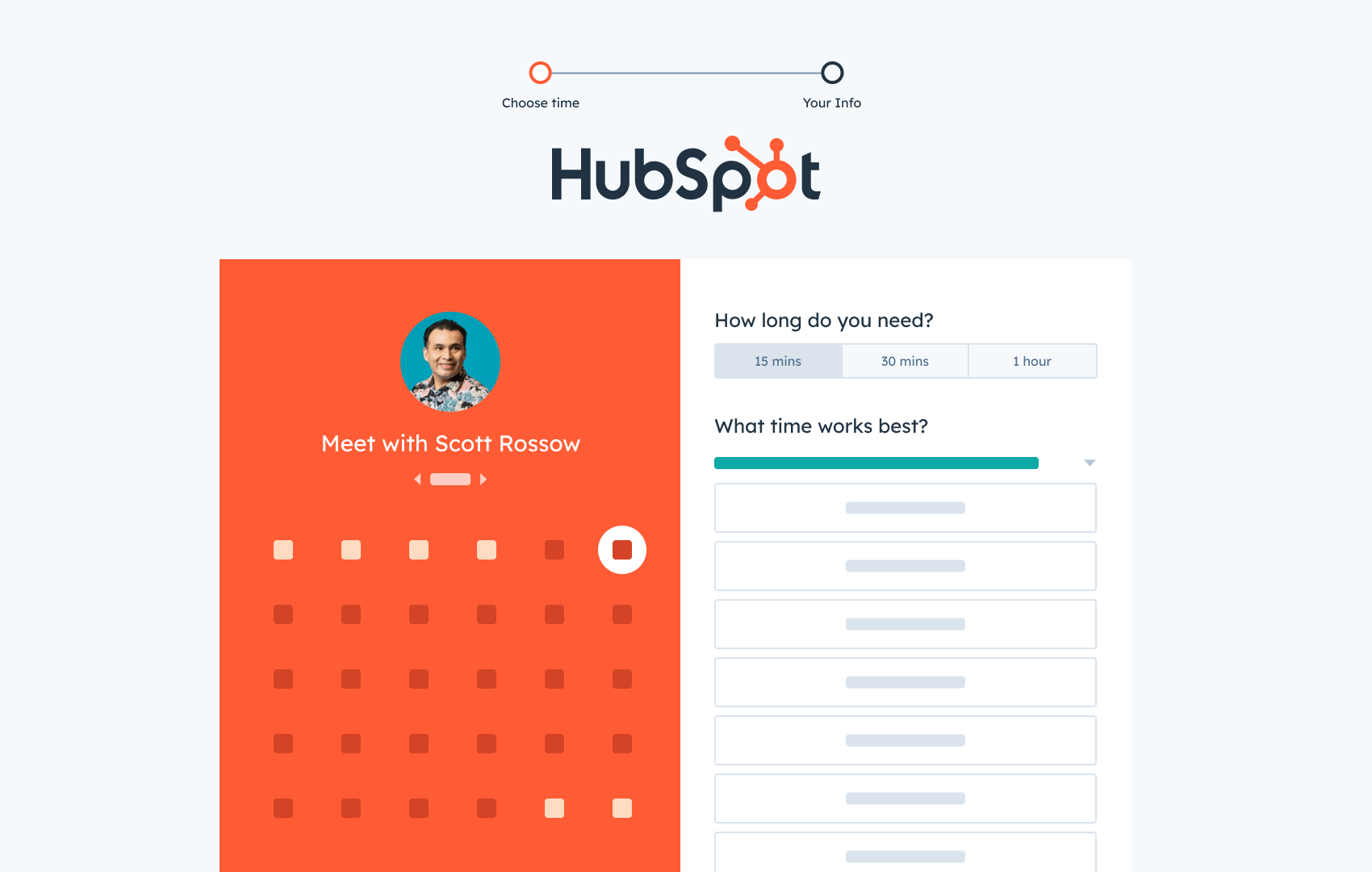
HubSpot's Free Meeting Scheduler
Schedule meetings faster and forget the back-and-forth emails. Your calendar stays full, and you stay productive.
- Let prospects book a meeting time
- Book more meetings and appointments
- Sync with Google and Office 365 Calendar
- And more!
|
Synchronous Stand-Ups |
Asynchronous Stand-Ups |
|
|
Summary |
|
|
|
Popular Tools |
|
|
To understand why stand-ups exist, it helps to understand the agile methodology.
Agile Methodology
Agile methodology is built around iterative development, which makes teams more involved in the project’s progress. Teams often work in sprints, using regular check-ins like stand-ups to address issues quickly and efficiently.
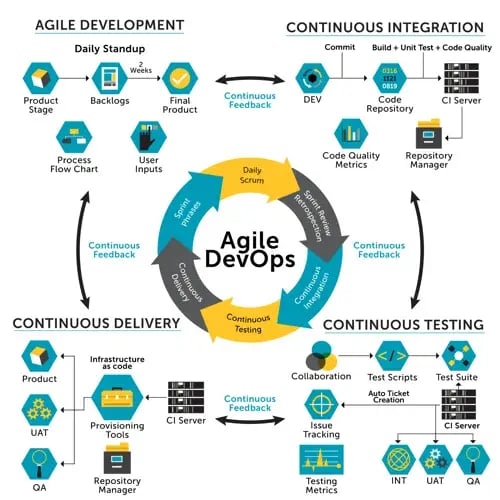
Agile is a change for companies using a waterfall model for projects. In waterfall, teams tackle projects one stage at a time and assume that requirements stay the same through development. There are three issues with the waterfall approach:
- Alignment. Teams are not always aligned.
- Delays. Unclear requirements often delay progress.
- Testing. Testing only begins after development is done.
Within agile teams, practices like stand-ups emerged to improve project productivity. But productivity with a daily stand-up meeting isn’t guaranteed. A specific format helps teams maximize the benefits.
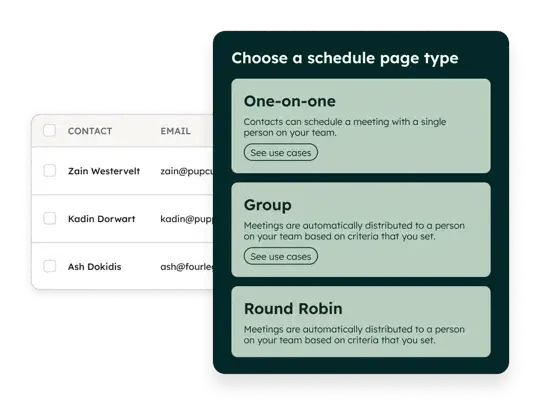
Scheduling stand-ups involves coordinating multiple schedules. helps internal teams book meetings by offering group scheduling links that display when all team members are available.
Stand-up Meeting Format
During a daily stand-up meeting, team members often answer three questions regarding their progress and problems:
- Progress. What’s been worked on since the last meeting?
- Current action. What’s being worked on now?
- Problems. Are there any blockers impeding progress?
The three-question format helps team members and leaders track everyone’s progress and assess what needs to be done to meet sprint goals.
How it’s done: In synchronous stand-ups, team members answer these questions one by one in a round-robin fashion. In asynchronous stand-ups, these same prompts are typically collected using stand-up software or chat tools rather than discussed live.
Let’s use my role as a writer on a blog team as an example. During a stand-up, here’s what I would say:
- “Yesterday, I finished writing X article and completed my second draft for Y article. Today, I will upload Y article to the content management system (CMS) and will draft two outlines for new articles. My current obstacle is that I lost access to the CMS and need to connect with someone from IT to regain access.”
From there, my manager could connect me with a specific engineer on the IT side and follow up with me after the stand-up. Following this format gives everyone involved in the meeting a clear overview of what they’re working on and how that will affect the sprint.
Stand-up Meeting Tools and Software
Stand-up meeting tools can be broken down into three main categories: synchronous, asynchronous, and automated software. Tools range from standard video call software to automated in-chat stand-up bots.
|
Tool |
Top Stand-up Features |
Price |
|
Google Meet |
Live video meetings, calendar-based scheduling, and automatic transcripts or notes |
Free plan, $7/month paid plan |
|
Team O’clock |
Timeboxed meeting facilitation with speaking order, timers, and agenda controls |
Free plan, $3/month paid plan |
|
MyCheckins |
Automated asynchronous check-ins with recurring prompts |
Free plan, $1.99/month paid plan |
|
Geekbot |
Chat-based asynchronous stand-ups delivered through Slack or Microsoft Teams with scheduled questions and reminders |
Free plan, $2.50/month paid plan |
|
Polly |
Automated stand-ups and polls that use interactive prompts to encourage participation and collect updates |
Free plan, $12/month paid plan |
|
Spinach AI |
AI-generated meeting notes that capture discussions and suggested follow-up tasks |
Free plan, $2.90/meeting hour paid plan |
For teams already on the HubSpot platform, give the meeting scheduler a spin. supports internal coordination by syncing team calendars with the CRM to automatically block busy times and prevent scheduling conflicts.
Synchronous Stand-up Software
Synchronous stand-up tools support real-time meetings held in person or over video. These tools work best for teams that operate in similar time zones and benefit from live discussion. Two popular options are Google Meet and Team O'clock. Key features to look for include:
- Reliable video or audio quality for the entire team.
- Ease scheduling, joining, and participating.
- Integration with calendars and team tools.
- Light facilitation or timeboxing features.
Google Meet is a widely used video conferencing platform that supports real-time stand-up meetings for teams working in similar time zones. It provides reliable video calls, easy scheduling through Google Calendar, and built-in transcription and captioning features. While it isn’t designed specifically for daily stand-ups, many teams use it because it integrates seamlessly with existing Google Workspace tools.
Key Features
- Easy joining and scheduling.
- Integration with calendars and team tools.
- Automatic transcription and note-taking.
Pros
- Accessibility features like live meeting captions (paid plans).
- Easy to use.
- Already included in the tech stack for many teams.
Cons
- No stand-up-specific structure.
- No participant monitoring to assist with facilitation and to stay on schedule.
Best for: Teams already using Google Workspace.
Price: Free plan available with paid plans (for Google Workspace as a whole) starting at $7/month.
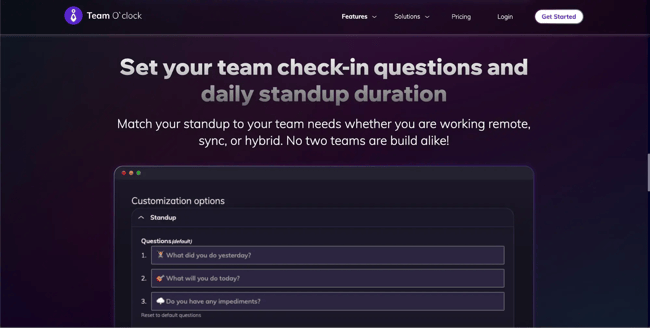
Team O’clock is a stand-up meeting tool designed to keep daily meetings short, structured, and on schedule. It includes built-in facilitation features like speaker order, timers, and timeboxed agendas to help teams avoid long or unfocused stand-ups. The tool focuses specifically on improving meeting efficiency rather than serving as a general video conferencing platform.
Key Features
- Timeboxed agendas.
- Speaker timers.
- Meeting facilitation.
Pros
- Keeps stand-ups brief and on schedule.
- Team-focused.
- Facilitates both synchronous and asynchronous meetings.
Cons
- Limited integrations and customizations.
Best for: Teams struggling with long, run-on stand-ups.
Price: Free plan available with paid plans starting at $3/month.
There are many popular tools developed for synchronous daily scrum meetings. More software options include Parabol and Zoom.
Asynchronous Stand-up Tools
Asynchronous stand-up software collects updates without requiring team members to be present at the same time. These tools are designed for remote or distributed teams and help reduce meeting overload. Updates are usually structured and documented automatically. Key features to look for in asynchronous stand-up tools include:
- Scheduled daily prompts and reminders.
- Easy integration with tools like Slack.
- Centralized summaries of updates.
- Time zone awareness.
- Engagement features.
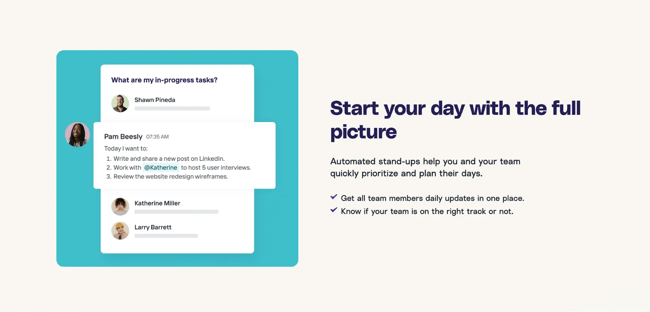
MyCheckins is an asynchronous stand-up tool that allows teams to share updates without meeting at the same time. It sends scheduled prompts and collects responses in a centralized dashboard so everyone can review progress when convenient. This approach works especially well for remote or distributed teams working across multiple time zones.
Key Features
- Scheduled async check-ins.
- Customizable prompts.
- Centralized update history.
Pros
- Designed specifically for async updates.
- Clear, structured responses.
- Good visibility across teams.
Cons
- Requires habit-building.
Best for: Teams that want stand-up updates stored in a dedicated dashboard rather than scattered across chat threads.
Price: Free plan available with paid plans starting at $1.99/user.
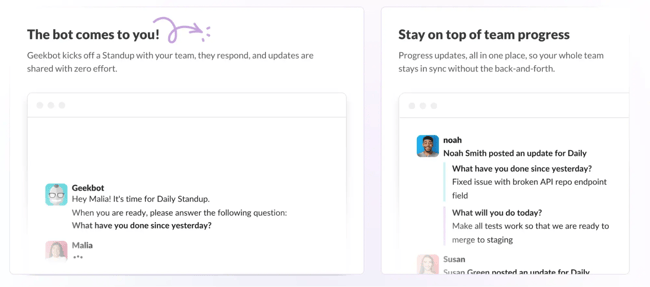
Geekbot is a chat-based stand-up tool that runs directly inside Slack or Microsoft Teams. It automatically asks scheduled stand-up questions and compiles responses into summaries for the team to review. By fitting into existing chat workflows, Geekbot allows teams to run daily stand-ups without scheduling meetings.
Key Features
- Automated standup questions.
- Slack and Teams integration.
- Scheduled reminders.
Pros
- Quick to set up.
- Fits into existing chat workflows.
Cons
- Updates can get buried in chat.
- Limited integrations.
Best for: Teams that prefer stand-ups to happen directly inside Slack or Microsoft Teams.
Price: Free plan available with paid plans starting at $2.50 per user/month.
More asynchronous meeting options include Standuply and ScrumGenius.
Automated Stand-up Tools
Automated stand-up tools focus on removing manual work around meetings. They use AI to set summaries and reporting to autopilot. Two popular automated stand-up tools to consider are Polly and Spinach AI. Key features include:
- Automatically-generated action items and updates.
- Automated prompts and scheduling.
- Integration with existing tools.
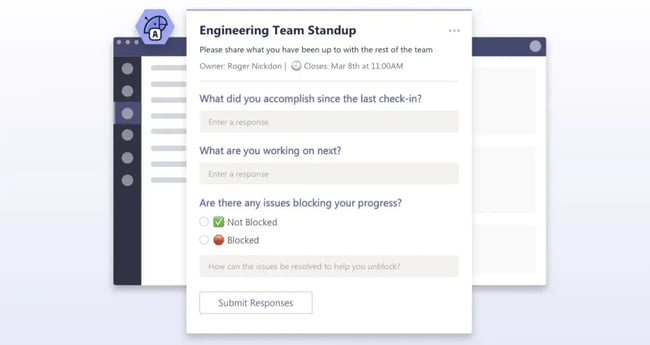
Polly is an automation tool that helps teams run stand-ups and collect updates using interactive prompts and polls. It works within Slack and Microsoft Teams, making it easy for teams to participate without switching platforms. Polly focuses on lightweight automation and engagement to help teams gather updates quickly and consistently.
Key Features
- Automated polls and stand-ups.
- Scheduled reminders.
- Summary reports.
Pros
- Flexible question formats.
- Easy to customize.
- Works inside Slack and Microsoft Teams.
Cons
- Limited integrations.
Best for: Teams wanting lightweight automation that fits into a Microsoft Teams or Slack tech stack.
Price: Free plan available with paid plans starting at $12/month.
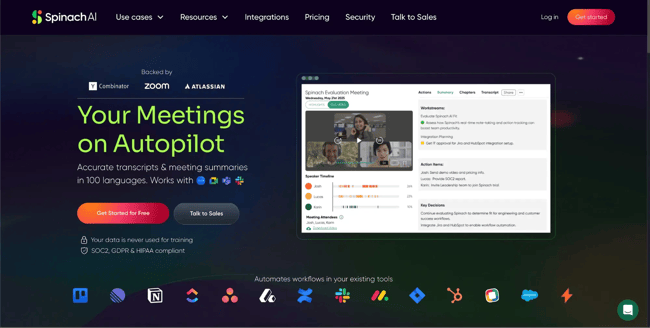
Spinach AI is a meeting assistant that uses artificial intelligence to capture notes, summaries, and action items from stand-up meetings. It automatically records key points and follow-up tasks so teams can focus on discussion instead of manual note-taking. This makes it especially useful for teams that want clear documentation and accountability after meetings.
Key Features:
- AI meeting notes.
- Automatic summaries.
- Action item capture.
Pros
- Reduces manual note-taking.
- Helpful for follow-ups.
- Works across meeting types.
Cons
- Uploading video retroactively takes extra time.
Best for: Teams that want automated meeting takeaways.
Price: Free plan available with paid plans starting at $2.90/meeting hour.
Other automated stand-up tools include Fellow and Hypercontext.
Stand-up Meeting Best Practices for Digital Teams
Effective stand-ups are the result of intentional choices, both in facilitation and in software. Here are software recommendations and a few tips that most teams can benefit from, whether they’re working together in real-time or collaborating across the globe.
1. Choose software that enforces time limits.
Enforcing brevity is difficult in short meetings, especially a 15-minute stand-up. One team member can single-handedly derail the entire group. Shift the responsibility of timekeeping from the team lead to the tools.
Rather than the scrum master manually keeping track of time and stepping in to move things along, consider a software that’s built for this exact problem.
Tools like Team O’clock enforce an environment where all parties are prepared to speak and able to monitor themselves. Each participant can see when they’ll be called on, and as each member speaks, a colored bar indicates how much of the allotted time is left:
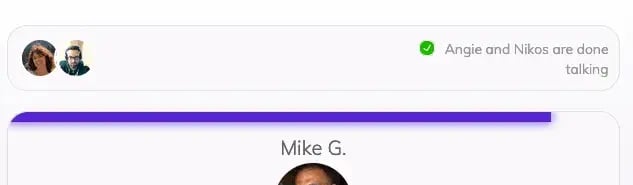
When meetings still run over, teams might benefit from asynchronous stand-ups where members type their contribution instead of going into verbal overdrive.
What I like: Not only does this feature from Team O’Clock take the pressure off of the facilitator to cut someone off, but it also helps team members practice self-awareness by monitoring their time spent speaking within the video call interface.
2. Use tools to capture and automate follow-ups.
Stand-up meetings have a clearly defined goal: to know everyone’s main focus and determine roadblocks that may affect the sprint. Once issues have been identified, follow-up meetings with smaller groups can be scheduled to address them, whether it’s to brainstorm solutions or resolve them. Consider using tools to initiate these follow-up meetings.
This reduces mental load on the facilitator and builds on the momentum of the meeting. It also cuts the delay between information and action (especially for asynchronous teams). Daily stand-up software like Spinach AI listens to follow-up meetings, summarizes discussions, and flags follow-up actions.
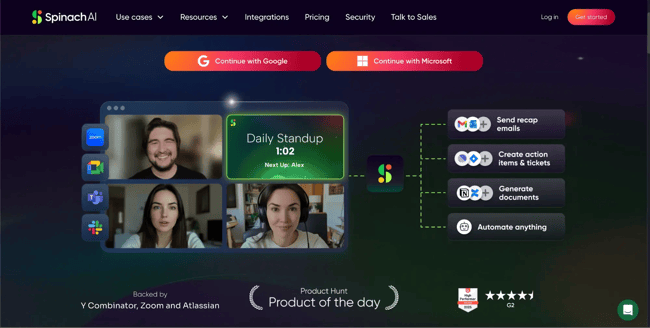
For example, let’s say during a stand-up, your team’s UX designer says they have a roadblock with the app design requirements and need more instruction from the product owner. While it’s great to mention the issue, the stand-up is not the time to get into the details. After the follow-up, quickly initiate a follow-up meeting with said product owner.
3. Let software standardize stand-ups.
Unpredictable stand-ups are sluggish at best and chaotic at worst. Software can automate the three most important stand-up factors: the agenda, frequency, and meeting length.
- Agenda. There are only three main areas a stand-up should cover: yesterday’s outcomes, today’s priorities, and current obstacles.
- Frequency. If the meetings are irregular, how will team members stay on the same page? When teams skip meeting days, details fall through the cracks and lead to more issues down the sprint.
- Meeting length. Fifteen minutes is the magic number for stand-ups. Make them much longer, and it turns them into something else that likely won’t be as productive.
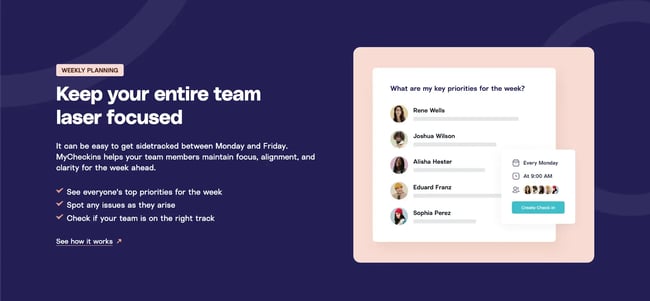
The right software investments create consistency by default instead of leaving it to fate each day. Automate reminders and schedule check-ins to prevent missed stand-ups, especially for remote and asynchronous teams.
Stand-up Meeting Ideas
Well-run stand-up meetings feel focused, useful, and easy to repeat. Here are practical tips that teams can use to maintain momentum.
1. Actually stand up.
The name “stand-ups” stems from the fact that these meetings are meant to be quick (so quick that attendees could be standing up). When in-person teams are having trouble staying on task, the no-chairs approach can be a simple way to break the pattern and distinguish stand-ups from normal business meetings.
If able, try having every attendee stand up while each person presents. This should encourage brevity and create a quick-touch atmosphere. Note that this isn’t recommended when it would isolate team members who are unable to stand.
2. Use a prop.
Instead of going around the table in order, switch speakers by passing a ball. Once a speaker has presented, they’ll choose the next person to speak by throwing the ball to them. This continues around the room until everyone has contributed.
Props can be useful during in-person meetings as they help attendees stay engaged. The anticipation of receiving the prop next can keep everyone on their toes.
It’s easy to drift off when you know your turn isn’t for another 10 minutes. This strategy encourages attention while making things fun.
3. Incorporate an icebreaker.
Most stand-ups happen daily. However, for teams that conduct them less often, it can be helpful to use an icebreaker to loosen everyone up. Some stand-up meeting software, like Team O’clock, has icebreaker questions built in.
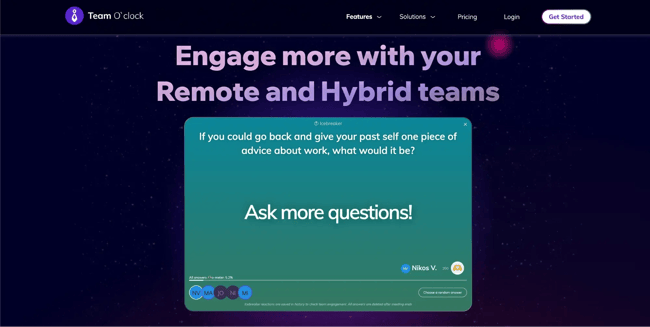
On HubSpot’s blog team, we have a rotating team member ask a question to start the meeting off. Past questions have ranged from “What is your dream vacation?” to “What would be the name of your memoir in six words?” It starts every meeting off on a lighthearted note before getting to the nitty-gritty work details.
HubSpot's Free Meeting Scheduler
Schedule meetings faster and forget the back-and-forth emails. Your calendar stays full, and you stay productive.
- Let prospects book a meeting time
- Book more meetings and appointments
- Sync with Google and Office 365 Calendar
- And more!
Common Stand-up Meeting Problems and Solutions
The most common stand-up meeting problems usually come down to structure or incorrect tools. For example, meetings may be too long, in mismatched time zones, or lack engagement. Many pain points teams face can be alleviated with the right software choices that focus on improving participation and keeping stand-ups productive.
Stand-ups Run Too Long
Face-to-face meetings, whether in person or video calls, can easily stray off-topic and be huge time wasters. Alternatively, text-based stand-ups prevent side discussions that can steer the conversation off track. Team members can direct message each other or start a thread that won’t disrupt the flow of information.
A tool like allows teams to:
- Send daily prompts to every team member based on working hours.
- Collect answers and send them to Microsoft Teams or Slack channel.
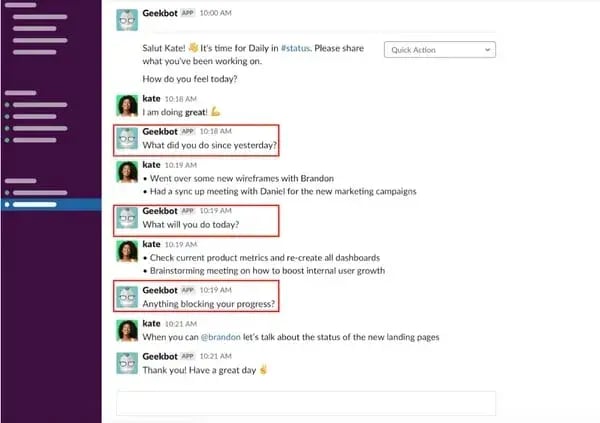
Asynchronous text-based stand-ups keep everyone on the same page while working within their schedules.
Time Zone Chaos
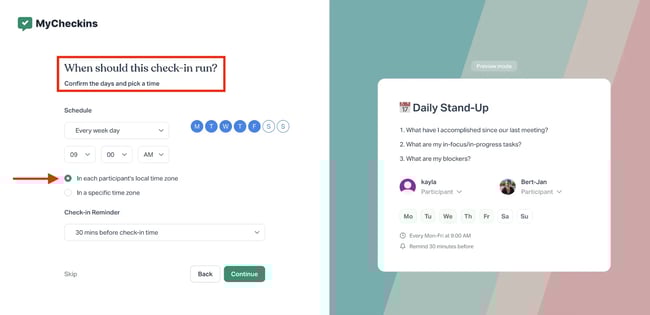
The whole team doesn’t need to speak in real-time to reap the benefits of a daily meeting. Different time zones are easy to navigate with asynchronous stand-up software. There are only four steps required to set this up:
- Questions. Input stand-up questions.
- Time. Choose when the questions should be sent to team members.
- Automatic time zone detection. Let the software send the check-in prompt at the right time for each user.
- Collect responses. Responses are accumulated in one centralized channel.
Setting this up can take less than a minute with a tool like MyCheckins:
can also help. Teams can find a time that works for everyone, even if attendees are scattered across time zones.
Low Engagement
The repetitive nature of stand-ups can make team members tune out. While the routine and predictability of a stand-up meeting are important, facilitators must also incite engagement.
Stand-up software like Polly can increase participation through prompts, polls, gamification, and surveys. In less than a minute, leaders can create an interactive element like the word cloud below to add an engaging element to digital stand-up meetings.
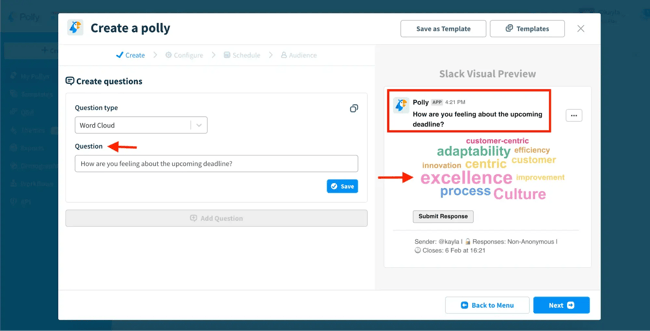
To help automate this process, it’s even possible to schedule recurring interactive elements directly with a Slack channel:
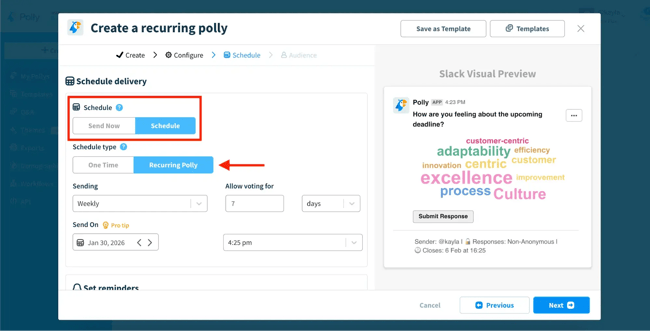
Not only does Polly help with more engagement, but it also generates more equitable participation. When speaking live in front of a group, some members will always talk more than others. Engagement tools help collect equal input from all members.
No Follow-through
Question three of a stand-up meeting is about blockers to success. Productive stand-ups should flow directly from blockers to action items. Otherwise, follow-through becomes murky. Software can help connect the dots between verbal/written updates in a stand-up meeting and the action items that are required to resolve problems.
Three steps must be taken to achieve this:
- Capture. This is done automatically in async stand-ups and can be added to sync stand-ups if they’re recorded.
- View. Allow all necessary participants to view and search the stand-up summary.
- Act. Integrate stand-up platforms with task or project management software for actionable follow-up.
One stand-up tool that has follow-through built into the structure is Spinach AI. Teams can upload meeting recordings to get summaries, transcripts, and action items automatically generated. Spinach AI can then sync with task management tools like Monday.com, Trello, ClickUp, and Asana so to-dos don’t evaporate after the daily stand-up.
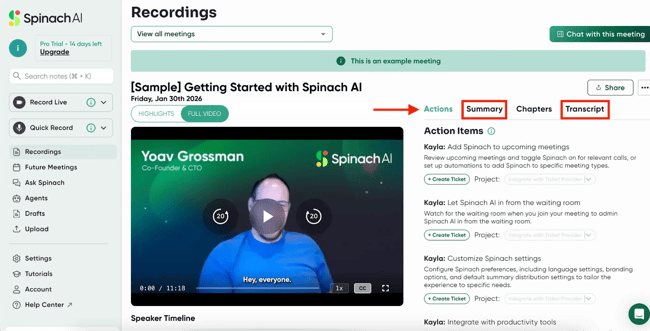
When one-on-one follow-up meetings are required, use to automate calendar sync and get something booked immediately.
Status Updates Instead of Collaboration
If stand-ups dissolve into status reports instead of collaborative problem-solving, then meetings become more of a reporting exercise rather than a collaborative tool. When stand-ups are feeling stale, pivot the questions being asked to encourage collaborative thinking.
For example, within GeekBot, users can select the “daily sync” template, and it automatically pulls prompts that encourage collaborative thinking:
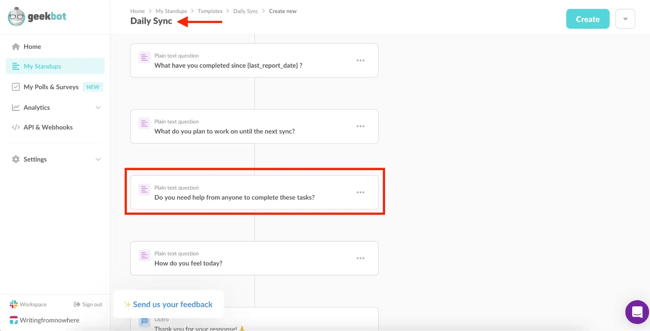
The question “Do you need help from anyone to complete these tasks?” is just a slight pivot away from the standard, “Are there any blockers impeding progress?” prompt. But the fact that it’s unexpected at all makes it effective as a pattern disruptor.
In my experience, collaboration improves when stand-ups zoom out from activity alone and encompass the intersections between teammates where work overlaps. Use the variety of prompts within stand-up software to help freshen stand-ups when responses become too automated and stale.
Choose Async When Possible
Asynchronous stand-ups save time and support distributed teams. The written record of these stand-ups also functions as a searchable project record/print backlog, without requiring meeting recordings to be retroactively uploaded. But asynchronous stand-ups alone won’t solve every productivity issue — these updates still need a clear path to discussion and resolution.
As valuable as live meetings are, most teams don’t require them to discuss what everyone accomplished yesterday and has ahead of them today. Daily stand-ups can be async. Then, teams can schedule live meeting follow-ups to overcome roadblocks together.
Overcome blockers by using to quickly book follow-ups or for centralizing communication.
Automate the routine.
Routine project processes like stand-ups should not rely on memory or discipline. Automation ensures stand-ups happen even on busy days and requires no manual effort from team leaders.
Stand-up meetings can leverage automation in three places:
- Reminders. Automatically ask team members to share daily updates at the right time for their time zone.
- Updates. Bring status reports into a single, searchable channel.
- Summaries. Capture and summarize stand-up contents.
Automation works best when follow-up actions are easy to coordinate. HubSpot tools support this by automatically logging meeting activity and keeping follow-up conversations connected to shared records, reducing the need for manual tracking.
Integrate with your workflow.
Stand-ups lose momentum when updates are scattered between tools. Teams shouldn’t have to transfer notes or action items manually. The smoothest setups connect updates directly to calendars, tasks, and conversations.
For example, Spinach AI integrates directly with HubSpot to sync meeting data and offer insightful summaries directly within your CRM.
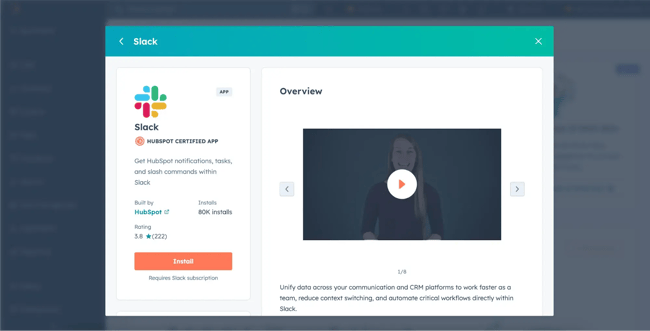
can also be connected to automatically share important activity from HubSpot (like tasks, notes, and meetings) in the dedicated #daily-standup channel. Teams can configure this so only relevant updates on a specific project show up, allowing everyone to come into the stand-up already aligned on what changed, what’s in progress, and where there might be blockers.
Stand-up software should complement the team’s existing tech stack. Before committing, ensure the software deeply integrates with existing tools and workflows.
Customize for context.
Static standup formats can lead to disengagement. When the meetings stagnate, pivot questions to disrupt patterns and open up conversation again.
HubSpot’s AI tool can summarize records and recent activity into short, contextual briefs. In practice, teams can use this before a stand-up to auto-generate a quick summary of a project record:
- Any highlighted risks or next steps.
- Which teammates were involved.
- What meetings happened.
- Which tasks moved.
With this orientation, the questions posed in the stand-up will be grounded in what actually changed on the project.
Measure and iterate.
Teams and projects are constantly evolving, and stand-ups need to be reviewed and refined when they become unproductive. Measuring stand-ups helps teams pivot frequency, prompts, or format over time.
HubSpot’s reporting and AI features help teams understand what happens between and after stand-ups. With Breeze AI and other CRM insights, teams can summarize meetings and calls, making it easier to spot gaps in engagement and refine standup practices based on real activity data instead of assumptions.
Daily stand-ups are an easy way to channel start-up culture in any team. For more productivity ideas to help teams run smarter, download our free guide and templates.
Get standing (metaphorically).
Use stand-ups to radically improve communication between teams and keep everyone aligned on large project goals. Stand-ups will never completely eliminate the need for longer meetings, but they help teams stay connected no matter how many moving parts the project has.
The market is rich with synchronous software to speak in real-time, and asynchronous stand-up tools help support remote team members. There’s no single “best” tool, but the features, price points, and integrations outlined in this guide will help teams make an investment that suits their needs.
Looking to book a stand-up and need to find the right time to meet? Use HubSpot Meeting Scheduler to make calendar management easy.
HubSpot's Free Meeting Scheduler
Schedule meetings faster and forget the back-and-forth emails. Your calendar stays full, and you stay productive.
- Let prospects book a meeting time
- Book more meetings and appointments
- Sync with Google and Office 365 Calendar
- And more!
Meetings






![Do You Really Need to Hold That Meeting [Quiz + Tips]](https://53.fs1.hubspotusercontent-na1.net/hubfs/53/time-wasted-meetings-data_2.webp)

-May-13-2026-06-38-53-3639-PM.webp)