.png?width=112&height=112&name=Image%20Hackathon%20%E2%80%93%20Horizontal%20(51).png)

Business meetings are one of the most common — and most complained-about — parts of modern work. Teams rely on business meetings to align priorities, make decisions, and move projects forward, yet many meetings still feel unfocused, unnecessary, or overly long.
The challenge has only grown in hybrid and remote environments. suggests the average employee is interrupted every two minutes (about 275 times per day), and more than half of meetings are ad hoc calls without calendar invites — two conditions that make productive business meetings harder by default.
With calendars packed and attention fragmented, business meetings now compete with deep work, asynchronous collaboration, and, as mentioned in the Microsoft study, constant notifications. When meetings lack a clear purpose or structure, the cost shows up quickly in wasted time and disengaged teams.
In this guide, I’ll break down the types of business meetings leaders need to master, along with proven strategies I’ve used to make meetings shorter, more focused, and far more effective — without adding more to anyone’s calendar.
Table of Contents
Types of Business Meetings You Need to Master
Business meetings fall into a few core categories, each with a distinct purpose, format, and success criteria. Understanding the type of meeting being held is the foundation of running it well. Without that clarity, meetings often drift, overrun, or fail to produce clear outcomes.
Status Meetings
Status meetings are designed to share progress updates, surface blockers, and maintain alignment across a team or project.
These meetings work best when the goal is visibility rather than deep discussion. In my experience, status meetings become inefficient when they turn into problem-solving sessions or status updates that could have been shared asynchronously.
Best for: Ongoing projects, cross-functional alignment, weekly or biweekly team check-ins.
Pro tip: Limit verbal updates to exceptions only. If everything is on track, the update should be brief or skipped entirely. Some teams now pair status meetings with shared dashboards or pre-reads, which keeps the live meeting focused and shorter.
HubSpot's Free Meeting Scheduler
Schedule meetings faster and forget the back-and-forth emails. Your calendar stays full, and you stay productive.
- Let prospects book a meeting time
- Book more meetings and appointments
- Sync with Google and Office 365 Calendar
- And more!
Strategy Meetings
Strategy meetings exist to make decisions, set direction, or evaluate tradeoffs. Unlike status meetings, they require preparation, context, and time for discussion.
When I run strategy meetings, I treat them as decision-making forums — not brainstorming free-for-alls. That mindset shift alone changes how participants show up.
Best for: Quarterly planning, roadmap decisions, prioritization exercises, and leadership alignment.
Pro tip: Every strategy meeting should end with a clearly documented decision, even if that decision is to defer.
Problem-Solving Meetings
Problem-solving meetings focus on diagnosing a specific issue and identifying a solution or next steps.
These meetings are most effective when the problem is narrowly defined in advance. I’ve seen too many sessions derail because participants arrive with different assumptions about what problem is actually being solved.
Best for: Process breakdowns, customer issues, operational bottlenecks.
Pro tip: Assigning a facilitator who is not the problem owner helps keep the conversation structured and objective.
Team-Building Meetings
Team-building meetings are designed to strengthen relationships, trust, and communication within a group.
While these meetings don’t always produce tangible deliverables, they support long-term performance by improving collaboration and morale. In distributed teams, especially, intentional team-building has become far more important than it was a decade ago.
Best for: New teams, post-project resets, remote or hybrid organizations.
Pro tip: Keep these meetings optional when possible. Not surprisingly, forced participation often undermines the goal.
No matter the meeting type, a tool like allows teams to schedule internal and external meetings without friction.
5 Proven Strategies for Better Business Meetings
Once the meeting type is clear, execution becomes the differentiator. The following strategies consistently improve outcomes across nearly every type of business meeting.
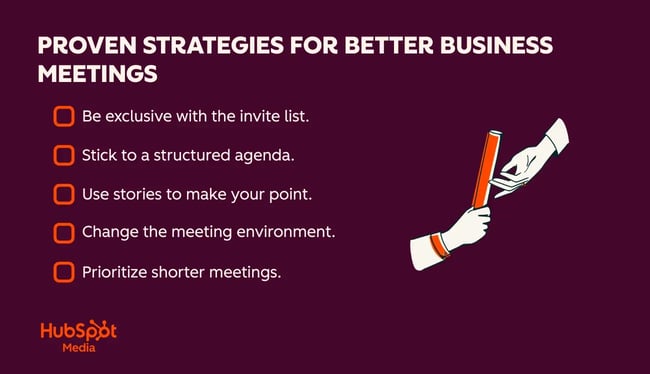
1. Be exclusive with the invite list.
According to a , it’s more difficult for meeting organizers to align goals with attendees’ roles as meetings scale in size. Despite clear evidence that larger meetings are less effective, still shows that large meetings (65+ attendees) have emerged as the fastest-growing meeting type, making clarity and decision ownership even harder to maintain.
The best way to make meetings more effective? Stop cc’ing the whole department, and put guidelines in place that cap the number of meeting participants at any given time. At Amazon, it was known as the “:” If the meeting holder couldn’t feed the entire group with two pies, they had included too many people.
Pro tip: Some teams designate “optional” attendees explicitly, signaling who is expected to contribute versus observe.
2. Stick to a structured agenda.
It’s easy for a 60-minute discussion about a specific feature or product roadmap to feel productive. Then everyone logs off and realizes that, while plenty of (often differing) opinions were shared, nothing was actually decided.
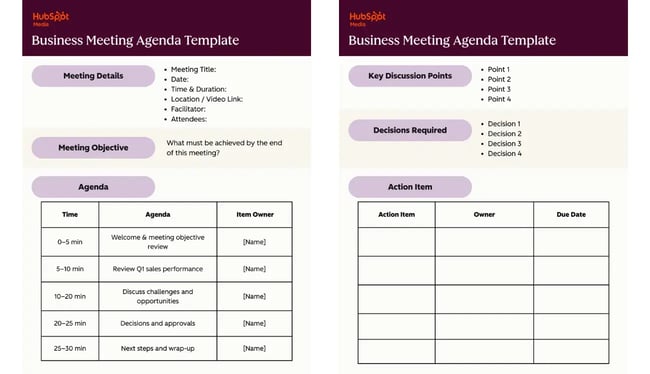
A structured agenda sets expectations, enforces time boundaries, and creates accountability. In practice, I’ve found that agendas only work when they are shared in advance and tied to outcomes, not just topics. The template below offers a basic agenda that business leaders can apply to most meetings.
Business Meeting Agenda Template
Meeting Details
- Meeting Title:
- Date:
- Time & Duration:
- Location / Video Link:
- Facilitator:
- Attendees:
Meeting Objective
What must be achieved by the end of this meeting?
Example: Align on Q2 sales priorities and confirm next steps for the product launch.
Agenda
|
Time |
Agenda Item |
Owner |
|
0–5 min |
Welcome & meeting objective review |
[Name] |
|
5–10 min |
Review Q1 sales performance |
[Name] |
|
10–20 min |
Discuss challenges and opportunities |
[Name] |
|
20–25 min |
Decisions and approvals |
[Name] |
|
25–30 min |
Next steps and wrap-up |
[Name] |
Tip: Assign time limits to each topic to keep the meeting on track.
Key Discussion Points
- Point 1
- Point 2
- Point 3
Decisions Required
List any decisions that need to be made during the meeting.
- Decision 1:
- Decision 2:
Action Items
|
Action Item |
Owner |
Due Date |
Notes & Follow-Ups
[Use this space to capture important context, questions, or follow-ups that don’t fit elsewhere.]
Tools like make it easier to attach agendas and context directly to calendar invites, which reduces last-minute confusion and improves preparation. Managers can also turn to third-party options like , which aims to align meeting participants and produce better business outcomes.
3. Use stories to make your point.
How information is delivered matters. In fact, a 2024 experiment found people rated identical information as more engaging when versus a bullet-point list, which is directly relevant to how updates and business cases land in meetings. The bottom line is that stories improve retention and engagement, particularly in virtual meetings where attention is harder to maintain.
I’ve seen strategy discussions stall when framed purely around data, then suddenly gain traction once someone connects the data to a real customer or operational story they had experienced.
Pro tip: Pair data points with concrete examples whenever possible. This keeps discussions grounded without overwhelming participants.
4. Change the meeting environment.
Changing the environment can reset energy and participation.
This doesn’t require anything dramatic. I’ve facilitated more productive conversations simply by switching from slide-driven calls to camera-on discussions, or by encouraging walking meetings for one-on-one conversations.
I used to have occasional meetings with a CEO where we’d walk around the business park. It took about 10 minutes, and if we needed more time, we would do another lap, and both know about how much time we had to bring the conversation to a close.
Also, when I have the option, I prefer to have my camera off in internal meetings because it allows me to get away from the distractions on my desktop and pace around the room. For organizations with a strict camera-on policy, making exceptions for certain internal meetings can reduce meeting fatigue and improve productivity.
Best for: Creative sessions, retrospectives, relationship-driven meetings.
5. Prioritize shorter meetings.
Walking meetings can naturally limit meeting length and encourage focus, but the reality is that most meetings can probably be abbreviated.
Shorter meetings force clarity. When time is limited, discussions naturally become more focused on decisions and next steps rather than background context or open-ended debate. While not appropriate for all use-cases, shorter formats work well for quick alignment meetings or early-stage problem discussions.
Pro tip: At , we’ve defaulted to 15-minute internal meetings instead of formerly half-hour or full-hour blocks. With only 15 minutes on the calendar, everyone understands they’ll need to get right to the point, and it has driven increased productivity while helping preserve billable hours for clients.
Making Every Business Meeting Count
The most effective business meetings share three traits: 1) a clear purpose, 2) the right participants, and 3) a structured path to outcomes. When those elements are present, meetings stop feeling like interruptions and start functioning as leverage.
Over time, I’ve found that improving meetings isn’t about adding more process — it’s about removing ambiguity. Clear agendas, defined meeting types, and documented outcomes compound quickly across an organization.
Tools can help reinforce these habits. For example, HubSpot’s Meeting Scheduler simplifies scheduling and preparation, while the Sales Hub AI Meeting Assistant reduces administrative overhead by capturing notes and summaries automatically. Used thoughtfully, these tools support better, more efficient meetings without becoming the focus themselves.
Ultimately, when meetings are run well, teams move faster, decisions stick, and calendars finally start working for the business instead of against it.
HubSpot's Free Meeting Scheduler
Schedule meetings faster and forget the back-and-forth emails. Your calendar stays full, and you stay productive.
- Let prospects book a meeting time
- Book more meetings and appointments
- Sync with Google and Office 365 Calendar
- And more!
Meetings


![Virtual vs. face-to-face communication [Stats to know in 2026]](https://53.fs1.hubspotusercontent-na1.net/hubfs/53/face-to-face-communication-1-20260318-6339455.webp)
![All the Bases Your Kickoff Meeting Needs to Cover [Template Included]](https://53.fs1.hubspotusercontent-na1.net/hubfs/53/Kickoff%20Meeting%20(1).jpg)