
So you’ve published genuinely helpful content enhanced with keyword research, backlinks, and optimized meta tags — yet it still doesn’t rank well. What gives? While on-page and off-page efforts come to marketers naturally, there’s a hidden layer without which your content gets passed over by search engines: I’m talking about technical SEO.
What is technical SEO? It’s the underlying foundation of your site (from server setup to page speed) that makes it easy for search engines to crawl, render, and index your content. You can have the best content out there, but without technical SEO, it won’t rank well.
In this technical SEO guide, I’ll cover the different types of SEO, why technical SEO matters, and how to implement it with actionable tips and checklists.
Table of Contents
- What is technical SEO?
- Technical SEO Audit Fundamentals
- Site Architecture and Structure
- Crawlability Checklist
- Mobile Optimization and Core Web Vitals
- Indexability Checklist
- Renderability Checklist
- Rankability Checklist
- Clickability Checklist
- Common Technical SEO Issues and Solutions
What is technical SEO?
Technical SEO refers to anything you do that makes your site easier for search engines to crawl and index. It covers everything that affects how machines move through your site — server setup, page speed, mobile usability, internal linking, structured data, and the underlying code that determines whether a search bot can read what you publish.
Think of technical SEO as the plumbing behind every other SEO tactic. Your content can be top notch and earn dozens of quality backlinks, but if Googlebot can’t access your pages or process them correctly, none of that work converts into rankings. as three sequential stages — crawling, indexing, and serving results — and each stage depends on technical signals you control.
.png)
Free Kit: How to Run an SEO Audit
Use this kit to start running a better website.
- SEO Template
- Audit Checklist
- Introductory Guide
- And more!
Download Free
All fields are required.
Form not available
You're all set!
Click this link to access this resource at any time.
Key Components of Technical SEO
Technical SEO breaks into eight core areas, each governing a different layer of how search engines interact with your site:
- Crawlability: whether bots can discover and access your pages through internal links, XML sitemaps, and robots.txt directives
- Indexability: whether discovered pages can be stored and returned in search results, controlled through tags like noindex and canonical
- Site architecture: how pages are organized, connected, and prioritized within your URL hierarchy
- Page speed: how quickly pages load and become interactive across devices
- Mobile optimization: how your site performs on mobile, which Google uses as the
- HTTPS and security: whether your site uses a valid SSL certificate to encrypt the connection between visitor and server
- Rendering: whether search engines can fully process JavaScript-dependent content before deciding what to index
- Structured data: schema markup that labels what each piece of content represents (product, article, FAQ, recipe, and so on)
We’ll go deeper on each of these in the checklists ahead.
Technical SEO vs. On-page SEO vs. Off-page SEO
The three branches of SEO solve different problems, and confusing them is one of the fastest ways to misdiagnose a ranking issue.
- On-page SEO is about the content and HTML elements on each page (title tags, headings, body copy, image alt text, meta descriptions, and keyword usage). It tells search engines what each page covers.
- Off-page SEO focuses on signals from outside your site (primarily backlinks, brand mentions, and third-party citations). It tells search engines whether other sources treat your page as trustworthy.
- Technical SEO focuses on infrastructure (XML sitemaps, canonical tags, internal linking, robots.txt, redirects, HTTPS, and page speed). It tells search engines whether they can access, understand, and serve your pages at all.
A page with thorough on-page optimization and credible backlinks still won’t rank if a misconfigured canonical tag points search engines at the wrong URL, or if a robots.txt rule blocks the crawler entirely. And as we’ll go over below, that’s why technical SEO is so important.
Why Technical SEO Matters
Strong content and strong backlinks can’t compensate for a site that search engines can’t crawl or render. When a page is blocked by robots.txt, hidden behind JavaScript that bots can’t execute, or buried six clicks deep in a tangled architecture, it functions as if it doesn’t exist.
Resolving the underlying issues translates into measurable gains in:
- Crawl efficiency: Search engines spend their limited crawl budget on the pages you actually want indexed.
- Index coverage: More of your priority pages enter the index and become eligible to appear in results.
- Mobile usability: Your site performs well in , which is now the default for all sites.
- Organic visibility: Your content has a fair chance to compete for the rankings it was built for.
Visibility is also no longer a single-channel game. Search behavior is splitting between traditional engines and answer engines like ChatGPT and Perplexity, and both rely on the same foundational signals: clean architecture, accessible content, and structured data they can parse. Technical SEO is the bar your content has to clear before any channel — Google, Bing, or an LLM — can surface it.
Understanding Technical SEO
Technical SEO is a beast that is best broken down into digestible pieces. If you’re like me, you like to tackle big things in chunks and with checklists. Believe it or not, the core of technical SEO breaks into five categories, each deserving its own checklist of actionable items. (We’ll also cover the fundamentals that support them and the common issues that tend to break them.)
These five categories and their place in the technical SEO hierarchy are best illustrated by this beautiful graphic that is reminiscent of but remixed for search engine optimization. (Note that we will use the commonly used term “Rendering” in place of Accessibility.)

Technical SEO Audit Fundamentals
Before you begin with your technical SEO audit, there are a few fundamentals that you need to put in place. Let’s cover these technical SEO fundamentals before we move on to the rest of your website audit.
1. Audit your canonical domain and redirects.
Your domain is the URL people type to reach your site, like hubspot.com. It’s how both visitors and search engines identify your site, so a consistent version matters for how your SEO value accumulates.
Most sites resolve on more than one variant, such as www and non-www, or http and https. Left unmanaged, search engines can treat each variant as a separate page serving the same content, which splits ranking signals and creates duplicate-content problems that dilute your SEO.
Google used to offer a preferred domain setting in Search Console that let you tell it which version you wanted indexed. Google and now selects a canonical version on its own using signals you provide. To steer that choice toward the version you want, you have three primary options: apply a rel=”canonical” tag, use a sitemap, or set up 301 redirects.
Of these methods, permanent 301 redirects do the heavy lifting. While canonical tags signal your intent to search engines, 301 redirects actively force both human visitors and crawlers to the correct URL structure. Configuring your server so that all variants — http, www, and non-www— seamlessly redirect to your single chosen canonical URL is what consolidates your ranking power and prevents duplicate content.
2. Secure your site with HTTPS.
HTTPS is the secure version of the protocol browsers use to load your site, and it runs on a TLS certificate (Transport Layer Security, newer and better than the SSL standard). The certificate encrypts the connection between a visitor’s browser and your web server, so data like form submissions, login credentials, and payment details can’t be read in transit. You’ll see it represented by a URL that begins with https:// in the address bar.
Two things make HTTPS non-negotiable in 2026 rather than a nice-to-have. First, Google and has kept it active since; the search team described it as a lightweight signal carrying less weight than content quality, so treat it as a baseline you clear, not a lever you pull for ranking gains. Second, and more pressing for your traffic, Chrome has flagged every page served over plain HTTP as in the address bar since July 2018. W3Techs shows that HTTPS is the default on , so an insecure site no longer looks merely behind — it looks broken, and that warning hurts trust and conversions.
If parts of your site still resolve over HTTP, you’ll need to migrate those pages to HTTPS and consolidate the variants. Here are the steps:
- Install a valid TLS certificate covering your domain and any subdomains you serve.
- Set up permanent server-side redirects, commonly 301 redirects, from every http:// URL to its final https:// equivalent on your preferred host. For example, redirect http://yourwebsite.com/page directly to https://yourwebsite.com/page or https://www.yourwebsite.com/page, depending on your canonical domain. This is the same redirect consolidation covered under your canonical domain above: point every protocol and hostname variant at one canonical HTTPS URL.
- Update canonical tags, hreflang annotations, internal links, and any hard-coded http:// references in your templates and CMS so nothing points back to the insecure version.
- Update your XML sitemap, usually located at yourwebsite.com/sitemap.xml, so it includes only canonical HTTPS URLs. Then confirm your robots.txt file, usually located at yourwebsite.com/robots.txt, references the HTTPS sitemap location and does not block the HTTPS version of your site.
- Verify and monitor the HTTPS version in Google Search Console. Use a Domain property where possible because it aggregates protocol and subdomain variants into one property. You can also keep URL-prefix properties for specific HTTP and HTTPS versions if you need more granular protocol-level troubleshooting.
Pro tip: After the migration, run a crawl with a tool like and filter for any remaining http:// resources. Mixed content — an HTTPS page that loads an image, script, or stylesheet over HTTP — is one of the most common reasons a migration looks complete but still triggers browser warnings.
3. Optimize page speed.
Core Web Vitals are a confirmed ranking factor, but Google is careful about how it frames the ranking payoff. There’s , and the search team treats Core Web Vitals as one input its ranking systems use alongside many others, with content relevance and quality carrying the primary weight.
The takeaway: Speed rarely vaults a thin page to the top, but when two pages match on relevance and authority, the faster one wins. Treat it as a baseline you clear, not a lever you crank for rankings on its own.
Speed also pays off well before rankings enter the picture. Slow pages lose visitors and conversions, which is reason enough to prioritize load time regardless of any algorithmic benefit.
Use these tactics to improve your average page load time:
- Compress and optimize your files. Compression shrinks images, plus your CSS, HTML, and JavaScript so each file transfers faster. Ideally, images should be in next-gen formats like WebP or AVIF. Specify dimensions so the layout doesn’t shift as they load.
- Audit redirects regularly. Every 301 redirect adds processing time, and chained redirects multiply that delay across pages. Point each redirect directly at its final destination.
- Trim and minify your code. Lean code renders faster than bloated markup. Minify and compress your CSS, HTML, and JavaScript to strip the whitespace and comments browsers don’t need.
- Use a content delivery network (CDN). A CDN makes it faster for your site to load on a visitor’s browser because it serves cached copies of your pages to each visitor from the nearest server in its network.
- Limit plugins and heavy themes. Outdated plugins introduce security vulnerabilities and unnecessary code that slow your site. Keep plugins current, run only the essential ones, and favor lean custom themes over bloated pre-built ones.
- Cache static assets. Caching stores a ready-built version of your pages so returning visitors don’t reload everything from scratch, which speeds up repeat visits.
To find where your site falls short, run it through or check out other website SEO software options available.
Free Kit: How to Run an SEO Audit
Use this kit to start running a better website.
- SEO Template
- Audit Checklist
- Introductory Guide
- And more!
Download Free
All fields are required.
Form not available
You're all set!
Click this link to access this resource at any time.
Site Architecture and Structure
Once your fundamentals are in place, the next layer is how your site is organized. A clear architecture lets crawlers discover every page that matters, helps Google understand how those pages relate, and concentrates authority on the URLs you most want to rank. Even a fast, secure site loses rankings when bots can’t navigate it efficiently.
Creating an SEO-Friendly Site Structure
A clean site follows a predictable hierarchy: Homepage → Category → Subcategory → Page. That shape lets a visitor (and Googlebot) reach any page in a few clicks and signals which pages sit higher in your website architecture.
Related pages are grouped together; for example, your blog homepage links to individual blog posts, which each link to their respective author pages. This structure helps search bots understand the relationship between your pages.
Your site architecture should also shape, and be shaped by, the importance of individual pages. The closer Page A is to your homepage, the more pages link to Page A, and the more link equity those pages have, the more importance search engines will give to Page A.
For example, a link from your homepage to Page A demonstrates more significance than a link from a blog post. The more links to Page A, the more “significant” that page becomes to search engines.
Conceptually, a site architecture could look something like this, where the About, Product, News, etc. pages are positioned at the top of the hierarchy of page importance.
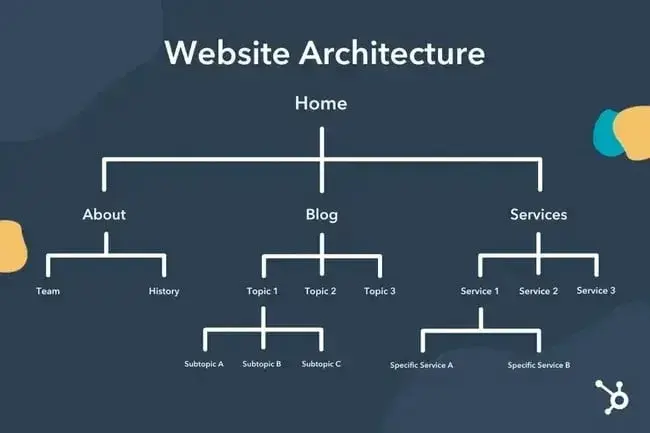
Make sure the most important pages to your business are at the top of the hierarchy with the greatest number of (relevant!) internal links.
A few more principles to follow:
- Keep important pages shallow. Priority pages such as product, pricing, and key top-of-funnel content should, as a rule of thumb, sit no more than three clicks from the homepage. Buried pages get crawled less often.
- Use consistent navigation. Header menus, footer links, and category landing pages should reflect the same structure crawlers see in your XML sitemap.
- Add breadcrumb navigation. Breadcrumbs help users orient themselves and give Google more context about how pages relate. Mark them up with .
- Eliminate orphan pages. Every published URL needs at least one internal link pointing to it. Pages with no inbound links may never be discovered or re-crawled.
If you’ve got an online store, check out our technical SEO tips for ecommerce.
URL Structure Best Practices
URLs do two jobs at once: They signal page topic to search engines and help users predict what they’ll find before clicking. recommends keeping URLs simple and readable.
A URL can use a subdomain, like blog.hubspot.com, or a subdirectory, like hubspot.com/blog. For example, a blog post titled “How to Groom Your Dog” might live at blog.bestdogcare.com/how-to-groom-your-dog, while a product page on the same site might live at bestdogcare.com/products/grooming-brush.
Whether you use subdomains, subdirectories, or labels like /products/ versus /store/ depends on your site structure and business needs. What matters most is that your URL structure is logical, easy to understand, and consistent within each content type. For example, don’t split blog posts between blog.yourwebsite.com and yourwebsite.com/blog/ unless there’s a clear strategic reason.
A few rules of thumb:
- Use lowercase letters and hyphens (not underscores) to separate words.
- Keep URLs short and descriptive, with the target keyword close to the front.
- Avoid session IDs, tracking parameters, and dynamically generated strings where possible.
- Use the same pattern across your site rather than mixing structures like /blog/post-name and /post-name for blog posts.
Strong versus weak:
- ? example.com/blog/technical-seo-checklist
- ? example.com/p?id=2847&ref=home_xyz
Internal Linking Strategy
Internal links serve two functions: They help search engines discover new pages, and they pass link authority between URLs on your site. Pages that receive more internal links tend to be treated as more important.
Best practices:
- Use contextual links inside body content. Links inside paragraphs can provide more context than navigation or footer links.
- Write descriptive anchor text. A phrase like “crawl budget” tells crawlers what the destination is about; “click here” tells them nothing.
- Build topic clusters. Group related content around a single pillar page so Google can see your depth on a subject. (HubSpot’s topic cluster model is one structured approach.)
- Audit links regularly. Use a crawler like Screaming Frog to surface broken internal links and orphan pages on a recurring basis.
Crawlability Checklist
Crawlability is the foundation of your technical SEO strategy. Search bots will crawl your pages to gather information about your site.
If these bots are somehow blocked from crawling, they can’t index or rank your pages. The first step to implementing technical SEO is to ensure that all of your important pages are accessible and easy to navigate.
Below, we’ll cover some items to add to your checklist as well as some website elements to audit to ensure that your pages are primed for crawling.
1. Create an XML sitemap.
Remember that site structure we went over? That belongs in something called an XML Sitemap that helps search bots understand and crawl your web pages. You can think of it as a map for your website. You’ll submit your sitemap to Google Search Console and Bing Webmaster Tools once it’s complete. Remember to keep your sitemap up-to-date as you add and remove web pages.
2. Maximize your crawl budget.
Crawl budget refers to the amount of time and resources search bots are likely to allocate to crawling your pages. Because crawl budget isn’t infinite, make sure you’re prioritizing your most important pages for crawling.
Here are a few tips to ensure that you’re maximizing your crawl budget:
- Remove or canonicalize duplicate pages.
- Fix or redirect any broken links.
- Make sure your CSS and JavaScript files are crawlable.
- Check your crawl stats regularly and watch for sudden dips or increases.
- Make sure any bot or page you’ve disallowed from crawling is meant to be blocked.
- Keep your sitemap updated and submit it to the appropriate webmaster tools.
- Prune your site of unnecessary or outdated content.
- Watch out for dynamically generated URLs, which can make the number of pages on your site skyrocket.
3. Utilize robots.txt.
When a search engine crawler visits your site, it typically will first check the robots.txt file, also known as the Robots Exclusion Protocol. This protocol can allow or disallow specific web robots from crawling your site, including specific sections or even pages. If you’d like to prevent bots from indexing your site, you’ll use a noindex robots meta tag. Let’s discuss both of these scenarios.
To Prevent Crawling
Use robots.txt when you want to tell compliant crawlers not to access certain sections of your site. This can help reduce crawl waste and keep bots away from pages that don’t need to be crawled. However, robots.txt doesn’t protect your site from bad actors. Malicious bots can ignore it, so use server-level protections, authentication, rate limiting, or bot management tools for sensitive content or abusive traffic.
To Prevent Indexing
Use a when you don’t want a page to appear in search results. This is often appropriate for pages like thank-you pages, login pages, internal search results, or other pages that don’t need organic search visibility.
No matter what, your depending on what you’d like to accomplish.
4. Add breadcrumb menus.
Remember the old fairy tale Hansel and Gretel where two children dropped breadcrumbs on the ground to find their way back home? Well, they were on to something.
Breadcrumbs are exactly what they sound like — a trail that guides users back to the start of their journey on your website. It’s a menu of pages that tells users how their current page relates to the rest of the site. Here’s an example of breadcrumb navigation on the Semrush website, showing how “social media” is nested within “marketing,” which is nested within “blog.”
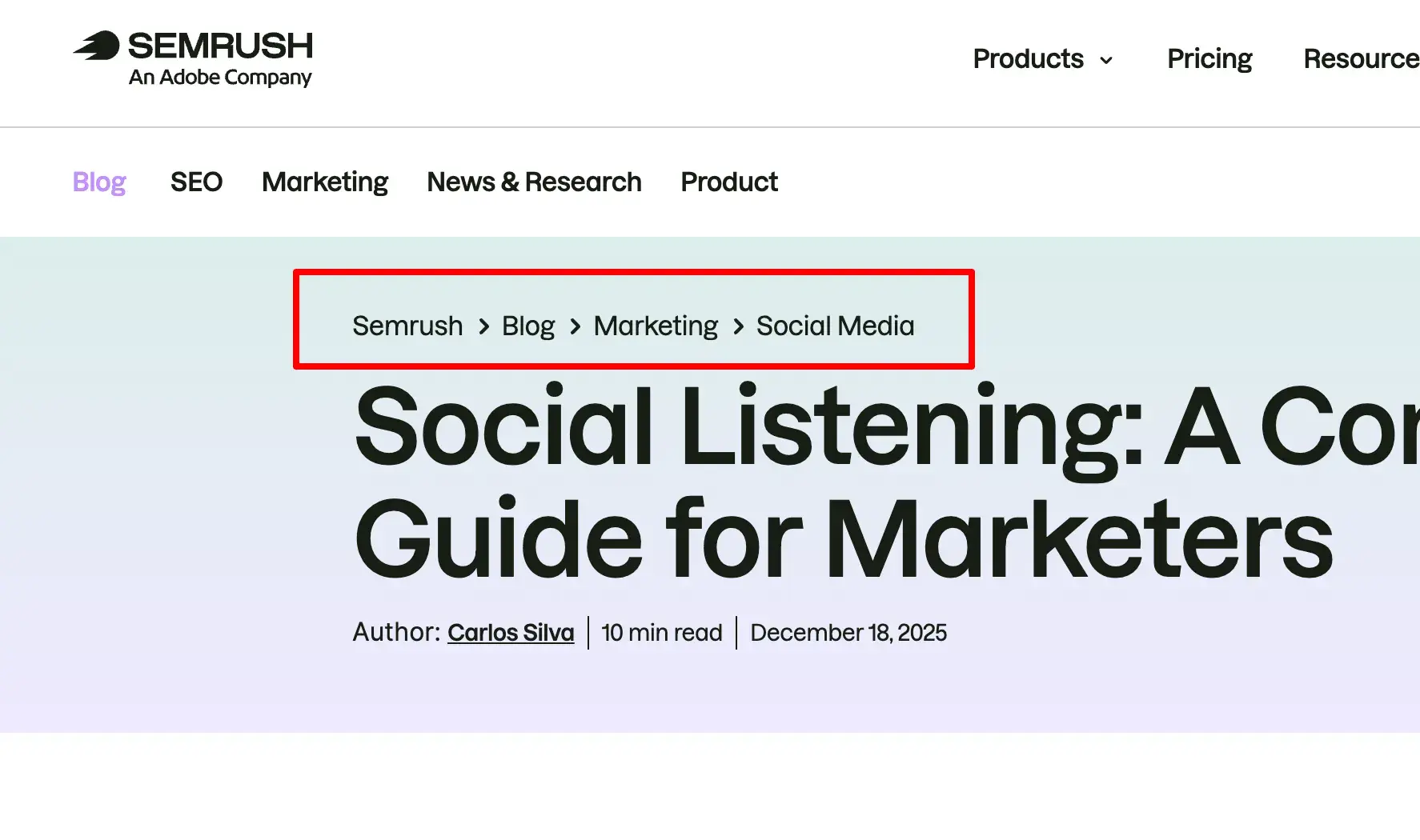
And breadcrumbs aren’t just for website visitors; search bots use them, too.
Breadcrumbs should:
- Be visible to users so they can easily navigate your web pages without using the back button.
- Use structured markup language to give accurate context to search bots that are crawling your site.
Not sure how to add structured data to your breadcrumbs? .
5. Handle pagination with crawlable links.
Remember when teachers made you number the pages of your research paper? Pagination plays a similar organizing role in technical SEO. It breaks a large set of content — a product category, a multi-part article, a forum thread — into a sequence of separate URLs. Your job is to make sure search bots can travel that sequence and reach every page in it.
For years, the standard move was to add rel=”next” and rel=”prev” tags in the <head> to signal the relationship between pages in a series. Google , and now treats each paginated page as an ordinary, standalone page. You don’t need to add the tags for Google’s benefit, and if you already have them, there’s no harm in leaving them (Bing still treats them as a hint).
What actually drives discovery now is plain HTML linking. To keep paginated pages crawlable:
- Link between pages with real anchor links. Each page should link to the next (and ideally to numbered pages further down the series) using standard <a href> links, not buttons or JavaScript events that bots may not trigger. before it can crawl the links inside it.
- Give each page a self-referencing canonical. Page 2 should canonicalize to page 2, not to page 1. Pointing every page at page 1 tells Google the deeper pages are duplicates, and any content that only lives on those pages can lose its path to discovery.
- 顿辞苍’迟 noindex deep pages to save crawl budget. Over time, search engines crawl noindex pages less often and may stop following the links on them, which can strand the content those links point to.
Pagination rarely makes or breaks a small site, but on large catalogs and deep archives, it directly affects how much of your content Google can reach.
Free Kit: How to Run an SEO Audit
Use this kit to start running a better website.
- SEO Template
- Audit Checklist
- Introductory Guide
- And more!
Download Free
All fields are required.
Form not available
You're all set!
Click this link to access this resource at any time.
6. Check your SEO log files.
You can think of log files like a journal entry. Web servers (the journaler) record and store log data about every action they take on your site in log files (the journal). The data recorded includes the time and date of the request, the content requested, and the requesting IP address. You can also identify the user agent, which is the software (like a browser or a search bot) that makes the request on behalf of a user or search engine.
But what does this have to do with SEO?
Well, search bots leave a trail in the form of log files when they crawl your site. You can determine if, when, and what was crawled by checking the log files and filtering by the .
This information is useful to you because you can determine how your crawl budget is spent and which barriers to indexing or access a bot is experiencing. To access your log files, you can either ask a developer or use a log file analyzer, like .
Mobile Optimization and Core Web Vitals
Crawlability gets bots to your pages, but mobile performance and page experience determine whether those pages rank. Mobile-first indexing is now the default for all sites, and Core Web Vitals are . A slow or unstable mobile experience can sink rankings that strong content and links would otherwise earn.
Understanding Mobile-first Indexing
Google indexes and ranks your site based on the . If a page renders differently on mobile than on desktop, the mobile version is what Google evaluates, and the gaps will cost you.
Key requirements:
- Content parity. Primary content, headings, and structured data on mobile must match desktop. Hidden text in collapsed menus is fine; missing text isn’t.
- Consistent metadata. Title tags, meta descriptions, robots directives, and canonical tags should be identical across both versions.
- Usable navigation. Mobile menus, internal links, and breadcrumbs need to work the same way on small screens.
- Mobile-friendly media. Images and video should serve responsively, with appropriate formats and lazy loading.
Core Web Vitals Explained
Core Web Vitals are three field metrics that measure real-world user experience. Google evaluates each at the , so a site only passes when most visitors get a “good” experience.
- Largest Contentful Paint (LCP) measures loading performance, or how long until the largest visible element renders. Aim for under 2.5 seconds. Improve LCP by speeding up server response times, compressing images, and removing render-blocking resources.
- Interaction to Next Paint (INP) measures responsiveness, or how quickly the page reacts to user input. Aim for under 200 milliseconds. INP . Improve INP by reducing JavaScript execution time, breaking up long tasks, and deferring non-critical scripts.
- Cumulative Layout Shift (CLS) measures visual stability, or how much page content unexpectedly moves during load. Aim for under 0.1. Improve CLS by reserving space for images and ads with explicit dimensions, and avoiding content injection above existing elements.
Mobile Optimization Checklist
A practical pass through the items most likely to break mobile performance:
- Use responsive design so a single codebase adapts to screen size, rather than a separate mobile URL.
- Preserve content across breakpoints. 顿辞苍’迟 strip body text, schema, or internal links from the mobile view.
- Make tap targets large and well-spaced so buttons and links are easy to hit without zooming.
- Use readable typography with at least a 16px base font size and high contrast against the background.
- Optimize media. Serve next-gen image formats (WebP, AVIF), specify dimensions, and lazy-load below-the-fold assets.
- Limit intrusive interstitials. Pop-ups that block content on mobile .
- Test regularly. Run for field and lab data, audit individual templates with , and monitor trends in .
Indexability Checklist
As search bots crawl your website, they begin indexing pages based on their topic and relevance to that topic. Once indexed, your page is eligible to rank on the SERPs. Here are a few factors that can help your pages get indexed.
1. Unblock search bots from accessing pages.
You’ll likely take care of this step when addressing crawlability, but it’s worth mentioning here. You want to ensure that bots are sent to your preferred pages and that they can access them freely. You have a few tools at your disposal to do this. To test your robots.txt file, use .
2. Remove duplicate content.
If you have duplicate content, Google might have a harder time choosing the right canonical URL and consolidating ranking signals. Remember to use canonical URLs to establish your preferred pages.
3. Audit your redirects.
Verify that all of your redirects are set up properly. Redirect loops, broken URLs, or — worse — improper redirects can cause issues when your site is being indexed. To avoid this, audit all of your redirects regularly.
4. Check the mobile-responsiveness of your site.
If your website is not mobile-friendly by now, then you’re far behind where you need to be. As early as 2016, , prioritizing the mobile experience over desktop. Today, that indexing is enabled by default. To keep up with this important trend, you can use PageSpeed Insights to check where your website needs to improve on mobile.
5. Fix HTTP status code issues and errors.
HTTP stands for HyperText Transfer Protocol, but you probably don’t care about that. What you do care about is when HTTP returns errors to your users or to search engines, and how to fix them.
HTTP errors can impede the work of search bots by blocking them from important content on your site. It is, therefore, incredibly important to address these errors quickly and thoroughly.
Since every HTTP error is unique and requires a specific resolution, the section below has a brief explanation of each, and you’ll use the links provided to learn more about or how to resolve them.
- 301 Permanent Redirects are used to permanently send traffic from one URL to another. Your CMS will allow you to set up these redirects, but too many of these can slow down your site and degrade your user experience as each additional redirect adds to page load time. Aim for zero redirect chains, if possible. Long redirect chains can slow crawling, dilute efficiency, and delay indexing.
- 302 Temporary Redirect is a way to temporarily redirect traffic from a URL to a different webpage. While this status code will automatically send users to the new webpage, the cached title tag, URL, and description will remain consistent with the origin URL. If the temporary redirect stays in place long enough, though, it will eventually be treated as a permanent redirect, and those elements will pass to the destination URL.
- 403 Forbidden Messages mean that the content a user has requested is restricted based on access permissions or due to a server misconfiguration.
- 404 Error Pages tell users that the page they have requested doesn’t exist, either because it’s been removed or they typed the wrong URL. It’s always a good idea to create 404 pages that are on-brand and engaging to keep visitors on your site (click the link above to see some good examples).
- 405 Method Not Allowed means that your website server recognized and still blocked the access method, resulting in an error message.
- 500 Internal Server Error is a general error message that means your web server is experiencing issues delivering your site to the requesting party.
- 502 Bad Gateway Error is related to miscommunication or an invalid response between website servers.
- 503 Service Unavailable tells you that while your server is functioning properly, it is unable to fulfill the request.
- 504 Gateway Timeout means a server did not receive a timely response from your web server to access the requested information.
Whatever the reason for these errors, it’s important to address them to keep both users and search engines happy, and to keep both coming back to your site.
Even if your site has been crawled and indexed, accessibility issues that block users and bots will impact your SEO. That said, we need to move on to the next stage of your technical SEO audit — renderability.
Renderability Checklist
A page can be crawled and indexed and still fail to rank if Google can’t process what’s actually on it. Rendering is the stage where search engines execute your JavaScript, build the visual layout, and decide which content counts toward indexing. When rendering breaks, priority content can be invisible to bots even though it loads cleanly in a browser.
1. Understand rendering in SEO.
Rendering is the process where search engines take your raw HTML, fetch the assets it references, execute any JavaScript, and build the final page they index. Google handles this in a , and the rendering queue can lag the crawl queue.
That delay matters because a page can be perfectly crawlable and still underperform when key content only appears after scripts run. If your headings, body copy, or internal links are injected by JavaScript, Google may initially discover less content from the raw HTML, and rendering-dependent content can be delayed or missed if resources are blocked, scripts fail, or the page exceeds rendering limits.
JavaScript-heavy templates can also make crawling and rendering less efficient, especially when they require many resources or slow responses, which may affect how quickly Google discovers and updates content.
2. Use JavaScript SEO best practices.
JavaScript isn’t inherently bad for SEO. Problems start when JavaScript becomes the only path critical content takes to reach the page.
- Use server-side rendering (SSR) or static site generation (SSG). Both approaches send a fully populated HTML response to Googlebot, so critical content is in place before any client-side scripts run.
- Practice progressive enhancement. Layer JavaScript on top of working HTML rather than building functionality that only exists once scripts execute. Body text, headings, and internal links should work in the initial response, with JavaScript adding interactivity on top.
- Keep priority content out of JavaScript-only interactions. 顿辞苍’迟 hide product details, FAQ answers, or pricing inside elements that require a click, hover, or scroll event to load.
- Test templates with JavaScript disabled. Turn off JavaScript in Chrome DevTools and reload a page from each major template. If the headline, body, and internal links disappear, search engines may see the same gap.
Free Kit: How to Run an SEO Audit
Use this kit to start running a better website.
- SEO Template
- Audit Checklist
- Introductory Guide
- And more!
Download Free
All fields are required.
Form not available
You're all set!
Click this link to access this resource at any time.
3. Follow this renderability optimization checklist.
Work through this checklist across every template type: homepage, category, product or pricing, blog post, and any single-page application views.
- Maintain server stability. Repeated 5xx errors or timeouts during a render attempt can cause Google to drop a page from the index. Monitor uptime and server response trends in .
- Serve critical content in the server-rendered HTML. View the page source (Ctrl+U or Cmd+Option+U) and confirm the H1, body copy, and primary internal links appear before any script tags execute.
- Audit JavaScript dependencies. Heavy third-party scripts, A/B testing tools, personalization layers, and chat widgets can delay or block the rendering of meaningful content. Defer or remove anything non-essential to first paint.
- Use lazy loading carefully. Lazy loading helps performance but creates SEO risk when applied to above-the-fold content or content Google needs for indexing. Follow and avoid loading patterns that depend on user-only scroll behavior.
- Limit page depth. Pages buried multiple clicks from the homepage are rendered and re-rendered less often. Pair this checklist with the internal linking practices from the site architecture section earlier in this guide.
- Test rendered output regularly. Use to compare the rendered HTML and screenshot Google sees against what loads in your browser. Run for SEO and performance diagnostics on a sample of pages, and spot-check each major template in a JavaScript-disabled browser session.
Once your rendered pages match what users see, the next step is making sure those pages compete for rankings.
Rankability Checklist
Now we move to the more topical elements that you’re probably already aware of — how to improve ranking from a technical SEO standpoint. Getting your pages to rank involves some of the on-page and off-page elements that we mentioned before but from a technical lens.
Remember that all of these elements work together to create an SEO-friendly site. So, we’d be remiss to leave out all the contributing factors. Let’s dive into it.
1. Implement internal and external linking.
Links help search bots understand where a page fits in the grand scheme of a query and give context for how to rank that page. Links guide search bots (and users) to related content and transfer page importance. Overall, linking improves crawling, indexing, and your ability to rank.
2. Focus on backlink quality.
Backlinks — links from other sites back to your own — provide a vote of confidence for your site. They tell search bots that External Website A believes your page is high-quality and worth crawling. As these votes add up, search bots notice and treat your site as more credible. Sounds like a great deal, right? However, as with most great things, there’s a caveat. The quality of those backlinks matters a lot.
There are many ways to get quality backlinks to your site, like outreach to relevant publications, claiming unlinked mentions, and providing helpful content that other sites want to link to.
3. Use topic clusters.
We at HubSpot have not been shy about our love for topic clusters or how they contribute to organic growth. Topic clusters link related content so search bots can easily find, crawl, and index all of the pages you own on a particular topic. They act as a self-promotion tool to show search engines how much you know about a topic, so they are more likely to rank your site as an authority for any related search query.
Let’s round this out with the final piece to the organic traffic pyramid: clickability.
Clickability Checklist
While click-through rate (CTR) has everything to do with searcher behavior, there are things you can do to improve your clickability on the SERPs. While meta descriptions and page titles with keywords do impact CTR, we’re going to focus on the technical elements because that’s why you’re here.
Ranking and click-through rate go hand-in-hand because, let’s be honest, searchers want immediate answers. The more your result stands out on the SERP, the more likely you’ll get the click. Let’s go over a few ways to improve your clickability.
1. Use structured data.
Structured data employs a specific vocabulary called schema to categorize and label elements on your webpage for search bots. The schema makes it crystal clear what each element is, how it relates to your site, and how to interpret it. Basically, structured data tells bots, “This is a video,” “This is a product,” or “This is a recipe,” leaving no room for interpretation.
To be clear, using structured data is not a “clickability factor” (if there even is such a thing), but it does help organize your content in a way that makes it easy for search bots to understand, index, and potentially rank your pages.
2. Win SERP features.
SERP features, including rich results, are a double-edged sword. If you win them and get the click-through, you’re golden. If not, your organic results are pushed down the page beneath sponsored ads, text answer boxes, video carousels, and the like.
Rich results are those elements that don’t follow the page title, URL, and meta description format of other search results. For example, the image below shows product rich results in an image grid of running shoes with pricing and star ratings.
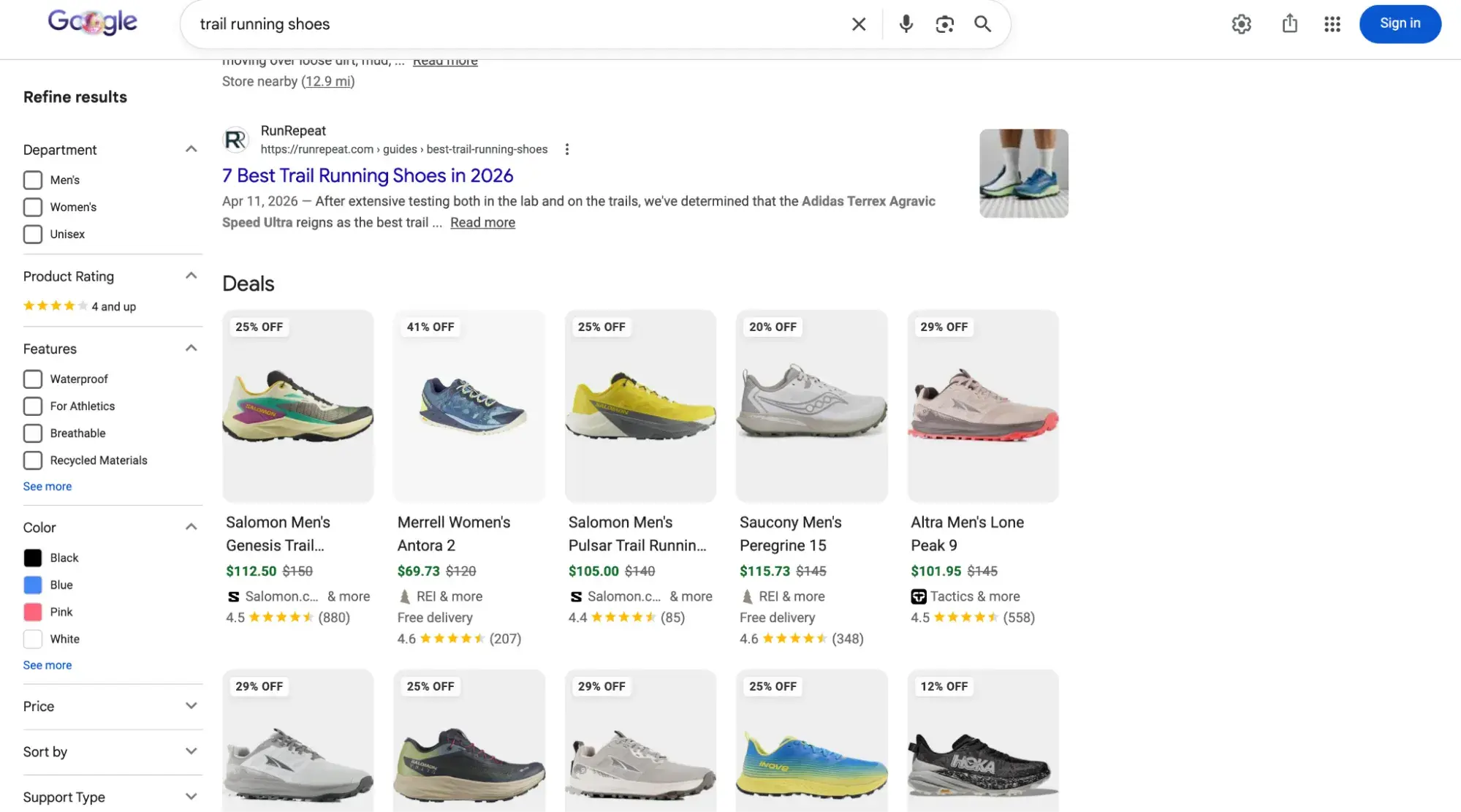
While you can still get clicks from appearing in the top organic results, your chances are greatly improved with rich results.
How do you increase your chances of earning rich results? Write useful content and use structured data. The easier it is for search bots to understand the elements of your site, the better your chances of getting a rich result.
Structured data is useful for getting these () from your site to the top of the SERPs, thereby increasing the probability of a click-through:
- Articles
- Videos
- Reviews
- Events
- How-Tos
- Images
- Local Business Listings
- Products
- Sitelinks
3. Optimize for AI Overviews.
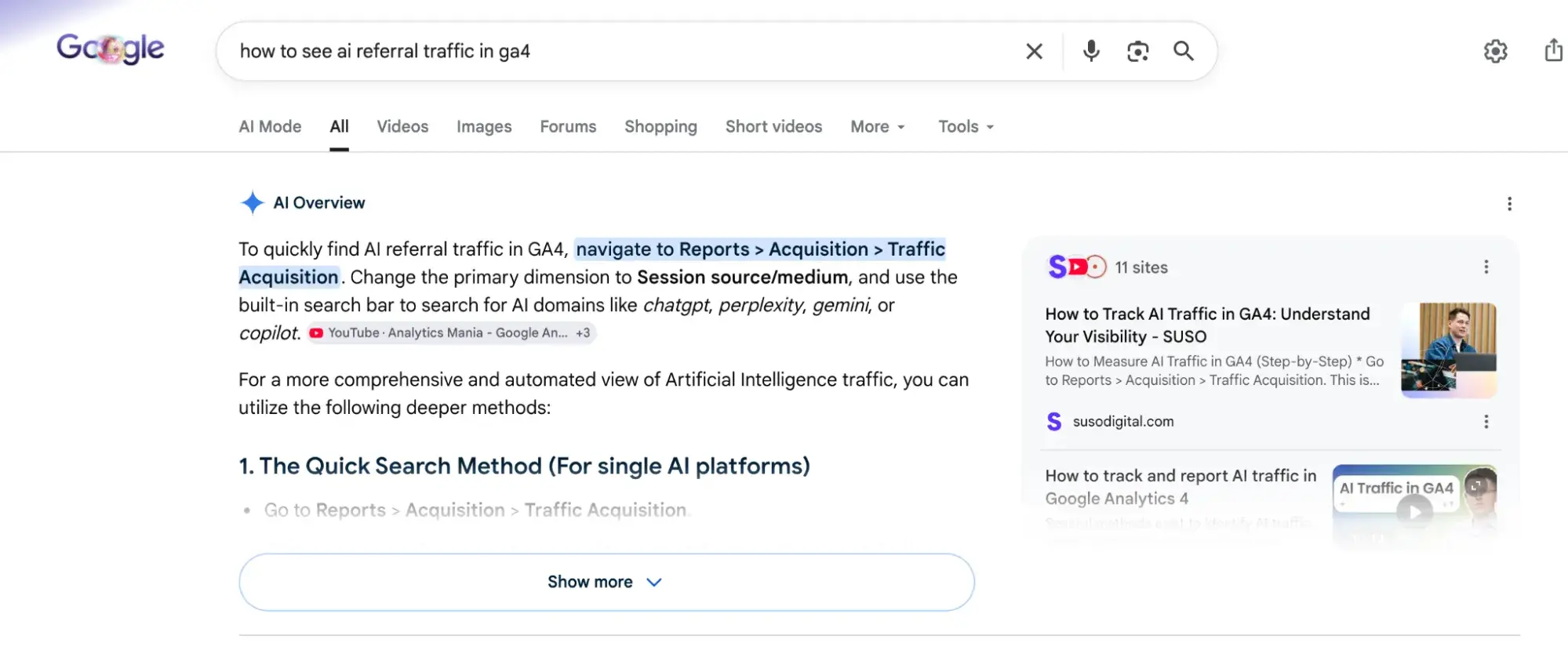
Google AI Overviews launched in 2024 and have been growing increasingly common on the SERPs. They’re intended to get searchers the answers to their queries as quickly as possible by putting an AI-generated summary answer at the top of the page, synthesized from multiple sites. These summaries include clickable links to sources, but even if you don’t get a click-through, in 2026, savvy marketers are learning how to rank in AI Overviews to gain mindshare and influence potential customers.
4. Consider Google Discover.
is an algorithmic listing of content by category specifically for mobile users. It’s no secret that Google has been doubling down on the mobile experience. The tool allows users to build a library of content by selecting categories of interest (think: gardening, music, or politics).
Common Technical SEO Issues and Solutions
The technical SEO issues below are the common culprits behind preventable ranking losses, and most can be diagnosed with Google Search Console, a desktop crawler like Screaming Frog, or other technical SEO tools.
Duplicate Content
A canonical tag signals the preferred version of a page when duplicate or near-duplicate URLs exist. The problem starts when multiple URLs serve the same content and search engines split ranking signals across them or index the wrong version. The usual culprits:
- HTTP and HTTPS variants resolving separately
- www and non-www versions
- trailing-slash inconsistencies
- Tracking parameters and session IDs
- Faceted navigation on category pages
- Printer-friendly or AMP duplicates.
Use 301 redirects to consolidate URL variants you don’t need to keep separate (see ). Apply rel=”canonical” to point near-duplicates at a preferred version when both URLs need to remain live. Then audit internal links so every link on your site points to the canonical URL, not a parameterized alternate.
Redirect Chains and Loops
A single 301 redirect passes value efficiently. A chain of redirects (A → B → C → D) forces crawlers to make multiple hops before reaching the final URL, which slows rendering, consumes crawl budget, and can cause Googlebot to give up on the chain. states, “By default, Google’s crawlers follow up to 10 redirect hops.” Redirect loops, where A points to B and B points back to A, fail immediately.
To fix this, point every redirect directly to its final destination, then update internal links so users and bots reach that URL in one request. Screaming Frog’s “Redirect Chains” report surfaces multi-hop sequences sitewide. Run this audit after every site migration, CMS swap, or URL restructure, since those events generate most of the chains.
Mixed Content and HTTPS Issues
Mixed content happens when an HTTPS page loads subresources (images, scripts, stylesheets, fonts) over HTTP. Browsers either block the insecure resources, breaking page functionality, or mark the site “Not Secure” from the address bar, eroding user trust.
To resolve it, serve every asset over HTTPS and replace hard-coded http:// references in your templates, theme files, CMS field defaults, and embedded third-party widgets. Browser DevTools (Security and Console panels) flag specific blocked resources page by page. CMS-level fixes (updating site-URL settings, regenerating media thumbnails) usually resolve the largest clusters in a single pass.
Crawl Budget Optimization
Crawl budget describes the URLs and assets search bots will fetch from your site in a given window.
Wasted crawl activity is the issue to attack. The usual offenders are:
- Faceted navigation generating near-infinite parameter combinations
- Internal search results pages
- Soft 404s
- Broken redirects
- Tag or archive pages with little unique value
Use robots.txt to block low-value URL patterns that search engines do not need to crawl, such as internal search results or crawl-trap parameters. Use noindex for pages that users need to access but that should not appear in search results, making sure those pages are crawlable so search engines can see the directive. Repair or remove broken internal links, and improve server response times so each crawl request is cheaper. Log file analysis remains one of the most accurate ways to see which URLs Googlebot is actually fetching and how often.
XML Sitemap Issues
An XML sitemap helps search engines find important URLs, but only when it stays clean. Common hygiene problems:
- URLs that 404 or redirect
- Pages tagged noindex
- Non-canonical variants
- Parameterized duplicates
- Stale lastmod timestamps that misrepresent when content actually changed
A bloated or inconsistent sitemap can make it harder to diagnose indexing issues and can weaken the sitemap as a reliable signal of which URLs are canonical, indexable, and worth crawling.
Rules to enforce:
- Include only canonical URLs that return a 200 status and are eligible for indexing
- Regenerate the file automatically from your CMS so it reflects current state
- Keep each sitemap file under of 50,000 URLs and 50MB uncompressed.
- Submit your sitemap or sitemap index in Google Search Console and monitor the Sitemaps report for “Couldn’t fetch” errors and unexpected URL count drops.
From Technical SEO to AI Visibility
Technical SEO, on-page SEO, and off-page SEO each solve a different piece of the same problem. Technical SEO determines whether search engines can crawl, render, and serve your pages. On-page SEO tells them what each page is about. Off-page SEO signals whether other sites treat your pages as trustworthy. Get one wrong and the other two carry less weight. Get all three right and your content is positioned to compete for traditional rankings.
But traditional search is no longer the only place visibility happens. Buyers are commonly turning to AI answer engines like ChatGPT and Gemini to find solutions, and you want your brand to show up.
What AEO Adds
Answer engine optimization (AEO) is the practice of improving how often and how accurately your brand appears in AI-generated answers on platforms like ChatGPT, Gemini, and Perplexity. AEO is a complement to SEO, not a replacement.
AEO and SEO target different surfaces, but they share the same foundation. Answer engines crawl, render, and parse content using many of the signals traditional search relies on, including clean site architecture, accessible HTML, structured data, and fast page speed. A site that passes the technical audits in this guide has already cleared the bar for AEO eligibility. What shifts is what you optimize for next.
The case for treating AEO as a discrete priority is hardening fast. According to :
- 58% of marketers say their organizations are already optimizing content for answer engines.
- 44% of marketers report making at least one business purchase based on a brand they discovered in an AI answer.
- AI search ranks as the #1 predictor of purchase intent among CRM software buyers.
That buyer behavior is real and accelerating, and it doesn’t show up in a traditional rank tracker.
How HubSpot AEO Fits In
Once your technical foundation is solid, the next question is whether your brand is being cited when buyers ask an answer engine about your category.
tracks brand citations across ChatGPT, Gemini, and Perplexity, benchmarks your visibility against named competitors, and recommends specific content updates to close citation gaps. The same product is included in 糖心Vlog Hub Professional and Enterprise, where it draws on HubSpot CRM data to inform prompt suggestions grounded in your business context.
The Bottom Line
Technical SEO determines whether search engines are able to find your pages. AEO determines whether answer engines surface your brand when buyers skip the search results entirely.
Editor's note: This post was originally published in November 2019 and has been updated for comprehensiveness.
Free Kit: How to Run an SEO Audit
Use this kit to start running a better website.
- SEO Template
- Audit Checklist
- Introductory Guide
- And more!
Download Free
All fields are required.
Form not available
You're all set!
Click this link to access this resource at any time.
Technical SEO