

Every business faces a critical decision: stick with familiar spreadsheets or invest in specialized software. It‘s a productivity challenge that impacts everything from sales tracking to financial planning. The advantages of spreadsheets for sales and other business processes are real — they’re free, familiar, and flexible.
However, spreadsheet benefits apply primarily to early-stage operations with limited deal volume. As teams grow, spreadsheet limitations compound: high error rates, manual data entry, and a lack of real-time visibility. Understanding when spreadsheets help versus when they hinder sales productivity determines whether businesses scale smoothly or struggle with data chaos.
This guide examines the advantages and disadvantages of spreadsheets for sales, comparing when spreadsheets work versus when CRM software becomes essential for scalability and automation.
Table of Contents
- Advantages of Spreadsheets for Sales
- Disadvantages of Spreadsheets for Sales
- Spreadsheets vs. Sales Software: The Productivity Challenge
- When to Use a Spreadsheet
- Spreadsheets vs. CRM for Sales: Feature Comparison
- 7 Key business processes: Spreadsheets vs. sales software
- Using Databases Compared to Spreadsheets
- Frequently Asked Questions About the Advantages and Disadvantages of Spreadsheets
Spreadsheets vs. Sales Software: The Productivity Challenge
Sales reps spend at least one hour a day on administrative tasks like manual data entry. When considering the administrative role of sales tools like spreadsheets or software, they both come with their challenges.
For starters, entering data into spreadsheets is a manual task. Time spent on data entry can add up quickly, especially when you have to enter and sort through a large amount of data in a single spreadsheet.
Not to mention, spreadsheets can have high error rates. A recent study found that used in business decision-making contain errors. Not only do spreadsheet mistakes create significant financial risks for a company, but they can also impact productivity. Identifying and correcting errors is a time-consuming administrative task that creates additional constraints on already busy sales teams.
Sales software can also involve administrative work, as it still requires some level of data entry or manual tasks. But modern sales tools help alleviate the administrative burden with automation and AI features. In fact, 32% of sales reps are already using AI to help automate manual tasks such as data entry.
When comparing sales databases to spreadsheets, the question then becomes one of speed vs. reliability — and sales teams need both to do their best work.
HubSpot's Free CRM Software
Free CRM Software & Tools for Your Whole Team
- Sales
- 糖心Vlog
- Operations
- Customer Service

Advantages of Spreadsheets for Sales
- Spreadsheets are free.
- Spreadsheets require minimal training.
- Spreadsheets are customizable.
- Spreadsheets can be more collaborative than other tools.
- It’s easy to manipulate and analyze data.
- You can integrate spreadsheets with certain tools.
- Spreadsheets are quick and easy to add into a workflow.
- Spreadsheets are fantastic tools for financial documents.
- You have access to countless spreadsheet templates.
- You can visualize data (with caveats).
Spreadsheets offer ten primary benefits for sales teams, particularly in early-stage operations with limited data volume and small team sizes. These advantages center on accessibility, cost-effectiveness, and flexibility.
1. Spreadsheets are free.
One of the main advantages of using spreadsheets for sales is that spreadsheet software is readily available and often free. Whether your company uses Microsoft Excel or runs on Google Workspace’s Google Sheets, spreadsheets offer cost-effective sales tracking for small teams.
2. Spreadsheets require minimal training.
Whether someone has used a spreadsheet to manage their finances or has spent countless hours building charts for previous roles, spreadsheets are familiar to most sales professionals.
Outside of building complicated formulas, recording information in spreadsheets is fairly intuitive and does not require intensive training to get the hang of. The intuitiveness of spreadsheets makes them an accessible option for teams scaling fast who don’t have time to train new employees to use complex software.
3. Spreadsheets are customizable.
Spreadsheets allow customization of sales-tracking processes, especially for those who know how to use their extensive formulas and functions. It’s possible to create any type of document using a spreadsheet, including calendars.
Because they’re so customizable, they can also be intimidating to use. It can be difficult to know where to begin unless there’s a spreadsheet template available for what you want to do. So when using spreadsheets for sales tracking, it’s essential that at least one of your team members knows how to customize a spreadsheet to streamline a business process.
4. Spreadsheets can be more collaborative than other tools.
Most business tools provide some collaboration features. For instance, Trello allows teams to manage projects in one interface. But no tool provides the same amount of accessibility as a spreadsheet.
Spreadsheets can be freely edited by anyone on the team, so there’s an automatic increase in collaboration. While other tools may bar some permissions based on team members’ titles or managerial levels, there are no such restrictions with spreadsheets (unless you purposefully restrict permissions). The lack of restrictions makes it easy for anyone on the sales team to update data, add new contacts, or provide notes on leads.
Do note that this is only true for online tools such as Google Sheets. A tool that’s downloaded on your local drive, like Excel, wouldn’t be as collaborative, because the file is only available on your laptop.
5. It’s easy to manipulate and analyze data.
Another key advantage of using spreadsheets for sales is that they make it easy to manipulate data. Spreadsheets allow teams to add, subtract, divide, and multiply datasets; create pivot tables; remove duplicates; retrieve data from other tabs; and search all rows and columns for a certain phrase or parameter.
There’s a downside to this, however. Spreadsheets can easily be broken if a piece of data from a formula or calculation is accidentally removed. It’s also easy to accidentally transfer a cell’s information to another cell, and by the time it’s caught, it may be too late to undo it.
6. You can integrate spreadsheets with certain tools.
This is especially true for Google Sheets, which is cloud-based. To connect spreadsheets to the other systems you use, is a free tool that lets teams work in the familiar Google Sheets environment while leveraging HubSpot's CRM capabilities behind the scenes.
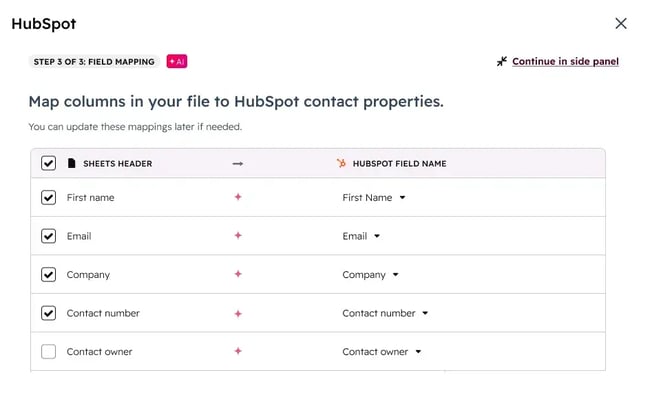
The tool automatically pushes data from Google Sheets into HubSpot, meaning teams can continue using spreadsheets for data collection and preparation without sacrificing the engagement tracking, automation, and insights that a proper CRM provides. It's particularly useful for teams transitioning away from spreadsheet-only workflows, or for specific use cases where spreadsheet flexibility is genuinely valuable, like bulk data imports, custom reporting templates, or collaborative data cleanup projects.
7. Spreadsheets are quick and easy to add into a workflow.
Whereas a dedicated system, such as , may take users time to adopt, spreadsheets pose no such challenges. Once a spreadsheet is created and shared, it’s easy to incorporate it into the team’s workflow — regardless of the team’s size.
8. Spreadsheets are fantastic tools for financial documents.
There’s no other tool like a spreadsheet for creating financial documents such as balance sheets, business budgets, and cashflow statements. Once ready to export the revenue and asset data from your bookkeeping tool, it’s as easy as plugging in the numbers and generating a new spreadsheet statement every quarter.
9. You have access to countless spreadsheet templates.
Earlier, I mentioned that to use a spreadsheet for a particular use case, you’ll likely need a template. Otherwise, it’d be hard to create a spreadsheet that works for you and your team. The good news is that many templates exist for both Excel and Google Sheets. There are nearly 100 examples in .
10. You can visualize data (with caveats).
Spreadsheets can be used to visualize data — but users must know how to do so effectively. With a tool like the , teams can simply access the reporting dashboards to see data visualized automatically. Spreadsheets can do the same thing, but users need to know how to appropriately choose the data to avoid errors.
Once teams learn how to handle a spreadsheet’s visualization tools, they can create charts and graphs with ease.
To summarize, spreadsheets may be sufficient for startups in the very early stages, but these advantages are often short-lived. Over time, spreadsheets can become more trouble than they're worth.
Even for a small company, managing customer information through spreadsheets is at best unproductive and at worst downright dangerous for a variety of reasons. Spreadsheets lack the security controls and access permissions of dedicated sales software, making customer data vulnerable to accidental sharing, unauthorized access, or intentional data theft. Without audit trails or role-based permissions, sensitive sales information can be disseminated to anyone via email, creating compliance risks and competitive disadvantages.
Disadvantages of Spreadsheets for Sales
- Spreadsheets are not user-friendly.
- Spreadsheets lack visibility.
- Spreadsheets are prone to errors.
- Advanced data visualization is difficult.
- Critical customer data isn’t utilized to its full potential.
- They don’t always integrate with business systems.
- Spreadsheets make it harder for managers to manage team members.
- Spreadsheets are difficult to scale.
Spreadsheets introduce eight critical limitations that compound as sales teams scale. These disadvantages affect data accuracy, team collaboration, security, and long-term productivity
1. Spreadsheets are not user-friendly.
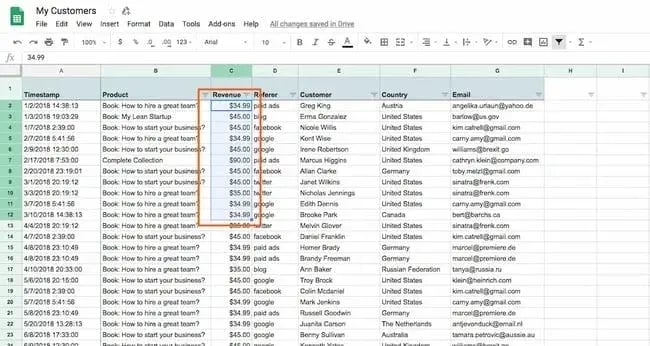
There’s no way around it. Spreadsheets are simply not user-friendly. They’re customizable and familiar, but when handling large amounts of data, users often scroll through hundreds, if not thousands, of rows and columns. It’s difficult to make spreadsheets easy to ingest and easy to read.
For instance, take a look at this spreadsheet:
And then look at similar information on :
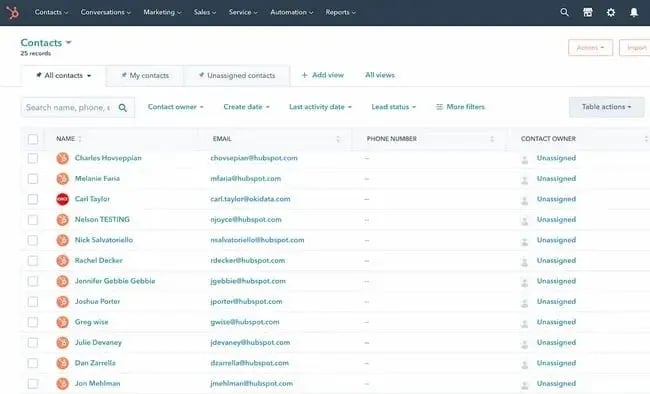
Much easier to read and manage, isn’t it? The above view is automatically applied in the CRM. Making a spreadsheet more user-friendly and easy to read requires significant tinkering with the colors, font, and font sizes.
2. Spreadsheets lack visibility.
While spreadsheets are collaborative tools that allow anyone on the team to add information, it’s hard to tell who made the edits. This can make it difficult to pinpoint the appropriate party if an error happens or if something else goes amiss with the sheet.
In sales, specifically, establishing an orderly system to divide leads and customers when working from spreadsheets can be challenging. Unless reps are trained to take meticulous notes and follow a rigorous documentation process, there's no indication of who last reached out to a customer or prospect, what the message said, or when the interaction took place.
Additionally, spreadsheets aren’t as secure as sales software. Unlike a dedicated system that requires a login, spreadsheets can be shared with anyone, anywhere, with the simple send of an email. This makes it easy for a disgruntled or dishonest employee to share leads and customer data with external contacts (read: your competitors).
3. Spreadsheets are prone to errors.
With so many people having their hands on a single spreadsheet, and with so many edits and calculations happening at once, it’s natural that spreadsheets will contain some type of error. Spreadsheets become error-prone as sales data grows.
That’s why it’s wise to invest in a database software that can quickly and accurately resolve errors on its own or flag them for fixing. The worst part about spreadsheets, especially large ones, is that it’s easy to miss errors unless someone is continuously combing through them row by row.
4. Advanced data visualization is difficult.
As mentioned, users can create charts and graphs in spreadsheets. But “create” is the key word. Assembling any kind of data visualization in a spreadsheet is time-consuming and frustrating. Beyond the graphic aspect, data visualization is important for advanced insights or sales team training, adding another limitation to spreadsheets.
This lack of visual assets makes it challenging to assemble meaningful reports from the data. As anyone who has tried to report from Excel knows, it's not for the faint of heart. The more complex the data, the more challenging reporting becomes.
5. Critical customer data isn’t utilized to its full potential.
One of the biggest limitations or risks of using spreadsheets for sales is treating customer data as static. Rows and columns sit there until someone manually does something with them. This leaves critical customer data waiting to be analyzed or interpreted.
Compare this to intelligent sales software that identifies buying signals, surfaces accounts showing engagement spikes, flags deals that have gone quiet, and recommends next actions based on what‘s actually working. The difference isn’t just efficiency; it's the gap between managing data and actually using it to close more deals.
6. They don’t always integrate with business systems.
Not all spreadsheets can integrate with existing sales and business systems. A lack of integration means that customers and prospects might receive redundant information... or none at all. Neither of these scenarios translates into sales or growth for the business.
7. Spreadsheets make it harder for managers to manage team members.
To effectively coach and mentor, managers need visibility into their team members' daily actions and processes. This is all but impossible to do through spreadsheets. Both team members and managers will quickly become frustrated with the seemingly endless cycle of uploading, downloading, attaching, and emailing spreadsheets.
A much better alternative is a project management tool or a CRM that keeps a record of all rep activity.
8. Spreadsheets are difficult to scale.
Sales tools must scale as the company and customer list grow. However, the bigger the spreadsheet, the more likely it is to contain errors and broken formulas. Not to mention, large spreadsheets are exponentially more unwieldy for users and administrators alike, making them difficult to scale with the needs of large businesses.
When to Use a Spreadsheet
Spreadsheets remain a useful tool for sales teams, even with the advancements in intelligent sales platforms. There are numerous use cases where a spreadsheet is the ideal solution.
“Spreadsheets shine the most when speed, flexibility, and experimentation outweigh structure,” suggests Stephen Hall, Head of Business Development at . “They’re ideal to use for small datasets or static lists when you just need to organize a small amount of information without ongoing automation (e.g., tracking competitor pricing, campaign test groups).”
Below are a few more use cases for sales spreadsheets.
When you want to manage a large dataset at one time
Spreadsheets are an excellent tool when teams need to handle and manipulate a large dataset on a one-time basis. When exporting all traffic data for the business website to identify the pages that earned the most traffic, spreadsheets allow you to quickly view data for a single date or a specific time range in a familiar interface.
However, to track traffic over time, spreadsheets aren’t the best tool, because the dataset needs to be exported each time access is needed. There’s also no easy way to visualize the data. You could still, but you’d have to use complex formulas to retrieve and visualize the data properly.
When your company is just starting out
Spreadsheets are cheap — and sometimes free, as is the case with Google Sheets. When a company first starts out, the money isn't exactly rolling in. Startups devote all of their cash to their product — and make do with the equivalent of duct tape on the operations side.
This means that when it’s time to track customer and , spreadsheets are the natural choice. It makes sense, too. When businesses only have a handful of customers, it’s easy to simply pop their information into a spreadsheet and share it with the one or two salespeople on staff.
However, once the business starts growing, it’s important to upgrade to a CRM or intelligent sales database.
When no dedicated tool exists for what you want to do
In some cases, there might not be a tool that can provide the dedicated organization and collaborative features that spreadsheets offer.
Consider a large writing team with distributed team members. Teams may want a tool that lets them see and sort all the articles everyone’s working on at once, rather than having to click from project board to project board, as required in project management software.
Spreadsheets are a great tool for that. Using formulas and functions, teams can create a spreadsheet that does exactly what they need.
If you don’t fall under these camps, you’re better off using a database as opposed to a spreadsheet, especially if you’re in sales.
Spreadsheets vs. CRM for Sales: Feature Comparison
|
Feature |
Spreadsheets |
CRM Software |
|
Cost |
Free (with Microsoft Office or Google Workspace) |
Free to paid (HubSpot CRM is free; enterprise options vary) |
|
Setup Time |
Immediate — no configuration required |
Minimal to moderate setup depending on complexity |
|
Learning Curve |
Minimal — most sales professionals already familiar |
Low to moderate — intuitive interfaces with some training |
|
Best For Team Size |
Under 5 people |
3+ salespeople to enterprise teams |
|
Ideal Deal Volume |
Fewer than 50 active opportunities |
50+ opportunities with unlimited scaling |
|
Data Entry |
Manual entry required for all updates |
Automatic activity logging and data capture |
|
Error Rate |
High (94% of business spreadsheets contain errors) |
Low — data validation and automation reduce errors |
|
Collaboration |
Limited — version control issues, file sharing via email |
Seamless — simultaneous editing, centralized data access |
|
Automation & Alerts |
None — all processes manual |
Automated follow-ups, reminders, workflow triggers, and risk notifications |
|
Pipeline Visibility |
Static snapshots requiring manual updates |
Real-time pipeline visibility with automatic updates |
|
Forecasting |
Manual calculations prone to errors |
AI-powered forecasting with predictive analytics |
|
Activity & History Tracking |
Manual logging and static records |
Automatic logging with complete timeline views |
|
Integration |
Limited (some tools like HubSpot for Google Sheets?) |
Native integrations with marketing, support, and sales tools |
|
Scalability |
Difficult — complexity increases exponentially |
Easy — scales efficiently from 10 to 100+ users |
|
Reporting |
Manual report building, time-consuming |
Automated dashboards with real-time insights |
7 key business processes: Spreadsheets vs. sales software
Seven core business processes reveal the practical limitations of spreadsheets compared to specialized sales software. Each process demonstrates different thresholds where spreadsheet functionality breaks down, and dedicated tools become essential
1. Sales Tracking
Sales tracking is the backbone of revenue operations. It's how teams monitor deal progression, forecast revenue, and identify bottlenecks in the sales cycle.
When spreadsheets work: Sales tracking spreadsheets are effective when there are a handful of deals in an early-stage startup or when managing a side project with fewer than 20 active opportunities.
When spreadsheets fail: Once a business hits scale. With multiple reps, complex sales cycles, and hundreds of opportunities, spreadsheets can‘t effectively track sales pipeline velocity, automatically log touchpoints, or flag at-risk deals. They’d constantly be asking, "Is this current?" and the answer is usually no. Sales software gives teams real-time pipeline visibility, automatic activity logging, and forecasting that doesn’t require manual updates.
2. Project Management
Sales teams are constantly juggling multiple initiatives — from campaign launches to account-based strategies to product rollouts — making project management essential for coordinating cross-functional work and hitting deadlines.
When spreadsheets work: Simple project checklists, one-off initiatives with clear timelines, or basic task lists for small teams working on a single project.
When spreadsheets fail: Managing dependencies, resource allocation, or anything involving more than five people. Spreadsheets can't send notifications when deadlines shift, visualize critical paths, or prevent two people from being assigned conflicting work. Project management software handles task dependencies and capacity planning, keeping everyone aligned without endless status meetings.
3. Financial Planning
From territory planning to commission structures to quota setting, sales leaders need accurate financial planning to allocate resources effectively and set realistic targets.
When spreadsheets work: Personal budgets, basic expense tracking, or quick financial models and scenario planning, where calculation flexibility is needed
When spreadsheets fail: Multi-department budgeting, financial consolidation, or anything requiring audit trails. One wrong formula and the entire budget is compromised. Financial planning software enforces data integrity, maintains version control, and provides the governance controls that finance teams actually need for compliance and accuracy.
4. Customer Data Management
Every sales interaction generates valuable data — contact information, buying signals, conversation history, preferences — and managing this data effectively determines whether reps can personalize outreach or waste time hunting for context.
When spreadsheets work: Collecting initial customer information for a beta test, managing a small email list under 100 contacts, or organizing data before importing it into a proper system.
When spreadsheets fail: The moment teams need to track customer history, segment audiences, or coordinate across teams. Spreadsheets create data silos — sales has one version, marketing has another, and support is working from a third. CRM software centralizes customer data, tracks every interaction, and ensures the entire organization works from a single source of truth.
5. Reporting and Analytics
Sales leaders make daily decisions based on metrics — conversion rates, win rates, average deal size, sales cycle length — and the quality of reporting directly impacts the quality of those decisions.
When spreadsheets work: Ad-hoc analysis, one-time data exploration, or custom calculations that require formula flexibility and manual manipulation.
When spreadsheets fail: Ongoing performance reporting, dashboards that need real-time data, or analysis that requires pulling from multiple sources. Manually updating reports wastes hours each week and guarantees insights are already outdated by the time they are shared. Analytics software connects directly to data sources, updates automatically, and delivers insights when they're needed.
6. Team Collaboration
Modern sales requires coordination — between SDRs and AEs, sales and marketing, individual contributors and managers — and seamless collaboration tools determine whether teams operate as a unified revenue engine or a collection of silos.
When spreadsheets work: Quick brainstorming sessions, collecting input from a small group on a one-time basis, or simple data sharing that doesn't require simultaneous editing.
When spreadsheets fail: Real-time collaboration at scale. Version control becomes a nightmare — someone‘s working on "Final_v3_REVISED_USE_THIS.xlsx" while another person updates "Final_v2.xlsx." Teams can’t see who changed what, when they made the change, or why. Collaboration software offers simultaneous editing, change tracking, and comment threads, eliminating the endless cycle of emailed attachments.
7. Inventory Management
For sales teams selling physical products or managing limited capacity (like consulting hours or event seats), inventory management prevents overselling, ensures accurate quoting, and maintains customer trust.
When spreadsheets work: Tracking inventory for a small operation with minimal SKUs, low transaction volume, and no need for real-time stock levels.
When spreadsheets fail: Managing multi-location inventory, handling high transaction volumes, or integrating with e-commerce and point-of-sale systems. Spreadsheets can't prevent overselling, automatically reorder stock, or update quantities across sales channels in real time. Inventory management software syncs stock levels instantly, triggers reorder points, and prevents costly errors associated with manual inventory tracking.
Using Databases Compared to Spreadsheets
Databases are programs that are designed to store, organize, and retrieve data. In sales, the most common type of database used is a client relationship manager, also known as a CRM. CRM systems offer better scalability and automation than spreadsheets.
For example, provides free sales tracking tools as an alternative to spreadsheets. It‘s built to handle everything spreadsheets can’t, from automatic activity tracking, real-time pipeline visibility, intelligent deal scoring, and centralized customer data that your entire revenue team can access and trust.
The platform throughout the customer journey, helping teams prioritize the right opportunities, automate repetitive tasks, and surface insights that would take hours to uncover manually. And unlike spreadsheets that become liabilities as companies scale, HubSpot CRM grows with your business — from startup to enterprise — without requiring teams to abandon their workflows or spend months on implementation.
Let’s compare working with a database to working with a spreadsheet.
1. A database serves as a central resource.
A CRM database is a tool that stores all of client and customer contact information in one central place that can be easily accessed by your entire team across multiple devices. This system can organize all of a company’s contact-related data, including emails, phone calls, and live chat with customers and prospects.
Hall emphasizes this sentiment, “Compared to spreadsheets, sales software is useful for team-wide visibility,” he says. “Shared dashboards, real-time activity logs, and permissions remove the version-control issues that spreadsheets create.”
He adds that central automation tasks are also important. “With sales software, our sales team’s tasks can be easily automated and tracked. Reminders, follow-ups, handovers, and reporting all benefit massively from this automation.”
2. It offers a seamless integration with other software.
Additionally, a CRM database can be seamlessly integrated with your company’s other business systems, including marketing software, which can improve collaboration between sales and marketing organizations, ensuring prospects don’t receive the same information or get missed altogether.
3. It’s easy to scale for growing companies.
Spreadsheets are effective at storing basic quantitative data and are often maintained manually. On the other hand, databases are more effective at storing qualitative data, which is why they are ideal for complex businesses with a large customer base or a complex sales process. Databases often have automation capabilities that help organizations save time on manual entry.
For companies scaling or rapidly acquiring new customers, upgrading from spreadsheets to a can help them sell to more customers.
Andrew Romanyuk, co-founder and SVP of Growth at , adds that sales software is also critical once data becomes more advanced.
“As soon as data starts to impact money, responsibility, and other people‘s work, I’m always in favor of specialized sales software,” he says. “If we're building a quarterly plan, calculating bonuses, or forecasting for investors, all the data should be in the system, not in the personal spreadsheet of someone in the sales department.”
Frequently Asked Questions About the Advantages and Disadvantages of Spreadsheets
1. What are the advantages of using spreadsheets for sales?
Spreadsheets offer flexibility, universal accessibility, and zero learning curve for most sales professionals. They're ideal for quick calculations, ad-hoc analysis, and situations where complete control over data structure and formulas is needed.
For very small teams (under five people) tracking fewer than 50 deals, spreadsheets provide a low-friction way to organize information without committing to software infrastructure. They also excel at data preparation, including cleaning and organizing information before importing it into more robust systems.
2. Which of the following are benefits of using spreadsheets to track sales data?
The core benefits include immediate availability (no setup required), customization freedom (build exactly what you need), offline access, and familiarity (most teams already know how to use them). Spreadsheets also allow for complex calculations and scenario modeling that some CRM systems can't easily replicate.
For startups testing sales processes or running pilot programs, spreadsheets let teams iterate quickly without the overhead of configuration. However, these benefits diminish rapidly as team size, deal volume, or process complexity increases.
3. What are three different reasons that you might use a spreadsheet for sales?
The first reason is data staging and cleanup — organizing prospect lists, normalizing data formats, or preparing bulk imports before moving information into your CRM. Second, custom financial modeling — building commission calculators, territory planning models, or quota scenarios that require formula flexibility.
Third, one-off analysis projects — exploring data relationships, testing hypotheses, or creating custom reports that fall outside the company’s standard reporting structure. In all three cases, spreadsheets complement rather than replace sales software.
4. When should I upgrade from spreadsheets to a CRM for sales tracking?
Upgrade immediately if your sales team is experiencing any of these signals:
- Sales reps asking “is this current?” about pipeline data
- Deals falling through cracks because follow-ups were missed
- Inability to forecast accurately
- Team members working from different versions of the same spreadsheet
- More than 30 minutes daily is spent updating sales data manually
As a general rule, once the business has more than three salespeople, manages more than 50 active opportunities, or needs to track customer interactions over time, a CRM becomes essential rather than optional.
5. Can spreadsheets handle complex sales processes?
Technically yes; practically, no. Spreadsheets can track multi-stage sales processes with multiple tabs and complex formulas, but they can't automatically log emails, set reminders based on deal activity, notify managers when deals stall, or prevent two reps from contacting the same prospect simultaneously.
Complex sales processes involve dependencies, time-based triggers, and cross-functional coordination — precisely the scenarios where spreadsheets break down, and errors multiply. The more complex the sales process, the more dangerous spreadsheets become.
6. How do spreadsheets compare to CRM software for sales tracking?
Spreadsheets are manual, static, and require constant human intervention to remain accurate, while CRM software is automated, dynamic, and updates in real time. Spreadsheets scale linearly — doubling the team doubles the administrative burden — while CRMs scale efficiently without exponentially increasing the work required to maintain data quality.
For sales tracking specifically, CRMs provide pipeline visibility, forecasting accuracy, and activity intelligence that spreadsheets cannot deliver at any scale.
Are the advantages of spreadsheets worth bearing the disadvantages?
The benefit of using spreadsheets for business comes down to two main factors: they‘re free (with Microsoft Office or Google Workspace), and they don’t require training.
These are certainly valid reasons — especially for a small company without cash to burn or training resources. But a database tool, such as the HubSpot CRM, is a much better fit for most teams. And the best part? A CRM can be just as low-cost as a spreadsheet.
For businesses ready to scale efficiently, moving from spreadsheets to a CRM eliminates persistent data problems and supports sustainable team and company growth.
Editor's note: This post was originally published in April 2015 and has been updated for comprehensiveness.
HubSpot's Free CRM Software
Free CRM Software & Tools for Your Whole Team
- Sales
- 糖心Vlog
- Operations
- Customer Service
Excel