.png?width=112&height=112&name=Image%20Hackathon%20%E2%80%93%20Vertical%20(67).png)
Customer monitoring is becoming essential for modern customer experience and service teams. As customer journeys span more channels and touchpoints, businesses require a systematic way to track customer behavior, satisfaction, and risk signals in real time, not just when something goes wrong.
This guide explains what customer monitoring is, how it works across the full customer journey, which customer success metrics matter most, and which tools support effective customer monitoring at scale.
Table of Contents
- What is customer monitoring, and how does it work?
- How to Monitor Customers Across the Full Journey
- Best Customer Monitoring Tools
- Customer Monitoring Metrics to Track
- Frequently Asked Questions About Customer Monitoring
What is customer monitoring, and how does it work?
Customer monitoring is the continuous process of tracking customer behavior, interactions, satisfaction signals, and health indicators across the entire customer journey to understand experience quality, identify risk, and guide timely action.
Unlike random surveys or retrospective analytic reports, customer monitoring focuses on what is going on at the moment. It takes and combines data from customer service interactions, product usage, , and operational metrics to create a real-time picture of customer health.
Centralized data platforms are a major requirement for customer monitoring. centralizes customer data in a single system, enabling customer service, success, and operations teams to monitor experience trends, trigger alerts, and respond proactively — rather than reacting after churn or dissatisfaction occurs.
.png)
50 Free Customer Service Email Templates
Templates to communicate price increases, apologies, thanks, and notifications to your customers with sincere, on-brand messaging.
- Price Increase Letter Templates
- Customer Apology Email Templates
- Referral Email Templates
- And More!
Download Free
All fields are required.
Form not available
You're all set!
Click this link to access this resource at any time.
How to Monitor Customers Across the Full Journey
Effective customer monitoring requires structure. Below is a method that customer experience leaders can use to monitor customers across the full lifecycle:
1. Centralize customer data in a single system
Customer monitoring starts with a unified source of truth. Customer interactions, support tickets, feedback, and lifecycle stage data must live in one system to avoid blind spots. gives teams a single view of engagement history, ownership, and lifecycle status without switching tools.
2. Map monitoring signals to journey stages
Customer monitoring works best when signals are tied to lifecycle stages: onboarding, adoption, support, renewal, and expansion. Each stage has different indicators, such as onboarding completion, ticket volume, satisfaction trends, or usage frequency.
3. Track service and feedback signals continuously
Monitoring customer service interactions reveals early friction. Ticket volume spikes, repeat issues, and unresolved cases are strong indicators of risk. Feedback tools, including CSAT, NPS, and CES, add experience-layer context to operational data.
combines ticketing, customer feedback, and health scoring so teams can monitor experience signals without manual reporting.
4. Create automated alerts for risk patterns
Customer monitoring becomes actionable when teams define thresholds. Examples include repeated low CSAT scores, increased response times, or inactivity over a defined period. Automated alerts ensure issues surface before escalation or churn.
5. Share visibility across teams
Customer monitoring should not be siloed within support. Dashboards allow customer success, operations, and leadership teams to monitor trends, review account health, and align on interventions using shared data.
Best Customer Monitoring Tools
Below are four customer service monitoring tools to help track customer experience, satisfaction, and health across the customer’s journey.
1.

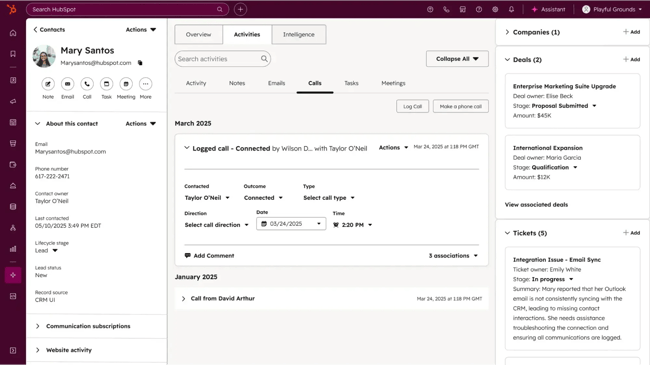
HubSpot CRM gives businesses a centralized view of every customer interaction, so nothing falls through the cracks. It tracks deals through the sales pipeline in real time. Built-in activity timelines and contact records mean reps always know the history of a relationship before reaching out. And with reporting dashboards layered on top, users can monitor trends in customer behavior, engagement, and revenue at a glance.
Core Features
-
Unified customer data
-
Lifecycle tracking
- Dashboards with easy-to-understand analytics
Pricing: A free tier is available; paid plans scale by features.
What it is: HubSpot CRM is an that centralizes customer data across marketing, sales, service, and success teams.
Why it matters: Customer monitoring depends on visibility. With HubSpot CRM, teams can track customer engagement, support history, and lifecycle status in one place. This makes it easier to identify health trends and churn risk early.
What I like: Native dashboards and automation reduce manual monitoring and help teams act on signals in real time.
2.
HubSpot's Service Hub helps teams monitor customers by centralizing every ticket, conversation, and inquiry in one place. Reps can send surveys to see how satisfied customers are, then store that information inside their CRM. The help desk and conversation inbox give teams full visibility into open issues and response times. Paired with reporting dashboards, Service Hub lets teams monitor support trends and performance.
Core Features
- Customer surveying, like
- Help desk ticketing
Pricing: Included in Service Hub plans.
What it is: Service Hub provides tools for , service performance, and .
Why it matters: Customer monitoring requires both qualitative and quantitative data. Service Hub enables teams to , calculate health scores, and monitor service interactions without separate systems.
Best for: Teams that want to connect service data and feedback directly to customer health.
3.
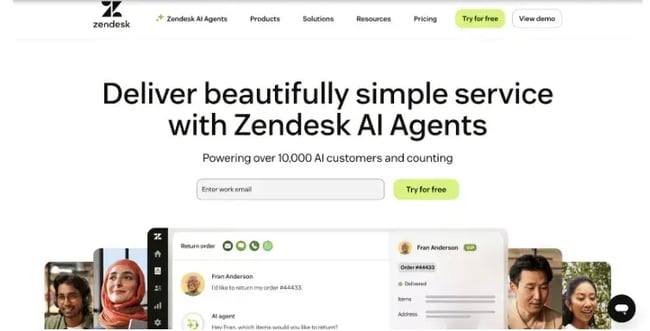
Zendesk is a customer service platform that tracks every support ticket, chat, and email in a unified agent workspace. The platform monitors response times, resolution rates, and customer satisfaction scores in real time. Teams can then better understand their support performance. Zendesk's reporting suite surfaces trends in ticket volume and customer sentiment so managers can course-correct quickly.
Core Features
-
Ticketing
-
Service analytics
-
Customer feedback
Pricing: Paid plans only.
What I like: Strong service monitoring capabilities, especially for high-volume support teams.
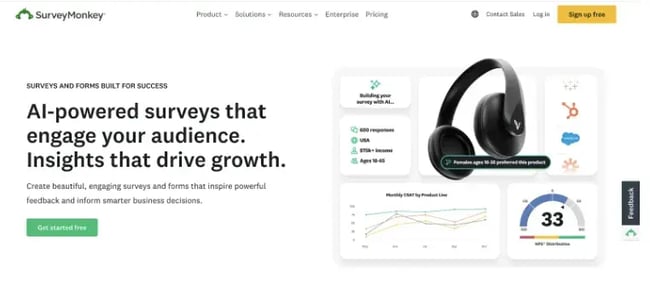
SurveyMonkey captures opinions at scale through customizable surveys sent at key touchpoints in the customer journey. Teams monitor sentiment trends over time with built-in analytics that break down responses by audience segment, question type, and date range. Rather than reactive support data, it gives businesses a proactive window into how customers feel — before issues escalate.
Core Features
-
Surveys
-
Feedback analytics
Pricing: Free and paid plans
What I like: Flexible survey creation for monitoring customer satisfaction trends over time.
Customer Monitoring Metrics to Track
1. Customer Satisfaction Score (CSAT)
Customer Satisfaction Score (CSAT) is a customer experience metric that measures how satisfied customers are with a specific interaction, product, or service. CSAT is one of the fastest ways to understand whether customers feel good or frustrated after an interaction.
Why it matters: Most customer problems don’t announce themselves loudly. They show up first as quiet frustration, confusion, delays, and unmet expectations. I use CSAT to pinpoint exactly where the experience breaks down. It's one of the most direct ways to track customer satisfaction and prioritize where to improve.
2. Net Promoter Score (NPS)
Net Promoter Score (NPS) is a customer loyalty metric that measures how likely customers are to recommend a brand, product, or service to others. Tracking NPS shows whether customers enjoy a product enough to recommend it to friends, family, or colleagues.
Why it matters: I pay attention to NPS because it tells me whether customers genuinely believe in what we’re offering, not just whether they’re still around. It helps me see beyond transactions and understand whether we’re building advocates or quietly losing them.
3. Customer Effort Score (CES)
Customer Effort Score (CES) is a customer experience metric that measures how easy or difficult it is for customers to complete a task or resolve an issue. The less effort customers expend to get value, the more likely they are to stay, renew, and trust the experience.
Why it matters: Paying close attention to CES is important, as it clearly shows where customer relationships quietly break down.
4. Ticket Volume and Resolution Time
Ticket volume tracks how many support requests customers submit, while resolution time measures how quickly those issues get resolved. These metrics reveal how much demand customers place on support and how efficiently teams resolve problems across the customer experience.
Why it matters: Watching ticket volume and resolution time usually reveals the stress in the system before it shows up elsewhere. Increased ticket volume or extended resolution times typically indicate that customers are encountering issues with poorly designed systems.
5. Customer Health Score
A customer health score is a single, at-a-glance number that shows how strong a team’s relationship is with a customer right now. It rolls up different signals, like usage, engagement, satisfaction, and outcomes, into one view so teams can quickly answer a simple question: Will the customer stay, leave, or grow with us?
Why it matters: Health scores provide a single view of customer risk and help teams be more intentional about customers’ outreach.
Frequently Asked Questions About Customer Monitoring
How is customer monitoring different from customer analytics?
Customer monitoring focuses on real-time signals across the customer journey to identify risk and trigger timely action. It draws on live data from service interactions, feedback, and usage to surface issues while there is still time to intervene.
Customer analytics looks at historical data and patterns to explain behavior, trends, and past performance. Where customer monitoring is action-oriented, customer analytics is insight-driven — informing strategy and long-term decisions rather than immediate responses.
Which customer monitoring metrics should I start with?
Most teams start with CSAT, ticket volume, and response or resolution time. for a simple reason: tThese metrics surface experience issues quickly, provide clear actionable signals, and are widely understood across customer success, support, and operations teams.
I recommend starting with this set because it builds confidence in the monitoring process early — the signals are easy to interpret and directly tied to customer experience quality..
How do I design alert thresholds without creating noise?
Alert thresholds work best when based on sustained trends rather than single events — a one-time CSAT dip is rarely actionable, but three consecutive low scores signals a pattern worth investigating.
Combining multiple related signals, such as usage patterns and support activity, further reduces false alarms and improves alert accuracy.
How do I monitor customers without risking privacy?
Customer monitoring teams protect privacy by collecting data on a consent basis, limiting monitoring to information necessary for service delivery, and applying role-based access controls so only authorized teams can view sensitive customer data.
These practices help organizations monitor effectively while staying compliant with applicable data protection regulations and internal privacy policies.
What is a customer health score, and when should teams build one?
A customer health score is a metric that combines multiple customer indicators — such as product usage, support activity, and feedback — into a single view of account status, commonly used to assess risk and identify accounts that may need attention.
Businesses typically after they have reliable and consistent data across core systems, including service interactions, customer feedback, and usage or engagement metrics.
Getting Started
Customer monitoring enables teams to see experience quality before it turns into churn. By centralizing customer data, tracking the right service and satisfaction signals, and using automation to surface risk patterns early, organizations can move from reactive problem-solving to proactive experience management.
When customer behavior, feedback, and service activity are monitored continuously across the full journey, teams gain the visibility needed to prioritize outreach, align across functions, and intervene at the right moments.
50 Free Customer Service Email Templates
Templates to communicate price increases, apologies, thanks, and notifications to your customers with sincere, on-brand messaging.
- Price Increase Letter Templates
- Customer Apology Email Templates
- Referral Email Templates
- And More!
Download Free
All fields are required.
Form not available
You're all set!
Click this link to access this resource at any time.
Customer Service