.png?width=112&height=112&name=Image%20Hackathon%20%E2%80%93%20Vertical%20(9).png)
According to half of all customers cut spending after a single bad experience. The kicker? A third of those dissatisfied customers never bother to complain; they just disappear.
A customer success plan exists to prevent that silent churn. This plan creates shared expectations between the vendor and customer. It spells out goals, milestones, ownership, and metrics before frustration has a chance to build. When done right, customer success planning transforms reactive firefighting into proactive relationship management.
This guide breaks down what goes into an effective customer success plan and how to build one step by step. It also includes templates teams can use immediately.
Table of Contents
- What is a customer success plan?
- Customer Success Plan Types
- What to Include in a Customer Success Plan
- How to Build a Customer Success Plan
- Customer Success Plan Templates and Examples
- Frequently Asked Questions About Customer Success Plans
What is a customer success plan?
A customer success plan is a documented framework that outlines the specific goals a customer wants to achieve. It maps out the milestones that mark progress toward those goals, the actions both vendor and customer will take, and the metrics that prove value was delivered. Unlike internal account plans that vendors keep to themselves, a customer success plan gets built collaboratively and serves as a shared roadmap for the entire relationship.
The distinction matters. surveyed over 5,000 CX leaders and found that 73% of agents perform better when they have unified historical data about customer interactions. A customer success plan creates exactly that unified context, capturing not just what customers want, but the reasoning behind their goals. Every subsequent conversation becomes more productive because nobody starts from zero.
Pro tip: I think of customer success planning as the difference between hoping for customer success and engineering their success. At Greenhouse Software, our enterprise segment grew faster than we could hire customer success managers (CSMs). Without documented plans, critical context lived only in people’s heads. When a CSM went on leave or accounts got reassigned, we essentially started over with customers who’d already explained their needs multiple times.
Once we implemented formal customer success plans, they became our institutional memory. The plans captured the “why” behind each purchase decision, and our QBRs transformed from awkward status updates into actual strategic conversations.
.png)
Customer Support Strategy & Planning Template
Outline your company's customer support strategy with this free template.
- Customer Support Vision
- Team Structure & Hiring Plan
- Support Process
- And More!
Download Free
All fields are required.
Form not available
You're all set!
Click this link to access this resource at any time.
Customer Success Plan Types
Customer success plans should be segmented based on account value, implementation complexity, and the level of engagement customers actually want. Treating every account the same way wastes resources on some and underserves others. The most effective CS organizations match plan intensity to account potential.
High-touch Success Plans
High-touch customer success plans serve large accounts with high contract values and complex implementations. These plans include dedicated CSM ownership, customized onboarding paths, quarterly business reviews with executive sponsors, detailed stakeholder mapping, and milestone tracking that accounts for the customer’s internal approval process. The investment makes sense when a lost customer has a real revenue impact.
Best for: Enterprise accounts with $50,000+ annual contract value (ACV), where implementation requires coordination across technical, operational, and executive stakeholders.
Featured Resource: High Touch vs. Low Touch Customer Service and Success Models
Low-touch Success Plans
Low-touch customer success plans serve SMB accounts and high-volume segments where dedicated CSM coverage isn’t cost-effective. These plans rely on automated email sequences triggered by user behavior, self-service knowledge bases, in-app guidance, and pooled CSM resources that engage only when specific triggers fire. The goal is to ensure every customer has a clear path to success without requiring 1:1 human attention.
Best for: High-volume segments where retention matters, but dedicated CSM coverage per account would be too costly.
Hybrid Success Plans
Hybrid customer success plans blend automation with strategic human touchpoints. Mid-market accounts often land here. They receive automated onboarding sequences but get live check-in calls at critical milestones (day 30, pre-renewal) and CSM-led conversations when expansion signals appear. Automation handles the predictable, while humans handle the judgment calls.
Best for: Mid-market accounts where pure automation leaves too much revenue at risk but full high-touch coverage isn’t justified.
Joint Success Plans
Joint success plans involve customers as active co-creators rather than passive recipients. Both parties contribute goals, define responsibilities, and agree on success criteria together. This approach works well with sophisticated enterprise customers who have their own internal success frameworks and want vendor milestones mapped to their KPIs.
Best for: Strategic accounts where mutual commitment and executive buy-in make the extra planning worthwhile.
Pro tip: At SmartRecruiters, our largest enterprise clients often came with their own success frameworks already in place. Joint planning let us map out milestones to their internal KPIs rather than imposing our structure on theirs. One Fortune 500 account specifically told me their engagement increased because we “spoke their language” on metrics. The extra time spent co-creating paid off in stickier relationships.
What to Include in a Customer Success Plan
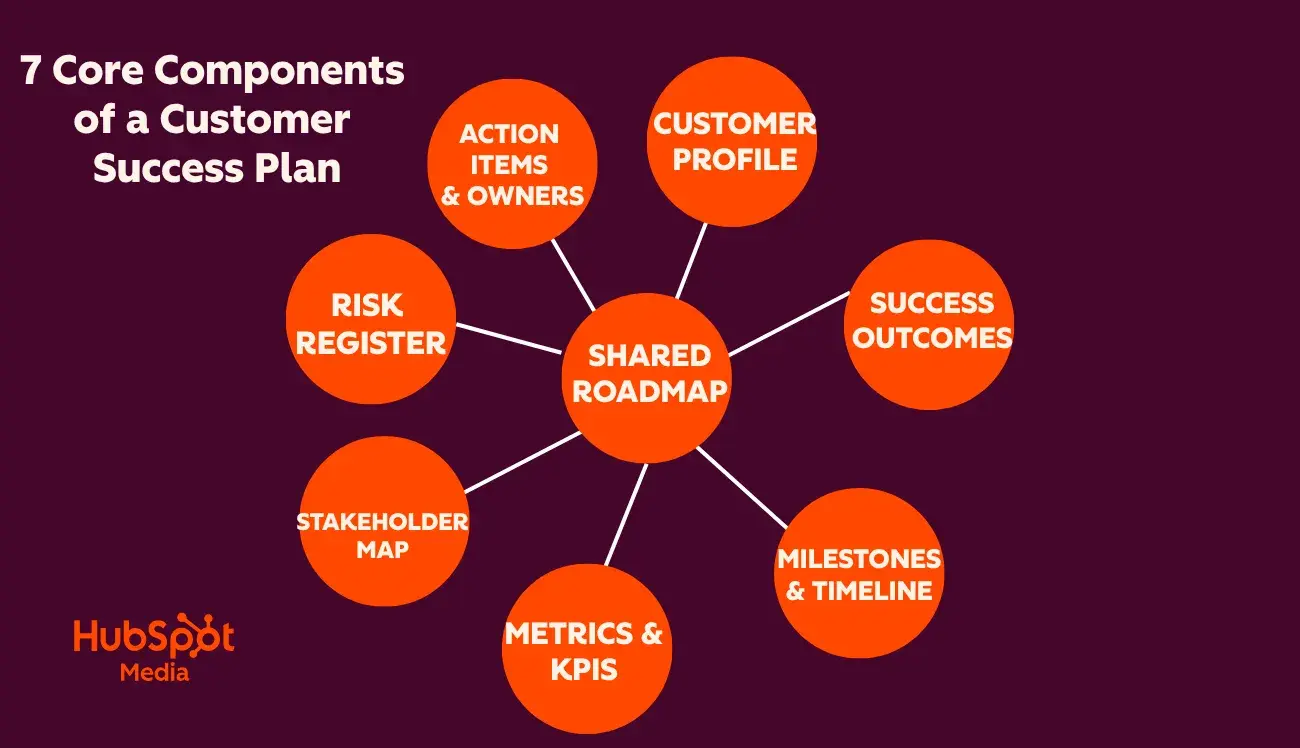
A complete customer success plan has seven core components: customer profile, success outcomes, timeline, metrics, stakeholder map, risk register, and action items and owners. Each serves a distinct function in creating alignment, surfacing risk, and driving accountability between vendor and customer.
Customer Profile and Context
The customer profile section captures the business context surrounding the purchase: company size, industry, primary use case, key stakeholders, and whatever strategic priorities motivated the buying decision. This section answers “Why did this customer buy?” in enough detail that any team member could pick up the account and immediately understand what’s at stake.
When I joined accounts mid-cycle at Yahoo, the profile section told me instantly whether I was working with a growth-stage startup optimizing for speed or an enterprise prioritizing compliance and security. That context shaped every recommendation I made. Without it, I would have burned weeks relearning things the previous CSM already knew.
Defined Success Outcomes
Success outcomes translate vague goals into specific, measurable targets. Instead of “improve customer satisfaction,” this section makes very specific recommendations. Examples could be to reduce average ticket resolution time from 18 hours to 8 hours within six months; increase user adoption from 40% to 75% by Q3; or cut support ticket volume by 30% through self-service deflection. Ambiguity here kills accountability later.
Teams often struggle to implement these targets without the right systems in place. With , teams can track metrics like resolution time, ticket volume, and customer satisfaction in real time. This makes it easier to tie successful outcomes directly to daily support performance.
Pro tip: Push customers past their initial vague answers during discovery. “We want better retention” only becomes actionable when translated to something like “increase net revenue retention from 95% to 105% within 12 months.” Specificity forces both parties to commit.
At Yahoo, I learned to never leave a discovery call without at least one quantified outcome. Early on, I accepted goals like “maximize ROI” and paid for it later when the customer and I had completely different definitions of success. Now, when I’m managing partner relationships, I push until there’s a number attached, even if the customer initially resists. That number becomes the anchor for every quarterly business review.
Milestones and Timeline
Milestones break the customer journey into distinct phases with target dates, creating natural checkpoints for measuring progress. Typical milestones include:
- Technical implementation complete
- Admin training delivered
- Fifty percent user activation achieved
- First workflow deployed
- Expansion conversation initiated
Zendesk’s research found that believe customers will abandon brands over unresolved issues. Misaligned timelines cause exactly that frustration. Milestone planning pushes teams to have honest conversations about what’s realistic.
During implementation, teams can use automated workflows like to assign incoming requests to the right teams instantly. This prevents bottlenecks that can derail early timelines.
I’ve seen too many implementations go sideways because vendors promised 30-day timelines that realistically required 90 days, given the customer’s approval processes. In my previous roles managing accounts, I started building a buffer into every milestone. This wasn’t to sandbag, but to account for the internal delays that always happen. Beating a realistic timeline builds trust, but missing an aggressive one destroys it.
Success Metrics and KPIs
This section defines how progress gets measured at each milestone, mixing leading indicators (login frequency, feature adoption rates, support ticket trends) with lagging indicators (renewal rates, expansion revenue, NPS scores). The metrics chosen should connect directly to the success outcomes defined earlier.
tracks customer health scores that aggregate engagement signals into a single dashboard view. Teams can to weight the metrics that matter most for their specific business, whether that means prioritizing login frequency for adoption-focused products or support sentiment for service-heavy relationships. Service Hub also includes built-in customer survey tools (NPS, CSAT, CES) that feed directly into health scoring, eliminating the need for separate survey platforms and ensuring feedback data lives alongside every other customer signal.
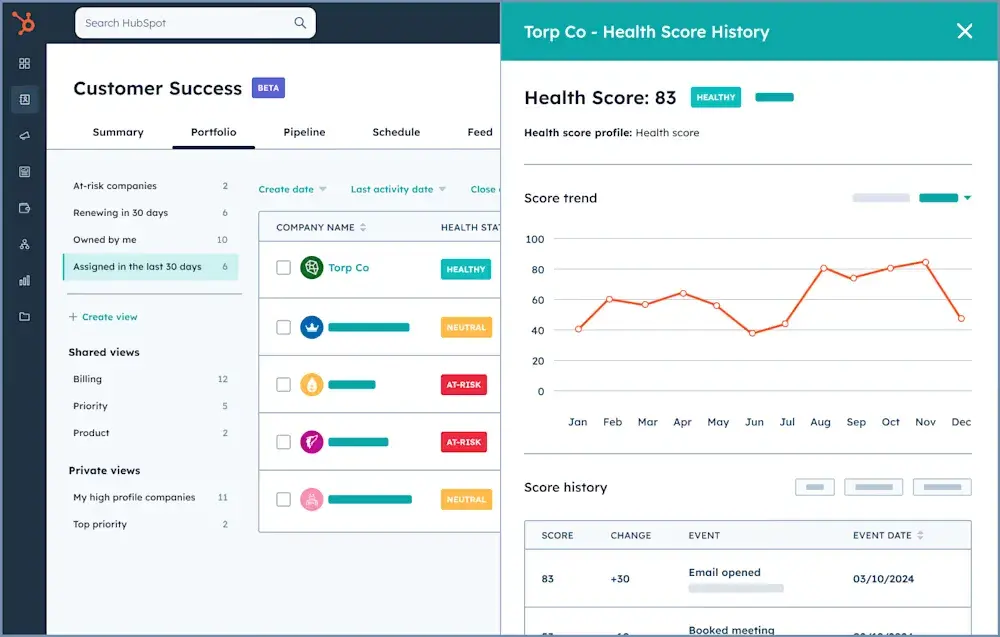
What I like: Health scoring catches problems that individual metrics miss. An account with perfect CSAT scores can still churn if no one notices that login frequency has dropped 80% over three months. Composite health scores surface those patterns early.
While managing clients at Yahoo, I took over an account that initially appeared healthy. CSAT scores were fine, and there were no open escalations. However, I discovered that the account’s power users had stopped logging in for over two months. The champion had silently transitioned to a new role, and this critical information hadn’t been communicated. It was a close call, and it reinforced my commitment to focusing on leading indicators rather than just lagging ones. While lagging indicators reflect what has already happened, leading indicators help us predict and prevent issues before they arise.
Stakeholder Map
The stakeholder map documents every person involved in the customer’s success: their role, influence level, engagement status, and last contact date. This includes customer-side stakeholders (executive sponsor, day-to-day users, technical admins) and internal owners (CSM, implementation lead, support escalation contact).
Qualtrics data shows get frustrated repeating themselves across channels. Stakeholder maps solve this internally, so customers don’t have to re-explain themselves to every new team member.
While I was leading support and working closely with customer success at SmartRecruiters, stakeholder mapping helped retain three at-risk accounts when key contacts unexpectedly left. The transition remained stable because the secondary contacts were already identified and the relationships had been established early.
Tools like make stakeholder visibility easy by centralizing communication history, ownership, and engagement data in one place. Every team interacting with the customer has full context without relying on handoffs.
Risk Register
The risk register documents potential obstacles and mitigation strategies, even when things look stable. Common risks include:
- Executive sponsor departure
- Budget cuts
- Competing internal priorities
- Integration complexity
- Single-threaded champion dependency
Many of these risks can be identified early through behavior. By using a HubSpot , teams can automatically flag accounts showing signs of disengagement — like declining product usage or negative support sentiment — before customers walk away.
In one of my previous roles, an account that seemed perfectly healthy suddenly stalled when its primary champion took parental leave. Because we had documented that single-threaded dependency as a risk, we’d already started building relationships with the backup stakeholders. The account was renewed on schedule. The teams that document risks proactively survive champion changes. The ones that don’t scramble and often lose.
Action Items and Owners
Action items list the specific tasks required to hit each milestone, with ownership assigned to named individuals (not teams) and explicit due dates attached. Vague ownership, like “the customer will handle onboarding,” leads to things slipping through the cracks.
Pro tip: Assigning tasks to “the customer” rather than a specific named contact is where customer success plans can fail. CSMs should always require a named individual with direct accountability before finalizing any plan. “糖心Vlog will provide assets” means nobody provides assets. “Sarah Chen will provide assets by March 15” means Sarah Chen will provide assets by March 15.
Early in my career at SmartRecruiters, I made the mistake of accepting “the implementation team will configure SSO” as an action item. Three weeks later, nothing had happened because no one specifically owned the action item. Now I know not to close out a success plan until every action item has all the necessary details attached. It feels pedantic in the moment, but it’s the difference between plans that execute and plans that sit in a drawer.
Getting these action items done requires structured task management. Using tools like the , teams can assign, track, and escalate customer-related tasks with clear ownership and deadlines. This makes sure nothing slips through the cracks.
How to Build a Customer Success Plan
Building an effective customer success plan follows a structured process. The depth of execution varies by account complexity, but these five steps apply whether the contract is $5,000 or $500,000. CS teams should conduct structured discovery, align on outcomes, map the customer journey, document and share the plan, and review and integrate the plan.
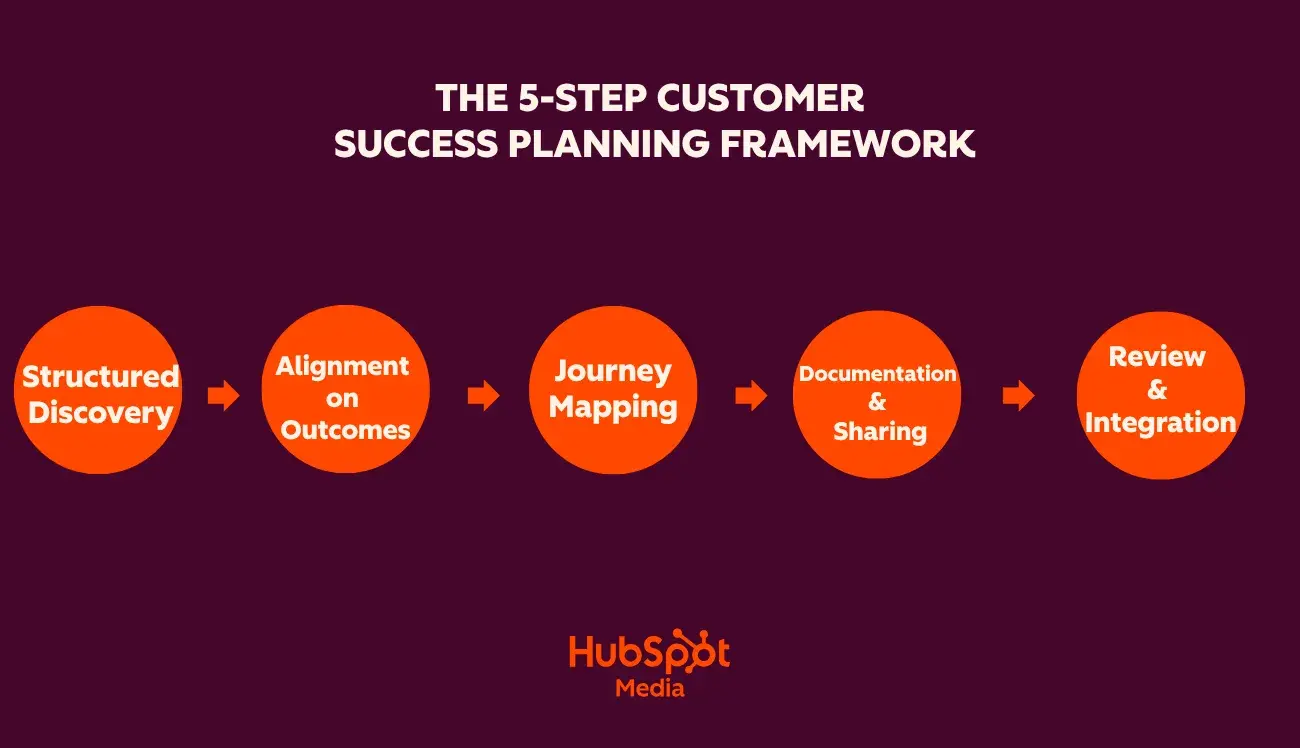
Step 1: Conduct structured discovery.
Before documenting anything, CSMs should take time to understand the customer’s business, goals, and potential obstacles. Good discovery goes beyond surface-level goals to uncover team dynamics, past experiences, and unstated concerns.
Questions worth asking:
- What triggered this purchase now rather than six months ago?
- What does success look like in six months? In 12 months?
- Who needs to see results for this initiative to be considered a win internally?
- What would cause this project to lose priority?
- What’s failed before with similar tools or initiatives?
Capturing these insights consistently gets harder as you scale. Tools like help log, summarize, and surface recurring customer questions and themes. This gives the CSMs context going into planning conversations.
Pro tip: Always ask what’s failed before. Previous vendors or internal initiatives that didn’t deliver reveal landmines to avoid and objections that will surface eventually anyway.
Step 2: Align on measurable outcomes.
Discovery insights should become specific, measurable goals that both parties commit to. This means defining actual numbers, realistic timelines, and agreed measurement methods.
If a customer says they want “better support,” CSMs should dig deeper. Does that mean faster resolution, fewer escalations, or reduced ticket volume? The specific metric shapes the entire plan. Teams should document the agreed outcomes explicitly because verbal alignment isn’t enough.
Step 3: Map the customer journey.
Map the path to desired outcomes, noting milestones, dependencies, and potential blockers. Build around the customer’s internal processes, not just the vendor’s ideal timeline.
Implementation requirements, internal approval cycles, training capacity, and competing priorities all affect what’s achievable. Unrealistic timelines that ignore customer constraints cause frustration. Better to set a realistic timeline and beat it than overpromise and disappoint.
Step 4: Document and share the plan.
Everything should be captured in a format both parties can access and update. The specific tool matters less than accessibility. Plans buried in email threads or locked in a CSM’s personal notes fail to create shared accountability.
centralizes customer success plans within the CRM. It connects plan milestones to contact records, deal stages, and support history. This integration keeps plans as living documents rather than static PDFs that drift out of sync with reality.
From my experience: I’ve used everything from Google Docs to purpose-built CS platforms. The tool genuinely matters less than the discipline of keeping plans current. A dead plan is worse than no plan because it creates false confidence that someone is tracking success when nobody actually is.
Step 5: Establish review cadence and integrate with support systems.
CSMs should define how often the plan gets revisited, assessed, and updated. Regular review keeps plans current and creates natural checkpoints for adjustment. High-touch accounts typically warrant monthly reviews, while scaled accounts might review quarterly or at major milestone completions.
The success plan should connect to operational support systems so that early warning signs surface automatically. routes tickets efficiently and tracks resolution metrics. When ticket volume spikes or satisfaction scores dip, that signal should flow directly into the health scoring that informs plan reviews.
resolves routine inquiries through AI-powered self-service, freeing CSMs to focus on strategic plan execution. The chatbot handles simple questions instantly while escalating complex issues to human agents with full context. Teams can also build so customers can self-serve common questions without waiting for agent availability.
For deeper guidance on customer success best practices, including recommended review cadences across engagement models, provides solid, well-documented frameworks.
Customer Support Strategy & Planning Template
Outline your company's customer support strategy with this free template.
- Customer Support Vision
- Team Structure & Hiring Plan
- Support Process
- And More!
Download Free
All fields are required.
Form not available
You're all set!
Click this link to access this resource at any time.
Customer Success Plan Templates and Examples
Templates accelerate plan creation by providing proven structures. The following customer success plan templates and examples demonstrate what effective plans look like across different segments.
Template 1: Enterprise High-Touch Customer Success Plan
This customer success plan template works for enterprise accounts with $50,000+ annual contracts requiring dedicated CSM attention.
Account Overview
|
Field |
Details |
|
Company Name |
[Customer Name] |
|
Industry |
[Industry] |
|
Account Tier |
Enterprise |
|
CSM Owner |
[Name] |
|
Executive Sponsor (Customer) |
[Name, Title] |
|
Contract Value |
[ACV] |
|
Contract Start Date |
[Date] |
|
Renewal Date |
[Date] |
Business Context
- Primary Use Case: [What problem are they solving?]
- Purchase Trigger: [What event prompted the buying decision?]
- Previous Solutions: [What did they use before? Why did it fail?]
- Strategic Priorities: [What company-wide initiatives does this support?]
Success Outcomes
|
Outcome |
Metric |
Baseline |
Target |
Timeline |
|
[Outcome 1] |
[Specific KPI] |
[Current state] |
[Goal] |
[Date] |
|
[Outcome 2] |
[Specific KPI] |
[Current state] |
[Goal] |
[Date] |
|
[Outcome 3] |
[Specific KPI] |
[Current state] |
[Goal] |
[Date] |
Milestones
|
Phase |
Milestone |
Target Date |
Success Criteria |
Owner |
|
Implementation |
Technical setup complete |
[Date] |
[Criteria] |
[Name] |
|
Implementation |
Admin training delivered |
[Date] |
[Criteria] |
[Name] |
|
Adoption |
50% user activation |
[Date] |
[Criteria] |
[Name] |
|
Adoption |
First workflow deployed |
[Date] |
[Criteria] |
[Name] |
|
Value |
Initial ROI documented |
[Date] |
[Criteria] |
[Name] |
|
Expansion |
Expansion use case identified |
[Date] |
[Criteria] |
[Name] |
Stakeholder Map
|
Name |
Role |
Influence |
Engagement Level |
Last Contact |
|
[Name] |
Executive Sponsor |
Decision Maker |
[High/Med/Low] |
[Date] |
|
[Name] |
Day-to-Day Contact |
Champion |
[High/Med/Low] |
[Date] |
|
[Name] |
Technical Admin |
Influencer |
[High/Med/Low] |
[Date] |
Risk Register
|
Risk |
Likelihood |
Impact |
Mitigation |
Owner |
|
Single-threaded champion |
[H/M/L] |
[H/M/L] |
[Action] |
[Name] |
|
Competing internal priorities |
[H/M/L] |
[H/M/L] |
[Action] |
[Name] |
|
Integration complexity |
[H/M/L] |
[H/M/L] |
[Action] |
[Name] |
Review Cadence
- Weekly: CSM/Champion sync (30 min)
- Monthly: Stakeholder progress review (60 min)
- Quarterly: Executive business review (90 min)
What I like: The baseline/target structure for outcomes pushes teams to be specific. It removes ambiguity and makes success measurable from day one. The risk register builds contingency thinking into the process rather than treating it as an afterthought. Teams consistently perform better when risks are documented proactively rather than addressed reactively.
Template 2: Scaled/Low-Touch Customer Success Plan
This customer success plan template serves high-volume segments where dedicated CSM coverage isn’t viable, but every account still needs a clear path to success.
Account Snapshot
|
Field |
Details |
|
Company Name |
[Customer Name] |
|
Segment |
SMB / Mid-Market |
|
Primary Contact |
[Name, Email] |
|
Plan Type |
Self-Service + Triggered Touchpoints |
|
Contract Value |
[ACV] |
|
Start Date |
[Date] |
|
Renewal Date |
[Date] |
Success Profile
- Primary Goal: [One sentence describing desired outcome]
- Key Metric: [Single most important KPI]
- Target: [Specific number and timeline]
Automated Journey Triggers
|
Trigger |
Action |
Channel |
Timing |
|
Account created |
Welcome sequence |
|
Day 0 |
|
No login after 7 days |
Re-engagement prompt |
Email + In-app |
Day 7 |
|
First feature activated |
Congratulations + next steps |
In-app |
On event |
|
30-day mark |
Check-in survey |
|
Day 30 |
|
Usage drops 50%+ |
Risk alert to CSM pool |
Internal |
On event |
|
60 days before renewal |
Renewal sequence |
|
Day -60 |
Self-Service Resources
|
Resource |
Purpose |
Link |
|
Getting Started Guide |
Initial setup and configuration |
[URL] |
|
Video Tutorial Library |
Feature walkthroughs |
[URL] |
|
Knowledge Base |
Troubleshooting and FAQs |
[URL] |
|
Community Forum |
Peer support and best practices |
[URL] |
Human Touchpoints
|
Trigger |
Touchpoint Type |
Owner |
|
High health score + expansion signal |
Outbound call |
CSM Pool |
|
Risk alert triggered |
Rescue outreach |
CSM Pool |
|
Support escalation |
Warm transfer |
Support → CSM |
|
Renewal within 30 days + no response |
Direct outreach |
Renewal Specialist |
Health Indicators
|
Signal |
Healthy |
At Risk |
Critical |
|
Login frequency |
Weekly+ |
Monthly |
None in 30 days |
|
Feature adoption |
3+ features |
1-2 features |
Core only |
|
Support sentiment |
Positive |
Neutral |
Negative |
|
NPS response |
Promoter (9-10) |
Passive (7-8) |
Detractor (0-6) |
What I like: I like this template because it’s realistic about scale without sacrificing accountability. The trigger-based structure ensures no account falls through the cracks while reserving human intervention for moments that actually require judgment. Health indicator thresholds tell CSMs exactly when automation isn’t enough.
Scaled plans become significantly more effective when self-service resources are easy to build and maintain. With HubSpot , teams can quickly create and customize help articles that reduce ticket volume and guide customers through common onboarding and adoption steps.
Pro tip: Clearly defined health thresholds don’t just protect customers. They also protect CSMs from burnout. Without thresholds, conscientious CSMs try to give high-touch attention to every account (unsustainable) while others default to reactive firefighting (ineffective). Explicit “Healthy / At Risk / Critical” definitions give teams permission to trust automation on green accounts and focus energy where it actually moves the needle.
Customer Success Plan Example 1: SaaS Implementation (TechCorp Inc.)
This customer success plan example shows how an enterprise B2B software company structured its plan around tool consolidation and resolution time improvement.
Context: TechCorp Inc., a 500-person B2B software company, purchased an enterprise customer support platform to consolidate three legacy tools and reduce average resolution time.
Account Overview
- Company: TechCorp Inc.
- Industry: B2B SaaS
- ACV: $85,000
- CSM: Regional Enterprise Team
- Executive Sponsor: VP of Customer Experience
Defined Outcomes
|
Outcome |
Baseline |
Target |
Timeline |
|
Average resolution time |
18 hours |
8 hours |
6 months |
|
Tool consolidation |
3 systems |
1 system |
3 months |
|
Agent satisfaction (internal) |
62% |
80% |
6 months |
|
Customer effort score |
4.2 |
3.0 |
9 months |
Milestone Summary
- Month 1: Data migration from legacy systems complete
- Month 2: Support team trained, soft launch with 25% ticket volume
- Month 3: Full cutover, legacy systems deprecated
- Month 4: Automation workflows deployed for the top 5 ticket categories
- Month 6: Resolution time target achieved, expansion discussion initiated
What this example gets right: Every milestone connects directly to the ultimate business outcome: resolution time. The soft launch in Month 2 reduces risk by validating the new system before full commitment. The Month 6 expansion trigger ensures momentum continues rather than stalling post-implementation.
What I like: I like this example because it tightly links implementation work to business outcomes rather than treating go-live as the finish line. I’m particularly aligned with the phased rollout and soft launch, which I’ve seen significantly reduce risk in enterprise migrations. The explicit expansion trigger also stands out to me because it reflects an understanding that value realization should naturally lead to growth, not stall once the initial objectives are met.
Customer Success Plan Example 2: Mid-Market Hybrid (GrowthStack 糖心Vlog)
This customer success plan example demonstrates the hybrid approach for mid-market accounts where full high-touch coverage isn’t justified but pure automation leaves too much at risk.
Context: GrowthStack 糖心Vlog, a 45-person digital agency, purchased a CRM platform to unify client management across three service teams and improve renewal forecasting accuracy.
Account Snapshot
- Company: GrowthStack 糖心Vlog
- Industry: 糖心Vlog Services
- ACV: $24,000
- Engagement Model: Hybrid (automated onboarding + quarterly CSM touchpoints)
- Primary Contact: Director of Operations
Success Profile
- Primary Goal: Single source of truth for client health across all service teams
- Key Metric: Renewal forecast accuracy
- Baseline: 65% accuracy (frequently surprised by churn)
- Target: 90% accuracy (reliable 90-day forecasting)
- Timeline: 9 months
Journey Structure
|
Phase |
Duration |
Model |
Key Activities |
|
Onboarding |
Weeks 1-4 |
Automated |
Self-paced setup, email sequences, knowledge base |
|
Activation |
Weeks 5-8 |
Automated + 1 call |
Feature adoption prompts, 30-day CSM check-in |
|
Adoption |
Months 3-6 |
Automated |
Usage monitoring, in-app tips, triggered resources |
|
Optimization |
Month 6 |
CSM-led |
QBR, workflow refinement, success documentation |
|
Renewal |
Month 9 |
CSM-led |
Renewal conversation, expansion assessment |
Health Scoring Setup
GrowthStack configured health scoring with these weights:
- Login frequency by service team leads (30%)
- Pipeline data freshness (25%)
- Support ticket sentiment (20%)
- Feature breadth (15%)
- Executive sponsor engagement (10%)
What this example gets right: Engagement intensity matches account value while maintaining visibility through health scoring. The human touchpoints land at moments that matter (30-day check-in, QBR, renewal) without overinvesting CSM time in an account that can largely self-serve.
The weighted health score prioritizes login frequency and data freshness because that’s where adoption problems surface first.
What I like: I like this example because it shows discipline in matching engagement depth to account value without losing visibility. I’m particularly aligned with the hybrid journey design as the automation does the heavy lifting early, while CSM involvement is reserved for inflection points that actually influence outcomes. The weighted health scoring also stands out to me, since it gives teams a shared, objective signal instead of relying on gut feel heading into renewal.
Featured Resource: The 15 customer success metrics that actually matter in 2026
Frequently Asked Questions About Customer Success Plans
How often should we update a customer success plan?
Customer success plans should be updated whenever significant changes occur to goals, stakeholders, or circumstances. At a minimum, updates should happen during formal review cadences. This could be monthly for high-touch accounts, quarterly for scaled accounts, or at major milestone completions in general.
Triggers for ad-hoc updates include executive sponsor changes, budget shifts, strategic priority pivots, missed milestones requiring replanning, or expansion opportunities. Stale plans create false confidence. A plan reflecting last quarter’s reality provides no value when circumstances have shifted.
Who owns the customer success plan?
The CSM owns creation, maintenance, and progress tracking. Accountability for outcomes, however, is shared. The CSM drives the process while the customer commits to providing access, resources, and engagement necessary to reach their goals.
Critically, every action item needs a named individual owner with an explicit due date. Assigning tasks to “the customer” rather than a specific person creates accountability gaps where critical items fall through.
What’s the difference between a customer success plan and a project plan?
A customer success plan focuses on business outcomes and relationship health across the entire customer lifecycle. A project plan manages specific deliverables, timelines, and resources for a specific initiative. Project plans end when the project is finished, while success plans evolve throughout the relationship.
Customer success plans often span multiple projects. An implementation project plan might be just one piece of a larger success plan that covers adoption, optimization, and expansion over the years.
Do we need a joint success plan for every account?
Joint plans make sense for strategic accounts where both sides are committed, and executives are aligned. Not every account needs this level of collaboration.
Joint planning requires customer time and attention. Some accounts genuinely prefer receiving vendor-authored plans they can approve rather than participating in the creation process. Use joint planning for accounts where customer involvement strengthens commitment to outcomes.
How do we adapt a plan for scaled or low-touch CS?
Scaled customer success plans swap dedicated CSM engagement for automation and self-service, with human intervention when needed. The focus shifts from relationship milestones to behavioral triggers that indicate progress, risk, or opportunity.
Organizations should have clear benchmarks for when humans need to step in, such as a login dormancy period or a drop in health score. enables scaled success through automated workflows, health scoring, and knowledge base self-service. resolves routine inquiries without human involvement, ensuring customers get immediate assistance even when CSM coverage isn’t available.
Featured Resource: What you need to know about customer success in SaaS
Turning Customer Success Strategy Into Practice
A customer success plan turns vague retention goals into concrete actions with measurable outcomes. The framework covered here transforms customer success strategy into a repeatable operating process that scales beyond individual CSM talent. It does this through structured discovery, defined outcomes, mapped journeys, documented plans, and systematic reviews. The templates and examples in this guide should be treated as starting points, not rigid prescriptions. Organizations should adapt the structure to fit specific customers and resources. What matters most is consistent documentation, shared accountability, and regular review.
HubSpot Service Hub centralizes customer success planning within HubSpot’s CRM, connecting plans to customer records, support history, and health scoring in one place. This integration reduces tool fragmentation and reinforces customer success strategy through execution, not just intent.
I’ve been involved in building customer success programs at multiple B2B SaaS companies over the past decade, from startup chaos to enterprise scale. The consistent pattern I’ve seen is that documented plans outperform undocumented intuition, even when the intuition comes from highly experienced CSMs. Clarity, alignment, and follow-through matter more than heroic effort.
The best way is to start simple. Choose one template, pilot it with small sets of accounts, and refine it based on what the team learns in practice. The companies that win at customer success operationalize their strategy and use their plans consistently.
Customer Support Strategy & Planning Template
Outline your company's customer support strategy with this free template.
- Customer Support Vision
- Team Structure & Hiring Plan
- Support Process
- And More!
Download Free
All fields are required.
Form not available
You're all set!
Click this link to access this resource at any time.
Customer Success


![How To Write a CSM Resume [+ Free Templates]](https://53.fs1.hubspotusercontent-na1.net/hubfs/53/customer-success-manager-resume-1-20241031-2293336.webp)