.webp?width=112&height=112&name=Help-Desk-EN@3x%20(1).webp)

Mobile help desk software gives support teams access to ticket queues, customer history, and collaborative tools directly on their phones and tablets. As remote work has become the norm across industries, the ability to manage support workflows from a mobile device has shifted from a convenience to a requirement — especially for field service teams who need to update tickets on-site in real time.
Mobile help desk apps reduce response times, improve after-hours coverage, and eliminate customer data gaps across distributed teams. In this guide, I’ve evaluated the 10 best mobile help desk solutions available in 2026 and the key features service leaders should consider when selecting one.
Table of Contents
- What is mobile help desk software?
- Benefits of a Mobile Help Desk
- Essential Features Every Mobile Help Desk Tool Must Have
- The Best Mobile Help Desk Software
What is mobile help desk software?
Mobile help desk software is an app that gives service teams access to a customer service platform directly on their mobile devices. Unlike a simple mobile-responsive website accessed through a browser, a genuine mobile help desk app is purpose-built for on-the-go workflows. It provides push notifications for new and updated tickets, offline access for field agents, touch-optimized ticket workflows, and security features like biometric login.
Support teams use mobile help desk apps to manage tickets, communicate with customers, collaborate with other agents, and access customer data from any location via a native iOS or Android app.
Mobile help desk software syncs data in real time between mobile and desktop interfaces. This supports data parity, prevents duplicate work, allows reps to move conversations seamlessly across devices and locations, and ensures service teams are always working from current customer data.
.webp?)
Free Help Desk & Ticketing Software
Keep track of customer requests in one unified help desk that connects to your CRM database.
- Provide personalized, AI-powered support to your customers
- Save time, reduce errors, and streamline service processes
- Improve rep efficiency & time to resolution
- And more!
Benefits of a Mobile Help Desk
Mobile help desk software helps teams remain cohesive and efficient when reps are away from their desks or working in the field. Support teams that utilize mobile help desk solutions see gains in response time, coverage, and team flexibility.
Faster Response Times
Mobile help desk apps send push notifications for new and updated tickets, alerting agents the moment a customer submits a request. If an agent has to step away from their desk, they can respond to customer requests and manage queues from their phone. The ability to triage, assign, and respond to tickets on mobile means urgent issues get addressed faster, resulting in measurable improvements in average response time, first?time fix rates, and SLA compliance.
Improved and Extended Coverage
Mobile help desk software improves after-hours coverage by allowing reps to manage workflows and respond to tickets from anywhere. Service teams can offer wider support windows without needing to keep an office open after hours or hire overnight staff. A rep can handle an urgent escalation from home rather than let it sit unresolved until morning.
, while 12% expect a response within 15 minutes or less. Mobile help desk software closes the response gap and helps teams meet customer expectations by keeping agents reachable around the clock.
Continuity for Field and Remote Teams
Field service teams use mobile help desk software to sync ticket and customer record updates in real time with their broader customer service platform. For businesses with on-site technicians, installation crews, and consultants, these team members can manage records and update cases on-site while ensuring customer data is always clean and reliable.
Consistent Customer Experience
When service teams have access to unified customer data on mobile, customers receive the same quality of personalized support, whether the rep is at their desk or responding to a ticket while in line for a latte. Mobile help desk software supports a consistent customer experience by allowing reps to manage and update records anywhere, anytime, reducing the risk of customer details being lost when they transition from mobile to desktop.
Essential Features Every Mobile Help Desk Tool Must Have
Not every customer service platform with a mobile app is fully built for mobile work with distributed teams. Support team leaders should evaluate every mobile help desk candidate against the following must-have features:
Intuitive Mobile Interface
A must have an intuitive, mobile-optimized user interface. Reps should be able to manage tickets and respond to customer inquiries with minimal training. It should feel like a natural extension of the desktop customer service platform it connects to, but with reduced complexity and access to the most commonly used functionalities in one or two taps.
Pro tip: Service team leaders should test a mobile help desk app before committing to a platform. Have a select team of service reps use the mobile app and instruct them to perform common actions, such as assigning or closing a ticket or adding an internal note. If reps struggle to find these common functionalities, the interface may not be intuitive.
Real-time Sync
must sync in real time with the associated desktop customer service platform. Real-time sync is necessary to prevent duplicate work and the loss of important customer data. If a rep updates a ticket from their phone, any colleague viewing the same ticket on desktop must be able to work on it simultaneously, with full confidence that the information is up to date and that there will be no conflicting information or collisions.
Offline Capabilities
Mobile help desk solutions with offline capabilities allow reps to view tickets and draft responses without a reliable connection. Offline access is crucial for field service teams who often work at client sites with no Wi-Fi or spotty cell service. In those cases, mobile help desk software must keep agents productive even without a connection.
Offline capabilities allow agents to draft replies, update ticket statuses, and add notes while offline. Once connectivity returns, those updates must automatically sync with the system. Platforms that offer read-only offline access but not write access simply won’t cut it. Service teams must be able to work on customer tickets offline and have those changes seamlessly sync without extra steps or input.
Team Collaboration Tools
Mobile help desk software should include team collaboration tools, such as notes, @mentions, and chat, to keep remote teams fully aligned on the go. Support reps should easily be able to tag a team member directly on a case or customer record, or loop in a manager for an escalation, all from their phones.
Collaboration features reduce resolution time and increase service quality. When a remote rep can tag a colleague for a second opinion or loop in a colleague with all the context already attached, the case can move forward without having to hunt down information or dig through previous cases.
When I was a support rep at HubSpot, I often relied on my teammates for assistance. I would Slack my teammates or walk over to a product expert’s desk for help on tricky cases. I was a support rep before the advent of remote work, though, and many reps today don’t have the privilege of sitting next to teammates they can collaborate with at the tap of a shoulder. For remote support and field service teams, a mobile help desk solution with collaboration tools is essential to keep teams connected and deliver high-quality service.
Security Features
Mobile help desk software introduces some security risks that desktop environments don’t. A field service rep or remote team member could lose their phone, posing a risk of data exposure. Mobile help desk software needs to include security features like biometric login (Face ID, fingerprint), automatic session timeouts after inactivity, and remote wipe capabilities to maintain data security in the event of a lost or stolen device. In addition, data must be end-to-end encrypted both in transit and at rest.
Pro tip: Teams handling sensitive data in healthcare, finance, or government should ensure their mobile help desk app is GDPR and/or HIPAA-compliant. For B2B teams vetting vendors, SOC 2 certification is a strong signal that a platform takes data security seriously.
The Best Mobile Help Desk Software
1. (via )
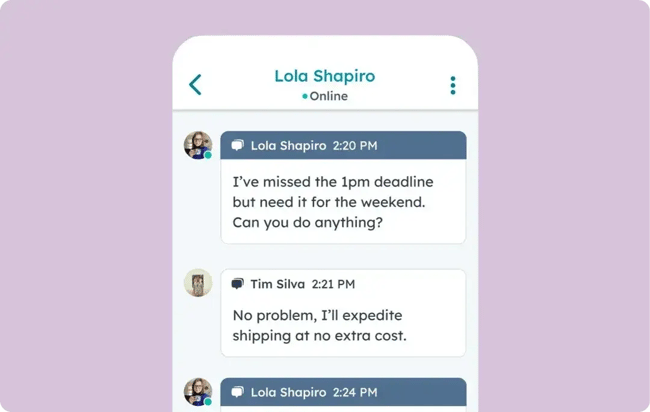
is a fully featured, AI-powered customer service platform that helps teams scale support and drive customer retention. Using the , teams can access their customer service dashboard, manage tickets, respond to customers, and close conversations in their shared customer inbox from anywhere.
HubSpot Service Hub sits natively within HubSpot’s unified CRM, so every ticket includes full customer context, even on mobile. When reps respond to customers or update a ticket from HubSpot’s mobile help desk, the data is synced in real time with Service Hub, without losing context or interrupting the customer experience. HubSpot Service Hub and mobile help desk offer omnichannel ticketing, meaning reps can respond to customer inquiries from live chat, social media, email, SMS, WhatsApp, and more, all within the desktop or mobile help desk.
HubSpot’s mobile help desk also has features to streamline reps’ workflows. Breeze categorizes incoming tickets, summarizes long threads to help get reps up to speed on complex cases without reading every interaction, and suggests personalized responses based on ticket history, the customer’s CRM data, and brand voice.
As a former support rep from the pre-AI era, I spent countless hours drafting customer replies and searching through past interactions and tickets for context. The difference is hard to overstate: Breeze by HubSpot now streamlines tasks that were once a mundane, unavoidable reality of working in support. Better yet, reps can now work from anywhere using the , which mirrors the Service Hub desktop experience with a sleek and thoughtfully designed mobile-first UI.
What I like: Support reps always have complete customer context because of the mobile help desk’s native integration with HubSpot CRM.
Pros
- Intentionally designed mobile UI
- Native integration with HubSpot CRM
- Breeze AI features for surfacing insights and managing cases on the go
Cons
- Advanced Service Hub features are available only on paid plans. AI features are limited at lower tiers.
Pricing: Free plan available with paid plans starting at $9 per user a month.
Best for: Teams of any size seeking an AI-powered mobile help desk with native CRM integration.
Free Help Desk & Ticketing Software
Keep track of customer requests in one unified help desk that connects to your CRM database.
- Provide personalized, AI-powered support to your customers
- Save time, reduce errors, and streamline service processes
- Improve rep efficiency & time to resolution
- And more!
2.
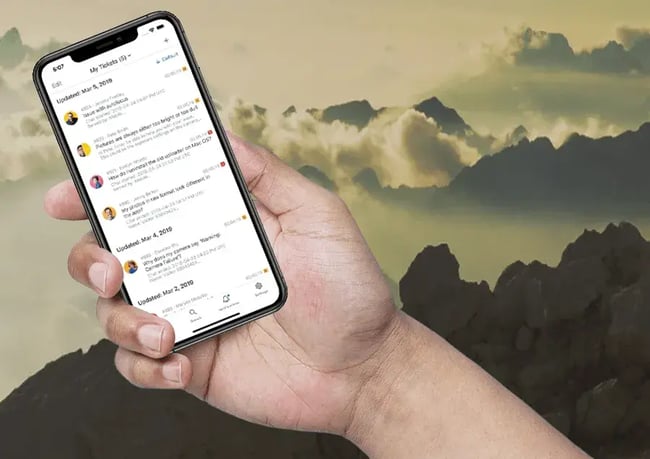
Zendesk’s mobile app provides agents with full access to its Agent Workspace, including tickets, customer profiles, conversation history, and knowledge base, all from iOS and Android devices. Real-time push notifications immediately alert agents when tickets arrive or are updated, and AI-powered routing and suggested responses help to streamline reps’ work on mobile. With over 1,200 marketplace integrations, Zendesk connects to almost any tool a support team already uses.
What I like: Zendesk’s unified Agent Workspace is a clean, useful home base for support reps. I like that Agent Workspace lets reps customize their workspace with adaptive layouts to fit all types of priorities and workflows.
Pros
- Full Agent Workspace on mobile
- Strong AI routing and response suggestions
- 1,200+ integrations
- Enterprise-grade security and compliance
Cons
- Complex to configure at scale
- AI Copilot is an additional $50/agent/month
Pricing: Starting at $19 per user a month.
Best for: Enterprise and mid-market teams seeking a scalable, deeply integrated mobile support platform.
3.
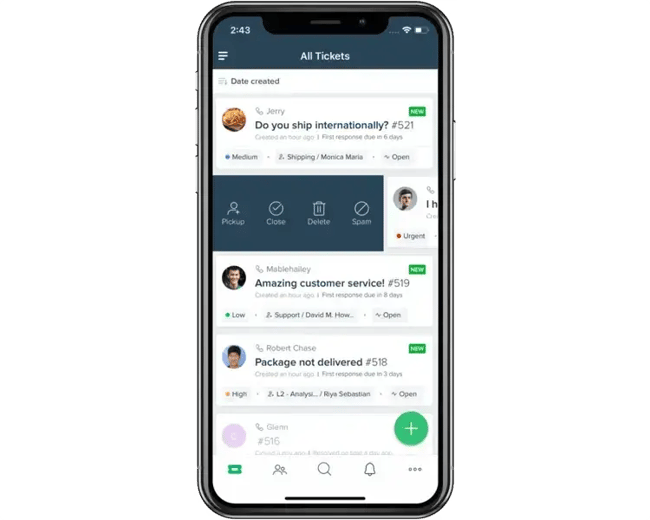
Freshdesk’s mobile help desk offers comprehensive ticket management capabilities from a unified inbox. Reps can view, prioritize, assign, and resolve tickets while accessing full customer context and knowledge base articles from their phones.
Freshdesk’s Freddy AI highlights suggested solutions and summarizes lengthy ticket threads directly within the mobile interface, which is useful for remote and field service agents. G2 user reviews specifically call out Freshdesk’s intuitive UI and collaboration features/integrations with Slack and Teams, which is essential for reps working together on tickets.
What I like: Freddy AI’s ticket summaries are genuinely useful on mobile. Agents can get up to speed on a complex case in seconds without scrolling through a long thread.
Pros
- Freddy AI features are accessible on mobile
- Collision detection prevents duplicate responses
- Clean, fast mobile UI
- Free plan available
Cons
- Advanced automation requires higher-tier plans
- Reporting is less robust than Zendesk or HubSpot
- Omni-channel service is not available at the lowest tier
Pricing: Starting at $19 per user a month.
Best for: Small to mid-sized teams that need an affordable, full-featured mobile help desk with AI capabilities.
4.
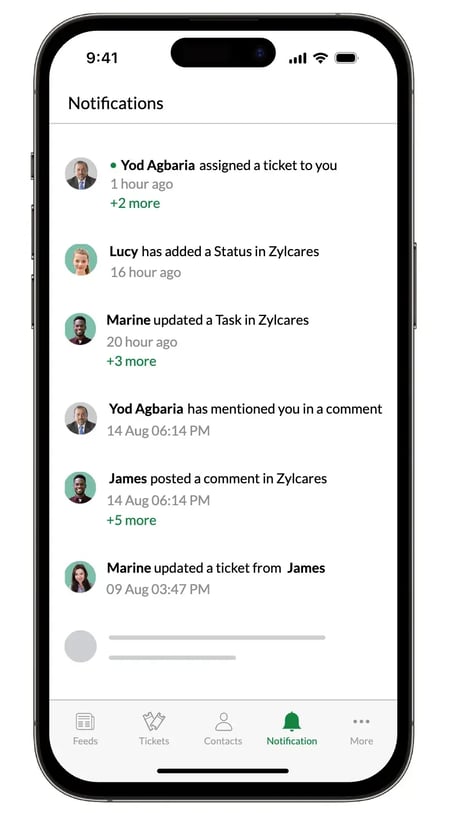
Zoho Desk is a help desk solution within the broader Zoho business software suite, which includes tools for marketing, sales, finance, project management, and more. The mobile app allows reps to organize, prioritize, respond to, and close customer tickets from their phones. Agents can collaborate with colleagues on tickets using social media-style commenting and tagging, and Zoho Desk integrates natively with the broader Zoho suite, making it the obvious choice for teams already running Zoho for sales, marketing, or operations.
What I like: Zoho’s app lets reps customize swipe gestures to perform frequently performed actions like editing, assigning, and moving tickets.
Pros
- Free plan for up to 3 agents
- Zia AI for sentiment flagging and response suggestions
- Native Zoho ecosystem integration
- Affordable paid tiers
Cons
- No offline mode for ticket management on mobile
- Third-party integrations outside Zoho require more configuration
Pricing: Free plan available. Paid plans starting at $7 per user a month.
Best for: SMBs already in the Zoho ecosystem.
5.
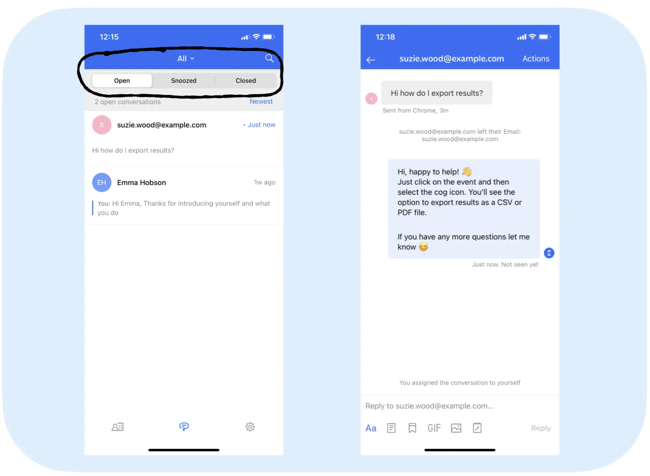
Intercom is a modern help desk solution with strong AI features and a clean, minimal UI. Intercom’s Fin AI agent can autonomously resolve customer inquiries by drawing on past tickets and the company’s knowledge base, and intelligently escalate cases to human agents.
Intercom’s flagship help desk is impressive; however, its mobile app, Intercom Conversations, falls short. The mobile app allows reps to reply to conversations, add internal notes, @mention teammates, reassign tickets, send articles and macros, and manage priorities on the go. However, Intercom has placed the app in maintenance mode, meaning new features are not being developed and only severe widespread issues are being addressed. In addition, some key actions, such as creating tickets and attaching files, are not supported on mobile.
What I like: Intercom’s Messenger SDK lets teams create a seamless in-app support experience within their websites or apps.
Pros
- Best-in-class AI agent (Fin)
- Strong in-app messaging features
- Clean, conversational UI
Cons
- Mobile app is in maintenance mode (no new features being developed)
- Cannot create new tickets or attach files from mobile
- No free plan
- Pricing can be unpredictable with Fin’s per-resolution billing
Pricing: Starting at $29 per user a month, $0.99 per Fin resolution.
Best for: SaaS and tech companies that want to embed AI-powered support directly inside their mobile products.
6.
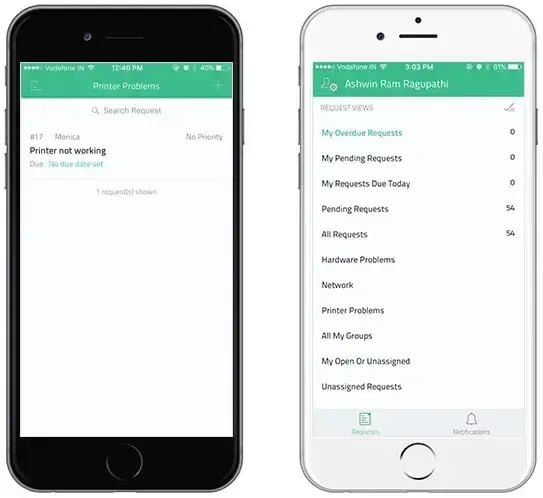
ManageEngine ServiceDesk Plus is a help desk platform built primarily for IT service management. It features a mobile app for iOS and Android that allows agents to create, assign, and close service requests from their phones, and search tickets by unique ID for fast lookups in the field.
Beyond ticket management, ManageEngine includes a self-service portal for ticket deflection, change management tools, project management tools, IT asset management, and more. Overall, ManageEngine is a comprehensive platform for enterprise IT teams. Reviewers on G2 note that basic configuration is straightforward while the platform still offers depth for teams seeking advanced automation and customization.
What I like: The unique request ID search on mobile is a useful feature for field technicians who need to pull up a specific ticket immediately, without scrolling through queues.
Pros
- Strong ITIL workflow support
- Asset management accessible on mobile
- Business units feature for companies with multiple departments
- AI-assisted ticket categorization, sentiment analysis, and suggested responses
Cons
- Interface feels dated compared to some alternatives
- IT-focused rather than customer-facing support
Pricing: Available upon request.
Best for: IT support teams seeking ITIL-aligned mobile support with asset management.
7.
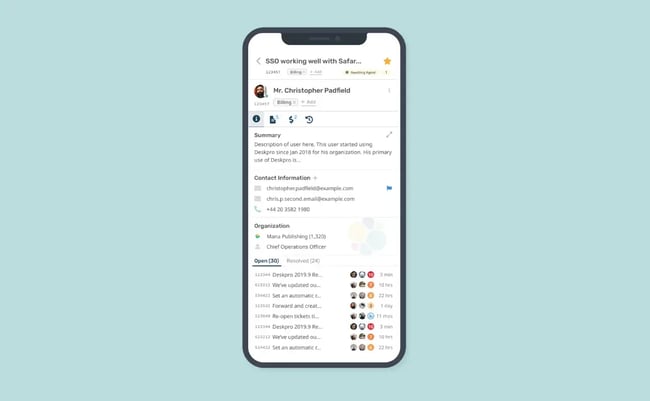
Deskpro is one of the few help desk platforms that support on-premises deployment, enabling government, defense, healthcare, finance, and legal teams to host their own data locally to meet compliance requirements. Most help desk solutions offer AI capabilities by routing data through public cloud models such as ChatGPT or Claude, but Deskpro differentiates itself by enabling organizations to run AI features in private, locally hosted environments.
Deskpro’s mobile app allows agents to manage tickets, respond to customers across email, live chat, voice, and social media, and access full customer and organization profiles with complete interaction history. Deskpro’s mobile app has a simple interface, but it isn’t light on features.
What I like: Agents can set up custom swipe-based automation rules on mobile. For example, escalating a ticket and routing it to a specific product expert with a single left- or right-swipe.
Pros
- Cloud and on-premise deployment options
- AI capabilities within fully private environments
- ISO 27001, SOC 2, and GDPR certified
- Full customer and organization profile access on mobile
- Swipe-based mobile automation rules
Cons
- Complex initial setup, especially for on-premise deployment
- Higher starting price than most competitors
- Limited offline access on mobile
Pricing: Starting at $39 per user a month for Deskpro Cloud. Pricing for Deskpro Private is available upon request.
Best for: Regulated industries and government teams that require on-premise help desk deployment.
8.
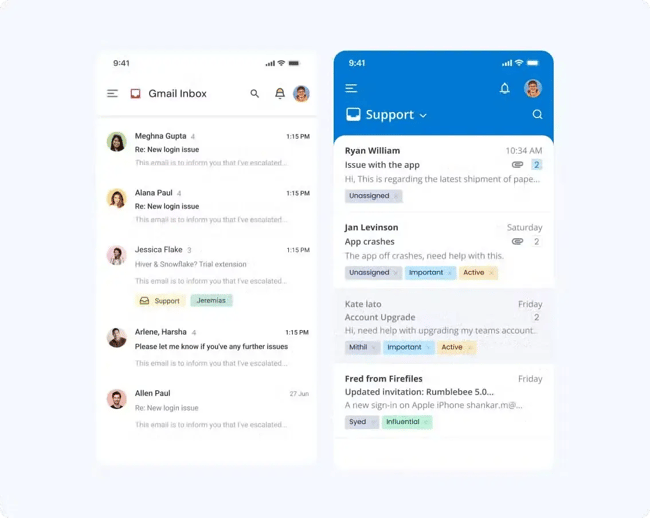
Hiver is a customer support platform that transforms the Gmail interface into a fully featured help desk. It offers a minimal learning curve since agents are already familiar with Gmail, and equips their inboxes with a shared inbox view, AI-powered ticket tagging, shared drafts, sentiment analysis, and team collaboration features.
Hiver’s mobile app lets teams access shared inbox conversations from anywhere and collaborate with teammates using notes and shared drafts. The interface feels clean and consistent with the broader Gmail and Google Workspace experience.
What I like: Shared drafts on mobile allow multiple agents to collaborate on a reply before sending. This feature is valuable for junior reps handling complex or sensitive customer issues who need a second set of eyes before hitting send. As a former HubSpot support rep, I wish I had access to something like that in my early days. Instead, I had to do it the old-fashioned way with a Slack message or a tap on a senior teammate’s shoulder.
Pros
- No new interface to learn for Google Workspace teams
- Shared drafts and collision detection on mobile
- AI-powered drafts, sentiment analysis, and ticket categorization
Cons
- Mobile app doesn’t offer the full feature set compared to desktop
- Omnichannel capabilities not available in Gmail. However, Hiver offers a standalone .
Pricing: Free plan available. Paid plans starting at $25 per user a month.
Best for: Google Workspace teams seeking a Gmail-native help desk.
9.
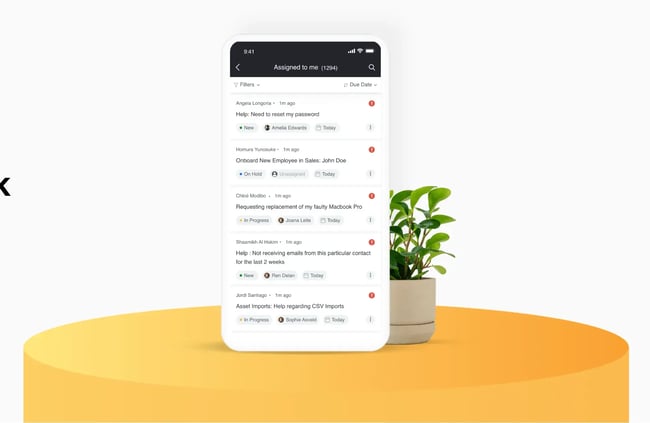
HappyFox is a modern help desk solution that enables omnichannel support with robust ticketing, automation, and AI features. Most help desk solutions make the same claim, but HappyFox backs it up with one of the fastest implementation timelines in the category. Jorge R., a Support Team Lead at a mid-market company, notes in his that “with minimal configuration you can start your help desk support system” and that “after an easy implementation you can start providing customer support almost instantly.”
HappyFox’s mobile app gives reps a full view of ticket details right on their phones. They can use the mobile help desk app to respond to and categorize tickets, collaborate with colleagues, and track key metrics like ticket inflow and agent performance directly from the mobile interface.
What I like: HappyFox can be configured to manage both customer-facing and internal support operations from a single instance, making it one of the few tools on this list that consolidate customer support and an IT help desk into one platform.
Pros
- Fast implementation with minimal configuration required
- Manages both customer-facing and internal IT support
- Multi-brand support for teams managing multiple products
- Strong automation and AI suite
Cons
- Some advanced features, including custom reports and asset management, are only available on higher-tier plans
- Limited reporting features
Pricing: Starting at $24 per user a month OR $1,599 a for unlimited agents.
Best for: Small to mid-sized teams seeking a fully featured help desk that can be implemented quickly.
10.
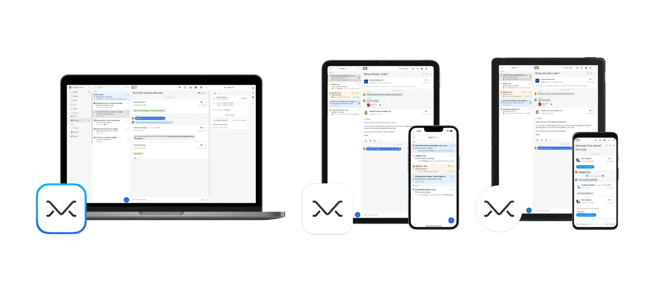
Missive is a collaborative inbox platform that consolidates email, SMS, WhatsApp, Instagram, and live chat into a single shared workspace. Where most help desks convert customer messages into numbered tickets routed through formal queues, Missive takes a different approach, keeping conversations feeling like natural email threads that the whole team can see, assign, and collaborate on.
Missive is a standalone mail client with dedicated desktop apps for Mac and Windows, and mobile apps for iOS and Android. Their mobile help desk app has a clean interface reminiscent of traditional email clients like Gmail, but with mobile help desk features. I downloaded the app on my phone and was able to connect multiple Google accounts with ease. I liked that I could add internal comments directly within email threads, rather than in a sidebar or a separate collaboration portal.
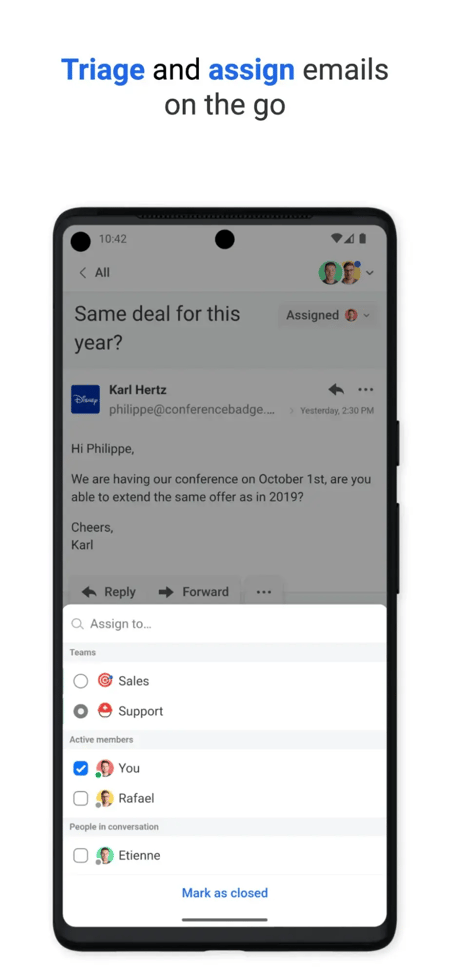
For small teams looking to collaborate closely on customer support emails, or even on sales and other business correspondence, Missive is a lightweight and flexible alternative to traditional ticketing systems.
What I like: Missive supports real-time collaborative drafts, allowing multiple teammates to edit the same reply simultaneously before it goes out.
Pros
- Works with Gmail, Outlook, Microsoft 365, and any IMAP provider
- Standalone app on desktop and mobile, not browser-dependent
- Unified inbox across email, SMS, WhatsApp, Instagram, and live chat
- Real-time collaborative drafts
- Free plan available
Cons
- No dedicated ticketing system, making it less suited for high-volume support operations
- No built-in knowledge base
- Fewer native integrations than larger platforms
Pricing: Starting at $14 per user a month
Best for: Small teams that want a unified inbox across email and messaging channels without a traditional ticketing system.
Choosing the Right Mobile Help Desk Software
Mobile help desk software has become a core part of how support teams operate, not just a backup for when reps step away from their desks. The right tool gives agents full access to ticket queues, customer history, and collaboration features from anywhere, whether they are working remotely, in the field, or covering after-hours requests. For most teams, the decision comes down to three factors: how well the mobile experience mirrors the desktop platform, how reliably it syncs data in real time, and whether it includes the security features distributed teams require.
HubSpot Service Hub is a strong starting point for teams that want a mobile help desk with native CRM integration and AI features built in. The best mobile help desk is the one agents will actually use, so testing the app with a small group of reps before committing to a platform is always worth the extra step.
Editor's note: This post was originally published in April 2019 and has been updated for comprehensiveness.
Free Help Desk & Ticketing Software
Keep track of customer requests in one unified help desk that connects to your CRM database.
- Provide personalized, AI-powered support to your customers
- Save time, reduce errors, and streamline service processes
- Improve rep efficiency & time to resolution
- And more!
Customer Support