
If you’re stuck in the CRM vs CMS debate, I’m here to help. When building a website for your business, you quickly learn that it involves much more than a flashy front page — and deciding if you need a CRM, a CMS, or both can be overwhelming.
You need workflows in place to update your websites, track your content’s performance, and manage your customer base. And wouldn’t life be so much easier if all of these workflows could function in harmony with each other?
The solution requires just two critical technologies in website development: a CRM and a CMS. In this article, I’ll explain the difference between these two tools, how to integrate them across different platforms, and which top CRMs and CMSs are worth your time and money.
Table of Contents
- What is a CRM?
- What is a CMS?
- CRM vs. CMS: 5 Key Differences
- Similarities Between CMS and CRM
- Core Features of CRM and CMS
- When to Use CRM vs CMS (Or Both)
- Benefits of CMS-CRM Integration
- How to Integrate Your CMS With a CRM
- CRM vs. CMS Frequently Asked Questions
- Top CRMs and CMSs
- CMS and CRM: The Ultimate Duo
What is a CRM?
CRM stands for customer relationship management, and it’s software that stores all your prospect and customer data, including names, phone numbers, email addresses, associated businesses, purchases, and prior interactions.
Some primary CRM use cases include:
- Enabling salespeople to prep for a meeting with a prospect
- Helping customer service agents gain context on a customer’s open support ticket
- Empowering marketers to personalize campaigns based on the specific interests of different customer segments
A CRM is the reason why, when I called a moving company three months after my initial inquiry, the salesperson was able to “remember” all my details from before, such as my address and the size of my apartment. It makes the sales process smoother and more personalized.
Though CRMs have historically been used mainly by sales teams, they’re now frequently used by customer service and marketing teams because of the rich data they provide about a customer. A CRM is critical for tracking and nurturing customer relationships and gaining important context about specific individuals.

HubSpot's Free Website Builder
Create and customize your own business website with an easy drag-and-drop website builder.
- Build a website without any coding skills.
- Pre-built themes and templates.
- Built-in marketing tools and features.
- And more!
What is a CMS?
CMS stands for content management system, and it’s software that makes it easy for non-developers to manage, publish, and edit digital content, particularly on websites.
Some primary CMS use cases include:
- Enabling a blogger to upload photos and write text for a blog post
- Allowing an editor to see the version history of a specific blog post and roll back to a previous version
- Empowering a marketer to build a landing page for a lead gen campaign without tapping the engineering team
A CMS is the reason I’m able to quickly publish this blog post after I write it, without needing to code. Without a CMS, website owners/content managers would have to edit the source code and use a process known as File Transfer Protocol (FTP). This would require developer help, using up valuable resources and slowing down the time to publication. A CMS is critical business software because it streamlines workflows and saves time.
Alternatively and less commonly, a CMS can also refer to a client management system/software. Client management software is the same thing as a CRM. A CRM can manage a freelance writer’s clients just as easily as it can manage a restaurant’s customers. It all comes down to one thing: tracking interactions and nurturing business relationships.
CRM vs. CMS: 5 Key Differences
For a quick overview of the difference between a CRM and a CMS, glance at the comparison table below. For details, read on.
|
CRM (Customer Relationship Management) |
CMS (Content Management System) |
|
|
Purpose and Function |
Focuses on tracking and managing customer interactions and nurturing customer relationships |
Focuses on easily building, updating, and managing digital content, usually webpages |
|
Primary Users |
Sales reps, customer service agents, small business owners, email marketers, demand generation marketers, and digital marketers |
Content marketers, bloggers, editors, small business owners, SEO specialists, and web developers |
|
Data Types |
Stores customer names, email addresses, phone numbers, purchase history, call transcripts, emails, and support tickets |
Stores images, video, audio, and text content such as blog posts and landing pages |
|
Business Impact |
Helps nurture leads, close deals, personalize sales pitches and marketing campaigns, and prevents prospects from slipping through the cracks |
Helps publish relevant content and measure content performance to prove ROI |
|
Typical Features |
Contact management, sales pipelines, deal tracking, content repository, reporting, and automated data capture |
Content management tools, publishing tools, themes and templates, analytics, SEO tools, drag-and-drop visual editors, and content versioning |
Purpose and Function
The core focus of a CRM is to track and manage customer interactions and nurture customer relationships. The core focus of a CMS is to easily build, update, and manage digital content, usually webpages.
Primary Users
The typical users of a CRM are sales reps, customer service agents, small business owners, email marketers, demand generation marketers, and digital marketers. The typical users of a CMS are content marketers, bloggers, editors, small business owners, SEO specialists, and web developers.
Data Types
A CRM typically stores customer names, email addresses, phone numbers, purchase history, call transcripts, emails, and support tickets. A CMS typically stores images, video, audio, and text content such as blog posts and landing pages.
Business Impact
A CRM helps you nurture leads, close deals, personalize sales pitches and marketing campaigns, and ensure every prospect and customer gets the proper attention. A CMS helps you publish relevant content and measure content performance to prove ROI.
Typical Features
Typical CRM features include contact management, sales pipelines, deal tracking, content repository, reporting, and automated data capture. Typical CMS features include content management tools, publishing tools, themes and templates, analytics, SEO tools, a drag-and-drop visual editor, and content versioning.
Similarities Between CMS and CRM
Though a CRM and CMS serve different purposes, there are a few areas where they overlap, including:
- Centralized data storage. Both a CRM and a CMS bring disparate data into a centralized repository so your team can easily find what they need to do their job. A CRM stores customer data like contact info and call transcripts, while a CMS stores content for publication, like blog posts, images, and videos.
- Analytics and reporting. Both tools provide analytics and reporting to help your teams measure performance. A CRM, for example, might show average deal size, while a CMS might show top pages by organic traffic.
- Workflow automation. This is a huge time-saver for teams: Both a CRM and CMS will automate previously tedious, manual tasks. A CRM can remind salespeople to follow up on hot leads, while a CMS can schedule publishing.
HubSpot's Free Website Builder
Create and customize your own business website with an easy drag-and-drop website builder.
- Build a website without any coding skills.
- Pre-built themes and templates.
- Built-in marketing tools and features.
- And more!
Core Features of CRM and CMS
Depending on the size of your business and your specific operations, you might need both of these systems to keep your operations moving in the right direction. Let’s unpack what each does on its own by looking at the core features.
Key CRM Features
Organizations use CRM software to track how every lead and customer interacts with their online business. To support your goals, most CRMs include the following.
Contact Management Tools
CRMs store contacts as records, each containing relevant customer information like name, company name, and contact information. With this information logged, sales teams can understand each lead and customer journey at a glance and view overall customer patterns in bulk.
Customer records also keep track of the relationship between sales representatives and customers. Every interaction — email, phone call, meeting, etc. — is stored in the CRM so sales reps know when to follow up with individual prospects.
CRMs also allow users to segment customers into lists by criteria like location, company type, or company size. This helps paint a clear picture of your customer base and helps reps tailor their sales strategies to specific segments.
Automated Data Capture
In my opinion, one major benefit of CRM software is its ability to between contacts and sales reps. Rather than copy-pasting phone numbers, meeting times, emails, and form responses into your system, an integrated CRM takes care of this on its own, eliminating a huge source of friction for your team.
Deal Tracking
Your CRM should have a way to track where each contact currently sits in the sales process, and this information is stored in the contact record. As contacts progress along the buyer’s journey, the CRM lets reps update the deal stage, or the stage is bumped up automatically.
Sales Content Library
CRMs allow for the creation of a sales content library that contains templates for prospect communications to help close more deals. Reps can create templates for emails, forms, and more, which helps standardize the sales process and saves time spent writing individual communications.
Reporting
Finally, a capable CRM needs to aggregate your sales data into digestible reports so that you and your sales team can extract trends and insights. Reports also help your sales team stay on track with their sales goals and hit quotas. In a CRM, reports can be generated for contacts, segments, or your entire organization’s performance over a specified period.
Key CMS Features
If your CRM is your customer management hub, your CMS is your website hub. Organizations use a CMS to build and manage their ever-evolving online presence, with help from the following features.
Content Management Tools
Most popular CMSs comprise two systems under one piece of CMS software: a content management back end and a content publishing front end.
A CMS back end handles everything related to storing and organizing your digital assets. It provides an interface for you to browse your content and pick items to put on your front end. Some tools also let you edit your content directly with a rich editor before placing it on a page.
Publishing Tools
All CMSs have an interface for publishing content to your website (and possibly other digital channels, like mobile applications). Front-end tools allow you to arrange your content on pages for the best possible display.
Depending on the CMS and extensions you add, your publishing tool might be bare-bones and code-based, or it may incorporate a WYSIWYG editor (short for “what you see is what you get”). A WYSIWYG editor lets you edit pages without writing code, often via a drag-and-drop interface.
I suggest checking to make sure your CMS allows you to preview your content before taking it live. You should also be able to schedule your pages for publishing.
Themes and Templates
A theme determines the look of a website, including its colors, fonts, and layouts. Themes may also include specialized widgets to enhance your site’s functionality. Themes can usually be downloaded and purchased from an online marketplace, though some might come with your CMS.
Not to be confused with a theme, a template is a single-page layout (often offered within a theme) that is pre-built for a specific type of page. Rather than constructing a web page from scratch, users can instead employ templates for homepages, landing pages, product pages, blog posts, and more.
Importantly, I think themes and templates should be responsive, meaning their layouts change in response to different screen sizes on desktop, mobile, and tablet devices.
Analytics
On top of letting you manage and publish content online, CMSs often include analytics tools to track key performance indicators like traffic, page views, bounce rates, devices used, and location. These metrics can be compiled into a dashboard view so you can gain a clear overall picture of your site’s health. If your CMS doesn’t have built-in analytics, I recommend making sure it integrates with a third-party tool like Google Analytics.
HubSpot's Free Website Builder
Create and customize your own business website with an easy drag-and-drop website builder.
- Build a website without any coding skills.
- Pre-built themes and templates.
- Built-in marketing tools and features.
- And more!
SEO Tools
A quality CMS won’t just let you run a website — it will help you get your website in front of more people. Through native tools or extensions, a CMS enables you to create XML sitemaps, add 301 redirects, boost website performance, and optimize your pages’ metadata.
Blogging Tools
Built-in blogging tools, including page templates and content editors, make it easy for any online business to start publishing right away to support its content marketing efforts. In fact, WordPress, the most popular CMS, began as and remains largely known as a CMS for bloggers.
Extensions
No one CMS can cover every possible website need, which is why we have extensions. From enabling ecommerce and membership functionality to bettering SEO to enhancing the user interface, these software add-ons add the functionality your website needs but your CMS lacks on its own.
When to Use CRM vs CMS (Or Both)
Deciding between a CRM and CMS (or realizing you need both) comes down to your business priorities and daily operations. Here's how I break it down.
When You Need a CRM
- You're managing more than a handful of customer relationships. Once you have enough contacts that you can‘t remember each one’s history off the top of your head, a CRM becomes essential for tracking interactions and follow-ups.
- Your sales team is losing deals due to missed follow-ups. If leads are slipping through the cracks because no one knows who contacted them last or what was discussed, a CRM provides the visibility you need.
- You want to personalize outreach at scale. When you're ready to segment your audience and tailor your sales pitches or marketing campaigns based on customer behavior and preferences, a CRM gives you the data to do it.
- Your inbox has become unmanageable. If you're drowning in emails and struggling to keep track of customer conversations across teams, a CRM centralizes everything in one searchable place.
When You Need a CMS
- You need to update your website without developer help. If making simple text changes or uploading new images requires technical help, a CMS puts control back in your hands.
- You're publishing content regularly. Whether it's blog posts, landing pages, or product updates, a CMS streamlines the process of creating, editing, and scheduling content.
- You're pursuing an SEO strategy. If organic search is a priority, a CMS provides the tools you need to optimize metadata, manage redirects, and improve site performance.
- You want to prove the ROI of your website. A CMS with built-in analytics helps you track traffic, conversions, and engagement so you can demonstrate the value of your content efforts.
When You Need Both
Most growing businesses eventually discover they need both systems working together. If you're generating leads through your website and then nurturing those leads through a sales process, CRM-CMS integration becomes critical.
For example, when a visitor downloads an ebook from your CMS, that contact information should flow directly into your CRM, triggering automated follow-up sequences and giving your sales team instant visibility.
Businesses with both marketing and sales functions — especially those focused on lead generation and customer retention — can see the biggest payoff from a connected CRM-CMS setup. This combination eliminates data silos, reduces manual data entry, and creates a seamless handoff between marketing and sales teams.
Benefits of CMS-CRM Integration
The title of this article might read “CRM vs CMS,” but I think there’s actually no competition here — these tools should in conjunction with each other. Since your customers interact with your website, your customer tracking system needs to interact with your website management system.
Here are five benefits of a CMS-CRM integration.
1. Funnel activity from your CMS to the CRM.
A good CMS-CRM integration will funnel all activity on your website straight into your CRM for instant analysis, reporting, and actionable insights. You’ll also be able to see how your site is performing alongside your other online channels, which better informs your marketing and content strategy.
2. Automate certain tasks.
Integrating your CRM with your CMS can save your employees valuable time. Some tasks, like follow-ups, can be automated.
This is particularly helpful for your sales team. Once a lead has entered their contact information in a lead magnet, your CRM can help schedule and automate the follow-up, making it much easier for your sales team to keep track of leads.
3. Optimize your marketing strategies.
Content marketing is a necessary part of your overall marketing strategy. But how do you know you’re creating content your audience wants to read and, more importantly, needs? By monitoring user behavior within your CRM and CMS, and seeing if content leads to conversions.
The insights you gather from user behavior can help you create better, more impactful content. Effective content helps with your search engine ranking, too, keeping the SEO wheel turning favorably in your direction.
HubSpot's Free Website Builder
Create and customize your own business website with an easy drag-and-drop website builder.
- Build a website without any coding skills.
- Pre-built themes and templates.
- Built-in marketing tools and features.
- And more!
4. Take advantage of unified reporting.
When your CMS and CRM are integrated, you can pull data from both systems into a single dashboard. Instead of toggling between platforms to piece together how a blog post led to a closed deal, you can trace the entire customer journey in one place. HubSpot provides that shows which pages and campaigns influenced each closed deal.
5. Create content with deeper personalization.
Integration gives your content team access to CRM data they wouldn't otherwise have — like purchase history, support interactions, and sales stage. With this information, you can serve dynamic content that speaks directly to where a visitor is in their journey.
HubSpot uses personalization tokens as that automatically insert CRM data such as names, company details, and job titles into emails, landing pages, and web content. For example, a returning customer might see a headline that greets them by name and references their industry, while a first-time visitor sees a generic welcome message.
In the next section, I’ll explain the steps you need to take to integrate your CMS with a CRM. But before we continue, see our CRM guide and CMS guide if you want to learn more about either individual tool.
How to Integrate Your CMS With a CRM
Integrating your CMS and CRM is a smart move. I’ve found it helps streamline your operations, keeps your teams on the same page, and helps you monitor lead activity.
However, merging your systems can be a challenge. Follow these steps to reduce some of the friction.
1. Identify your data points.
It’s no secret: Your CRM and CMS generate a ton of data. While sharing data across your departments is vital to successful marketing and sales operations, some of the data you collect isn’t beneficial for individual departments.
Take some time to identify which data points are the most useful for your teams. You’ll want to include data that speaks to user behavior on your website, like conversion rates and how long a lead spends on your web page. You’ll also want to include data from your sales funnels.
Identifying your data points will help make your CRM-CMS integration easier.
2. Pick an integration method.
There are a couple of ways to integrate your CRM and CMS. You can integrate by:
- Using an API
- Implementing middleware to act as a bridge between your CRM and CMS
- Hiring a web developer to build and work with your systems, so you don’t have to
If you’re unsure which method is best for you, contact your IT department. They’ll be able to help you pick the best approach.
3. Plan and implement the integration.
If I’ve learned anything in life, it’s this: If something can go wrong, it usually will. That’s why having a plan is important.
Before you give the go-ahead to integrate your CRM and CMS, take a look at your calendar and plan “Integration Day.” You can help mitigate potential issues by scheduling your integration at a time when it will be the least disruptive to your operations.
You might find scheduling your integration for after normal work hours to be best, or you might schedule it over a holiday break. Either way, look for a time when most of your employees will be out of your systems and plan your integration then.
4. Test it.
When I worked in the state government, I had the opportunity to be a super-user before my office launched a new data management system. As a super-user, it was my job to explore the system before other users and find any sticking points that might cause friction.
Before you make your CRM-CMS available to all of your employees, follow my office’s lead and identify super-users. They can help you test your systems to make sure everything is functioning properly.
5. Monitor, monitor, monitor.
Once your integration is complete, there’s still work to do. You’ll need to continuously monitor your systems to get the most out of them for your business. As your employees and potential leads interact with your CRM-CMS, you’ll identify opportunities to better optimize your processes.
CRM vs. CMS Frequently Asked Questions
Is WordPress a CMS or CRM?
WordPress is a CMS, but it does offer CRM plugins in its directory that can extend its CMS to have CRM functionality. Popular options include , FluentCRM, and Jetpack CRM.
Is Salesforce a CRM or CMS?
Salesforce is primarily a CRM, but it does have CMS capabilities through Salesforce CMS. Salesforce CMS is a hybrid CMS, meaning it can be used as a traditional monolithic architecture or a headless architecture (which is helpful for businesses delivering content across multiple channels, such as a website, smart TV, and smartwatch).
Can one system do both?
Yes, HubSpot is both a CMS and a CRM. More specifically, HubSpot‘s CMS (Content Hub) is built upon the HubSpot CRM, ensuring data flows seamlessly between the two. There’s no installation or technical implementation you need to do. They're already connected. Visitor interactions on your Content Hub website are stored in the CRM so you can track the customer journey from first page visit through to purchase.
HubSpot's Free Website Builder
Create and customize your own business website with an easy drag-and-drop website builder.
- Build a website without any coding skills.
- Pre-built themes and templates.
- Built-in marketing tools and features.
- And more!
What's the difference between CRM and CEM?
CRM (Customer Relationship Management) focuses on managing customer data, sales processes, and service interactions; it tracks what is happening with your customers. CEM (Customer Experience Management) takes a broader approach, focusing on the entire customer journey across multiple touchpoints and examining why customers feel the way they do about your brand. While CRM collects transactional data like contact information and sales calls, CEM captures feedback and sentiment to improve experiences at every touchpoint.
Do small businesses need both?
Yes, small businesses with a website typically benefit from having both a CRM and a CMS. A CMS allows you to publish content and manage your website without developer help, while a CRM helps you track leads, follow up with prospects, and personalize your outreach as your customer base grows. For budget-conscious small businesses, starting with a unified platform like HubSpot (or pairing a free CMS like WordPress with a free CRM, which website owners can do via the HubSpot WordPress plugin) can provide both capabilities without significant upfront investment.
Top CRMs and CMSs
If you’re in the market for a CMS, consider the available CRM integrations for each one on your list. Just about every well-known CMS will work with one or more CRMs, but the integration processes differ in cost, functionality, and options available. Be mindful of which CMS-CRM setup will work best overall for your business.
Alternatively, if you’ve already decided on a CMS but are unhappy with the CRM options available to you, don’t be afraid to switch to a CMS with a more effective CRM integration. The effort spent to switch your CMS will be more than made up for by customers earned through a better CRM.
I’ll share some of the best CMSs and CRMs available, organized into three categories:
- Unified CRM/CMS Platforms
- Best CMS Platforms with CRM Integration
- Best CRM Platforms with CMS Integration
Unified CRM/CMS Platforms
Unified CRM/CMS platforms have a distinct advantage in that data flows seamlessly between the two tools, streamlining and unifying your sales and marketing efforts. On top of that, there’s no complicated technical installation — it’s ready out of the box.
1.
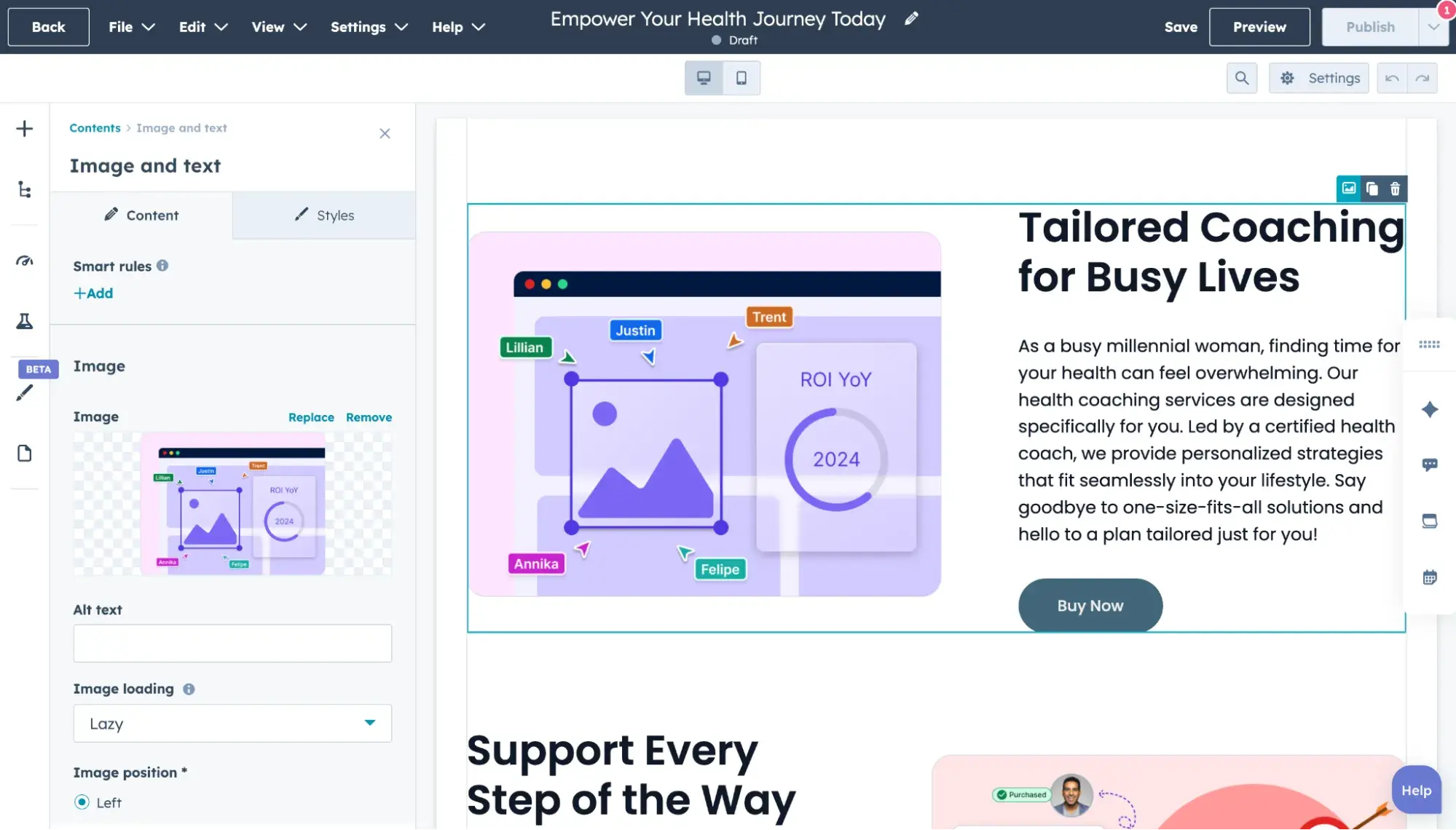
Content Hub is a CMS built on top of , giving you access to tools for lead capture, contact management, and analytics in the same place as your content management system. Every interaction on your Content Hub website is stored in the CRM for easy reporting. New leads from your website are also automatically saved in your CRM as contacts, which you can organize into lists and easily track from first interaction to purchase.
Content Hub and HubSpot CRM keep things simple yet powerful. With these tools fully integrated into a single platform, you’ll spend less time trying to sync up software tools and more time optimizing your customer experience, nurturing leads, and growing your online business.
Because it’s built upon the same platform as HubSpot’s Sales Hub and tightly integrated with it, Content Hub is an excellent choice if you’re looking for a sales CMS.
2.
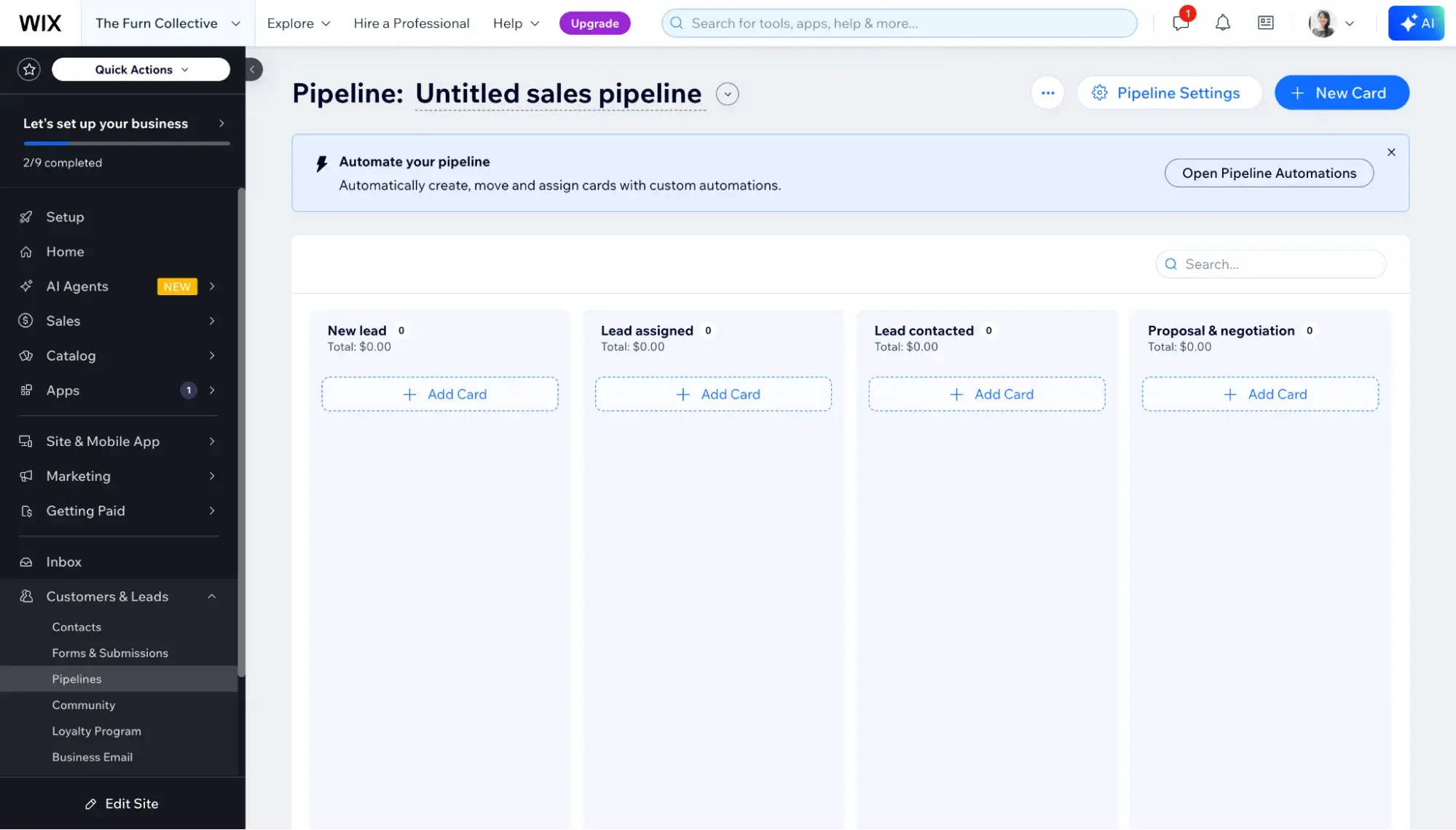
Wix has made a name for itself in the CMS space with its ease of use, which extends to its CRM as well. Because of its unified CMS-CRM, there’s nothing to install — you get access to CRM capabilities like contact management, lead gen forms, and pipelines when you sign up to build a site.
Wix's platform also has marketing tools, including email marketing, Google Ads, social media marketing, and SEO features, all of which you can find right within the website editor.
Best CMS Platforms with CRM Integration
Go with a CMS-first platform that integrates with a CRM if your primary business function is publishing and editing content, optimizing for SEO, and other CMS-heavy activities, but you still want the contact management and personalization offered by a CRM. This is also a good option for businesses that don’t mind the extra technical steps of integrating the two tools.
3.
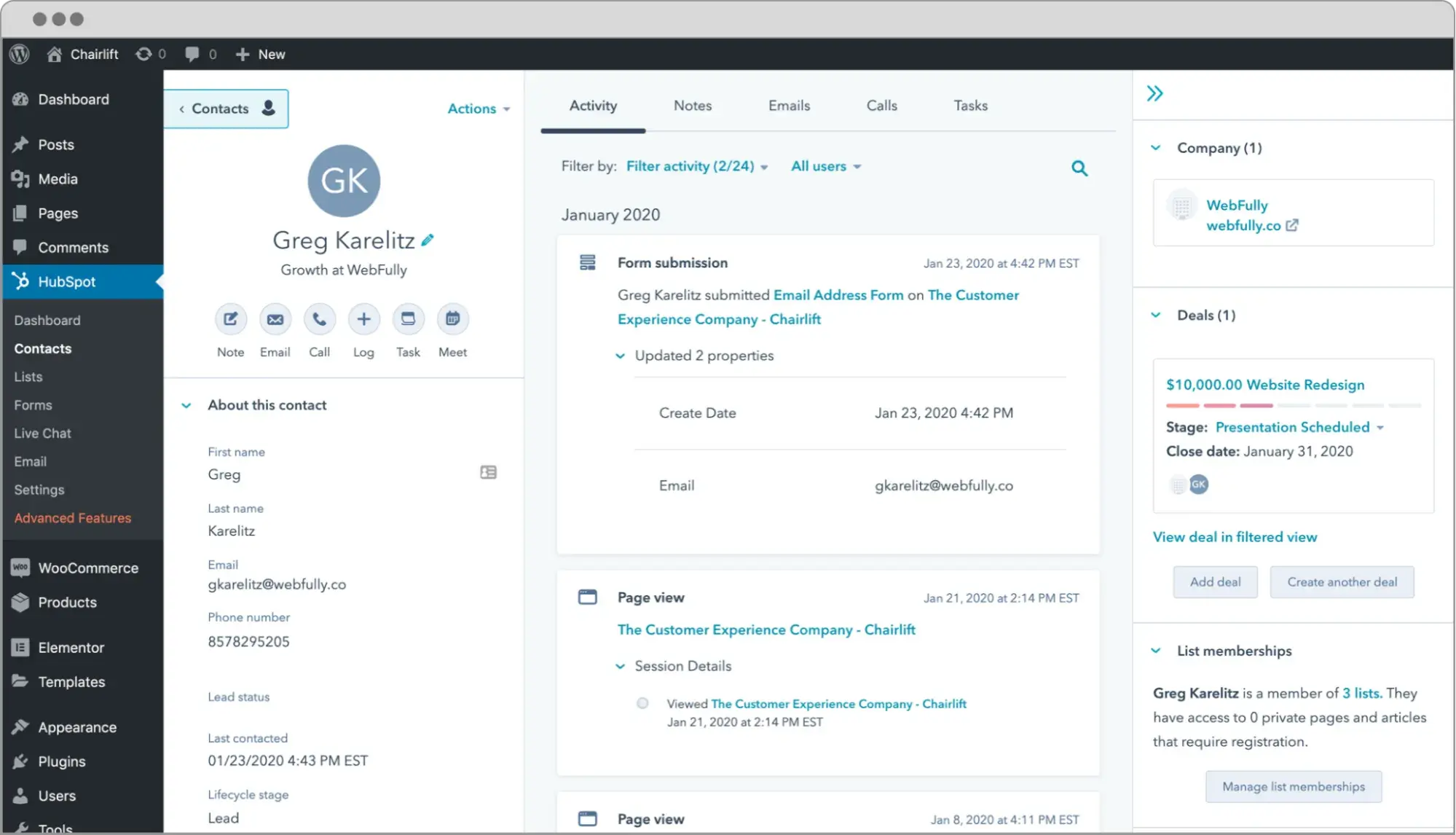
Adding a CRM to your WordPress website is as simple as . Add-ons like the HubSpot WordPress plugin seamlessly sync WordPress with a CRM, no coding required.
The connects your website with HubSpot CRM, which works to capture your visitor information, organize contacts into lists, and review your sales metrics with reports. HubSpot CRM easily integrates with other apps like WooCommerce, Stripe, and Gmail.
For more CRM options, check out our list of favorite CRM plugins.
4.
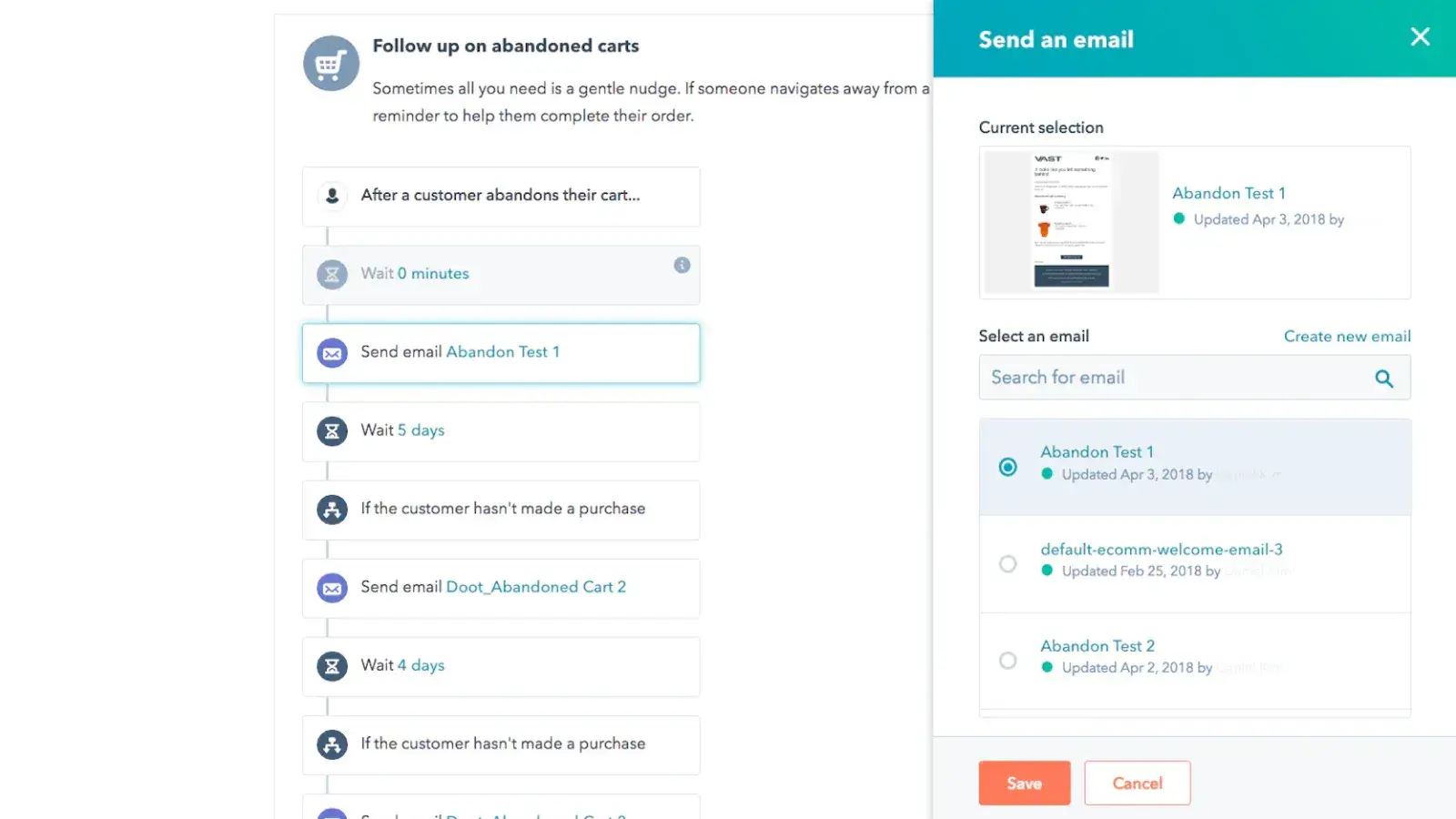
Shopify is a robust ecommerce platform with a CMS that makes it easy for anyone to launch an online store. Shopify easily integrates with third-party CRM software available from its marketplace. Browse for CRM integrations in the , or pick one of my recommendations:
- . HubSpot CRM is one of the top Shopify-compatible CRMs and hands-down the best free CRM available. I like that it offers features to create deep connections with leads and customers, including personalized CTAs and email nurturing, content engagement tracking, and extensive integrations with other popular marketing and sales tools.
- . Metrilo’s CRM app for Shopify emphasizes its in-depth segmentation of customers with advanced activity tracking, detailed customer profiles, and a highly customizable filtering tool. Its range of pricing plans is aimed at fitting your business’s needs, regardless of size.
5.
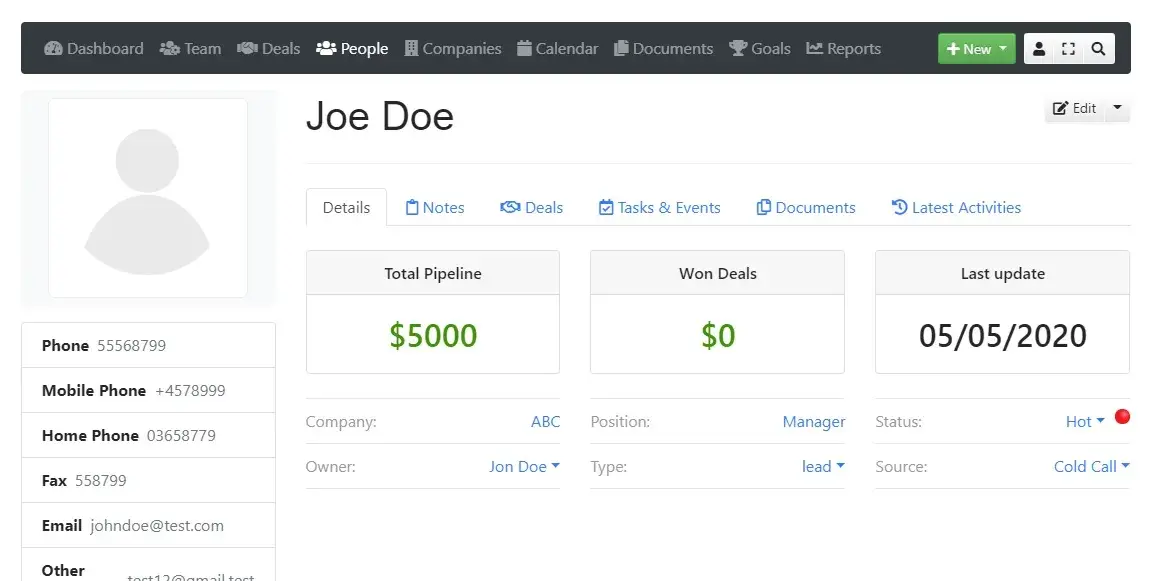
An open-source CMS that’s often seen as a middle ground that balances technical flexibility with ease of use, Joomla allows room for broad customization with extensions, including some reputable CRM integration options. Some popular Joomla CRM extensions include:
- . As the leading Joomla CRM extension, JoomCRM offers CRM features for contact and deal management, team management, lead capture, and more. I think it’s a great place to start.
- . For a broader business solution with CRM included, try the Joomla vBizz extension. It offers powerful and flexible business management features, including customer relationship solutions for project planning, activity tracking, communicating with leads, and analytics.
- . CiviCRM is designed specifically for nonprofit websites. This extension empowers users to build strong relationships with funders and partners. Its specialized tools facilitate donation collection, event management, and site membership.
6.
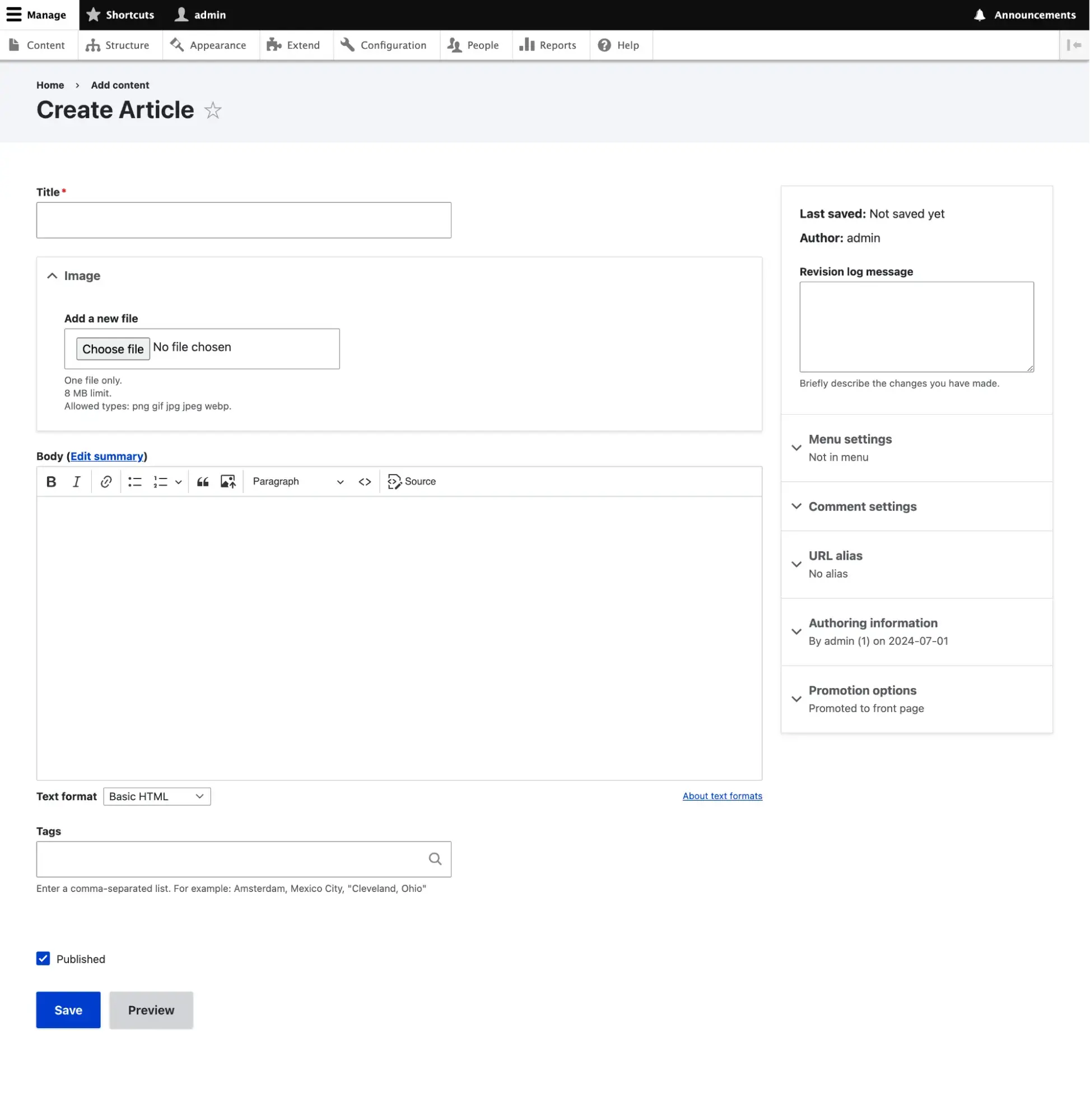
To add a CRM to Drupal, you can choose from a few well-reviewed CRM modules. Drupal is more hands-on (read: developer-focused) than other CMSs, so expect a more involved process to link a CRM to your site. I recommend trying out these modules for Drupal:
- . The Drupal HubSpot module uses HubSpot’s API to sync your Drupal site with HubSpot’s tools, including HubSpot CRM. Users can fill out forms on your Drupal site with their information, which is then stored in HubSpot’s system.
- . This open-source CRM accommodates the core CRM needs of nonprofit organizations: contact management, engagement tracking, event registration, and member profiles. RedHen is built for Drupal. This allows for some customization and backend access for those more comfortable with code.
Best CRM Platforms with CMS Integration
If you’re a sales-focused business doing light publication, you might opt for a CRM-first platform that integrates with CMS tools. Here are two of my recommendations.
7.
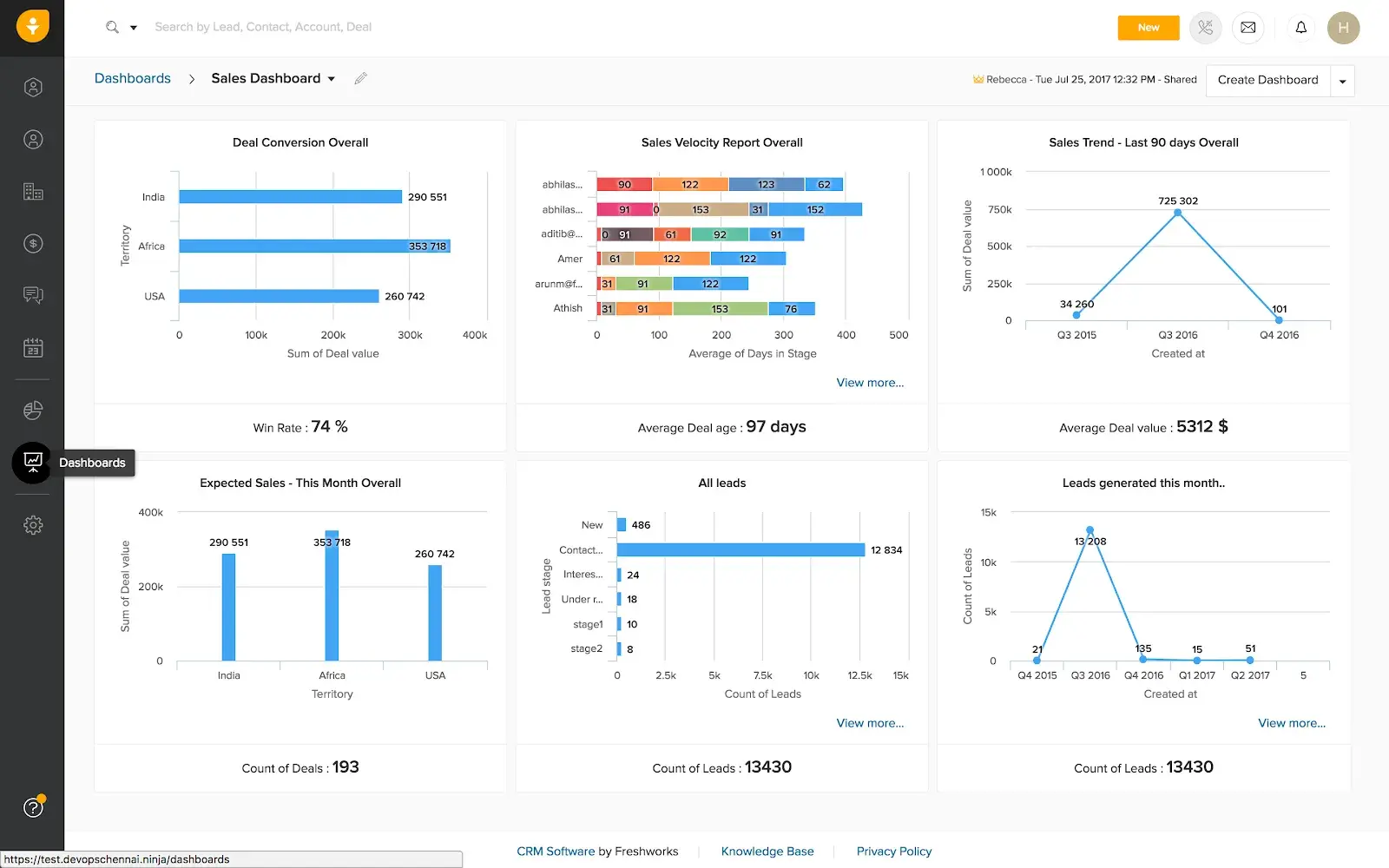
Freshsales is an AI-powered sales CRM by Freshworks. Its Freddy AI provides intent scores to help sales reps identify and prioritize qualified leads as well as generate personalized email outreach. Freshsales boasts a and 1,220 reviews on G2. Users love its ease of use and helpful customer support.
What I like about Freshsales is that it's supported by a WordPress plugin by , which connects your form submissions to the Freshsales CRM (you do need to make sure you‘re using a compatible WordPress forms plugin, though). Without this CRM-CMS integration, you’d have to manually enter the form submission data so you could track that lead in your Freshsales CRM.
8.
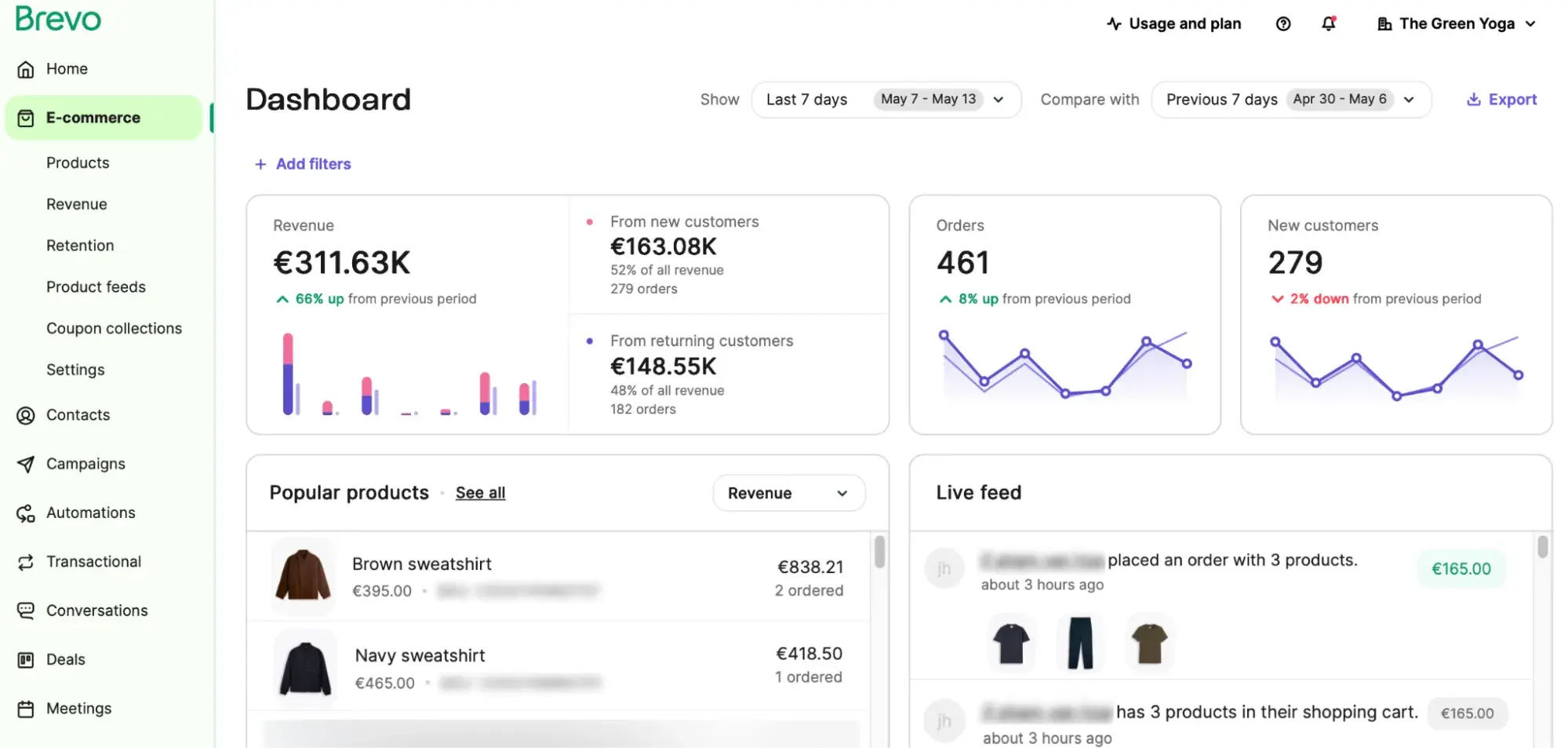
Brevo is a unified customer platform with email and SMS marketing, automation, and CRM capabilities — but unlike HubSpot, it does not offer a native CMS. Thankfully, though, Brevo boasts a bevy of integrations (150+).
I was really impressed by its list of 16 CMS integrations, including the major ones like WordPress, Shopify, Webflow, Squarespace, Drupal, Joomla, and Wix. So, if you’re looking for a CRM with solid email marketing software and are okay with installing a CMS integration, Brevo might be a good option.
CMS and CRM: The Ultimate Duo
Every digital business (which is pretty much every modern business) has sales and has web content. Therefore, every digital business can benefit from having a CRM and having a CMS — and many can benefit from integrating both.
A CRM-CMS integration can ultimately save you time, money, and lost leads. The sooner you implement this, the sooner you’ll understand your audience and leverage your insights to earn their trust.
Editor's note: This post was originally published in July 2020 and has been updated for comprehensiveness.
HubSpot's Free Website Builder
Create and customize your own business website with an easy drag-and-drop website builder.
- Build a website without any coding skills.
- Pre-built themes and templates.
- Built-in marketing tools and features.
- And more!
Content Management System






.webp)